
Philips LX3900SA: Functional Overview
Functional Overview: Philips LX3900SA
Functional Overview
English
➠
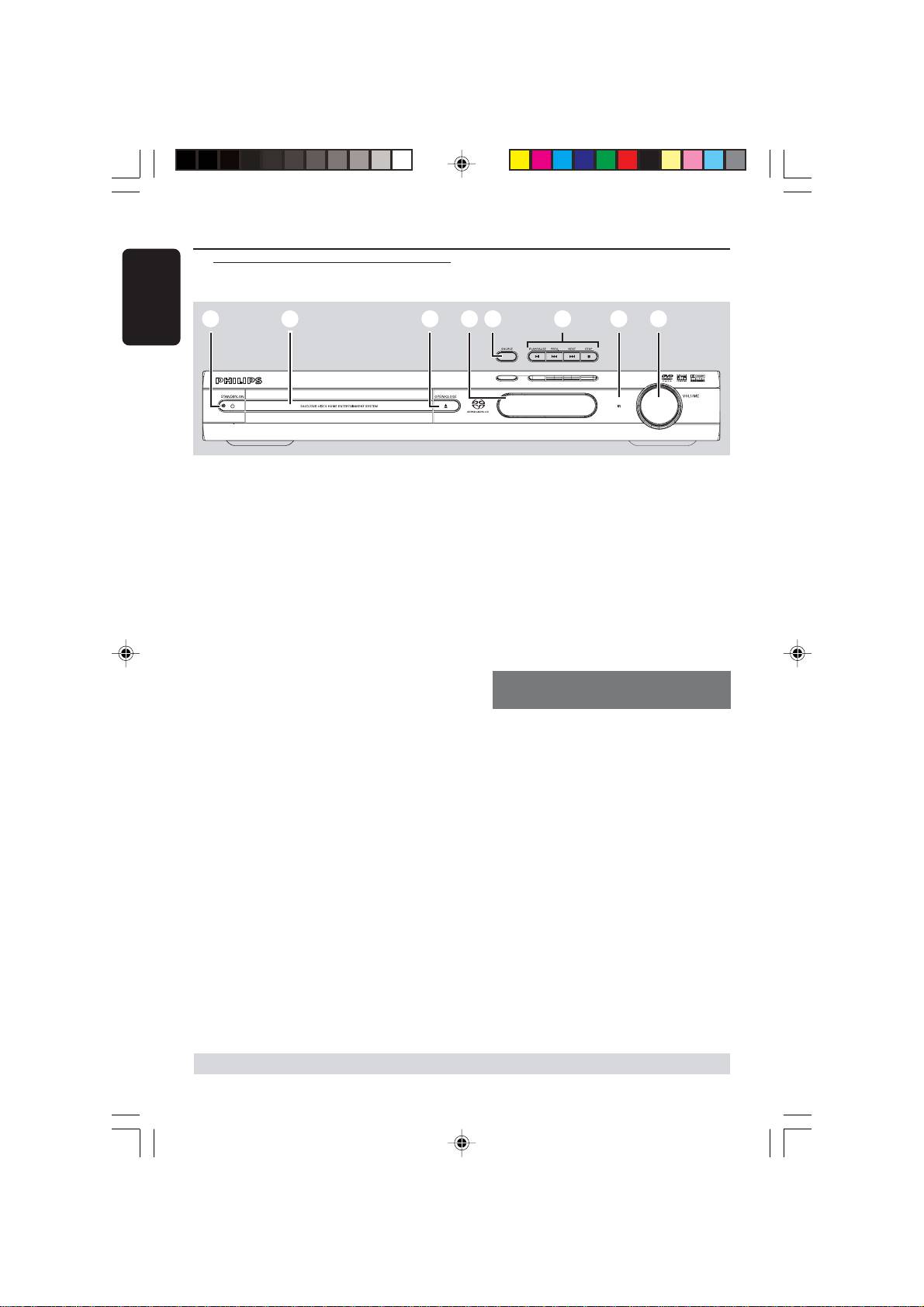
1 STANDBY ON (B)
– Switches to Eco Power standby mode or
turns on the system.
– Led ON in Eco Power standby mode.
2 Disc tray
3 OPEN•CLOSE 0
– Opens/Closes the disc tray.
4 System display panel
5 SOURCE
– Selects the relevant active source mode:
DISC, TV, TUNER or AUX/DI.
– DISC: switches to DISC source mode.
– TV: switches to TV source mode and/or
*to turn on the Philips TV (only on the
remote control).
– TUNER: toggles between FM and MW
band.
–AUX/DI: toggles between AUX and
DIGITAL IN source mode.
6 ÉÅ PLAY•PAUSE
– DISC: starts/pauses playback.
– TUNER: starts preset radio station
installation in Plug & Play mode (only on
the main unit).
S PREV / NEXT T
– DISC: *searches backward/forward or
selects a track.
– TV: selects previous/next channel (Philips
TV only).
– TUNER: tunes the radio frequency up/
down.
* = Press and hold the button for more than two seconds.
14
3139 115 22871
1
2
3 5
4
6
8
Main unit and remote control
7
Ç STOP
– Exits an operation.
– DISC: stops playback.
– TUNER: *erases a preset radio station.
7 iR
–Point the remote control towards this
sensor.
8 VOLUME (VOL +-)
– Adjusts the volume level.
Control buttons available on the
remote only
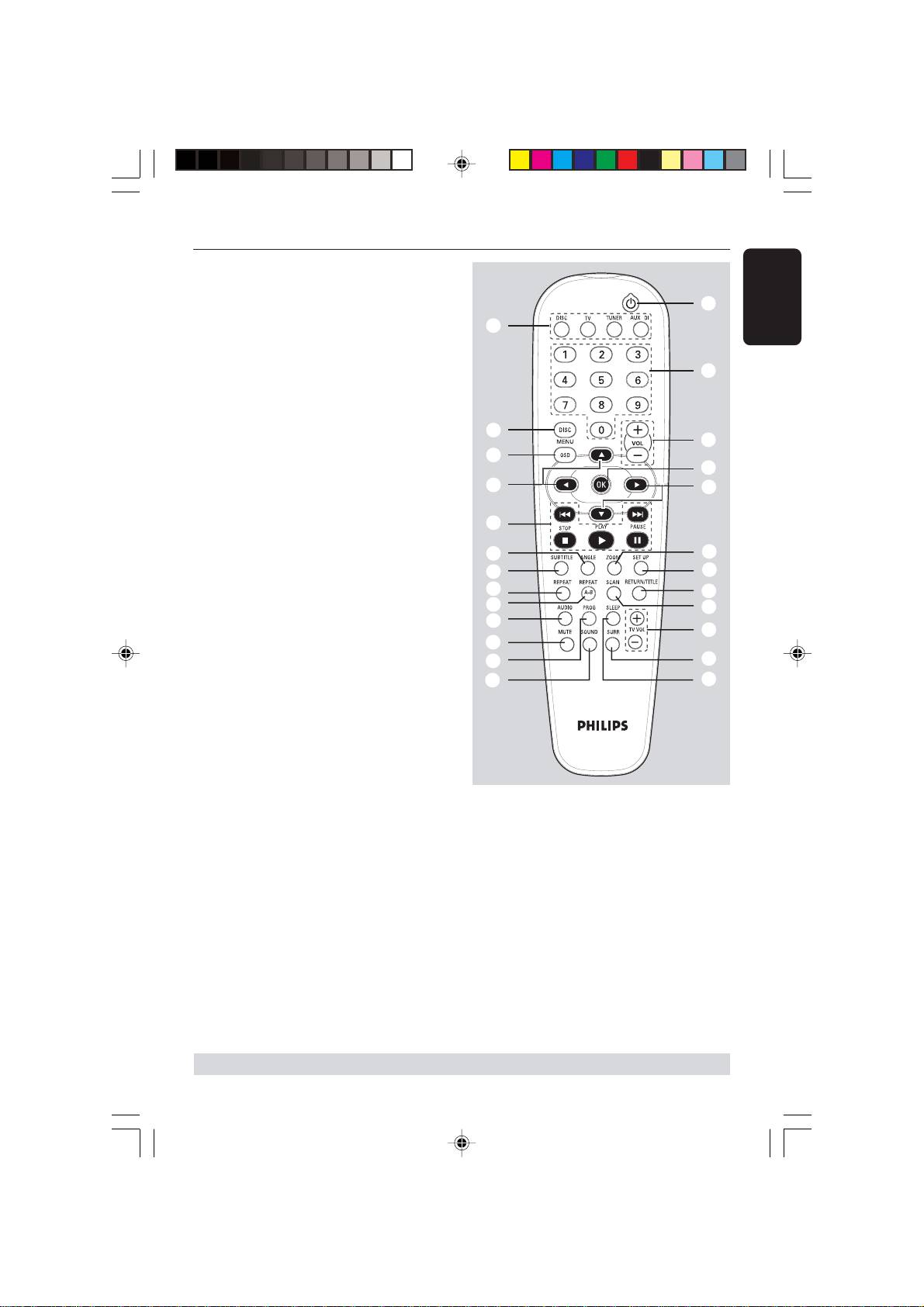
9 DISC MENU (DISC source mode only)
– Enters or exits disc contents menu.
–For VCD version 2.0 only;
In stop mode, turns on/off playback
control (PBC) mode.
During playback, returns to main menu.
0 OSD MENU (DISC source mode only)
– Enters or exits on-screen display.
! 1 2 3 4
– Selects movement direction in the
menu.
– Use 1 2 to select a preset radio
station.
– Use 3 4 to select auto tuning in Tuner
source mode.
001-041-LX39-22-Eng1 12/12/2003, 10:20 AM14
Functional Overview
@ ANGLE
– Select a DVD disc camera angle (if
available).
ª
/
English
# SUBTITLE
5
– Selects a subtitle language.
$ REPEAT
•
– Selects various repeat modes.
% REPEAT A-B
– Repeats a specific section on a disc.
9
8
^ AUDIO
0
– Selects an audio language (DVD) or an
≥
audio channel (CD).
!
!
& MUTE
–Mutes or restores the volume.
6
* PROG
@
§
– DISC: starts programming.
#
∞
– TUNER: starts *automatic/ manual preset
$
≤
programming.
%
£
( SOUND
^
™
– Selects a sound effect.
&
¡
) SLEEP
*
– Sets the sleep timer function.
(
)
¡ SURR
– Selects multichannel surround or stereo
mode.
™ TV VOL +-
– Adjusts TV volume (Philips TV only).
£ SCAN
≥ OK
– Plays the first few seconds of each track/
– Confirms a selection.
chapter within a disc.
• Numeric Keypad (0-9)
≤ RETURN/TITLE
– Enters a track/title number of the disc.
–To go back to previous menu.
– Enters a number of a preset radio station.
–Displays the disc’s Title menu (if available).
ª B
∞ SET UP
– Switches to Eco Power standby mode.
– Enters or exits system setup menu.
– In TV mode, *switches Philips TV on/off.
§ ZOOM
– Enlarges a picture on the TV screen.
* = Press and hold the button for more than two seconds.
15
001-041-LX39-22-Eng1 12/12/2003, 10:20 AM15
3139 115 22871
