
Vitek VT-3539: WEATHER CONDITIONS DISPLAY
WEATHER CONDITIONS DISPLAY: Vitek VT-3539
Table of contents
- WEATHER STATION USER INSTRUCTIONS Features: Block with main display:
- Remote sensors: OPERATING CONTROLS
- READ BEFORE USING For best results: GETTING STARTED Step 1: Setting up the remote sensor:
- Step 2: Receiver settings SYNCHRONIZING THE OUTDOOR TEMPERATURE READING Auto-detect function: Manual learning function (Search for remote sensor signals):
- SETTING THE TIME AND ALARM Setting the time:
- WEATHER CONDITIONS DISPLAY
- Hi and Lo symbols on the display Temperature trend indicator The temperature trend indicator shows the temperature trend registered by a separate sensor over the past half-hour. TEMPERATURE CONDITIONS REPORT Temperature conditions reporting symbols Black ice warning
- TEMPERATURE ALARM SETTINGS High temperature alarm Low temperature alarm When the alarm will be heard
- BACKLIGHT USING AN EXTERNAL WIRED SENSOR LOW BATTERY INDICATOR Receiver:
- Remote sensor:
- RESOLVING MALFUNCTIONS Problem Resolution
- TECHNICAL CHARACTERISTICS Meteorological station receiver Meteorological station remote sensor MINIMUM SERVICE LIFE - 3 YEARS
ENGLISH
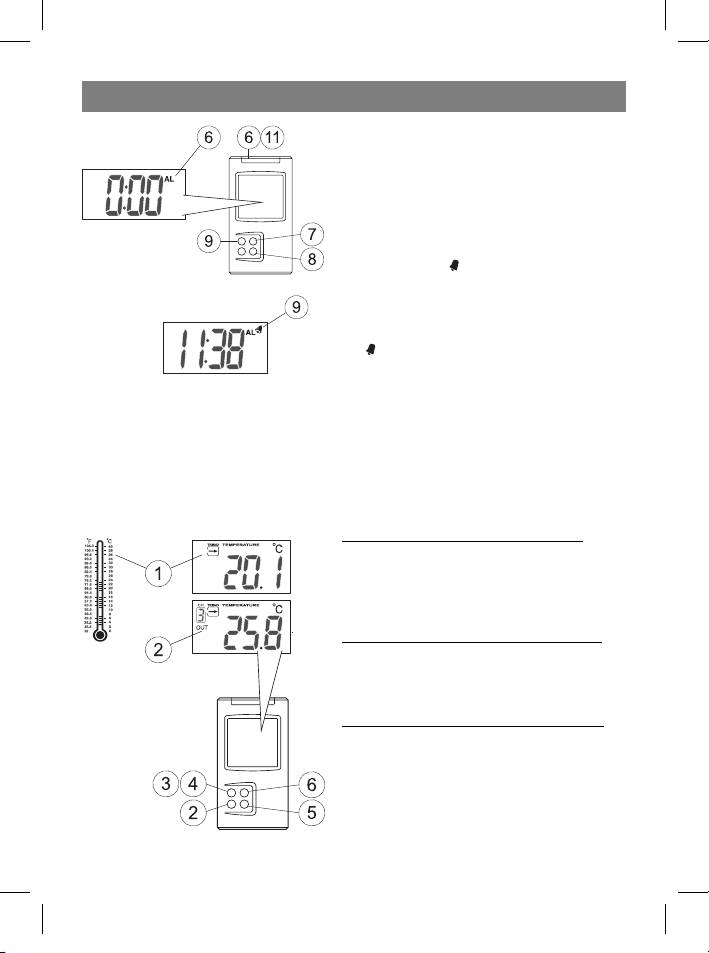
6 Use the Hour/+/Max button to choose the
hour.
7 Use the Minute/-/Min button to choose
the minute.
8 While in alarm mode, press the Alarm/°C/
°F button to turn the alarm on or off. If the
alarm is ON, the
symbol will appear on the
display.
When the alarm is activated:
9 When the alarm is activated, the alarm sym-
bol will blink on the LCD.
10 Press the Mode/Snooze button to temporarily turn off the alarm for five minutes.
After this time has passed, the alarm will ring again.
11 Press ANY OTHER button on the device to turn off the alarm completely.
If the alarm is not turned off, it will automatically turn itself off after one minute.
WEATHER CONDITIONS DISPLAY
Controlling the indoor temperature
After installing the batteries, the LCD will
show the indoor temperature. It also shows
a graphical thermometer of the indoor tem-
perature.
Displaying the temperature in °C or °F
To switch from °C to °F (or the opposite) press
the Alarm/°C/°F button while in time display
mode.
Minimum and maximum temperatures
To display the minimum temperature on the
LCD, pres the Minute/-/Min button while in
time display mode.
To display the maximum temperature on the
LCD, press the Hour/+/Max button while in
time display mode.
7
35391.indd 735391.indd 7 23.05.2006 17:08:5123.05.2006 17:08:51



