
Vitek VT-3539: Remote sensor:
Remote sensor:: Vitek VT-3539
Table of contents
- WEATHER STATION USER INSTRUCTIONS Features: Block with main display:
- Remote sensors: OPERATING CONTROLS
- READ BEFORE USING For best results: GETTING STARTED Step 1: Setting up the remote sensor:
- Step 2: Receiver settings SYNCHRONIZING THE OUTDOOR TEMPERATURE READING Auto-detect function: Manual learning function (Search for remote sensor signals):
- SETTING THE TIME AND ALARM Setting the time:
- WEATHER CONDITIONS DISPLAY
- Hi and Lo symbols on the display Temperature trend indicator The temperature trend indicator shows the temperature trend registered by a separate sensor over the past half-hour. TEMPERATURE CONDITIONS REPORT Temperature conditions reporting symbols Black ice warning
- TEMPERATURE ALARM SETTINGS High temperature alarm Low temperature alarm When the alarm will be heard
- BACKLIGHT USING AN EXTERNAL WIRED SENSOR LOW BATTERY INDICATOR Receiver:
- Remote sensor:
- RESOLVING MALFUNCTIONS Problem Resolution
- TECHNICAL CHARACTERISTICS Meteorological station receiver Meteorological station remote sensor MINIMUM SERVICE LIFE - 3 YEARS
ENGLISH
2 The receiver requires two AA batteries.
• All settings will be lost when changing the batteries.
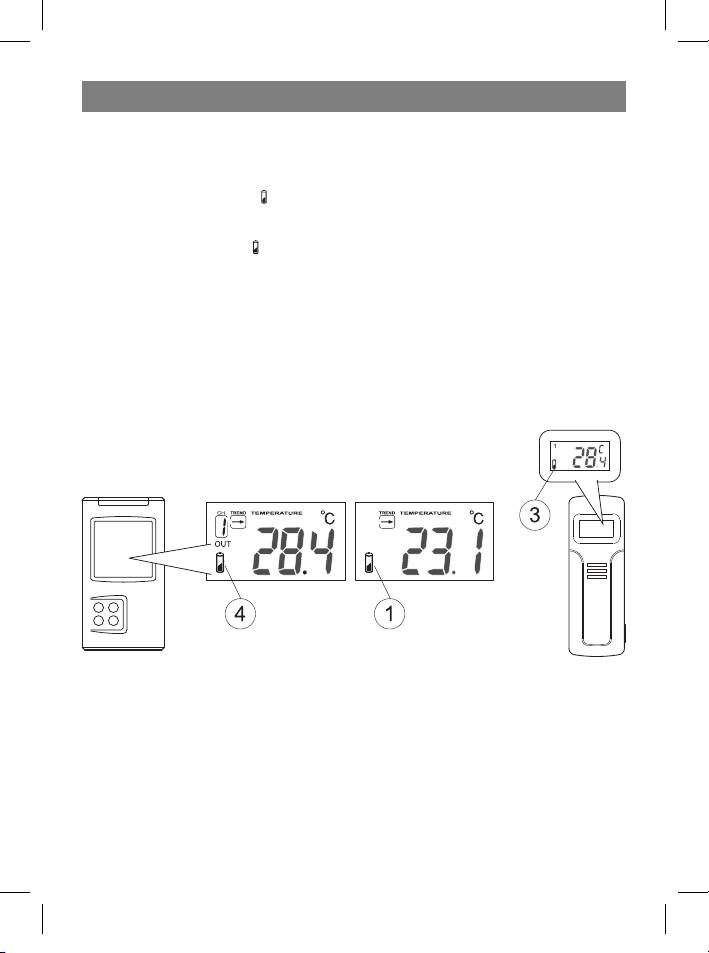
Remote sensor:
1 If the low-battery symbol appears on the display, this means that the remote sen-
sor’s battery will soon die.
2 The low-battery symbol
will also be shown on the section of the display below the
weather trend data, relating to external weather conditions.
3 The remote sensor requires two AA batteries.
• All required settings will have to be re-entered after changing the batteries.
• If the remote sensor is exposed to very low temperatures for a long period of time,
the batteries may lose there charge and the operating range of the sensor may be
reduced. High temperature conditions can also affect battery life.
11
35391.indd 1135391.indd 11 23.05.2006 17:08:5223.05.2006 17:08:52



