
Vitek VT-4073 SR: 4.2 N/P function 4.3 Subtitles 4.4 OPEN/ 4.5 PBC (PLAYBACK) 4.6 MIC ON/OFF 4.7 ANGLE 4.8 LANGUAGE» 4.9 TITLE 4.10 MENU 4.11. DIRECTION KEYS 4.12 3D FUNCTION 4.13 NUMBER KEYS 4.14 TIME 4.15 REPEAT FROM A TO B
4.2 N/P function 4.3 Subtitles 4.4 OPEN/ 4.5 PBC (PLAYBACK) 4.6 MIC ON/OFF 4.7 ANGLE 4.8 LANGUAGE» 4.9 TITLE 4.10 MENU 4.11. DIRECTION KEYS 4.12 3D FUNCTION 4.13 NUMBER KEYS 4.14 TIME 4.15 REPEAT FROM A TO B: Vitek VT-4073 SR
Table of contents
- Operating manual MAINTENANCE RULES IMPORTANT SAFETY NOTICES USAGE NOTICES ON THE DVD PLAYER USAGE NOTICES ON POWER SUPPLY MAIN FEATURES OF THE DEVICE
- 24bit/96Khz Digital/Analog (D/A) converter. Component video output. Laser head overcurrent protecting system 1. Brief instruction of controls Front panel function: Back panel function:
- Remote control 2. PREPARATIONS 2.1 PACKAGE SET 1. DVD player 2.2 Battery installation into the remote control 2.3 SYSTEM CONNECTION
- Channal amplifier Digital audio amplifier 2.4. PLAY MODE SETTING 3. BASIC OPERATION
- 3.1. Disc playing 4. FUNCTIONALITY DESCRIPTION
- 4.2 N/P function 4.3 Subtitles 4.4 OPEN/ 4.5 PBC (PLAYBACK) 4.6 MIC ON/OFF 4.7 ANGLE 4.8 LANGUAGE» 4.9 TITLE 4.10 MENU 4.11. DIRECTION KEYS 4.12 3D FUNCTION 4.13 NUMBER KEYS 4.14 TIME 4.15 REPEAT FROM A TO B
- 4.16 REPEAT FUNCTION 4.17. ZOOM 4.18. PROGRAM 4.19. R/L FUNCTION (SOUND BALANCING) 4.20 VOLUME AND MUTE 4.21. THE “SLOW“ FUNCTION 4.22 VIDEO FUNCTION 5. SETTING UP THE SYSTEM
- 1.1. ANGLE MARK 1.1.3 SCREEN LANGUAGE 1.1.4 HIDE SUBTITLES 1.1.5 SCREEN PROTECTION 1.1.7 MEMORY PLAY SETTINGS
- 1. AUDIO SETUP 1..1 SPEAKER SETUP 1..1.1. DOWNMI� MODE When the center, rear and the subwoofer speaker are in the “Off” 1..1.3 CENTRAL SPEAKER
- 1..1.4 REAR SPEAKER 1..1.5 WOOFER SPEAKER 1.. DIGITAL AUTO SETUP 1...1 DIGITAL AUDIO OUTPUT 1... LPCM OUTPUT
- 1..3. DOLBYDIGITALSETUP 1..3.1 L+R SETUP 1..3. DYNAMIC RANGE COMPRESSION 1..4 EQUALIZER SETUP 1..4.1 EQUALIZER MODE 1..4. BASS ENHANCING 1..4.3 SUB WOOFER
- 1..4.4. TREBLE BOOST 1..5 3D PROCESSING SETUP 1..5.1 PRO LOGIC II SETUP 1..5.1.1 PRO LOGIC II SETUP 1..5.1.. PRO LOGIC II SETUP
- 1..5.1.3. PRO LOGIC II SETUP 1..5.1.4 PRO LOGIC II SETUP 1..5.1.5 PRO LOGIC II SETUP 1..5.1.5. MI�TURE MODE 1..6 MICROPHONE SETUP 1..6.1 MICROPHONE SETUP
- 1..6.1.1 MICROPHONE SETUP 1.3 VIDEO SETUP 1.3.1 COMPONENT 1.3. TV MODE 1.3.3 QUALITY 1.3.3.1 SHARPNESS 1.3.3. BRIGHTNESS 1.3.3.3 CONTRAST 1.4. PREFERENCE SETUP
- 1.4.1 TV TYPE SETUP AUDIO SETUP SUBTITLE SETUP DISC MENU LANGUAGE SETUP PARENTAL CONTROL
- 1.4.6. DEFAULT SETTINGS 1.5. PASSWORD SETUP 1.5.1. PASSWORD SETUP. 1.5.. PASSWORD 6. OPERATING THE МР3 FUNCTION 7. JPEG SETTINGS 8. TROUBLESHOOTING GUIDE 9. DISC PROTECTION
- 10. MPEG 4 OPERATION 11.Technical Specifications
ENGLISH
7
After pressing the DISPLAY key fort he fifth time the message will
disappear from the screen.
4.2 N/P function
Press the N/P key repeatedly to get NTSC, Multi or PAL notices on the
screen (please, stop the disc playing before choosing this function).
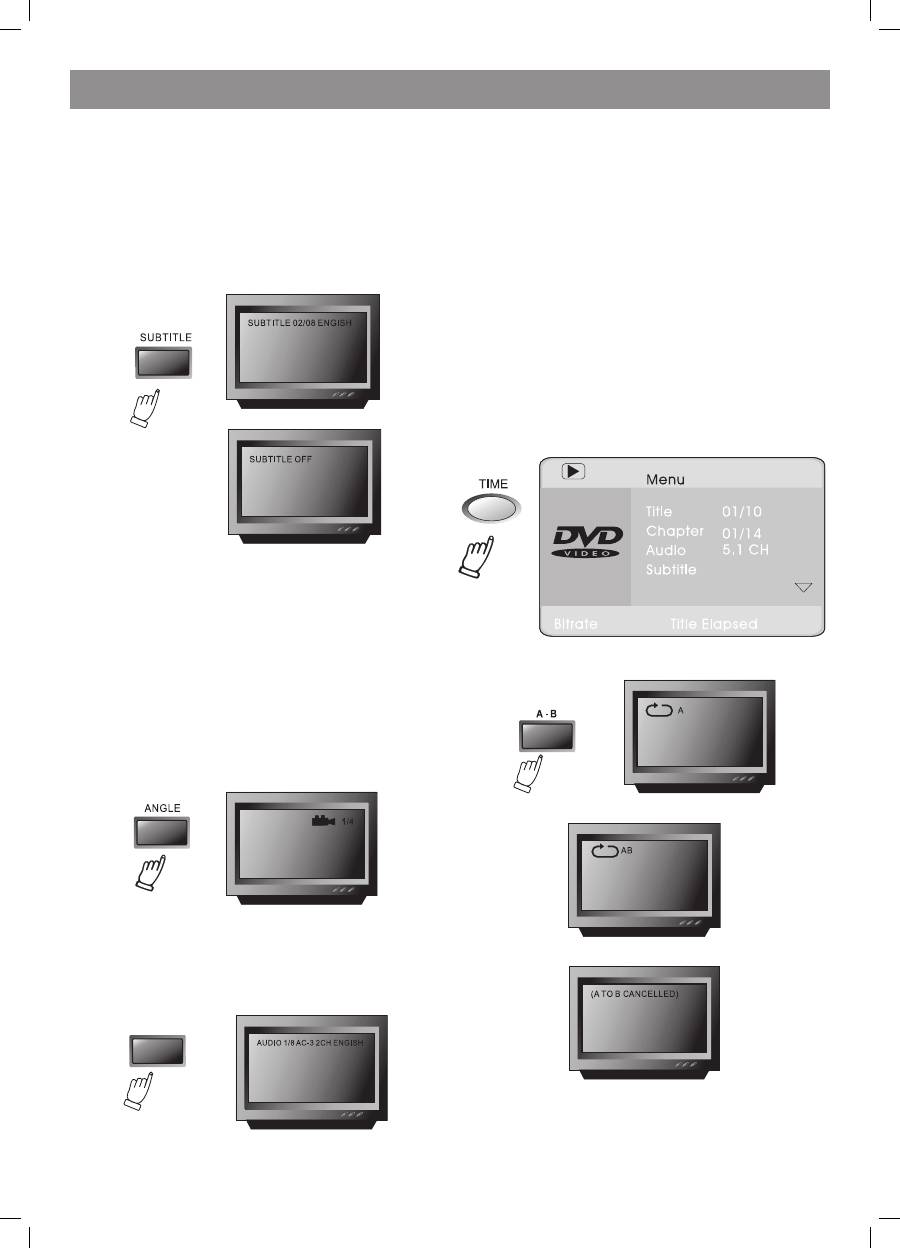
4.3 Subtitles
This function enables you to select multi subtitle languages (3
languages, only for discs with multi subtitles encoded). Press the
SUBTITLE key to get the desired text on the screen.
For instance, to select language 1 (English) from 8 options do the
following steps:
4.4 OPEN/
CLOSE
Eject or load the disc tray in Disc mode.
4.5 PBC (PLAYBACK)
When playing SVCD, VCD.0 discs press PBC – the disc menu will show.
You can select a program from the menu. After loading the disc, the unit
will enter PBC ON play automatically. After pressing the PBC button the
PBC OFF notice will appear on the screen. In this mode the menu won’t
appear – press digit key to select the track directly. PBC menu won’t
appear for VCD1.1, CDDA and Mp3 formats.
4.6 MIC ON/OFF
Use the Karaoke switch.
4.7 ANGLE
During athletic matches, concerts or theatrical programs you can select
various angles to view the same image by pressing the ANGLE key
continually (this function will work only for multi angle encoded discs).
4.8 LANGUAGE»
There are 8 languages to select (4 languages for CD format).
Press LANGUAGE key to select languages (this operation works only for
multi language encoded discs).
For example, when selecting language 1 from language options with
sound field effect AC3, channels, English the following notice will
appear on the screen:
4.9 TITLE
Press TITLE key to get the title menue (this operation works only with
multi title encoded discs).
4.10 MENU
Press MENU key to return to the main menu for DVD playing (this
function works only with multi subtitle encoded discs).
4.11. DIRECTION KEYS
When playing discs, the four direction keys allow you selecting your
option in the title, menu or setup.
If there is no menu or it’s not in the setup status, pressing the “left“
button of the remote controller switches off the VFD display, and
pressing the “right” direction key turns the VFD display on.
4.12 3D FUNCTION
Press 3D button to select the surround sound mode.
4.13 NUMBER KEYS
Press relevant number keys for playing favourite pictures according to
their series numbers in the menu.
4.14 TIME
This DVD player can display various data related to the disc played.
Pressing the TIME button allows selecting the title and the chapter,
Audio, Subtitle languages, Angle, Title time, Chapter time, repeat mode,
or display time.
4.15 REPEAT FROM A TO B
First set the initial point (A) by pressing the AB key:
Then set the end point (B) by pressing the AB key once again:
After this setting the program will repeat playing from A to B.
Third
pressing the AB key will cancel repeating.
4073IM.indd 7
09.10.2007 12:28:31
