
Vitek VT-4086 SR: REPEAT FOLDER FOLDER General Setup Page Other Functions Playing Picture CD or JPEG files Operations: Picture selection and Preview: TV Display Rotate Picture: Previous and Next selection: Zoom in and Zoom out: Angle Slide show OSD Lang (On screen display language) Captions Stop Playing Karaoke Singing Screen saver MPEG-4, DIVXdiscpIayback Last Memory
REPEAT FOLDER FOLDER General Setup Page Other Functions Playing Picture CD or JPEG files Operations: Picture selection and Preview: TV Display Rotate Picture: Previous and Next selection: Zoom in and Zoom out: Angle Slide show OSD Lang (On screen display language) Captions Stop Playing Karaoke Singing Screen saver MPEG-4, DIVXdiscpIayback Last Memory: Vitek VT-4086 SR
Table of contents
- DVD PLAYER ACCESSORIES
- Rear panel/Front panel/Display information Rearpanel Front panel Display information
- Preparation before using Remote control Progressive Scan
- Connections 5.1CH output terminal connect to Active subwoofer
- Operating instructions for functions Direct select by numeric button: Audio VCD/CD disc track selection USB READER FUNCTION TV System Setting When playing DVD other discs, press the^^ button to enter fast forward Video Output Mode Selection Volume Control Slow Motion Play/Pause Menu play for DVD discs Frame by Frame play Track or Chapter Skip Repeat
- Repeat appointed part Picture Zoom Memory Play Search play For DVD discs: Multi angle DVD play MP3 Playback Audio Channel Selection Play mode SelectSubtitle Language SINGLE REPEATONE
- REPEAT FOLDER FOLDER General Setup Page Other Functions Playing Picture CD or JPEG files Operations: Picture selection and Preview: TV Display Rotate Picture: Previous and Next selection: Zoom in and Zoom out: Angle Slide show OSD Lang (On screen display language) Captions Stop Playing Karaoke Singing Screen saver MPEG-4, DIVXdiscpIayback Last Memory
- Audio Setup Page Dialog SPDIFOutput Speaker setup page SPDIF output PCM Channel Downmlx LPCM out Dolby Digital Setup Front Speaker Central speaker Rearspeaker Dual Mono Subwoofer Dynamic Test Tone
- Equalizer Setup 3 D processing The setup structure is as below:
- RESOLUTION TV Mode Preference page Video Quality Setup TV System AUDIO/SUBTITLE/DISC MENU Sharpness Gamma Luma-delay PARENTAL CONTROL Brightness Contrast Hue Saturation CHANGETHERATING HDMI Default Password Setup Page PASSWORD MODE PASSWORDCHANGE
- How to handle, protect and clear discs DVD player Copyright
- Maintenance and Troubleshooting
ENGLISH
REPEAT FOLDER
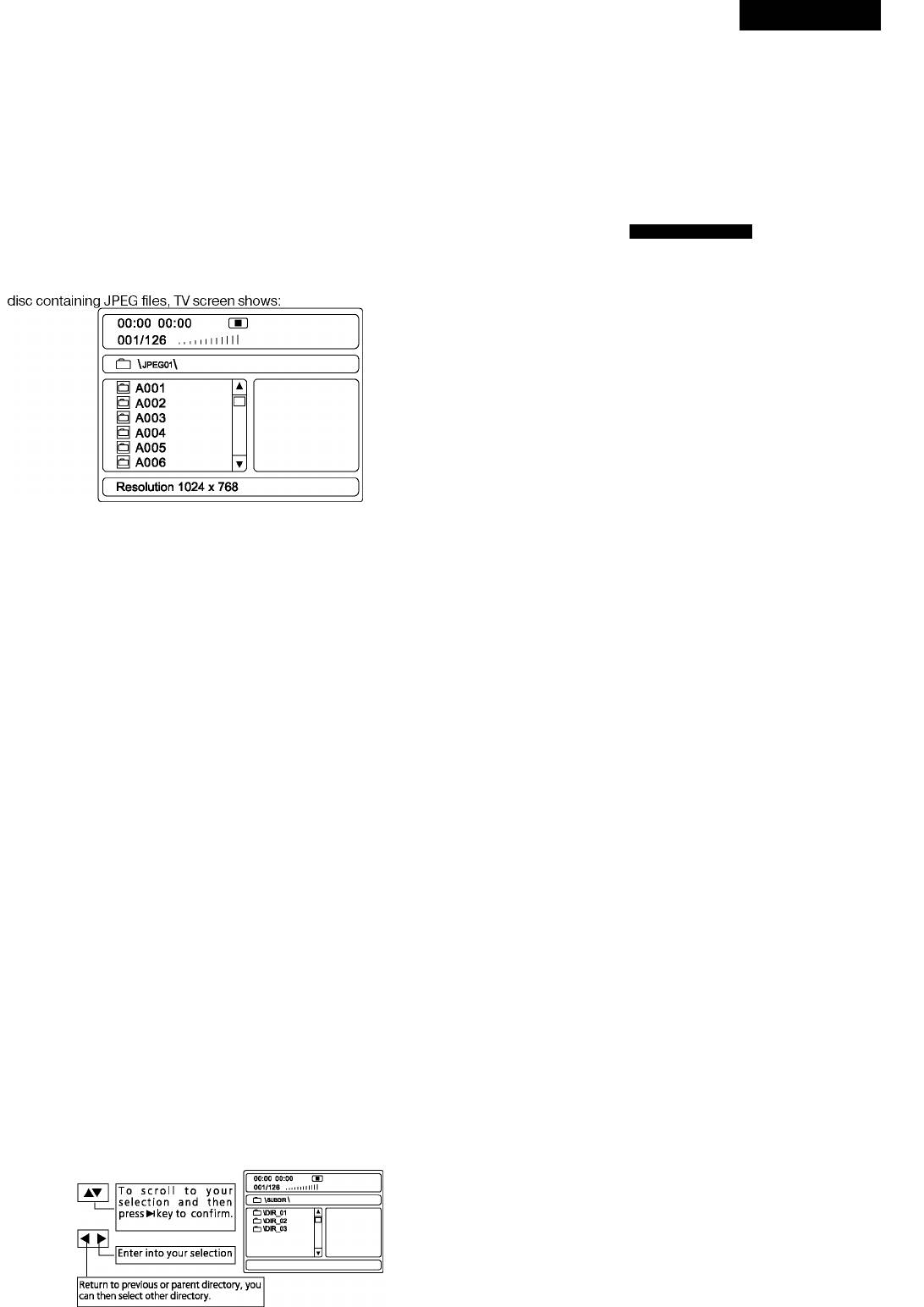
1) To stop playing press the STOP/RETURN button at any time.
All files In the selected folder will be played repeatedly.
2) Return to the parent directory. Press left arrow to select another
directory.
FOLDER
All files In the selected folder wlllbe played only once.
General Setup Page
The setup menu is used to configure the home theater system.
Other Functions
• Press SETUP button and enter into the general setup page, the page
Functions such as MUTE, VOLUME, PAUSE, PREVIOUS, NEXTetc. are
setup structure as below:
__________________________
also available for MP3 discs and the function same as playing audio CD.
Playing Picture CD or JPEG files
-General Setup Page-
The DVD player Is compatible to Picture CD and The player will automati
cally play pictures In slide discs containing JPEG Image files (with .JPG
TV Display
PS Normal/ps
flleshow mode Ifthedisc containing morethan one extension). This
Normal/LB
function Is similar to MP3 picture. Upon loading a Kodak Picture CD or
Wide
Angle Mark ON On
Off
OSD Lang
ENG ENGLISH
RUSSIAN
Captions
Off
On
Off
Screen Saver
ON On
Off
Last Memory Off On
Off
Operations:
Press arrow buttons to select, and then press the ENTER button to con
Picture selection and Preview:
firm.
Press arrow buttons to select the target picture MPEG-4, DIVX disc Play-
Press SETUP button again to cancel the system setup.
backand presswi buttontoshow. Ifyoudon’tpressNi keytheplayerwill
show the picture In preview area once the cursor stops.
TV Display
NORMAL/PS (Pan Scan)
Rotate Picture:
Select this option when the player is connected to a standard 4:3 aspect
You can use the arrow buttons^AT to rotate,
invert, mirrorthecurrent
ratio TV set. 16:9Wide screen source picture shown on the screen with
showing picture.
some part cut off automatically.
NORMAL/LB (Letter Box)
Previous and Next selection:
Select this option when the player is connected to a standard 4:3 aspect
You can pressM^ Prev button to show previous picture
ratio TV set. The full 16:9 wide screen source pictures will be shown on
or Next^l button to show next picture manually.
the screen, but with black bars on the top and bottom.
Wide
Zoom in and Zoom out:
Select this option when the player is connected to a wide screen TV.
You can press ZOOM button then followed with<^^^ (Fast Reverse
/ Fast Forward) to zoom out or button at anytime. There are following
Angle
zooming levels available: 50%, 75%, 100%, 125%, 150%, and 200%.
• ON: when the playing DVD disc having multi-angle option available,
When the picture is zoomed in you can use arrow buttons to shift and
an angle mark will be shown on the TV screen.
pan to viewthedesired part ofthe picture.
• OFF: NO angle markwill be showon the screen when multi-angle
option available.
Slide show
The DVD player is compatible to Picture CD and the player will automati
OSD Lang (On screen display language)
cally play pictures in slide discs containing JPEG image files (with .JPG
To selectthe On-Screen-Displaylanguage, default setting is English
flleshow mode ifthedisc containing morethan one extension). There
(RUSSIAN).
are 16 available modes to wide the TV screen when displaying a new
picture.
Captions
• ON:To display captions on TV screen when available.
Stop Playing
• OFF: To disable captions display.
When in normal play, press key to cancel play and return to the menu
NOTE: Only when the TV set supports captions display that the feature
interface and then you can select other directory or files.
can function well.
Karaoke Singing
Screen saver
Inset the microphone into the microphone plug hole; adjust the micro
When there is no activityofthe player for about several minutes, screen
phone volume knob to proper position. Please turn the amplifier volume
saver will be displayed to prevent potential damage to the TV screen.
down before inserting the microphone and turn up after inserting to
• ON:To activate screen saver.
avoid high frequency self-excitation before the unit is well adjusted.
• OFF: To disable screen saver.
MPEG-4, DIVXdiscpIayback
Last Memory
The DVD player can memorize the playing time when player turned to
standby mode so thatwhen itturned on again, the same disc will resume
playfrom the point.
• ON: Enable last memory function.
• OFF: Disablelastmemoryfunction.


