
Vitek VT-4086 SR: Repeat appointed part Picture Zoom Memory Play Search play For DVD discs: Multi angle DVD play MP3 Playback Audio Channel Selection Play mode SelectSubtitle Language SINGLE REPEATONE
Repeat appointed part Picture Zoom Memory Play Search play For DVD discs: Multi angle DVD play MP3 Playback Audio Channel Selection Play mode SelectSubtitle Language SINGLE REPEATONE: Vitek VT-4086 SR
Table of contents
- DVD PLAYER ACCESSORIES
- Rear panel/Front panel/Display information Rearpanel Front panel Display information
- Preparation before using Remote control Progressive Scan
- Connections 5.1CH output terminal connect to Active subwoofer
- Operating instructions for functions Direct select by numeric button: Audio VCD/CD disc track selection USB READER FUNCTION TV System Setting When playing DVD other discs, press the^^ button to enter fast forward Video Output Mode Selection Volume Control Slow Motion Play/Pause Menu play for DVD discs Frame by Frame play Track or Chapter Skip Repeat
- Repeat appointed part Picture Zoom Memory Play Search play For DVD discs: Multi angle DVD play MP3 Playback Audio Channel Selection Play mode SelectSubtitle Language SINGLE REPEATONE
- REPEAT FOLDER FOLDER General Setup Page Other Functions Playing Picture CD or JPEG files Operations: Picture selection and Preview: TV Display Rotate Picture: Previous and Next selection: Zoom in and Zoom out: Angle Slide show OSD Lang (On screen display language) Captions Stop Playing Karaoke Singing Screen saver MPEG-4, DIVXdiscpIayback Last Memory
- Audio Setup Page Dialog SPDIFOutput Speaker setup page SPDIF output PCM Channel Downmlx LPCM out Dolby Digital Setup Front Speaker Central speaker Rearspeaker Dual Mono Subwoofer Dynamic Test Tone
- Equalizer Setup 3 D processing The setup structure is as below:
- RESOLUTION TV Mode Preference page Video Quality Setup TV System AUDIO/SUBTITLE/DISC MENU Sharpness Gamma Luma-delay PARENTAL CONTROL Brightness Contrast Hue Saturation CHANGETHERATING HDMI Default Password Setup Page PASSWORD MODE PASSWORDCHANGE
- How to handle, protect and clear discs DVD player Copyright
- Maintenance and Troubleshooting
ENGLISH
Repeat appointed part
^ Sub titie 01/03: Fre nch^
This function for you to piaythe desired part.
Set point A Set points
(A-B)
JL JL
• To disable subtitle display, press SUB-T button until Subtitle off is
I
------
►! ¿3AB I
--------
► repeatfinrtion
shown on TV screen.
Remarks:
Note: others discs operation methods are aiike DVD discs.
The function of subtitle is only available for discs with multi subtitles. The
subtitle language varies as per discs.
Picture Zoom
The feature is used to zoom in or zoom out the motion picture or stiii im
Memory Play
ages when piaying Video Discs.
This player can memorize the last stop point and play from this point
• The feature is used to zoom in or zoom out the motion picture or stiii
onwards when PLAY/PAUSE is pressed again.
imageswhen piayingVideo Discs.
• When playing, press STOP/RETURN once to stop playback. The
(ZOOM)
player will memorize the current point. In this state. Press PLAY/
PAUSEor RESUME button to resume playfrom that point.
• Press STOP/RETURN twice will clear the memory that if play is re
sumed, the disc will be played from the beginning.
• And there are aiso 3 ieveis of zoom out mode, press ZOOM button
NOTE: MP3 discs have no this function.
4-6 times to choose.
Search play
(ZOOM)
When playing avideo or audio disc, you can go to your desired position
directlyviathis function.
For DVD discs:
• To return to normai size, press ZOOM for the seventh time.
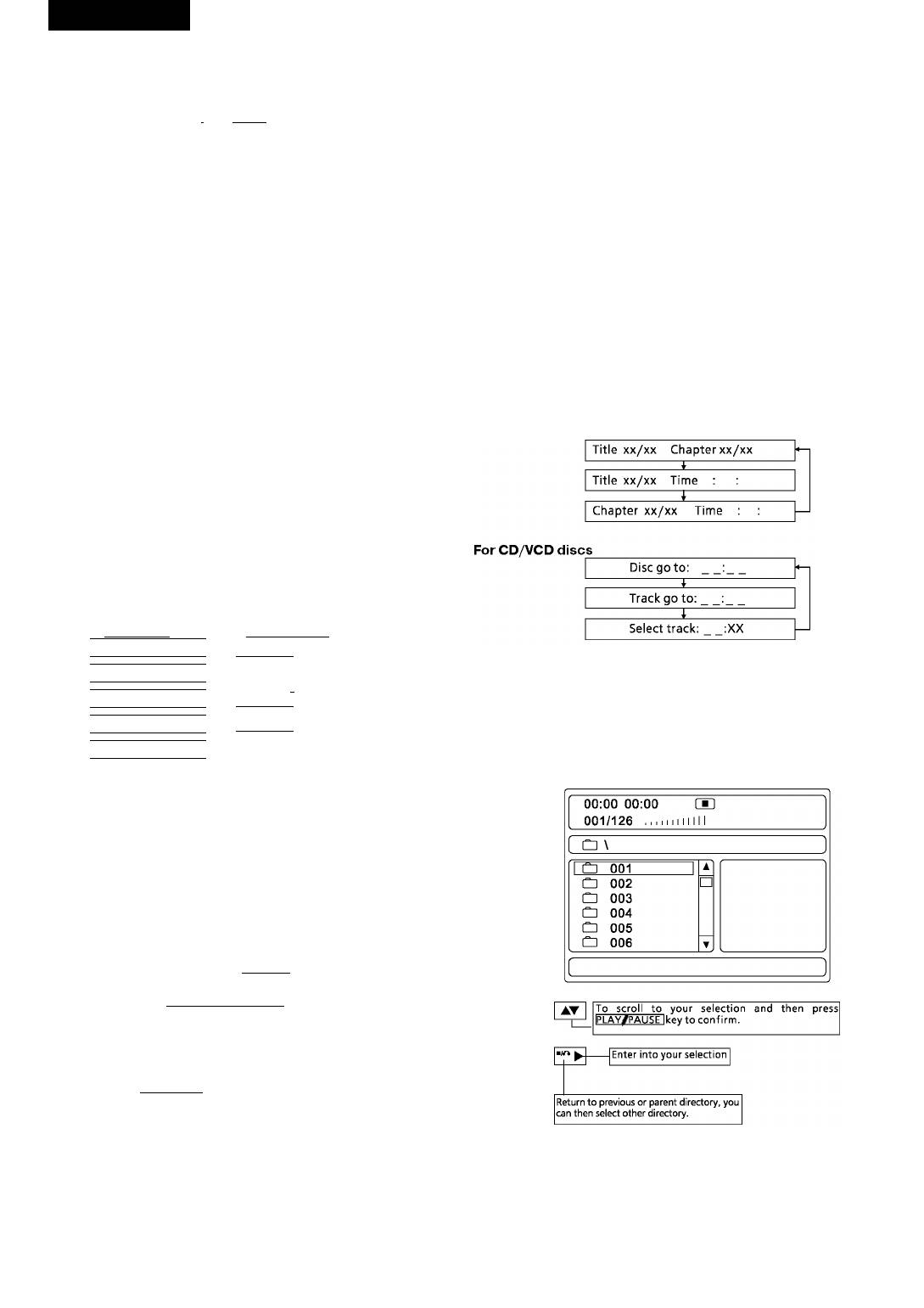
Press the GOTO key to display on screen as follows:
Multi angle DVD play
Some DVD discs may contain scenes shot from different angies; in this
case the ANGLE key may be used to viewthe same scene from different
angies.
This function is oniy appiicabie to discs recorded with scenes shot at
different angies.
OSD-On Screen Display
On screen display can be displayed to check the playing time and re
maining time for each title, chapter, track or the whole discs. Press OSD
keyto check.
For DVD discs
For VCD/CD discs
I Title Elapsed
I Single Elapsed
Itt m /10 rH 10/40 0:74:40 \
I Track 02/18 01:20
____________
1
1 Title Remain
1
I Single Remain
Using the direction keys, digit keys to enter the chapter, title or time’s
Itt 01/10 ch 10/40 1:29:33 1
Track 02/18 03:40
1
I
value, then press ENTER start playing.
1 Chapter Elapsed
1
Total Elapsed
|tT 01/10 ch 10/40 0:01:00 |
I Track 02/18 06:32
____________
1
1 Chapter Remain
1
I Total Remain ^
MP3 Playback
Itt 01 /10 CH 10/40 0:04:00 1
I Track 02/18 55:30
____________
The DVD player can playback discs, including CDROM, CD-R, CD-RW,
Display Off L
DVD-ROM, DVD-Retc. recordedwithMP3 audio files. Multiple andmul-
tilevel directories are supported.
For DVD disc, you select ‘displayoff’ option will stop OSD function.
ForVCD/CD disc, ifyou press OSD key, the OSD mode ofyour selection
will displayon screen till you stop the playing.
Audio Channel Selection
When playing DVD discs, press the AUDIO button to select your desired
audio channel.Thisisonly applicable if the disc has a different audio
channel function incorporated.
For example: Ifamovie discwith English, French and Spanish, you can
press the AUDIO button continuouslyto select and confirm.
(AUDIO)
Audio 1/3:AC-3 5.1CH English
--------
1
Audio 2/3:AC-3 5.1CH French
-
-------
I
I Auido3/3:AC-3 5.1CH Spanish
When playing VCD disc, press the VOCAL Key to switch between human
sound and audio track and remove the effect of human sound.
(VOCAL),
________
, ,
_________
,
»|Mono Left
--------------
»¡Mono Right|-
Stereo ] Mix-Mono
In playofamoviedisc, ifit hastwo languages, pressthe VOCAL keyto
Play mode
select between the two languages.
There are four play modes available, when playing, press REPEAT button
to choose the MP3 play mode.
SelectSubtitle Language
When playing a DVD disc with multi subtitles, you can choose a desired
SINGLE
subtitle with the SUB-T button:
A file will be played only once.
For example: There are 3 different language subtitles available on the
DVD disc.
REPEATONE
• Press the SUB-T button to select a subtitle with desired language as
Piaythe selected file repeatedly.
shown on the TV screen.


