
Vitek VT-4086 SR: Connections 5.1CH output terminal connect to Active subwoofer
Connections 5.1CH output terminal connect to Active subwoofer: Vitek VT-4086 SR
Table of contents
- DVD PLAYER ACCESSORIES
- Rear panel/Front panel/Display information Rearpanel Front panel Display information
- Preparation before using Remote control Progressive Scan
- Connections 5.1CH output terminal connect to Active subwoofer
- Operating instructions for functions Direct select by numeric button: Audio VCD/CD disc track selection USB READER FUNCTION TV System Setting When playing DVD other discs, press the^^ button to enter fast forward Video Output Mode Selection Volume Control Slow Motion Play/Pause Menu play for DVD discs Frame by Frame play Track or Chapter Skip Repeat
- Repeat appointed part Picture Zoom Memory Play Search play For DVD discs: Multi angle DVD play MP3 Playback Audio Channel Selection Play mode SelectSubtitle Language SINGLE REPEATONE
- REPEAT FOLDER FOLDER General Setup Page Other Functions Playing Picture CD or JPEG files Operations: Picture selection and Preview: TV Display Rotate Picture: Previous and Next selection: Zoom in and Zoom out: Angle Slide show OSD Lang (On screen display language) Captions Stop Playing Karaoke Singing Screen saver MPEG-4, DIVXdiscpIayback Last Memory
- Audio Setup Page Dialog SPDIFOutput Speaker setup page SPDIF output PCM Channel Downmlx LPCM out Dolby Digital Setup Front Speaker Central speaker Rearspeaker Dual Mono Subwoofer Dynamic Test Tone
- Equalizer Setup 3 D processing The setup structure is as below:
- RESOLUTION TV Mode Preference page Video Quality Setup TV System AUDIO/SUBTITLE/DISC MENU Sharpness Gamma Luma-delay PARENTAL CONTROL Brightness Contrast Hue Saturation CHANGETHERATING HDMI Default Password Setup Page PASSWORD MODE PASSWORDCHANGE
- How to handle, protect and clear discs DVD player Copyright
- Maintenance and Troubleshooting
ENGLISH
Connections
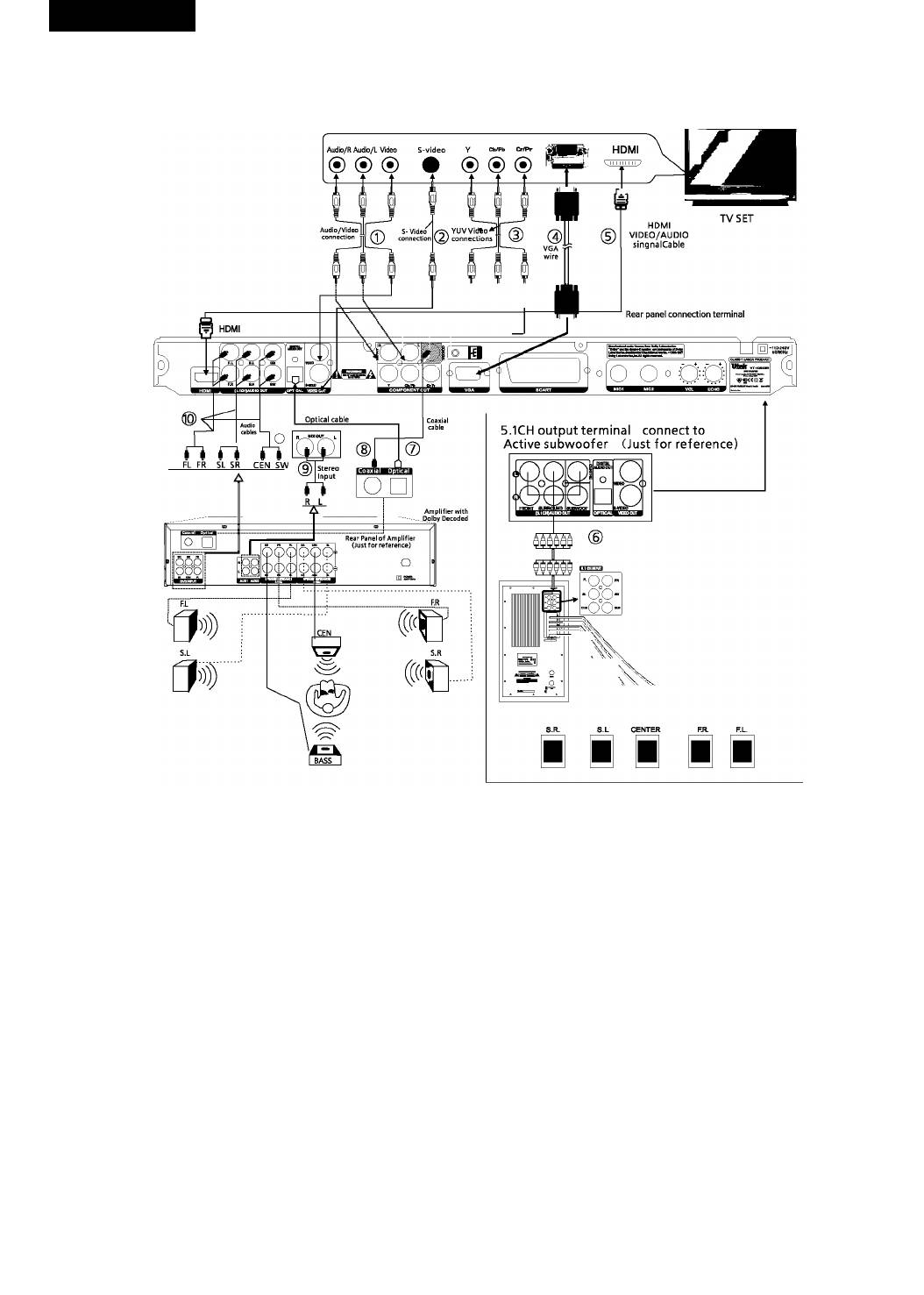
ConnecttoTVset and Dolby Digital 5.1CH Surround Sound System or Dolby Digital Acoustics
Please connect the home theater surround sound system and TV set according to the following diagram and instructions:
Connection terminal of TV SET
Note:
1. When connectingthe playertoTVset onlyselect one group from fivevideo groupsconnection.
2. Selectthecorresponding output mode ofTVsetand DVD player according tothevideo connection method.
1) AV
2) S-VIDEO
3) YUV
4) VGA
5) HDMI
Please refer to the TV set manual when connecting.
Dolby, “Pro Logic and double D marks are trademarks of
DolbyLab. Production authorized by Dolby Lab.
Confidential works notpermitted to issue. Dolby Lab 1992-1997. All rights reserved.
5.1CH output terminal connect to Active subwoofer
1. ConnectS.I channels(6channelstotally)oftheDVDanalogaudiooutputto theS.I channelinputportoftheactivesubwoofer.
2. Selectthe OFF option ofdownmix menu.
3. See the instruction manuals for active subwoofer at the same time.
• When connecting Power Amplifier via coaxial or optical cable, please select the “Spdif/Raw” of digital output.
• See instruction manual for power amplifier of Dolby digital at the same time.
• The standard configuration ofthe Dolby hometheater is5.1 channel loudspeaker replay. Ifyou have notconnected the middle and bass
loudspeakers, setthem at “OFF” mode with the loudspeaker setting function, their signal will be replayed bysuperposing on left/right tracks.
Remark: According your need, just select one group audio connection among 1,6,7,8,9, 10.
1. Before connecting, be sure to disconnect all equipment power supply.
2. All loudspeakers should be placed at the same distance to the audience.
3. Do not connect the coaxial output of the unit to the analog signal input port.
4. Do notturn on/offthe unitfrequently(the interval should be 10 secondsat least).


