
Vitek VT-4086 SR: Rear panel/Front panel/Display information Rearpanel Front panel Display information
Rear panel/Front panel/Display information Rearpanel Front panel Display information: Vitek VT-4086 SR
Table of contents
- DVD PLAYER ACCESSORIES
- Rear panel/Front panel/Display information Rearpanel Front panel Display information
- Preparation before using Remote control Progressive Scan
- Connections 5.1CH output terminal connect to Active subwoofer
- Operating instructions for functions Direct select by numeric button: Audio VCD/CD disc track selection USB READER FUNCTION TV System Setting When playing DVD other discs, press the^^ button to enter fast forward Video Output Mode Selection Volume Control Slow Motion Play/Pause Menu play for DVD discs Frame by Frame play Track or Chapter Skip Repeat
- Repeat appointed part Picture Zoom Memory Play Search play For DVD discs: Multi angle DVD play MP3 Playback Audio Channel Selection Play mode SelectSubtitle Language SINGLE REPEATONE
- REPEAT FOLDER FOLDER General Setup Page Other Functions Playing Picture CD or JPEG files Operations: Picture selection and Preview: TV Display Rotate Picture: Previous and Next selection: Zoom in and Zoom out: Angle Slide show OSD Lang (On screen display language) Captions Stop Playing Karaoke Singing Screen saver MPEG-4, DIVXdiscpIayback Last Memory
- Audio Setup Page Dialog SPDIFOutput Speaker setup page SPDIF output PCM Channel Downmlx LPCM out Dolby Digital Setup Front Speaker Central speaker Rearspeaker Dual Mono Subwoofer Dynamic Test Tone
- Equalizer Setup 3 D processing The setup structure is as below:
- RESOLUTION TV Mode Preference page Video Quality Setup TV System AUDIO/SUBTITLE/DISC MENU Sharpness Gamma Luma-delay PARENTAL CONTROL Brightness Contrast Hue Saturation CHANGETHERATING HDMI Default Password Setup Page PASSWORD MODE PASSWORDCHANGE
- How to handle, protect and clear discs DVD player Copyright
- Maintenance and Troubleshooting
ENGLISH
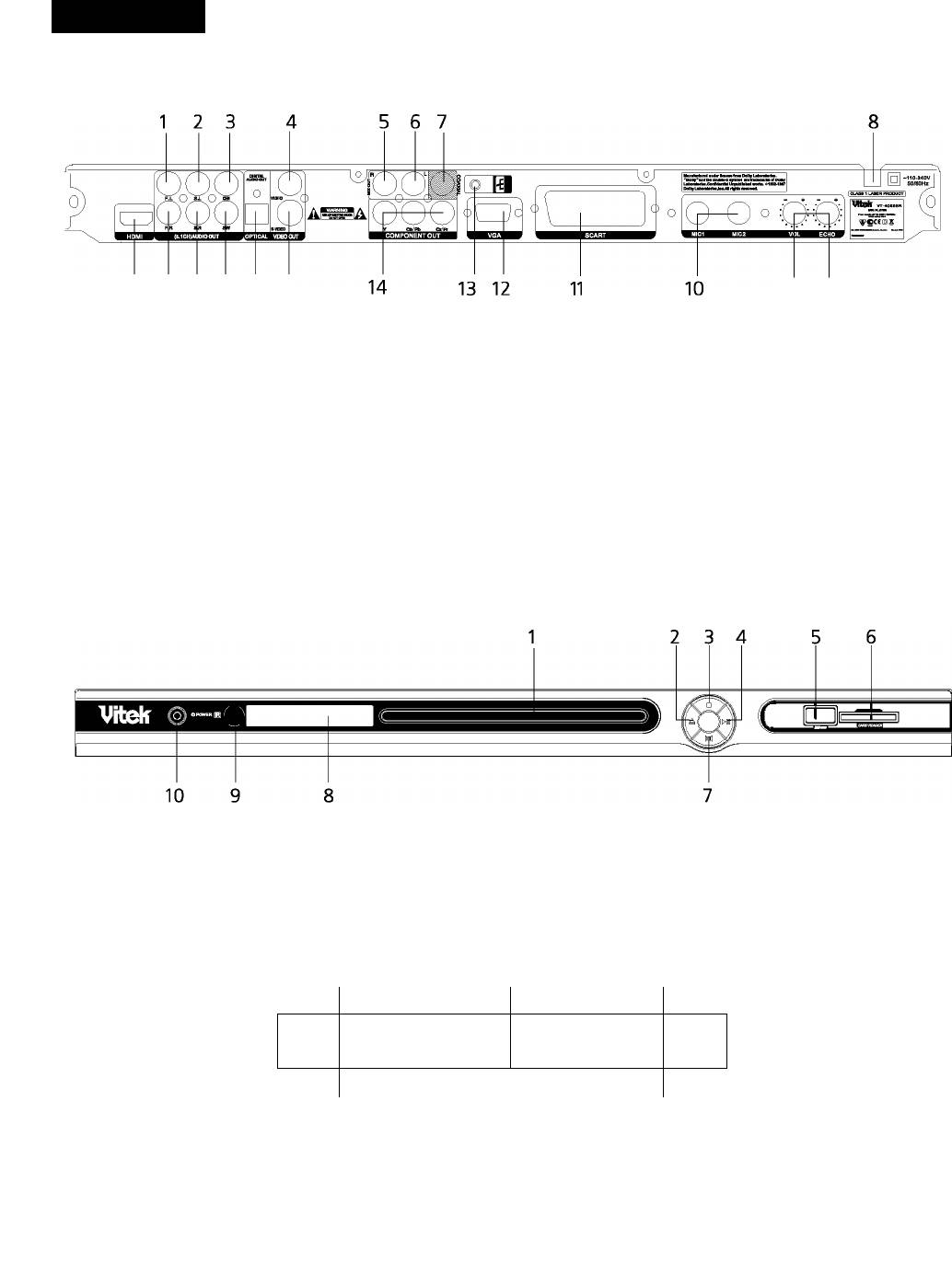
Rear panel/Front panel/Display information
Rearpanel
20 19 18 17 16 15
21 9
1. 5.1CHF.L.audiooutput
12. VGAterminai
2. 5.1CHS.L.audiooutput
13. Grounding
3. 5.1CHcenteraudiooutput
14. Componentvideooutput
4. Composite video output
15. S-video
5. Mix-outrightaudiooutput
16. Digitaiopticaiaudiooutput
6. Mix-outieftaudiooutput
17. 5.1 CHS.Waudiooutput
7. Digitai coaxiai audio output
18. 5.1 CH S. R audio output
8. ACpowerwire
19. 5.1 CH F. Raudiooutput
9. Mie Echo controi knob
20. HDMi terminai
10. Microphonesocket
21. Mie voiume controi knob
11. SCARTterminai
Front panel
1. Disc/tray
6. Card reader
2. Open/Ciose
7. Vocai
3. Stop
8. Dispiayscreen
4. Piay/ Pause
9. Remote control receiver window
5. USB
10. Power switch
Display information
DV D 1
^3 dts
VC D 1
O / 88- 88--00M
^4 □□□
8 7
DVD indicator
Piay
Playtime display
MP3 indicator
Dolby indicator
MP4 indicator
Pause
8. VCD indicator


