
Vitek VT-3796: Speed of data recording from line input Deleting files from the MP3/WMA player
Speed of data recording from line input Deleting files from the MP3/WMA player: Vitek VT-3796
Table of contents
- IMPORTANT TECHNICAL SAFETY RECOMMENDATIONS SAFETY MEASURES
- PLAYER FUNCTIONS AND CONTROL ELEMENTS
- CONTROL ELEMENTS
- Top/ Bottom panel LCD Display
- Installing the battery SYSTEM REQUIREMENTS Operating characteristics
- USING THE MP3/WMA PLAYER CONNECTING THE USB CABLE
- COMPARE THE PLUGS ON THE USB CABLE BEFORE USING Turning the unit On/Off Listening with Headphones
- Hold function Volume adjustment For your reference
- USING THE PLAYER
- Choosing a function mode Playback speed ADDITIONAL FUNCTIONS Bookmarks
- Equalizer
- ID3 Language (MP3 text: name of album, song and artist)
- Backlight Dictaphone Function
- Repeat Function Data transfer speed in bits
- Speed of data recording from line input Deleting files from the MP3/WMA player
- Formatting files on the MP3/WMA player
- Choosing the Voice Data Recording Speed Checking the memory level and the operating system version FM Band RECORDING VOICE DATA
- Recording from auxiliary devices
- LISTENING TO THE RADIO
- Saving into memory Saving a tuned radio station frequency Recalling a saved radio station Deleting a programmed radio station Recording from the radio
- TROUBLESHOOTING SPECIFICATION
ENGLISH
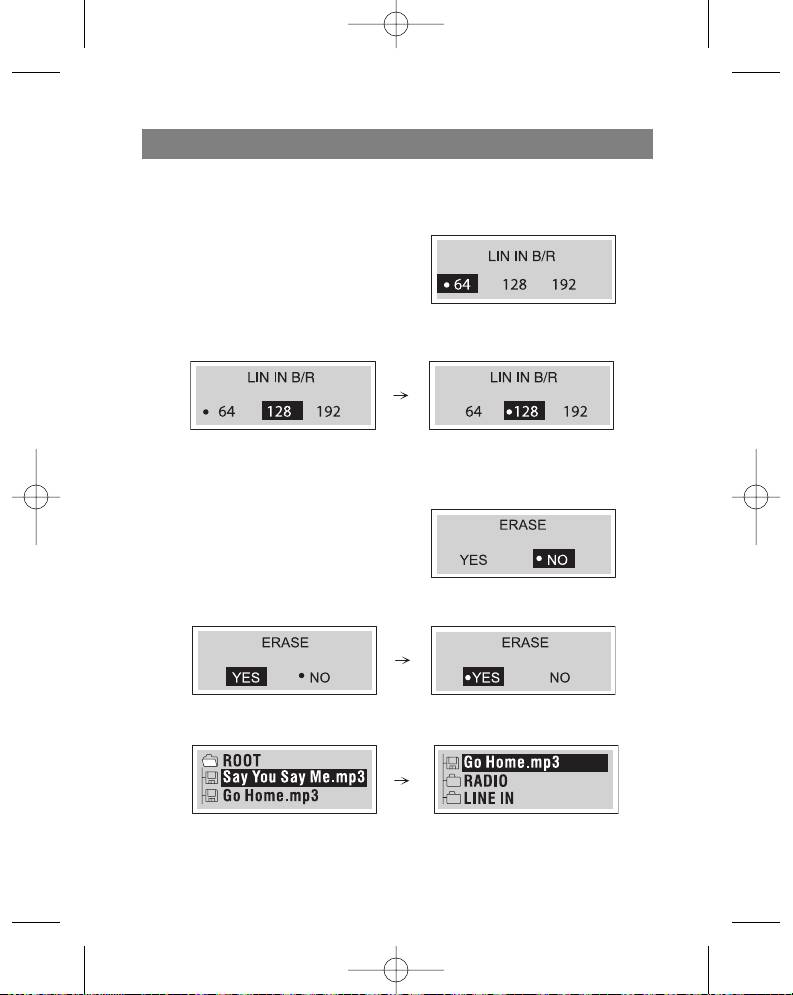
Speed of data recording from line input
Before recording anything on the MP3/WMA player, choose the line data transfer
speed in bits.
1. Press and hold the Menu button for two
seconds and then use function selector to
choose the (LINE IN B/R) menu.
2. Use the Skip/Search (/ ) button to
select the needed speed and choose it
with the Play () button .
3. Press the Menu button to exit the “Line in data transfer» menu.
Deleting files from the MP3/WMA player
1. Press and hold the menu button for two
seconds and then use the function selector
to choose the “Erase” function.
2. Use the Skip/Search ( /) buttons to
choose ”YES” and then press the Play ( )
button.
3. Use the (+/-) button to choose the files that you want to delete.
15
3796new1.qxd 4/1/05 5:56 PM Page 15


