
Karcher PC 60-130 T: Troubleshooting
Troubleshooting: Karcher PC 60-130 T
-
7
Danger
Risk of injury! The main switch is to be
switched off while carrying out any repairs
or maintenance jobs.
If malfunction can not be fixed, the de-
vice must be checked by customer serv-
ice.
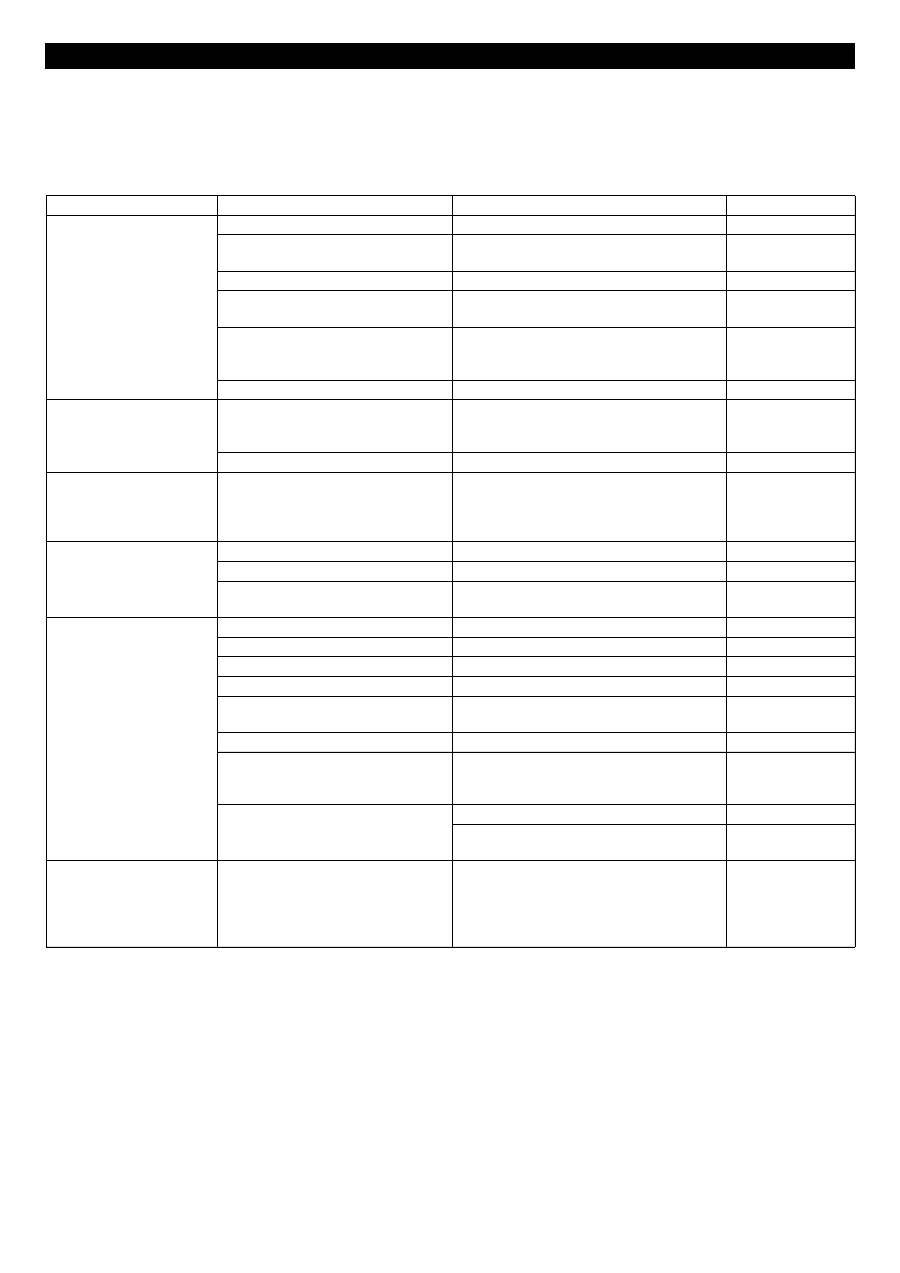
Troubleshooting
Fault
Possible cause
Remedy
of whom
Appliance is not running
Main switch is switched off.
Turn on the main switch.
Operator
Mains fuse in the power supply is
faulty.
Replace the fuse.
Operator
Timer lapsed.
Set the cleaning time.
Operator
Device hood has not been closed
properly.
Press the handle downward.
Operator
Filling level too low.
Fill water into the detergent container until
the indicator lamp "Heater" lights up green or
shuts off.
Operator
There is no voltage in the machine.
Check electrical mains.
Electrician
The indicator lamp for the
heater will light up red
Water shortage
Fill water into the detergent container until
the indicator lamp "Heater" lights up green or
shuts off.
Operator
Filling level sensor is faulty.
Replace filling level sensor.
Customer Service
The indicator lamp for the
operating status will light up
red
Turntable overloaded.
Take some load off the turntable or reposition
the parts. To reset a fault, briefly open the
machine hood and close it or briefly turn the
timer switch to "0".
Operator
Turntable does not turn
Load too heavy or too large.
Remove some parts.
Operator
Turntable loaded unevenly.
Correct the load arrangement in the basket. Operator
Turntable defective.
Check whether the turntable turns while it is
not loaded. If not, call customer service.
Operator
Bad cleaning result
Cleaning time too short.
Increase the cleaning time.
Operator
Detergent liquid is dirty.
Replace the detergent liquid.
Operator
Nozzles are blocked.
Clean the nozzles.
Operator
Filter blocked (optional).
Clean or replace the filter inlay.
Operator
Oil percentage in the detergent liquid
is too high.
Turn on the skimmer.
Operator
Pump does not work
Check motor protection switch.
Operator
Wrong rotating direction of the pump
motor.
Rectify the electrical connection. The fan of
the pump motor must rotate in the direction of
the arrow.
Electrician
Temperature too low.
Set the thermostat to a higher level.
Operator
Check thermostat or temperature limiter; re-
place, if required.
Customer Service
The indicator lamp for tem-
perature will light up red
Temperature limiter has got triggered. Allow the device to cool; remove the cause of
the fault. Reset the temperature limiter in the
heater switch cabinet by pressing the reset
button. Contact Customer Service if the fault
recurs.
Operator
17 EN
Table of contents
- Deutsch
- Sicherheitseinrichtungen
- Geräteelemente
- Inbetriebnahme
- Außerbetriebnahme
- Pflege und Wartung
- Hilfe bei Störungen
- Garantie Ersatzteile Technische Daten
- English
- Safety Devices
- Device elements
- Start up
- Shutting down
- Maintenance and care
- Troubleshooting
- Warranty Spare parts Technical specifications
- Français
- Dispositifs de sécurité
- Éléments de l'appareil
- Mise en service
- Mise hors service
- Entretien et maintenance
- Assistance en cas de panne
- Garantie Pièces de rechange Caractéristiques techniques
- Italiano
- Dispositivi di sicurezza
- Parti dell'apparecchio
- Messa in funzione
- Messa fuori servizio
- Cura e manutenzione
- Guida alla risoluzione dei guasti
- Garanzia Ricambi Dati tecnici
- Nederlands
- Veiligheidsinrichtingen
- Apparaat-elementen
- Inbedrijfstelling
- Buitenwerkingstelling
- Onderhoud
- Hulp bij storingen
- Garantie Reserveonderdelen Technische gegevens
- Español
- Dispositivos de seguridad
- Elementos del aparato
- Puesta en marcha
- Puesta fuera de servicio
- Cuidados y mantenimiento
- Ayuda en caso de avería
- Garantía Piezas de repuesto Datos técnicos
- Português
- Equipamento de segurança
- Elementos do aparelho
- Colocação em funcionamento
- Colocar fora de serviço
- Conservação e manutenção
- Ajuda em caso de avarias
- Garantia Peças sobressalentes Dados técnicos
- Dansk
- Sikkerhedsanordninger
- Maskinelementer
- Ibrugtagning
- Ud-af-drifttagning
- Pleje og vedligeholdelse
- Hjælp ved fejl
- Garanti Reservedele Tekniske data
- Norsk
- Sikkerhetsinnretninger
- Maskinorganer
- Ta i bruk
- Stans av driften
- Pleie og vedlikehold
- Feilretting
- Garanti Reservedeler Tekniske data
- Svenska
- Säkerhetsanordningar
- Aggregatelement
- Idrifttagning
- Ta ur drift
- Skötsel och underhåll
- Åtgärder vid störningar
- Garanti Reservdelar Tekniska data
- Suomi
- Turvalaitteet
- Laitteen osat
- Käyttöönotto
- Käytön lopettaminen
- Hoito ja huolto
- Häiriöapu
- Takuu Varaosat Tekniset tiedot
- Πίνακας περιεχομένων
- Διατάξεις ασφαλείας
- Στοιχεία συσκευής
- Έναρξη λειτουργίας
- Απενεργοποίηση
- Φροντίδα και συντήρηση
- Αντιμετώπιση βλαβών
- Εγγύηση Ανταλλακτικά Τεχνικά χαρακτηριστικά
- Türkçe
- Güvenlik tertibatlar ı
- Cihaz elemanlar ı
- İş letime alma
- Kullan ı m d ı ş ı nda
- Koruma ve Bak ı m
- Ar ı zalarda yard ı m
- Garanti Yedek parçalar Teknik Bilgiler
- Оглавление
- Защитные устройства
- Элементы прибора
- Начало работы
- Вывод из эксплуатации
- Уход и техническое обслуживание
- Помощь в случае неполадок
- Гарантия Запасные части Технические данные
- Magyar
- Biztonsági berendezések
- Készülék elemek
- Üzembevétel
- Üzemen kívül helyezés
- Ápolás és karbantartás
- Segítség üzemzavar esetén
- Garancia Alkatrészek M ű szaki adatok
- eština
- Bezpe č nostní za ř ízení
- Prvky p ř ístroje
- Uvedení do provozu
- Zastavení provozu
- Ošet ř ování a údržba
- Pomoc p ř i poruchách
- Záruka Náhradní díly Technické údaje
- Slovenšina
- Varnostne priprave
- Elementi naprave
- Zagon
- Ustavitev obratovanja
- Nega in vzdrževanje
- Pomo č pri motnjah
- Garancija Nadomestni deli Tehni č ni podatki
- Polski
- Zabezpieczenia
- Elementy urz ą dzenia
- Uruchamianie
- Wy łą czenie z ruchu
- Czyszczenie i konserwacja
- Usuwanie usterek
- Gwarancja Cz ęś ci zamienne Dane techniczne
- Românete
- Dispozitive de siguran ţă
- Elementele aparatului
- Punerea în func ţ iune
- Scoaterea din func ţ iune
- Îngrijirea ş i între ţ inerea
- Remedierea defec ţ iunilor
- Garan ţ ie Piese de schimb Date tehnice
- Slovenina
- Bezpe č nostné prvky
- Prvky prístroja
- Uvedenie do prevádzky
- Vyradenie z prevádzky
- Starostlivos ť a údržba
- Pomoc pri poruchách
- Záruka Náhradné diely Technické údaje
- Hrvatski
- Sigurnosni ure đ aji
- Sastavni dijelovi ure đ aja
- Stavljanje u pogon
- Stavljanje izvan pogona
- Njega i održavanje
- Otklanjanje smetnji
- Jamstvo Pri č uvni dijelovi Tehni č ki podaci
- Srpski
- Sigurnosni elementi
- Sastavni delovi ure đ aja
- Stavljanje u pogon
- Nakon upotrebe
- Nega i održavanje
- Otklanjanje smetnji
- Garancija Rezervni delovi Tehni č ki podaci
- Съдържание
- Предпазни приспособления
- Елементи на уреда
- Пускане в експлоатация
- Спиране на експлоатация
- Грижи и поддръжка
- Помощ при неизправности
- Гаранция Резервни части Технически данни
- Eesti
- Ohutusseadised
- Seadme elemendid
- Kasutuselevõtt
- Kasutuselt võtmine
- Korrashoid ja tehnohooldus
- Abi häirete korral
- Garantii Varuosad Tehnilised andmed
- Latviešu
- Droš ī bas iek ā rtas
- Apar ā ta elementi
- Ekspluat ā cijas uzs ā kšana
- Ekspluat ā cijas p ā rtraukšana
- Kopšana un tehnisk ā apkope
- Pal ī dz ī ba darb ī bas trauc ē jumu gad ī jum ā
- Garantija Rezerves da ļ as Tehniskie dati
- Lietuviškai
- Saugos į ranga
- Prietaiso dalys
- Naudojimo pradžia
- Naudojimo nutraukimas
- Prieži ū ra ir aptarnavimas
- Pagalba gedim ų atveju
- Garantija Atsargin ė s dalys Techniniai duomenys
- Зміст
- Захисні пристрої
- Елементи приладу
- Введення в експлуатацію
- Зняття з експлуатації
- Догляд та технічне обслуговування
- Допомога у випадку неполадок
- Гарантія Запасні частини Технічні характеристики
