
Vitek VT-3549 SR: HOW TO CHECK THE BAROMETRIC PRESSURE
HOW TO CHECK THE BAROMETRIC PRESSURE: Vitek VT-3549 SR
Table of contents
- INTRODUCTION DESCRIPTION
- A DISPLAY
- MAIN FEATURES: REMOTE UNIT A LED INDICATOR BEFORE YOU BEGIN
- BATTERY INSTALLATION: REMOTE UNIT BATTERY INSTALLATION: MAIN UNIT LOW BATTERY WARNING HOW TO USE THE TABLE STAND OR WALL MOUNTING GETTING STARTED
- HOW TO CHECK REMOTE AND INDOOR TEMPERATURES HOW TO READ THE KINETIC WAVE DISPLAY MAXIMUM AND MINIMUM TEMPERATURES AND HUMIDITY
- TEMPERATURE AND HUMIDITY TREND WEATHER FORECAST ATMOSPHERIC PRESSURE COMFORT LEVEL INDICATORS
- HOW TO CHECK THE BAROMETRIC PRESSURE
- HOW TO USE AND SCAN THE MOON PHASE DISCONNECTED SIGNALS TRANSMISSION COLLISION
- HOW TO SET THE RADIO CONTROLLED CLOCK CALENDAR CLOCK DISPLAY MODES HOW TO SET THE CLOCK MANUALLY HOW TO SET AND ARM THE ALARM
- SNOOZE FEATURE HOW TO STOP AN ALARM ALARM FEATURE HOW TO CHANGE THE TEMPERATURE ALARM SETTING PRECAUTIONS
- SPECIFICATIONS
ENGLISH
Indicator dis-
Shows that the
Temperature
Humidity
plays on the
Current
Range
Range
unit
Environment
Ideal range for both
20°C to 25°C
40%RH -
COM
relative humidity and
(68°F to 77°F)
70%RH
temperature
-5°C -+ 50°C
Contains excess
WET
OVER 70%RH
(23°F - 122°F)
moisture
-5°C -+ 50°C
Contains inadequate
DRY
Below 40%RH
(23°F - 122°F)
moisture
Less than 20°C
40%RH to
No Indicator
(68°F) or More
No comment
70%RH
than 25°C (77°F)
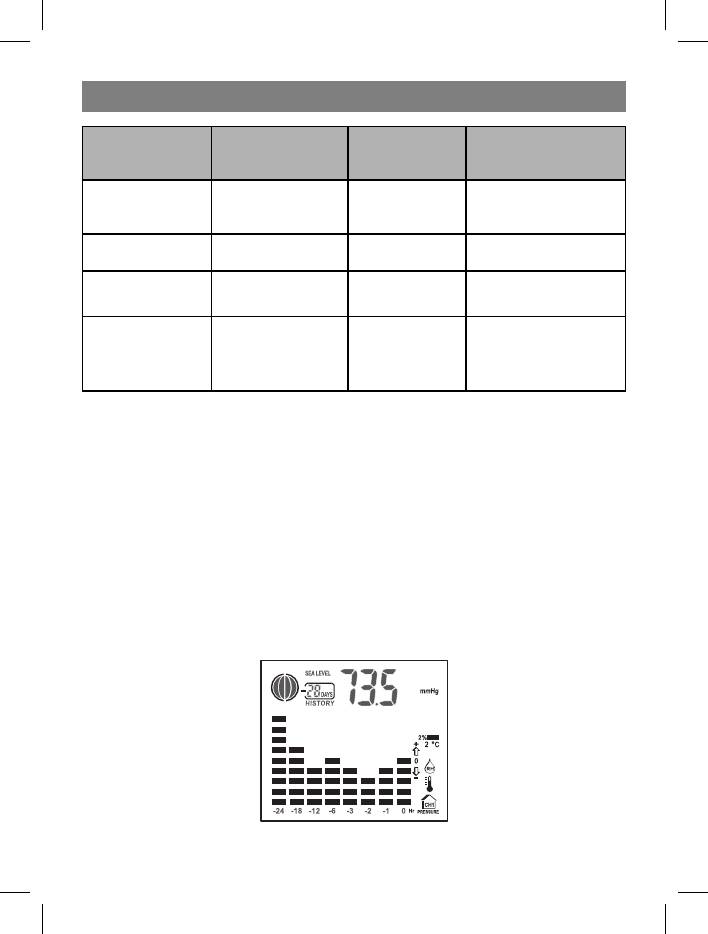
HOW TO CHECK THE BAROMETRIC PRESSURE
The current and historical barometric pressure is shown on the atmospheric pressure
window. For user staying at a higher altitude such as in the mountain area, see-level
barometric pressure applies. Use Pressure/ Altitude key to toggle the display to sea
level pressure display. Press and hold the Pressure/Altitude key to enter the sea level
pressure adjusting mode. Use the UP or DOWN key to enter sea level pressure and use
Pressure/Altitude to confirm. The atmospheric pressure can be displayed in mb/hPa
or inHg. To change the pressure unit, press and hold the Unit key at sea level pressure
display and use UP or Down key to select. Press the Unit key to confirm.
If you want to check the pressure history for a particular hour during the past 36 hours,
press the HISTORY button. Each press on the button will go back by an hour.
The recorded atmospheric changes for the past 24 hour are displayed in a bar chart
above the atmospheric pressure window.
8
3549.indd 849.indd 8 02.06.2006 16:59:3702.06.2006 16:59:37


