
Vitek VT-5009 SR: (C) TV Menu Function Operation BRIGHTNESS Setting: COLOUR Setting: CONTRAST Setting: SHARPNESS Setting: TINT Setting: LANGUAGE Setting: CALENDAR Setting: GAME Playing: Screen Mirror Function:
(C) TV Menu Function Operation BRIGHTNESS Setting: COLOUR Setting: CONTRAST Setting: SHARPNESS Setting: TINT Setting: LANGUAGE Setting: CALENDAR Setting: GAME Playing: Screen Mirror Function:: Vitek VT-5009 SR
Table of contents
- WARNINGS
- IMPORTANT SAFETY INSTRUCTIONS
- OPERATION BUTTONS AND PARTS 1. Main Unit (see page 2) 2. Remote Control (see page 3) POWER SUPPLY BASIC OPERA TION
- (C) TV Menu Function Operation BRIGHTNESS Setting: COLOUR Setting: CONTRAST Setting: SHARPNESS Setting: TINT Setting: LANGUAGE Setting: CALENDAR Setting: GAME Playing: Screen Mirror Function:
- Screen Up and Down Function: VIEW MODE Function: SCREEN BLUE BACK Setting SWAP Program Channel function: COPY Function: WEAK SIGNAL Function:
- (5) PRESET TV Program function: AUTO SEARCH Function: SEARCH Function (Manual Search): FINE TUNE Function: BAND Function: PROGRAM Function: SKIP Function: (6) CLOCK Set function SLEEP Function: TIME Function: OFF TIME Function:
- ON TIME Function: ALARM Function: B. TIME (BOOKING TIME) Function: B. PR. (BOOKING PROGRAM) Function: (D) FM Function Operation (1) PRESET FM Program of Radio Function: AUTO SEARCH Function: SEARCH Function: FINE TUNE Function:
- PROGRAM Function: STEREO Function: (2) SYSEM of FM Radio Mode Operation: (3) FUNCTION of FM Radio Mode Operation: (4) Clock Function Operation: (E) AV Mode Operation (F) Remote Control (G) Listen Audio with The Headphone (H) Charge Battery and Battery Operation Function:
- (I) Using Outdoor Antenna
- TROUBLE SHOOTING
- SPECIFICATIONS
ENGLISH
(C) TV Menu Function Operation
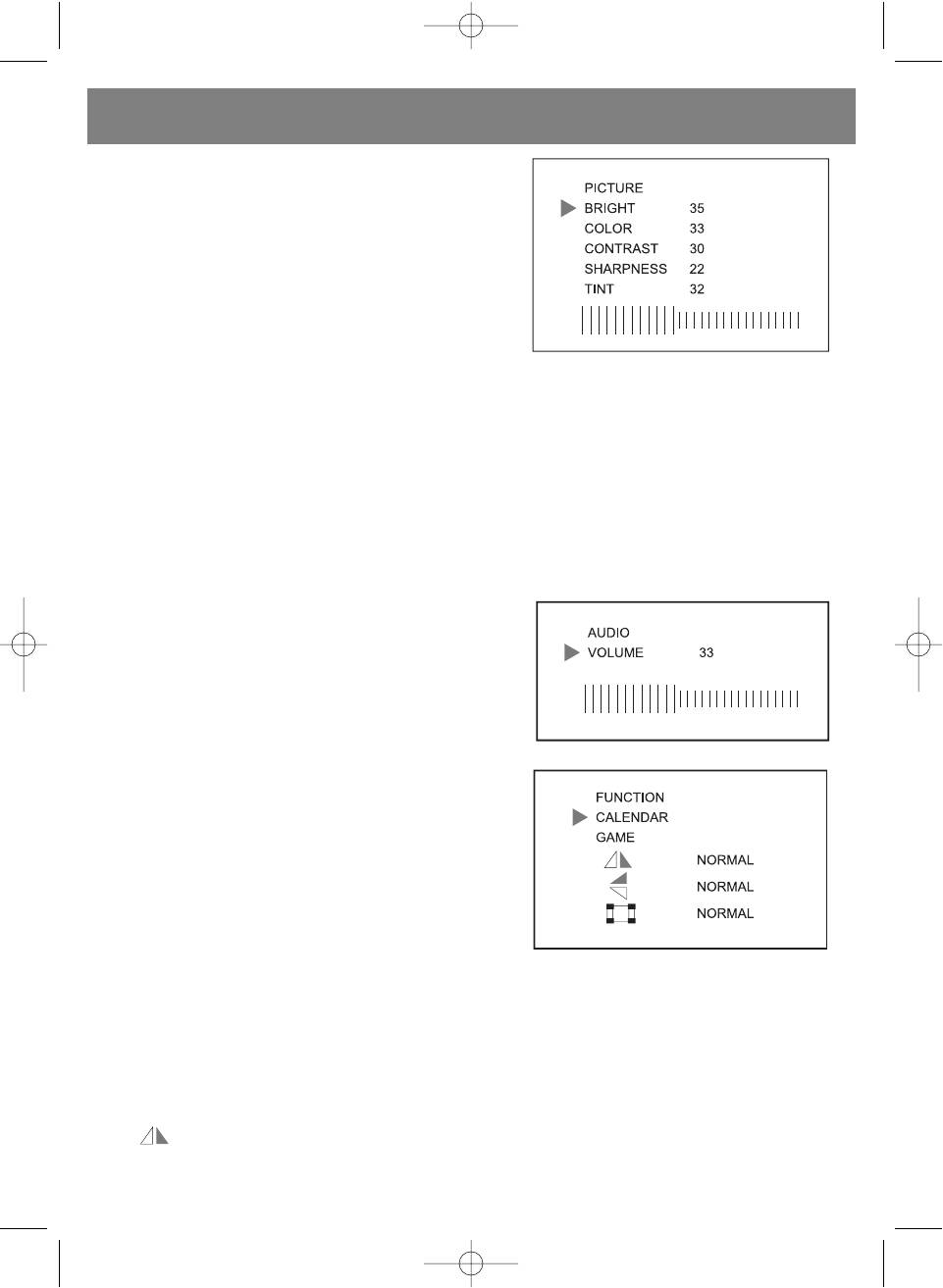
(1) Picture setting:
• Press the [MENU] button Picture setting menu will appear.
• Press the [CH+] or [CH] button to select setting.
• Press the [V+] or [V] button to adjust your desired setting level.
BRIGHTNESS Setting:
Press the [V+] or [V] button to adjust your desired brightness level
setting.
COLOUR Setting:
Press the [V+] or [V] button to adjust your desired colour level setting.
CONTRAST Setting:
Press the [V+] or [V] button to adjust your desired contrast level setting.
SHARPNESS Setting:
Press the [V+] or [V] button to adjust your desired sharpness level setting.
TINT Setting:
Press the [V+] or [V] button to adjust your desired tint level setting. (The TINT function is used in NTSC system only)
(2) Audio Level Setting
• Press the [MENU] second times then Audio setting menu will be
shown on the screen. Press or on hold the [V+] or [V] button to
set your desired volume level.
• The volume can also be set with the remote control by pressing
[V+] or [V] button on the remote.
(3) Function Setting
• Press the [MENU] button three times then the Function setting
menu will be shown on the screen.
• Press the [CH+] or [CH] button to select your desired function
setting position.
• Press the [V+] or [V] button to change your desired setting
function shown on the screen:
LANGUAGE Setting:
Press the [V+] or [V] button to your desired language setting.
CALENDAR Setting:
Press the [V+] or [V] button to display your desired year, month and date of calendar.
GAME Playing:
• The Russia Square game is installed in the unit.
• To play game, press the [V+] button to move box right side, press the [V] button to move box left side, press the [CH+] to
change box direction up and down, press the [CH] button to accelerate box movement.
Screen Mirror Function:
• The position is selected on screen, press the [V+] or [V] button to change picture display left to right side and
pressed the button back to normal mode.
7
5009.qxd 29.06.05 14:56 Page 7


