
Vitek VT-5009 SR: (5) PRESET TV Program function: AUTO SEARCH Function: SEARCH Function (Manual Search): FINE TUNE Function: BAND Function: PROGRAM Function: SKIP Function: (6) CLOCK Set function SLEEP Function: TIME Function: OFF TIME Function:
(5) PRESET TV Program function: AUTO SEARCH Function: SEARCH Function (Manual Search): FINE TUNE Function: BAND Function: PROGRAM Function: SKIP Function: (6) CLOCK Set function SLEEP Function: TIME Function: OFF TIME Function:: Vitek VT-5009 SR
Table of contents
- WARNINGS
- IMPORTANT SAFETY INSTRUCTIONS
- OPERATION BUTTONS AND PARTS 1. Main Unit (see page 2) 2. Remote Control (see page 3) POWER SUPPLY BASIC OPERA TION
- (C) TV Menu Function Operation BRIGHTNESS Setting: COLOUR Setting: CONTRAST Setting: SHARPNESS Setting: TINT Setting: LANGUAGE Setting: CALENDAR Setting: GAME Playing: Screen Mirror Function:
- Screen Up and Down Function: VIEW MODE Function: SCREEN BLUE BACK Setting SWAP Program Channel function: COPY Function: WEAK SIGNAL Function:
- (5) PRESET TV Program function: AUTO SEARCH Function: SEARCH Function (Manual Search): FINE TUNE Function: BAND Function: PROGRAM Function: SKIP Function: (6) CLOCK Set function SLEEP Function: TIME Function: OFF TIME Function:
- ON TIME Function: ALARM Function: B. TIME (BOOKING TIME) Function: B. PR. (BOOKING PROGRAM) Function: (D) FM Function Operation (1) PRESET FM Program of Radio Function: AUTO SEARCH Function: SEARCH Function: FINE TUNE Function:
- PROGRAM Function: STEREO Function: (2) SYSEM of FM Radio Mode Operation: (3) FUNCTION of FM Radio Mode Operation: (4) Clock Function Operation: (E) AV Mode Operation (F) Remote Control (G) Listen Audio with The Headphone (H) Charge Battery and Battery Operation Function:
- (I) Using Outdoor Antenna
- TROUBLE SHOOTING
- SPECIFICATIONS
ENGLISH
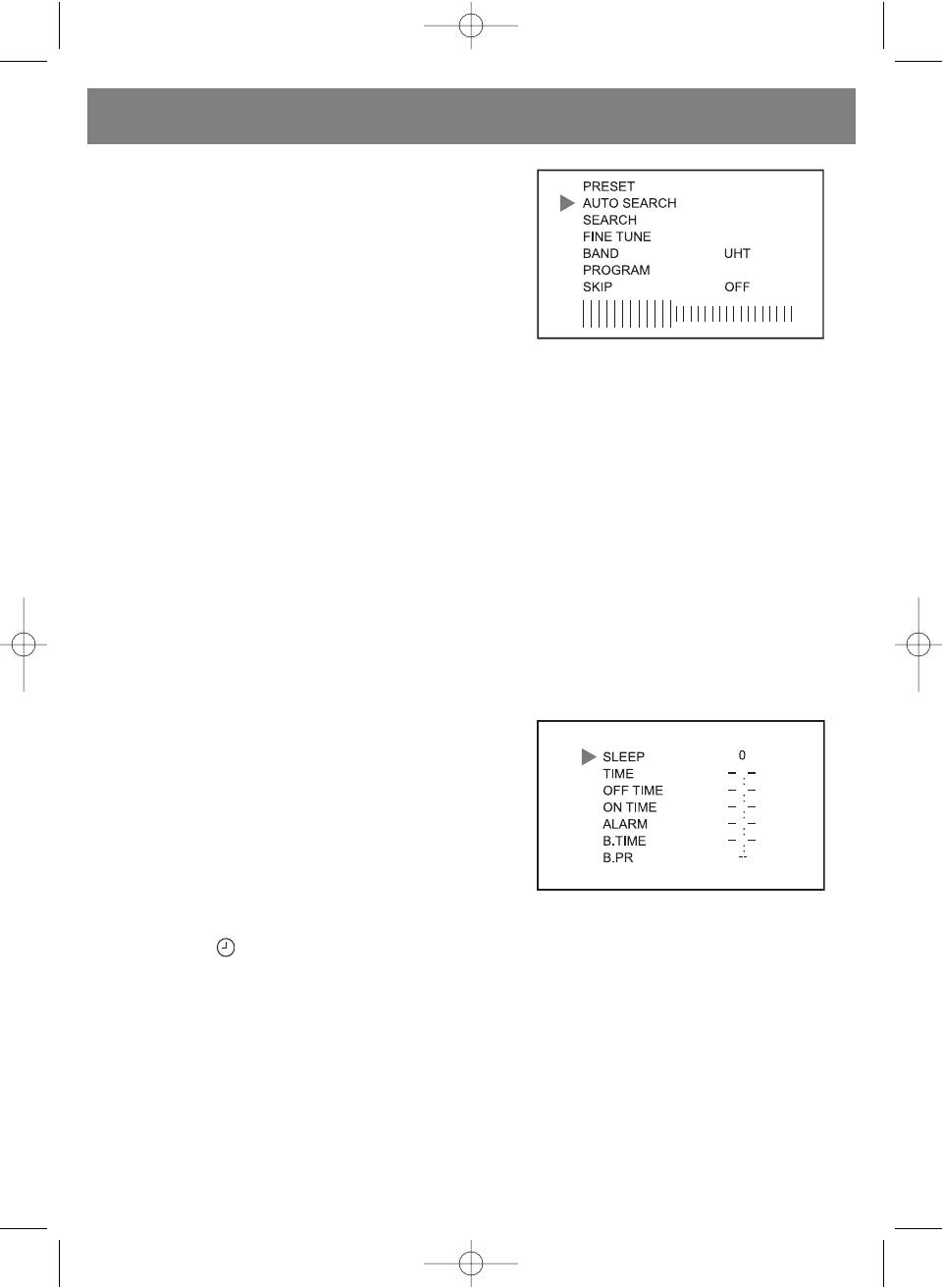
(5) PRESET TV Program function:
• Press the [MENU] button five times continuously then the preset
program setting menu will be shown on the screen.
• Press the [CH+] or [CH] to select your desired function. Then
pressed the [V+] or [V] button to set the item function as fol
lowing:
AUTO SEARCH Function:
AUTO SEARCH position is selected on screen, press [V+] or [V] to
search program with auto search processing. It will search all cur
rent TV program and store them automatically.
SEARCH Function (Manual Search):
SEARCH position is selected on screen, press the [V+] or [V] to search program and store it.
FINE TUNE Function:
The FINE TUNE position is selected on screen, press the [V+] or [V] button to adjust best receiving the program.
BAND Function:
The BAND position is selected on screen, press the [V+] or [V] button to your desired setting band for VHFL, VHFH or UHF
band.
PROGRAM Function:
The PROGRAM position is selected on screen, press the [V+] or [V] button to set up or down the program channel and select
your desired program memory from 0 to 255.
SKIP Function:
The SKIP position is selected on screen, press the [V+] or [V] button to set "ON" and the current program channel memory
will be deleted automatically.
(6) CLOCK Set function
Press the [MENU] button six times continuously then the Clock setting
menu will be shown on the screen.
Press the [CH+] or [CH] button to select your desired function.
Then press the [V+] or [V] button to set the item function.
NOTE: The all time setting will be canceled if the unit lose power supply.
SLEEP Function:
SLEEP position is selected on screen, press the [V+] or [V] button
once the sleep time will be counting up or down 10 minutes and the maximum sleep setting timer for 240 minutes.
Further, by pressing button of the remote handset to count up the sleep timer directly.
NOTE: When power off sleep timer setting would be reset.
TIME Function:
• TIME position is selected on screen, press the [V+] button to tune up the minute and pressed the [V] button to tune up
the hour to set real clock.
• In normal mode. When pressed the [V+] or [V] button clock will be display on the screen for 10 seconds automatically.
OFF TIME Function:
• OFF TIME position is selected on screen, press the [V+] button to tune up the minute and press the [V] button to tune up
the hour to set the off time.
• Then the unit will be counting down until the setting count to zero and the unit will be turned off automatically.
9
5009.qxd 29.06.05 14:56 Page 9


