
Vitek VT-4029 SR: SYSTEM BLOCK (FRONT VIEW) VENTILATION TURNING ON THE SYSTEM SPEAKER PLACEMENT REMOTE CONTROL UNIT
SYSTEM BLOCK (FRONT VIEW) VENTILATION TURNING ON THE SYSTEM SPEAKER PLACEMENT REMOTE CONTROL UNIT: Vitek VT-4029 SR
Table of contents
- SYSTEM BLOCK (FRONT VIEW) VENTILATION TURNING ON THE SYSTEM SPEAKER PLACEMENT REMOTE CONTROL UNIT
- CONNECTING THE SPEAKERS POWER CONNECTING TO A SOURCE SIGNAL
- OPERATING THE DEVICE MUTE FEATURE EQUALIZER PRESETS OPERATIONAL SAFETY SOUND EFFECTS: VOLUME LEVEL
- TECHNICAL CHARACTERISTICS
ENGLISH
SOUND ACOUSTICAL SYSTEM VT-4029
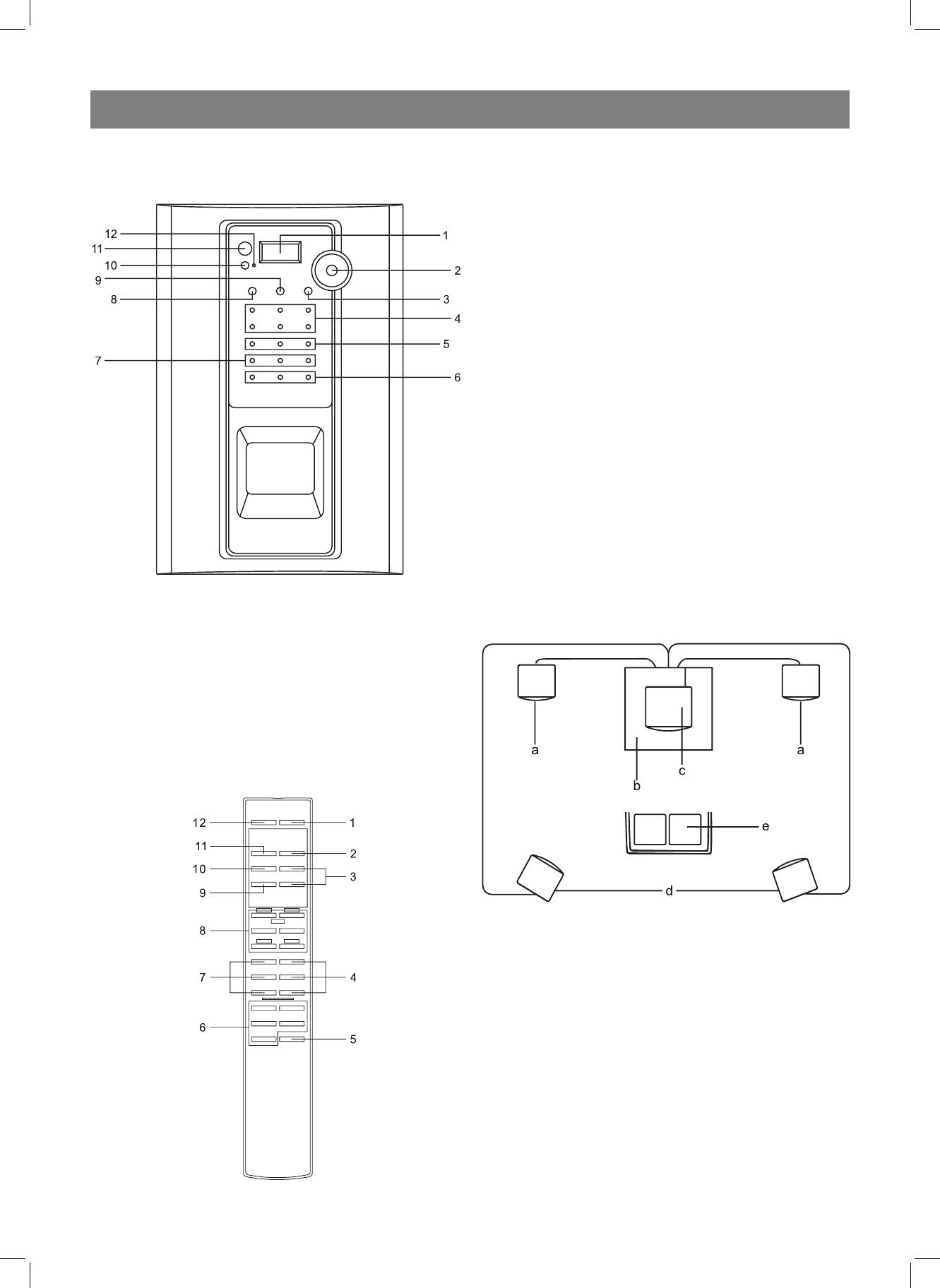
1. STANDBY button
2. INPUT button
3. VOLUME UP/DOWN button
SYSTEM BLOCK (FRONT VIEW)
4. SURROUND MODE button (PROLOGIC, 3 STEREO, STEREO)
5. TEST TONE button
6. PRESET EQUALIZER button (FLAT, CLASSIC, ROCK, POP, JAZZ)
7. CENTER MODE button (PHANTOM, NORMAL, WIDE)
8. SPEAKER SETUP button (FRONT L, CENTER, FRONT R, REAR L,
SUBWOOFER, REAR R)
9. SURROUND DELAY button
10. CENTER DELAY button
11. EFFECT button (MOVIE, CLASSICAL, PANORAMA)
12. MUTE button
The remote control unit operates on two “AA” or “R6” batteries.
VENTILATION
The device should be well ventilated in order to avoid overheating.
Do not enclose the device’s housing and do not install it in places with lim-
ited ventilation. Make sure that there is enough free space on both sides
of the device and that there is at least 20 cm of free space above.
TURNING ON THE SYSTEM
Switch the POWER ON/OFF (11) button to the “ON” position; the device
will enter standby mode. Press the STANDBY (10) standby button to turn
on the system.
SPEAKER PLACEMENT
This acoustical system has six sound channels. The subwoofer is located
in the device itself.
Place the speakers as illustrated below.
a. Front speakers
b. Main unit with subwoofer
1. Display
c. Center speaker
2. Volume regulator knob
d. Rear speakers
3. SPEAKER SETUP button
e. Location of viewer/listener
4. Speaker indicators (FRONT L, CENTER, FRONT R, REAR L,
SUBWOOFER, REAR R)
5. SURROUND MODE indicators (MOVIE, CLASSIC, PANORAMA)
6. CENTER MODE indicators (PHANTOM, NORMAL, WIDE)
7. SURROUND MODE indicators (PROLOGIC, 3 STEREO, STEREO)
8. TEST TONE button
9. INPUT button
10. STANDBY button
11. POWER ON/OFF button
12. STANDBY indicator
REMOTE CONTROL UNIT
Place the center speaker between the two front speakers. The center
speaker can be placed on the television, as it is equipped with a protec-
tive magnetic shielding.
The rear speakers do not have magnetic field shielding.
Do not place them near a television or computer display, as this can dam-
age the image projection.
Do not place cassette tapes on the speakers.
If you place the main unit too close to your television, it may cause image
distortion.
All connections should be made with the main power off.
3
4029.indd 34029.indd 3 07.04.2006 15:53:2907.04.2006 15:53:29


