
Vitek VT-4029 SR: CONNECTING THE SPEAKERS POWER CONNECTING TO A SOURCE SIGNAL
CONNECTING THE SPEAKERS POWER CONNECTING TO A SOURCE SIGNAL: Vitek VT-4029 SR
Table of contents
- SYSTEM BLOCK (FRONT VIEW) VENTILATION TURNING ON THE SYSTEM SPEAKER PLACEMENT REMOTE CONTROL UNIT
- CONNECTING THE SPEAKERS POWER CONNECTING TO A SOURCE SIGNAL
- OPERATING THE DEVICE MUTE FEATURE EQUALIZER PRESETS OPERATIONAL SAFETY SOUND EFFECTS: VOLUME LEVEL
- TECHNICAL CHARACTERISTICS
ENGLISH
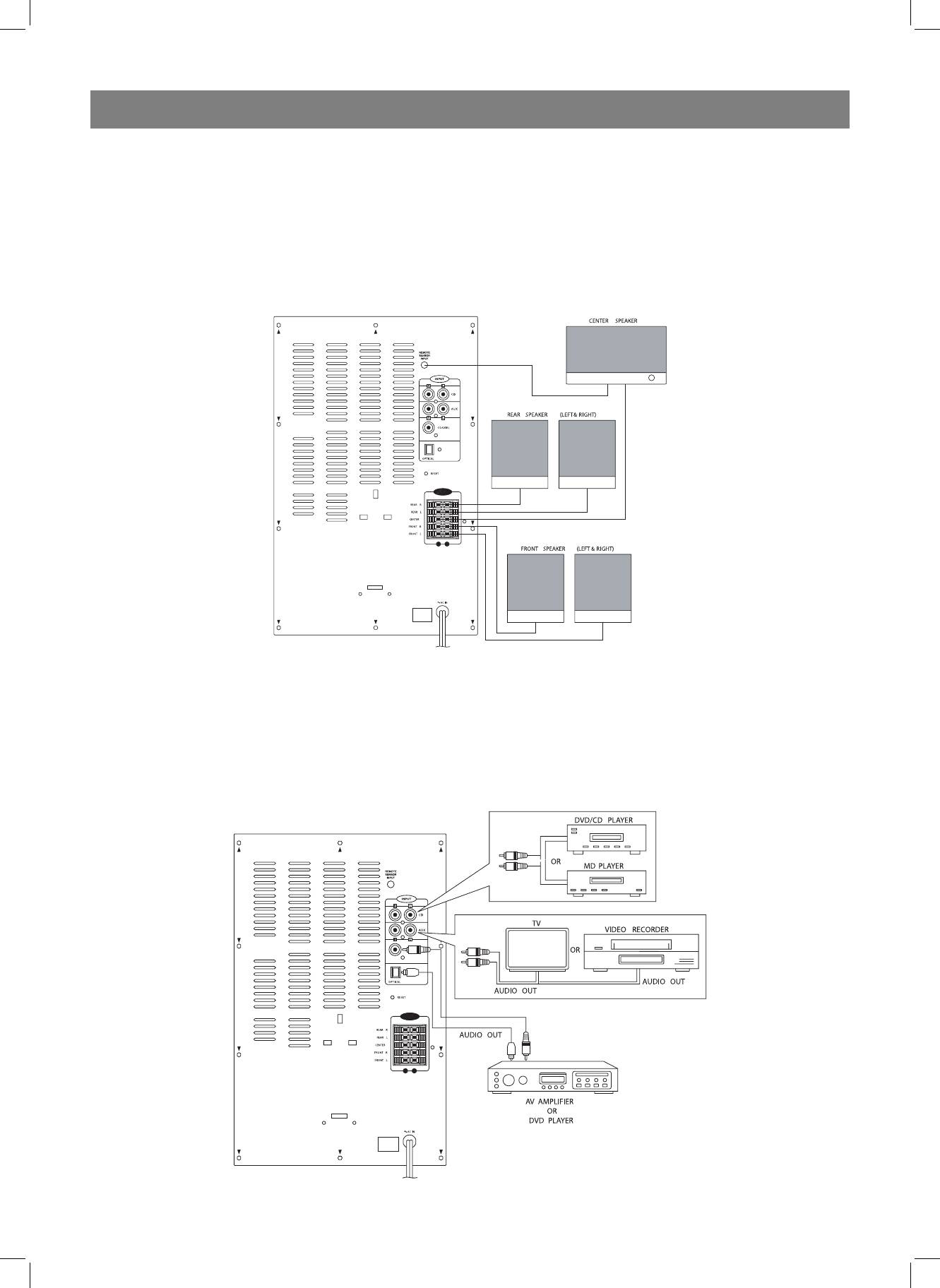
CONNECTING THE SPEAKERS
POWER
Connect the speaker cables to the corresponding jacks on the rear panel
1. Insert the power plug into an electrical outlet.
of the amplifier, according to the indicated color code and polarity. Press
2. Switch the POWER ON/OFF (11) button to the “ON” position. The red
down on the corresponding clamp. Without releasing the clamp, insert
STANDBY (12) indicator will light on the front panel of the device.
the end of the corresponding wire into the terminal (round hole), and then
3. Press the STANDBY (12) button on the main unit or (1) on the remote
release the clamp. The wire is now firmly attached. Connect the center
control unit to turn on the system. The display on the front panel of the
speaker remote control transceiver cable to the transceiver input jack lo-
device will show the volume level.
cated on the rear panel of the device.
4. In order to completely turn the system off, switch the POWER ON/OFF
All connections should be made with the main power off.
button (11) to the OFF position.
CONNECTING TO A SOURCE SIGNAL
In order to playback 5.1 channel sound, use RCA cables or a digital cable
to connect the audio output you’re your DVD player to the corresponding
audio input on the system.
Use an RCA cable to connect the audio output from a DVD or CD player to
the corresponding left (white) and right (red) CD (AUX 1) or AUX 2 input.
4
4029.indd 44029.indd 4 07.04.2006 15:53:2907.04.2006 15:53:29


