
Vitek VT-3625: STEREO/MONO (2) LOCAL/DX (2)
STEREO/MONO (2) LOCAL/DX (2): Vitek VT-3625
Table of contents
ENGLISH
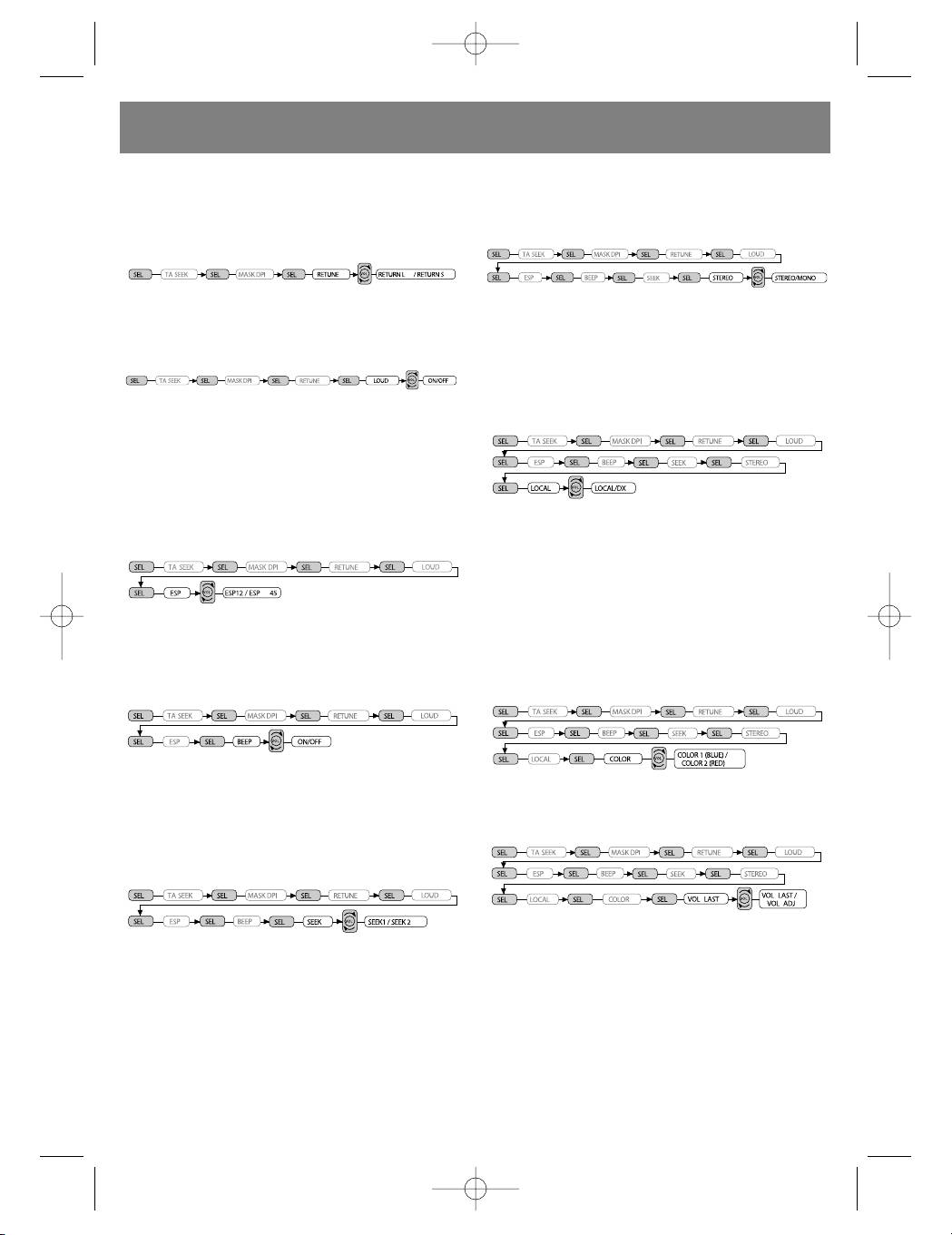
seconds, the retune mode activates.
STEREO/MONO (2)
RETUNE L: Sets the TA search mode delay to
Upon pressing the SEL button for more than 2
90 seconds.
seconds, the sound settings (stereo or mono)
RETUNE S: Set the TA search mode delay to 30
mode is activated.
seconds.
Controlling the frequency raising function (2)
When an FM stations signal strength is weak
Upon pressing the SEL button for more than 2
and contains a lot of static, you can increase
seconds, the settings mode for this function
reception quality by switching to mono mode.
activates.
LOCAL/DX (2)
Upon pressing the SEL button for more than 2
seconds, the local or distant radio station set-
The LOUD ON/OFF mode is chosen by rotating
tings mode is activated.
the VOL knob. The bass and treble characteris-
tics will be amplified.
ESP mode (2)
Upon pressing the SEL button for more than 2
seconds, the settings mode for the electronic
shock protection function (ESP) will activate: 12
Using the Local setting in areas with strong
seconds or 45 seconds.
signals allows the radio to only stop on stations
with strong signals during manual tuning (the
LOC symbol appears on the display). Activate
the Distant setting in areas with weak radio
signals in order to hear all the available stations.
BEEP mode (2)
Front panel backlight (2)
Upon pressing the SEL button for more than 2
Upon pressing the SEL button for more than 2
seconds, the sound accompaniment mode is
seconds, you can choose between blue or red
activated.
backlights.
BEEP ON: Each button press will be accompa-
nied by an audible beep.
Last volume level /settings (2)
Upon pressing the SEL button for more than 2
SEEK mode (2)
seconds, the volume setting mode is activated.
Upon pressing the SEL button for more than 2
seconds, you can change the settings of the
automatic SEEK mode.
VOL LAST: When turning on the radio, the vol-
SEEK 1: When the SEEK 1 option is selected,
ume will remain at the same level as when last
the automatic scanning of frequencies stops
used.
when a station is found, even if the user is still
VOL ADJ: The volume will be adjusted to a
holding down the SEEK button.
starting level (the user can adjust the volume
SEEK 2: The automatic scanning of frequencies
later) each time the unit is turned on.
does not stop when a station is found if the user
is till holding down the SEEK button. Upon
4. Station presets (1,2,3,4,5,6)
releasing the SEEK button, the automatic fre-
(A) Radio mode:
quency search will stop when the next station is
When pressed momentarily, these buttons tune
found.
the radio directly to the preset station. When
6
3625_4l.qxd 29.03.05 16:39 Page 6


