
Vitek VT-5010 SR: REMOTE CONTROL UNIT
REMOTE CONTROL UNIT: Vitek VT-5010 SR
Table of contents
ENGLISH
REMOTE CONTROL UNIT
Note
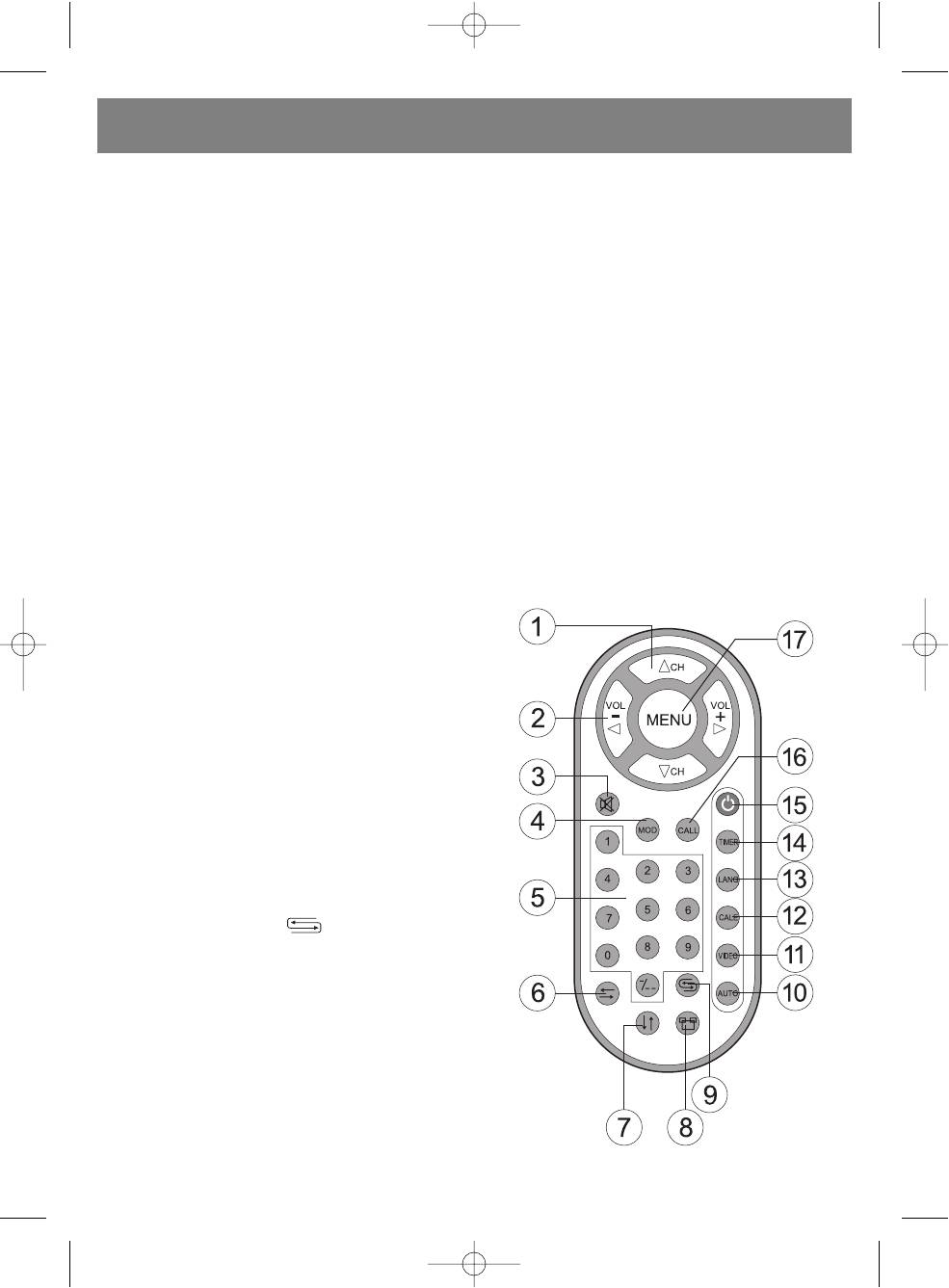
13. Menu language selection button (LANG)
1. When using the remote control unit aim it at the remote
Press the LANG button to choose the menu language:
control sensor on the TV body
English, Italian, Spanish, Portugal, German, Arabic,
2. Do not expose the remote control unit to water, moisture,
Chinese or Russian.
shock or falls.
14. Power off timer button (TIMER)
3. When using the remote control unit, the interval between
Press the timer button repeatedly until the desired
button pushes should be less than two seconds.
amount of minutes until power off is displayed on the
screen; after the timer gets to zero, the television will
1. Channel search buttons (CH)
automatically shut off. The maximum number of minutes
To change to a higher number channel, press the
is 120.
CH
#
button.
15. Power on/off button (POWER)
To change to a lower number channel, press the
Use the POWER button to turn the television on/off.
CH
$
button.
16. Button for displaying the current channel number
2. Volume adjustment buttons (VOL)
(CALL)
To increase the volume, press VOL+
#
.
To reveal the channel number on the screen, press the
To decrease the volume, press VOL
$
.
CALL button.
3. MUTE button
17. MENU button
If you want to turn off the sound, press this button.
Press the menu button to choose one of the various
Press the button again to restore the sound.
menus: Picture, Option, Clock, System, Preset.
4. Image MODE button
Press the MODE button repeatedly to choose the desired
image mode: standard, soft, bright, light.
5. Numerical buttons
Using these buttons you can choose from 255 channels
(from 0 to 254). If the channel number consists of one
digit, then use the 09 buttons. If the channel number
consists of two digits, then first press the / buttons
until the "" symbol appears on the screen, after which
use the 09 buttons to enter the desired channel number.
If the channel number consists of three digits, then press
the / button twice the "" symbol should appear on
the display, after which you can use the 09 buttons to
enter the channel number.
6. Flip display in horizontal direction
7. Flip display in vertical direction
8. Image format button
16:9 standard;
16:9 enlarged;
4:3 standard.
9. Previous channel button
Press this button to return to the previous channel.
10. AUTOsearch button
Press and hold the AUTO button for several seconds and
automatic channel searching will begin.
11. VIDEO mode button
To choose Video or TV, press the VIDEO.
12. Calendar button (CALE)
Press the CALE button. Use the CH
#
/CH
$
and
VOL+
#
/VOL
$
buttons to set the current year and
month.
5
5010.qxd 14.06.05 10:24 Page 5


