
Vitek VT-3545 W: Selecting Temperature/Alarm 1/Alarm 2/Dual time Display Selecting Temperature/Alarm 1/Alarm 2/ Dual time Display
Selecting Temperature/Alarm 1/Alarm 2/Dual time Display Selecting Temperature/Alarm 1/Alarm 2/ Dual time Display: Vitek VT-3545 W
Table of contents
- MULTI-FUNCTION ALARM CLOCK
- Selecting Temperature/Alarm 1/Alarm 2/Dual time Display Selecting Temperature/Alarm 1/Alarm 2/ Dual time Display
- Manual Time Setting Setting the Time Select 12 hour or 24 hour display format Calendar
- Setting the Alarm time ALARM 1 setting ALARM 2 setting Enable Alarm 1/Alarm 2:
- Deactivating the Alarm Foreign Time Display & setting Setting the Dual Time Light ON / OFF , LED Backlight ON / OFF Projection Light and its adjustment
- Temperature function Specifications Precautions
ENGLISH
INDICATOR STANDING FOR INDICATOR STANDING FOR
REPEAT ALARM
DATE
INDICATION
FOREIGN TIME INDICATION MONTH
SUMMER TIME
PM (12 HR Display ONLY)
INDICATION
AM (12 HR DISPLAY ONLY) DEGREE CELSIUS
ALARM 1 DEGREE FAHRENHEIT
ALARM 2 DUAL TIME
= After the batteries are installed, the LCD will turn on and beep for 2 seconds. The
clock will automatically search the radio signal. It takes about 3-5 minutes to finish
this process.
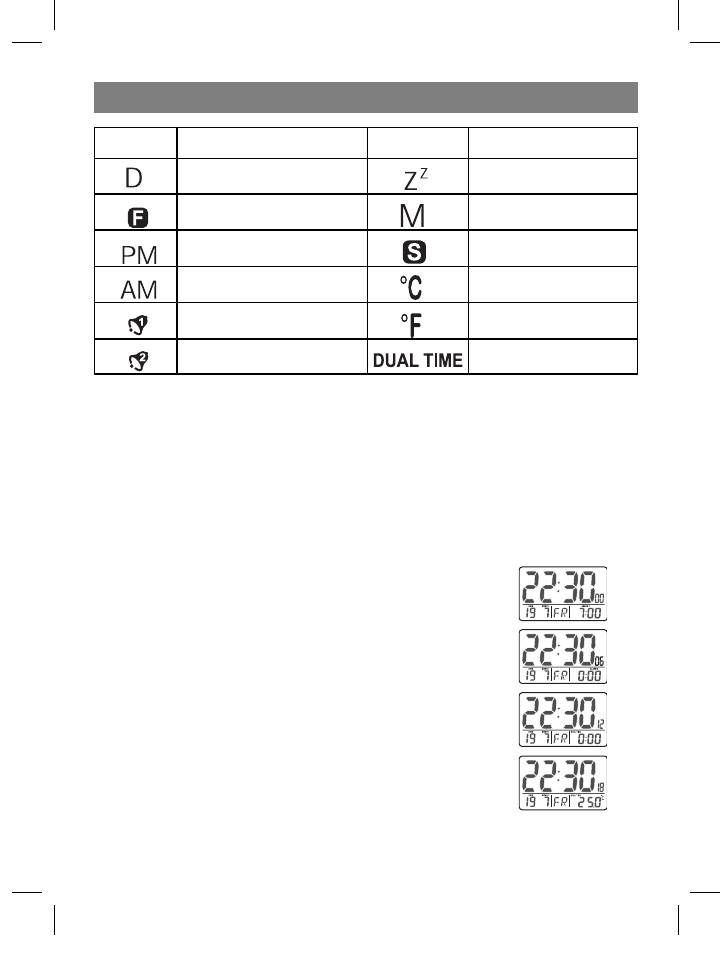
Selecting Temperature/Alarm 1/Alarm 2/Dual time Display
= Press MODE will display the ALARM1 time:
Selecting Temperature/Alarm 1/Alarm 2/
Dual time Display
= Press MODE will display the ALARM 1 time:
= Press MODE again will display the Alarm 2 time:
= Press MODE again will display the Dual Time:
= Press MODE again will display the Temperature:
5
3545IM.indd 5 26.05.2006 12:09:26


