
Vitek VT-3545 W: Manual Time Setting Setting the Time Select 12 hour or 24 hour display format Calendar
Manual Time Setting Setting the Time Select 12 hour or 24 hour display format Calendar: Vitek VT-3545 W
Table of contents
- MULTI-FUNCTION ALARM CLOCK
- Selecting Temperature/Alarm 1/Alarm 2/Dual time Display Selecting Temperature/Alarm 1/Alarm 2/ Dual time Display
- Manual Time Setting Setting the Time Select 12 hour or 24 hour display format Calendar
- Setting the Alarm time ALARM 1 setting ALARM 2 setting Enable Alarm 1/Alarm 2:
- Deactivating the Alarm Foreign Time Display & setting Setting the Dual Time Light ON / OFF , LED Backlight ON / OFF Projection Light and its adjustment
- Temperature function Specifications Precautions
ENGLISH
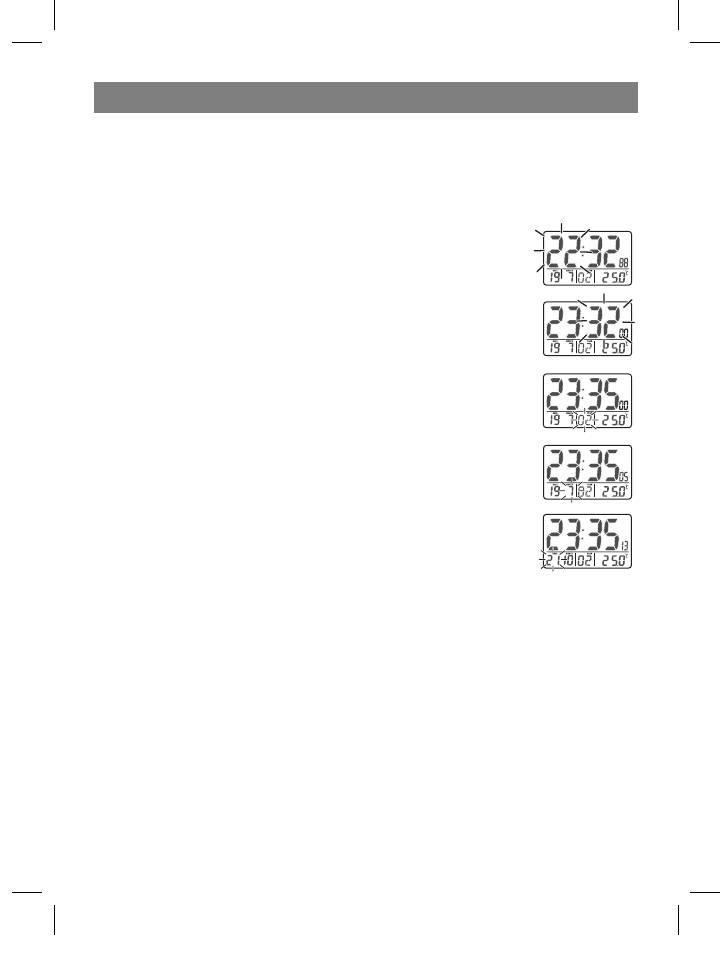
Manual Time Setting
The system date and time can be set by pressing MODE for 3 seconds in Time/
Temperature display.
Setting the Time
= Press MODE: the hour digits are blinking and can be set by
pressing UP or DOWN key.
= Press MODE again: the minute digits are blinking and can be set
by pressing UP or DOWN key.
= Press MODE again: the year digits are blinking and can be set by
pressing UP or DOWN key.
= Press MODE again: the month digits are blinking and can be set
by pressing UP or DOWN key._
= Press MODE again: the date digits is blinking and can be set by
pressing UP or DOWN key.
= Press MODE one last time: the normal time display appears.
Select 12 hour or 24 hour display format
= Press “+” will toggle the display format between 12 hour and 24 hour.
N.B.:
1. If no key is pressed within 30 seconds, it will exit the Manual Time Setting Mode
and go back to Time / Temperature Display without the data update.
2. During any setting mode, press and hold UP or DOWN key for 2 seconds for fast
setting.
Calendar
To change the weekday display from one language to another language, press DOWN
key for 3 seconds - the display will show the current language (GER for German
display, ENG for English display).
6
3545IM.indd 6 26.05.2006 12:09:26


