
Vitek VT-3624: ANTI-SHOCK PROTECTION (ESP) (2) CHOOSING LOCAL/DISTANT RADIO STATIONS AUDIBLE SIGNAL (BEEP) (2) SETTING THE VOLUME LEVEL (VOL SEEK (2) 4. STATION PRESETS (1,2,3,4,5,6) STEREO/MONO (2)
ANTI-SHOCK PROTECTION (ESP) (2) CHOOSING LOCAL/DISTANT RADIO STATIONS AUDIBLE SIGNAL (BEEP) (2) SETTING THE VOLUME LEVEL (VOL SEEK (2) 4. STATION PRESETS (1,2,3,4,5,6) STEREO/MONO (2): Vitek VT-3624
Table of contents
- OPERATING CONTROLS (FIG. A) MAINTENANCE INSTALLING THE UNIT IN YOUR AUTOMOBILE SAFETY MEASURES INSTALLING THE UNIT IN YOUR AUTOMOBILE
- REMOVING THE FRONT PANEL MASKING OF ALTERNATIVE FREQUENCIES RETUNING STATIONS (L / S) (2) 1. POWER ON/OFF 2,3. MENU SETTINGS BUTTONS: BASS/TRE- AUDIO PROCESSOR (AUDIO DSP) (2) TRAFFIC ANNOUNCEMENTS (TA SEEK /TA ALARM) (2) TONE COMPENSATION (LOUDNESS) (2)
- ANTI-SHOCK PROTECTION (ESP) (2) CHOOSING LOCAL/DISTANT RADIO STATIONS AUDIBLE SIGNAL (BEEP) (2) SETTING THE VOLUME LEVEL (VOL SEEK (2) 4. STATION PRESETS (1,2,3,4,5,6) STEREO/MONO (2)
- (B) CD/MP3 PLAYBACK MODE: USING THE RDS FUNCTION
- TECHNICAL CHARACTERISTICS
- RADIO (AM) GENERAL
ENGLISH
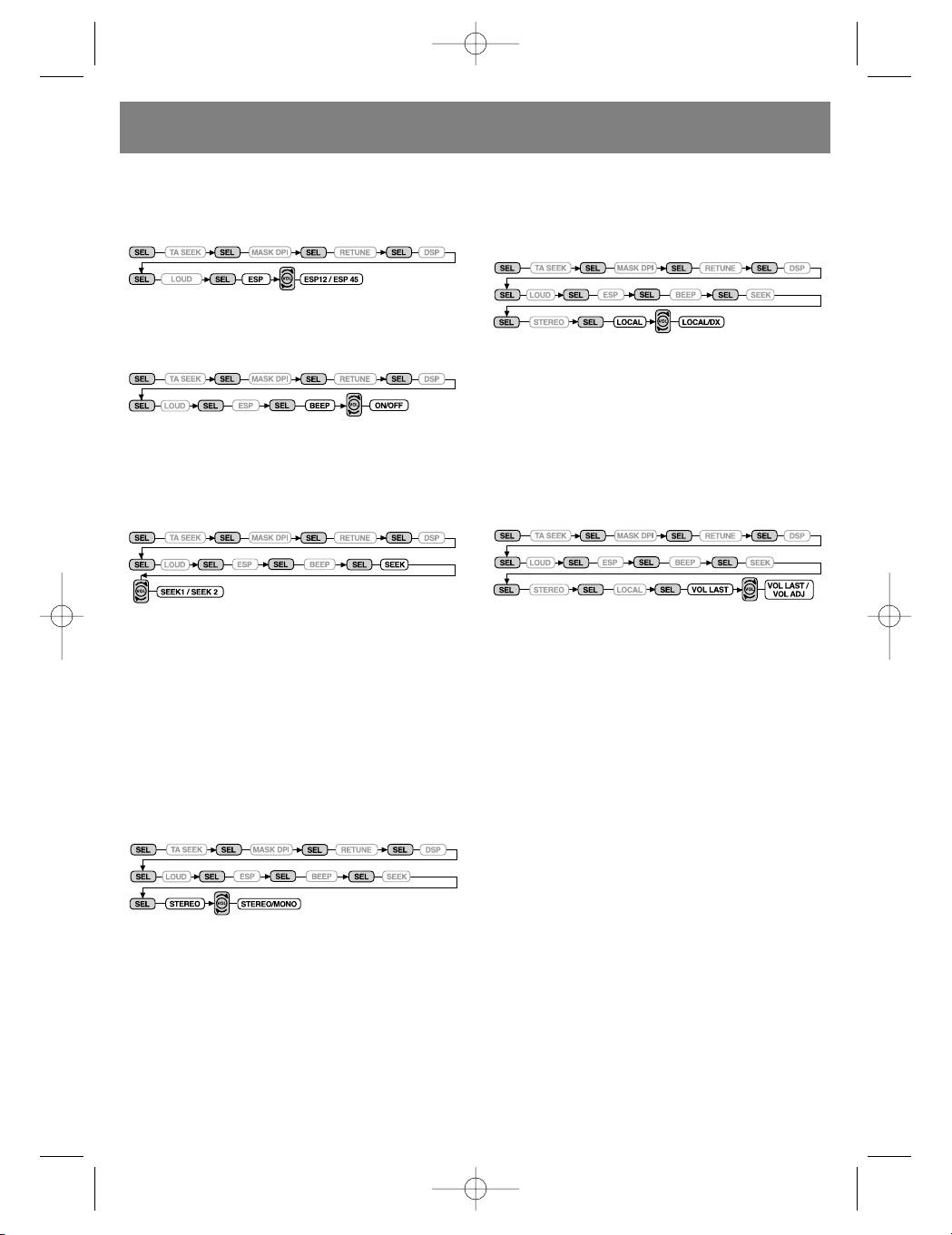
ANTI-SHOCK PROTECTION (ESP) (2)
CHOOSING LOCAL/DISTANT RADIO STATIONS
Pressing the SEL button for more than 2 sec-
(LOCAL/DX) (2)
onds activates the electronic shock protection
Pressing the SEL button for more than 2 sec-
mode (ESP): 12 seconds or 45 seconds.
onds sets the local or distant radio stations
search mode.
AUDIBLE SIGNAL (BEEP) (2)
Pressing the SEL button for more than 2 sec-
onds activates the audible sound accompani-
ment for each button-press.
Using the Local mode in areas with reliable
signal reception allow the radio to only stop on
stations with strong signals during manual tun-
ing (the LOC symbol will appear on the display).
Use the Distant mode in areas with weak radio
BEEP ON: An audible beep is heard each time a
signals in order so hear all the available stations.
control button is pressed.
SETTING THE VOLUME LEVEL (VOL
SEEK (2)
LAST/ADJUST) (2)
Pressing the SEL button for more than 2 sec-
Pressing the SEL button for 2 seconds activates
onds activates the automatic search mode.
the default volume-setting mode.
SEEK 1: When the SEEK 1 mode is chosen,
VOL LAST: Automatically sets the volume that
automatic scanning stops when a station is
the user last used.
found, even if the user is still holding down the
VOL ADJ: The deck automatically chooses the
SEEK button.
starting volume level (the user can adjust later)
SEEK 2: Automatic scanning does not stop if a
whenever the power is turned on or off.
station if found, but the user is holding down the
SEEK button. When the SEEK button is released,
4. STATION PRESETS (1,2,3,4,5,6)
the search will stop after the next station is
(A) RADIO MODE:
found.
When pressed momentarily, these buttons
choose the radio station saved in the correspon-
ding buttons memory. If the button is pressed
STEREO/MONO (2)
for more than 1 second, the current station will
Pressing the SEL button for more than 2 sec-
be saved into that buttons memory.
onds activates the sound type selection mode
The device includes the PTY function, which is
(stereo or mono).
set in the following manner:
PROGRAM TYPE music -- PROGRAM TYPE
speech -- off
Music
1. POP music, ROCK
2. LIGHT MUSIC
3. CLASSICAL, OTHER
When the FM station signal is week or there is a
4. JAZZ, COUNTRY
lot of static, signal reception can be increased
5. ETHNIC/OLD
by choosing the Mono mode.
6. FOLKLORE
Speech
1. NEWS, HAPPENINGS, INFORMATION
2. SPORT, EDUCATION, ARTISTIC PROGRAMS
3. CULTURE, SCIENCE, VARIOUS
4. WEATHER, FINANCES, CHILDREN
5. SOCIETY, RELIGION, CALL-IN RADIO PRO-
GRAMS
6. TOURISM, LEISURE, DOCUMENTARIES
6
3624_4l.qxd 29.03.05 16:25 Page 6


