
Vitek VT-3542 SR: HOW TO CHECK REMOTE AND INDOOR TEMPERATURES HOW TO READ THE KINETIC WAVE DISPLAY MAXIMUM AND MINIMUM TEMPERATURES TEMPERATURE TREND
HOW TO CHECK REMOTE AND INDOOR TEMPERATURES HOW TO READ THE KINETIC WAVE DISPLAY MAXIMUM AND MINIMUM TEMPERATURES TEMPERATURE TREND: Vitek VT-3542 SR
Table of contents
- A. FOURLINE DISPLAY
- MAIN FEATURES: REMOTE UNIT
- BEFORE YOU BEGIN BATTERY INSTALLATION: REMOTE UNIT BATTERY INSTALLATION: MAIN UNIT LOW BATTERY WARNING HOW TO USE THE TABLE STAND OR WALL MOUNTING GETTING STARTED
- HOW TO CHECK REMOTE AND INDOOR TEMPERATURES HOW TO READ THE KINETIC WAVE DISPLAY MAXIMUM AND MINIMUM TEMPERATURES TEMPERATURE TREND
- WEATHER FORECAST ATMOSPHERIC PRESSURE DISCONNECTED SIGNALS
- TRANSMISSION COLLISION CALENDAR CLOCK DISPLAY MODES HOW TO SET THE CLOCK HOW TO SET AND ARM THE ALARM SNOOZE FEATURE
- HOW TO STOP AN ALARM ALARM FEATURE PRECAUTIONS
- SPECIFICATIONS
- FAULTS AND TROUBLESHOOTING
ENGLISH
HOW TO CHECK REMOTE AND INDOOR TEMPERATURES
The wave display on the outdoors temperature indicates the reception of the remote unit is in
good order. If no readings are received from the remote unit for more than two minutes, blanks
“ ” will be displayed until further readings are successfully searched. Check the remote
unit is sound and secure. You can wait for a little while or Hold [
$
] for 2 seconds to enforce an
immediate search. If the temperature goes above or below than the temperature measuring
range of the main unit or the remote unit (stated in specification), the display will show “ ”.
HOW TO READ THE KINETIC WAVE DISPLAY
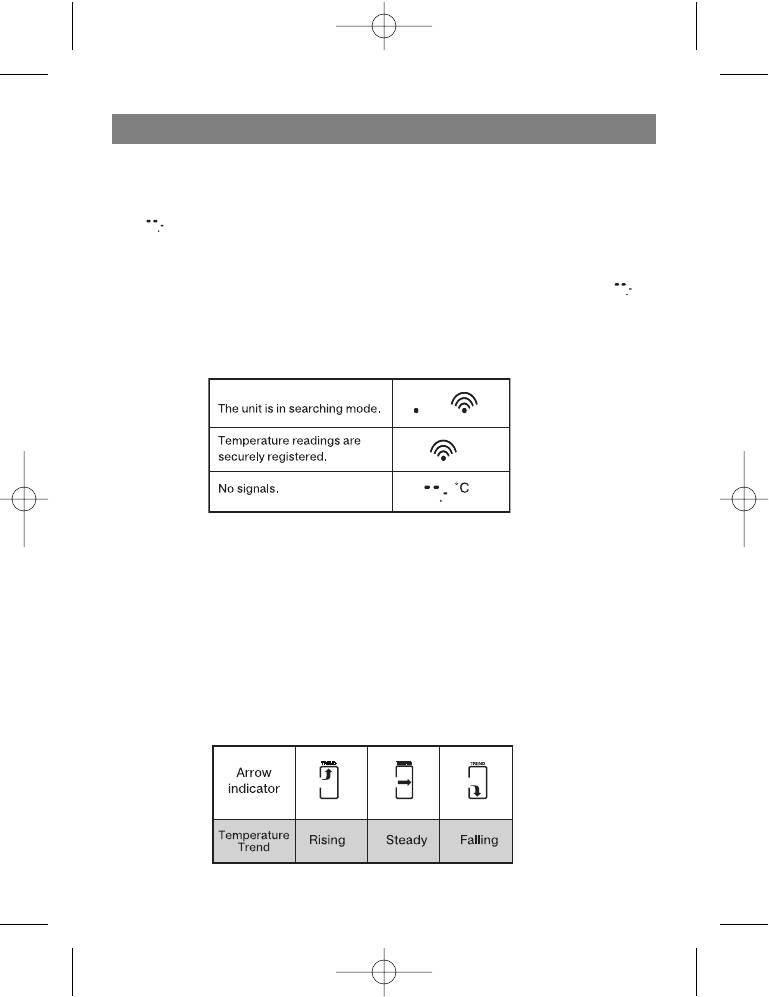
The kinetic wave display shows the signal receiving status of the main unit. There are three pos#
sible forms:
MAXIMUM AND MINIMUM TEMPERATURES
The maximum and minimum recorded indoor temperature, outdoor temperatures will be auto#
matically stored in memory. To display them, Press [ MEM ] once to display the maximum read#
ings and again the minimum readings. The respective indicators, [ MAX ] or [ MIN ] will be dis#
played. To clear the memory, hold down [ MEM ] for two seconds. The maximum and minimum
readings will be erased.
If you press [ MEM ] now, the maximum and minimum readings will have the same values as the
current ones until different readings are recorded.
TEMPERATURE TREND
The trend indicator shows the trend of temperatures collected at that particular remote sight.
Three trends: rising, steady, and falling will be shown.
6
3542.qxd 15.07.05 10:37 Page 6


