
Vitek VT-3528 BK: B. Buzzer pattern 3. Alarm duration and snooze function 2. Setting alarm output and alarm ON/OFF. 4. Changing display content 5. Changing display content 6. Sleep function
B. Buzzer pattern 3. Alarm duration and snooze function 2. Setting alarm output and alarm ON/OFF. 4. Changing display content 5. Changing display content 6. Sleep function: Vitek VT-3528 BK
Table of contents
- RADIOCLOCK Getting started 1. Time and calendar setting Actions (during data adjustment): Power connection
- Alarm 1. Alarm 2
- B. Buzzer pattern 3. Alarm duration and snooze function 2. Setting alarm output and alarm ON/OFF. 4. Changing display content 5. Changing display content 6. Sleep function
- RESET Caution: 7. Thermometer function Radio operation Infrared sensor function
- Time setting and projection unit tuning. Specifications:
ENGLISH
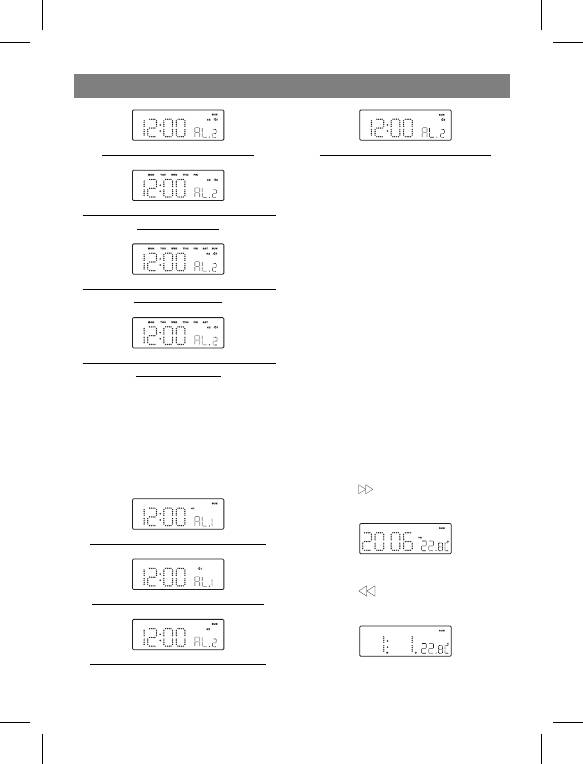
Display show minute setting mode.
Display show Alarm 2 wake up by Radio
B. Buzzer pattern
1st 8 second output 1 beep, 2st 8 second out-
put 2 beep, 3rd 8 second output 4 beep, after
Display show DOW (day of the week) setting
that continue output beep tone. The same pat-
mode (Mon to Fri).
tern repeat at the next minute again.
3. Alarm duration and snooze function
Alarm signals (buzzer or radio) will continue for
Display show DOW (day of the week) setting
30 minutes if no key is pressed, then will stop
mode (Mon to Sun).
automatically and wait for the same alarm time
on the next day.
Snooze function:
- During alarming press « SNOOZE» button
Display show DOW (day of the week) setting
(10) to enable snooze function. Buzzer
mode (Mon to Sat).
alarm or Radio alarm will be stopped.
- Snooze interval is 9 minutes.
2. Setting alarm output and alarm ON/OFF.
- Snooze will continue unless the Power
А. Changing alarm output
ON/OFF (Alarm Off) button is pressed or
Press «Al 1» (3)/«Al 2» (4) buttons in turn to
alarm signal is stopped automatically after
select wake up by Buzzer or Radio (adequate
30 minutes.
label will be displayed).
Press button «Al 1» (3) or «Al 2» (4) trice to
switch off the alarms.
4. Changing display content
Press button (8) to display current year,
after 5 sec display will return to the normal
mode.
Display show Alarm 1 wake up by Buzzer
5. Changing display content
Press button (7) to display current day
Display show Alarm 1 wake up by Radio
and month, after 5 sec display will return to the
normal mode.
Display show Alarm 2 wake up by Buzzer
6. Sleep function
During radio mode press «SNOOZE/SLEEP»
5
3528IM.indd 53528IM.indd 5 24.11.2006 15:25:0324.11.2006 15:25:03


