
Vitek VT-3525: Figure 2: Attention: Safety rules Figure 3: Figure 1:
Figure 2: Attention: Safety rules Figure 3: Figure 1:: Vitek VT-3525
Table of contents
- INSTRUCTION MANUAL Digital Clock mode Analogous Clock mode Connecting the power Digital clock mode
- Time Setting mode Set/reset current time Alarm 1 Setting mode
- Alarm 1 setting Figure 1:
- Alarm 2 Setting mode Alarm 2 setting Figure 2:
- Figure 3: Figure 4:
- Activation of the Switch Off By Timer function Using radio Alarm Temporary Switch Off func- tion: Connecting the sound signal source Reset
- Figure 2: Attention: Safety rules Figure 3: Figure 1:
- GUARANTEE Specifications
ENGLISH
sunlight, very high or low tempera-
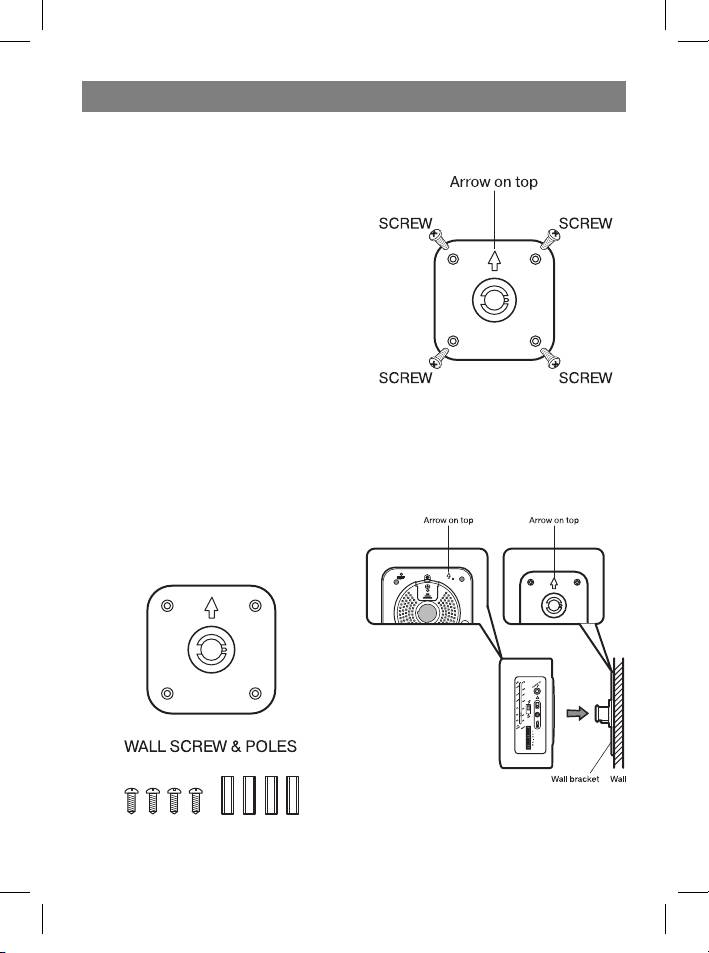
Figure 2:
tures, moisture, vibration, or dusty en-
vironments.
- Do not use any abrasive substances,
benzene or other solvents for clean-
ing the device surface. To clean the
device, wipe the device body with a
soft cloth dipped in a light solution of
nonabrasive cleaning agent.
- Do not attempt to insert cords, sharp
or other similar objects into ventilation
holes and other openings of the de-
vice.
Attention: Safety rules
Before connecting make sure that the
voltage indicated on the unit corresponds
to the voltage of your local area. Other-
wise the device can be damaged.
Keep away from moisture: Do not ex-
Figure 3:
pose the unit to dripping water or water
splashes.
Ventilation Never impede normal ventila-
tion of the working device.
Figure 1:
9
3525.indd 93525.indd 9 26.07.2006 11:45:0926.07.2006 11:45:09
Top 10 manuals
100.00
NZXT HALE90 1000W99.99
Samsung SM-R38099.97
AEG BSB 18C99.97
Dell 2700W99.97
Smeg KSEC70X99.96
Beurer HDE 4099.96
Pyramida KH 50 v.299.96
MSI CSM-H81M-P3299.96
AEG HR 562799.95
Melissa 640-048


