
Vitek VT-3479 R: General operation RADIO PLAYING A CASSETTE MAINTENANCE GENERAL INFORMATION ON RECORDING
General operation RADIO PLAYING A CASSETTE MAINTENANCE GENERAL INFORMATION ON RECORDING: Vitek VT-3479 R
Table of contents
- Warning and inportance Dripping warning:
- REMOTE CONTROL
- Top and front panels Power Supply BASIC FUNCTION RADIO
- General operation RADIO PLAYING A CASSETTE MAINTENANCE GENERAL INFORMATION ON RECORDING
- CD/MP3 PLAYER MAINTENANCE & SAFETY CD REPEAT
- TROUBLESHOOTING Guarantee
ENGLISH
General operation
seconds, when the leader tape passes the
1. To select your sound source adjust the
recorder heads.
source to MP3/CD/TAPE/RADIO.
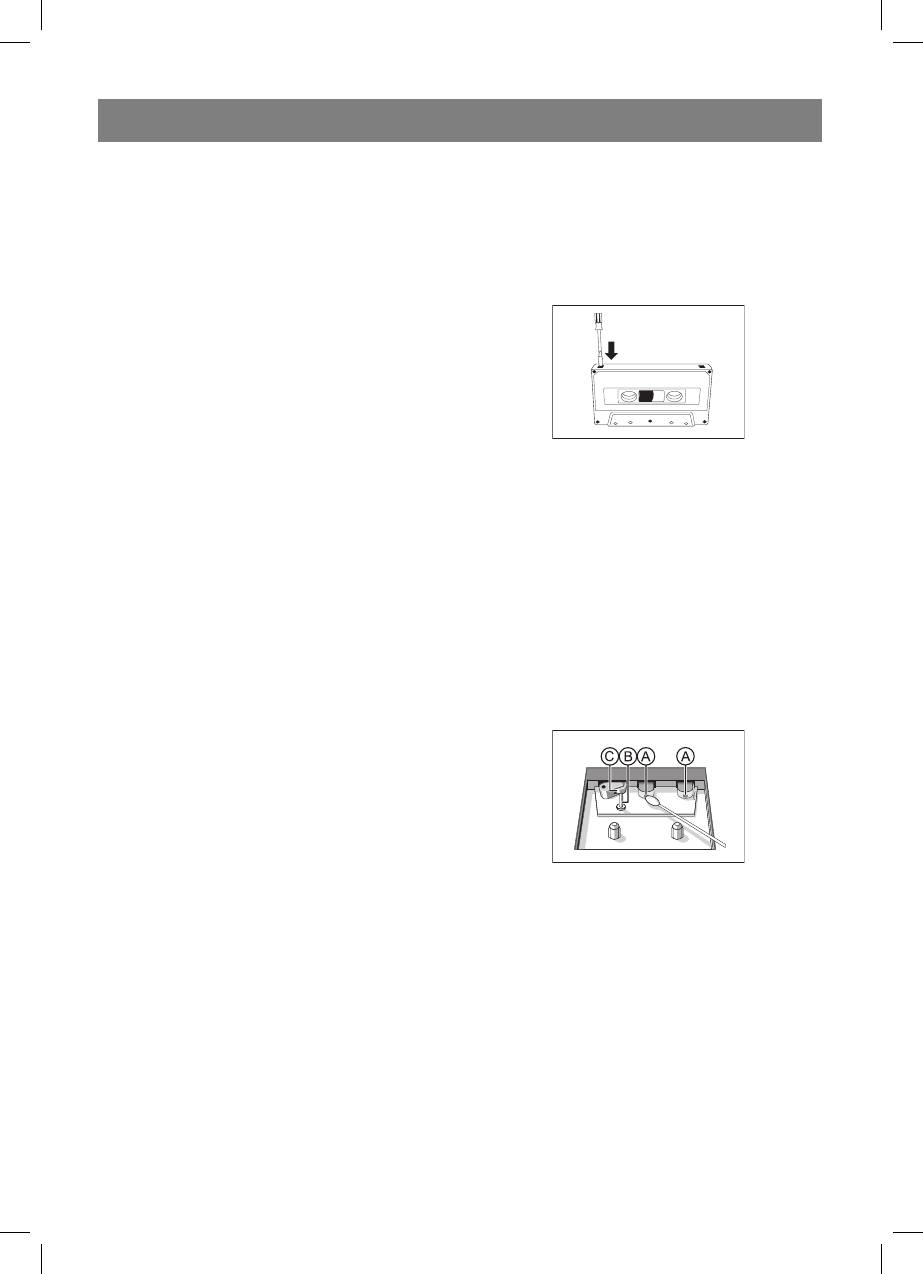
• To protect a tape from accidental erasure,
2. Adjust the sound with the VOLUME.
have the tape in front of you and break out
3. To switch off the set, adjust the source
the left tab.
selector to TAPE/off position.
Recording on this side is no longer possible.
To record over this side again, cover the
RADIO
tabs with a piece of adhesive tape.
Radio reception
1. Slide the FUNCTION selector to RADIO.
2. Slide the BAND selector to a desired
setting - FM STEREO, FM, AM.
3. Rotate the TUNING control to find the
desired stations.
NOTE: If the BAND selector is set to the FM
stereo position and you have tuned to an FM
stereo station, the FM stereo LED indicator
Recording from the radio
will light.
I. Tune to the desired radio station (See
4. When you have finished listening, slide the
TUNING TO RADIOSTATIONS).
FUNCTION selector to the OFF position to
2. Press STOP/EJECT to open the cassette
shut the power off.
door.
3. Insert a suitable cassette into the cassette
PLAYING A CASSETTE
deck and close the cassette door.
1. Select TAPE source.
4. Press RECORD to start recording.
2. Press STOP/EJECT to open the cassette
5. For brief interruptions, press PAUSE. To
door.
resume recording, press PAUSE again.
3 Insert a recorded cassette and close the
6. To stop recording, press STOP/EJECT.
cassette door.
4 Press PLAY to start playback.
MAINTENANCE
5 To interrupt playback, press PAUSE. To
Tape deck maintenance
resume, press the key again.
5. By pressing m or on the set, fast
winding of the tape is possible in both
directions.
7. To stop the tape, press STOP/EJECT.
- The keys are automatically released at the
end of the tape, except if PAUSE has been
activated.
To ensure quality recording and playback of
the tape deck, clean parts A ,B andC shown in
GENERAL INFORMATION ON RECORDING
the diagram below, after approx. 50 hours of
• Recording is permissible in so far as
operation, or on average once a month. Use a
copyright or other rights of third parties are
cotton bud slightly moistened with alcohol or a
not infringed.
special head cleaning fluid to clean the deck.
• This deck is not suitable for recording on
I. Open the cassette door by pressing STOP/
CHROME (IEC II) orMETAL (IEC IV) type
EJECT.
cassettes. For recording, use NORMAL type
2. Press PLAY and clean the rubber pressure
cassettes (IEC I) on which the tabs have not
rollers C .
been broken.
3. Press PAUSE and clean the magnetic heads
• The best recording level is set automatically.
A and also the CapstanB.
Altering the VOLUME controls will not affect
4. After cleaning, press STOP/EJECT.
the recording in progress.
Note: Cleaning of the heads can also be done
• At the very beginning and end of the tape,
by playing a cleaning cassette through once.
no recording willtake place during the 7
7
3479.indd 73479.indd 7 11.04.2006 16:36:1311.04.2006 16:36:13


