
Sigma ELECTRONIC FLASH EF-610 DG SUPER SA-STTL (シグマ用): LIMITS OF CONTINUOUS SHOOTING
LIMITS OF CONTINUOUS SHOOTING: Sigma ELECTRONIC FLASH EF-610 DG SUPER SA-STTL (シグマ用)
17
USING FLASH IN OTHER CAMERA MODES
Shutter Speed Priority Setting
By selecting the
S
mode of the camera, you can set the shutter speed from 30sec. to 1/X sync speed.
When you set the desired shutter speed, the camera will select the appropriate aperture value for the
background. If the subject is too light or too dark, the aperture value indicator will blink and show the
limit values (maximum or minimum aperture). In such as case, the camera proceeds to a take a flash
photograph at the limit value. Thus, the main subject in the picture should may be exposed correctly,
but the background may become under or over exposed.
Aperture Priority Setting
By selecting the
A
mode of your camera, the camera will select the appropriate shutter speed for the
scene. If the subject is too bright or too dark, the shutter speed indicator will blink and show the limit
(highest or slowest shutter speed) value. The highest shutter speed will be limited to the camera’s
normal flash synchronization speed. In such a case, the camera proceeds to take a flash photograph
at the limit value. Thus, the main subject in a picture should be exposed correctly, but the background
may become under or overexposed.
When used with M Mode
You can set the desired shutter speed and aperture value. You can set the shutter speed from top
sync speed to
bulb
. If you adjust the exposure according to the exposure meter indication, the camera
will work as for Daylight synchronization flash or slow, synchronization.
■
In the case of use with SD9, SD10, depending on the ISO setting, shutter speed will change to slow
shutter speed side. For more detailed information, please refer to Exposure Mode selection.
LIMITS OF CONTINUOUS SHOOTING
To prevent overheating of the flashgun’s circuitry, do not use your flash unit for at least 10 minutes
after continuously firing the flash for the number of exposures shown in the table below.
Mode
Number of Flash Exposures
TTL, M(1/1,1/2)
20 Continuous Flash Shots
M(1/4, 1/8)
25 Continuous Flash Shots
M(1/16-1/32)
40 Continuous Flash Shots
Multi 10
Cycle
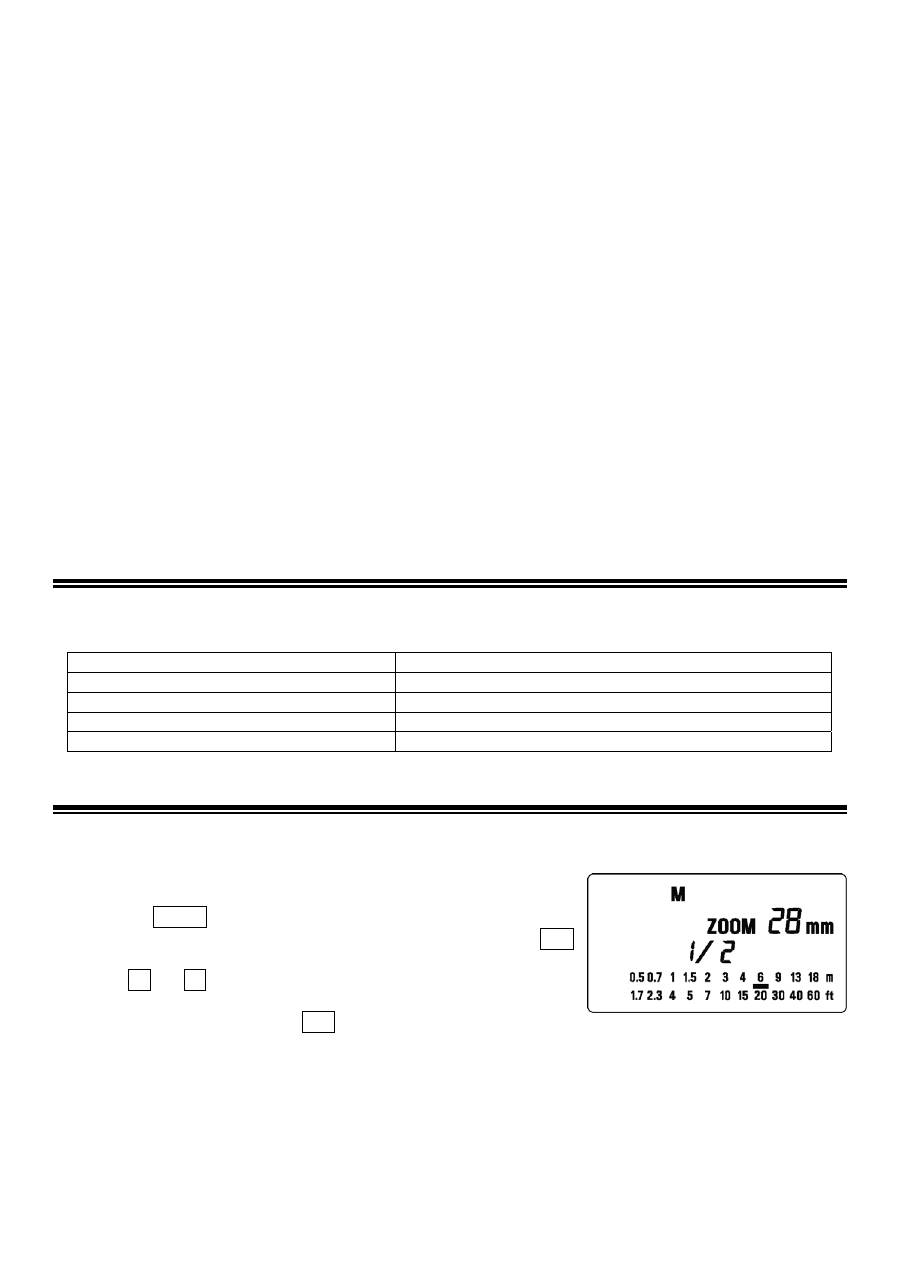
MANUAL FLASH OPERATION
Manual flash is provided for shooting subjects when the correct exposure is difficult to obtain in the
TTL mode. In the manual flash mode, you can set the flash power level from 1/1 (full) to 1/128 power
in one step increments.
1. Set the camera’s exposure mode to M.
2. Press the MODE button on the flash unit to select
M
.
3. The flash power output value blinks when you press the SEL
button.
4. Press + or – button to set the desired flash power output.
5. The manual flash output display will stop blinking and remain
displayed after you press the SEL button again.
6. Adjust the focusing by pressing the shutter button, note the subject distance on the focus ring on the
lens. Then adjust the lens’ aperture value or flash power level until the distance indicated on the
LCD panel of the flashgun is equal to the subject distance.
7. When the Ready Light of the flash is illuminated, the unit is ready for use.
■
You can calculate the correct exposure by using the following formula:
Guide Number “GN” / Flash to Subject Distance = F-stop
This flash unit will automatically calculate and indicate the appropriate subject distance according to
the above formula.(Please refer to table1 on the last page)
Оглавление
- 安全上のご注意
- 各部の名称( 1 ページ)
- 発光部のセット
- ワイドパネルについて
- 連続撮影時のご注意
- FP 発光
- モデリング発光
- バウンス撮影
- スレーブ発光
- 主要諸元
- PRECAUTIONS
- DESCRIPTION OF THE PARTS
- ADJUSTING THE FLASH HEAD
- WIDE PANEL
- LIMITS OF CONTINUOUS SHOOTING
- FP FLASH
- MODELING FLASH
- BOUNCE FLASH
- SLAVE FLASH
- SPECIFICATIONS
- VORSICHTSMAßNAHMEN
- BESCHREIBUNG DER TEILE
- EINSTELLEN DES BLITZKOPFES
- WEITWINKELSTREUSCHEIBE
- GRENZEN DER SERIENAUSLÖSUNG
- KURZZEITBLITZSYNCHRONISATION (FP)
- REDUZIERUNG ROTER AUGEN
- INDIREKTES BLITZEN
- „SLAVE“ GERÄT
- TECHNISCHE DATEN
- PRECAUTIONS
- DESCRIPTION DES ELEMENTS
- AJUSTEMENT DE LA TETE FLASH
- ELARGISSEUR D'ANGLE
- LIMITES DES PRISES DE VUE CONSECUTIVES AU FLASH
- FLASH HAUTE VITESSE FP (sauf SA-300)
- REDUCTION DE L'EFFET "YEUX ROUGES"
- FLASH INDIRECT
- FLASH ESCLAVE
- CARACTERISTIQUES TECHNIQUES
- PRECAUCIONES
- DESCRIPCIÓN DE LAS PARTES
- AJUSTE DEL CABEZAL DEL FLASH
- PANTALLA ANGULAR
- LIMITACIONES DEL DISPARO CONTINUO
- SINCRONIZACIÓN CON LA SEGUNDA CORTINILLA
- LUZ DE MODELADO
- FLASH REFLEJADO
- FLASH ESCLAVO
- ESPECIFICACIONES
- ATTENZIONE
- DESCRIZIONE DELLE PARTI
- REGOLAZIONE DELLA TESTA DEL FLASH
- DIFFUSORE GRANDANGOLARE
- LIMITAZIONI QUANDO SI SCATTA IN SEQUENZA
- SINCRONIZZAZIONE DELLA SECONDA TENDINA
- FLASH DI RIEMPIMENTO
- FLASH INDIRETTO
- FLASH AUSILIARIO
- SPECIFICHE
- BEMÆRK
- BESKRIVELSE AF FLASHENS DELE
- MONTERING OG AFMONTERING AF FLASHEN
- LCD-DISPLAY BELYSNING
- KONTINUERLIG OPTAGELSE
- SYNKRONISERING MED ANDET LUKKERGARDIN
- MULTI-FLASH FUNKTION
- TRÅDLØS FLASH
- SLAVE-FLASH
- SPECIFIKATIONER
- VOORZORGSMAATREGELEN
- OMSCHRIJVING VAN DE ONDERDELEN
- HET AFSTELLEN VAN DE FLITSKOP
- GROOTHOEK ADAPTER
- MAXIMALE PRESTATIES BIJ CONTINU FOTOGRAFEREN.
- FP FLITS (BEHALVE SA-300)
- MODEL / TESTFLITS
- INDIRECT FLITSEN
- SLAVE FUNCTIE
- TECHNISCHE GEGEVENS:
- 注 意各部位名稱
- 關於電池
- 安裝閃光燈到相機及其解除
- 液晶顯示屏夜光照明
- 閃燈連發限制
- 第二簾幕 ( 後簾 ) 閃燈同步
- 頻閃模式
- 相機與閃燈無線配合操控 ( 不適用於 SD9)
- 離機無線從屬( Slave )閃光模式
- 規 格
- 사용상 주의점
- 각부의 명칭
- 플래시 헤드 조정
- 와이드 패널
- 연속 촬영시 주의점
- 고속 싱크로(FP) 촬영
- 모델링 플래시
- 바운스 촬영
- 슬레이브 플래시
- 제품 사양
- ПРЕДОСТОРОЖНОСТИ
- ОПИСАНИЕ СОСТАВНЫХ ЧАСТЕЙ
- НАСТРОЙКА ГОЛОВКИ ВСПЫШКИ
- РАССЕИВАЮЩАЯ ПАНЕЛЬ
- ОГРАНИЧЕНИЯ ДЛЯ НЕПРЕРЫВНОЙ СЪМКИ
- СИНХРОНИЗАЦИЯ ПО ВТОРОЙ ШТОРКЕ
- МОДЕЛИРОВАНИЕ ВСПЫШКИ
- НАПРАВЛЕННОСТЬ ВСПЫШКИ
- ДОПОЛНИТЕЛЬНАЯ ВСПЫШКА
- ХАРАКТЕРИСТИКИ
- PRECAUÇÕES
- DESCRIÇÃO DOS COMPONENTES
- COMO AJUSTAR A CABEÇA DO FLASH
- PAINEL DE GRANDE ANGULAR
- LIMITES DE DISPAROS CONTÍNUOS
- FLASH FP
- O FLASH EM MODO DE PRÉ-VISÃO (FLASH MODELING)
- FLASH INDIRECTO
- FLASH ESCRAVO
- ESPECIFICAÇÕES
