
Vitek VT-4026: CONNECTION
CONNECTION: Vitek VT-4026
Table of contents
- SUBWOOFER REAR PANEL HINTERTAFEL DES SUBWOOFERS ЗАДНЯЯ ПАНЕЛЬ САБВУФЕРА ЗАДНЯ ПАНЕЛЬ САБВУФЕРА REMOTE CONTROL UNIT FERNBEDIENUNGSPULT ПУЛЬТ ДИСТАНЦИОННОГО УПРАВЛЕНИЯ ПУЛЬТ ДИСТАНЦІЙНОГО КЕРУВАННЯ
- 5.1 Active Speaker System with AM/FM Tuner PACKING LIST DEVICE DESCRIPTION REAR PANEL OF SUBWOOFER REMOTE CONTROL UNIT
- CONNECTION
- SYSTEM OPERATION A. TURNING THE POWER ON / OFF B. VOLUME C. 3D SOUND MODE D. CENTER SPEAKER E. REAR SPEAKERS F. FRONT SPEAKERS G. AUDIO SOURCE SELECTION 2.1 CH or 5.1 CH H. MUTE FUNCTION I. AM/FM TUNER RESOLVING MALFUNCTIONS 1. THERE IS NO SOUND AT ALL 2. NO SOUND IS COMING FROM THE FRONTLEFT SPEAKER
- 3. NO SOUND IS COMING FROM THE FRONTRIGHT SPEAKER 4. NO SOUND IS COMING FROM THE CENTRAL SPEAKER 5. NO SOUND IS COMING FROM THE REAR SPEAKERS 6. NO RADIO STATION RECEPTION PRECAUTIONARY MEASURES: APPENDIX
- TECHNICAL CHARACTERISTICS
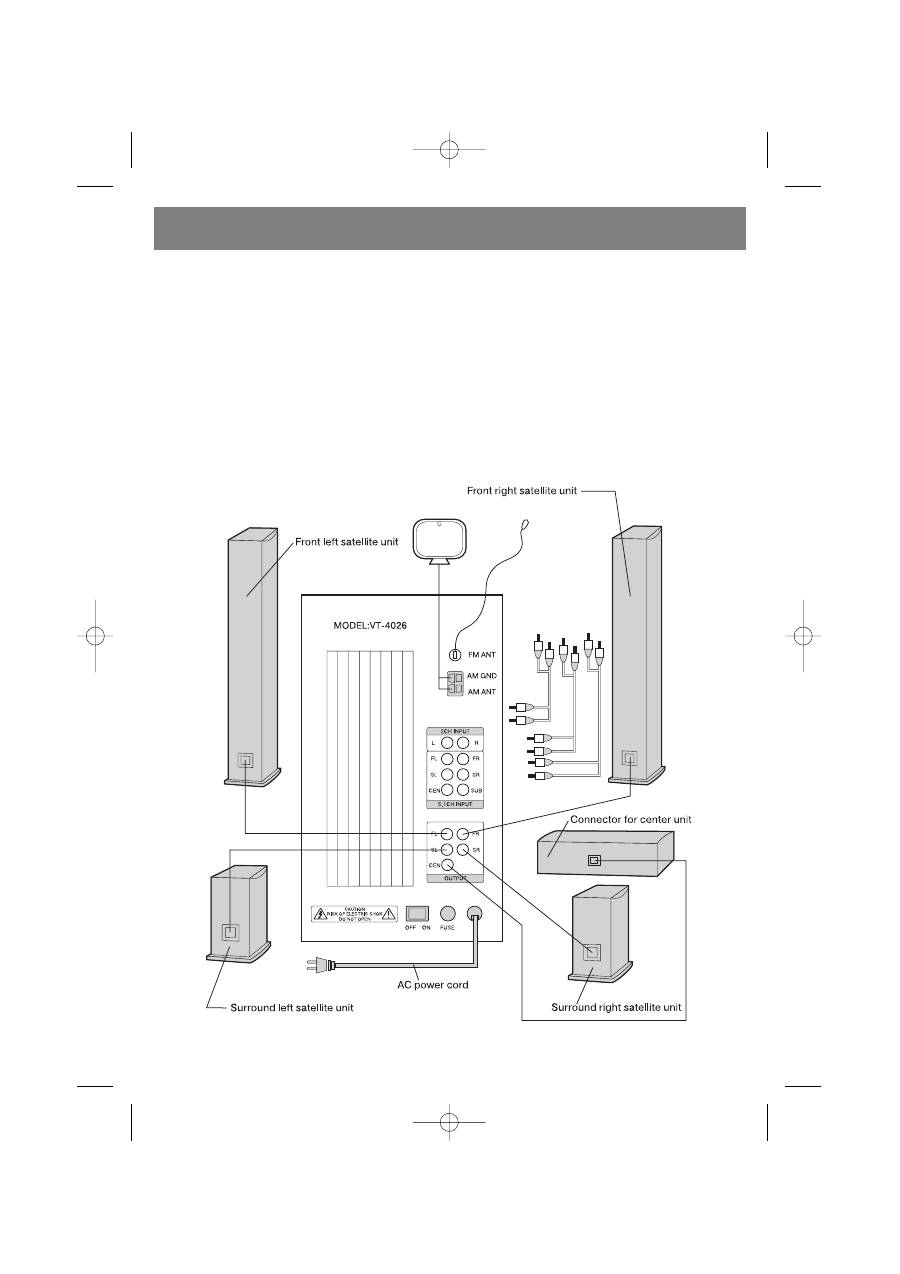
CONNECTION
Make sure that the device connected to the subwoofer (DVD player, for example) is turned off. Set the overall system volume
to a minimum before making connections.
1.Open the lid of the battery compartment on the remote control unit and insert the batteries, according to proper polarity.
2.Connect the wires from the front left and right satellite speakers, the central speaker, and the rear left and right satellite
speakers to the output jacks on the rear panel of the subwoofer marked FR, FL, CEN, RR, and RL.
3.Using an audio cable, connect any 2channel audio source (CD player, for example) to the 2.1 CH INPUT jacks and any 6
channel audio source (for example, a DVD player with builtin AC3/Dolby Digital decoder) to the 5.1 CH INPUT jacks on the
subwoofer.
4.Connect the AM and FM antennas to their respective jacks located on the rear panel of the subwoofer.
5.Connect the power cord to an electrical outlet and set the power switch, located on the rear panel of the subwoofer, to the
ON position. Start playback on the connected audio source and use the volume control, located on the remote control unit or
on the front panel of the subwoofer, to set the desired volume level.
ENGLISH
5
4026.qxd 04.10.2005 11:31 Page 5



