
Vitek VT-3525 SR: Figure 3: Figure 4:
Figure 3: Figure 4:: Vitek VT-3525 SR
Table of contents
- INSTRUCTION MANUAL Digital Clock mode Analogous Clock mode Connecting the power Digital clock mode
- Time Setting mode Set/reset current time Alarm 1 Setting mode
- Alarm 1 setting Figure 1:
- Alarm 2 Setting mode Alarm 2 setting Figure 2:
- Figure 3: Figure 4:
- Activation of the Switch Off By Timer function Using radio Alarm Temporary Switch Off func- tion: Connecting the sound signal source Reset Attention
- Figure 2: Attention: Safety rules Figure 3: Figure 1:
- GUARANTEE Specifications
ENGLISH
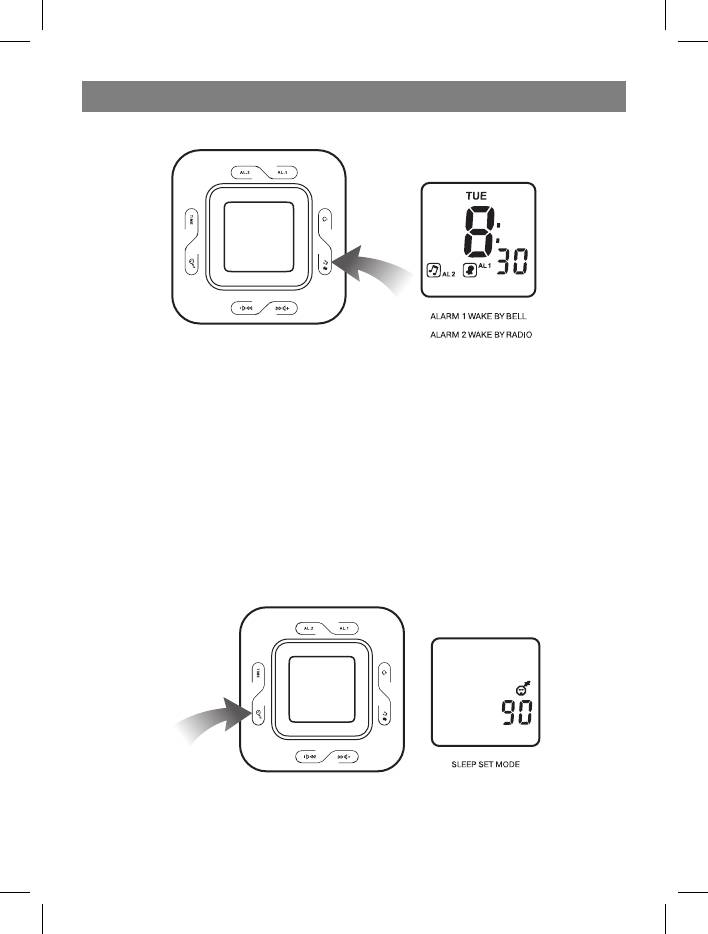
Figure 3:
Setting the type of alarm signal and its switching on/off
Press the Select Alarm 1/ 2/ 1+2 button (13) to select a sound signal or radio for the
alarm signal (Figure 3).
Alarm signal duration
The alarm sound signal or radio will be on for 1 hour if no buttons are pressed. Then the
alarm will switch off automatically and will be activated the next day at the set time.
Alarm switching off
Press the Power button (14) to switch off the alarm signal. This button is also used to
disable the alarm temporary switch off function.
Figure 4:
Switch Off By Timer mode
7
3525.indd 73525.indd 7 26.07.2006 11:45:0826.07.2006 11:45:08
Top 10 manuals
100.00
NZXT HALE90 1000W99.99
Samsung SM-R38099.97
AEG BSB 18C99.97
Dell 2700W99.97
Smeg KSEC70X99.96
Beurer HDE 4099.96
Pyramida KH 50 v.299.96
MSI CSM-H81M-P3299.96
AEG HR 562799.95
Melissa 640-048


