
Melissa 631-033: PROGRAMMING YOUR PERSONAL DATA
PROGRAMMING YOUR PERSONAL DATA: Melissa 631-033
Table of contents
IM6 19/12/03 12:03 Side 13
PROGRAMMING YOUR PERSONAL DATA
Attention: Carry out the following operations
one after the other and within a few seconds
or the device will automatically interrupt the
programming mode.
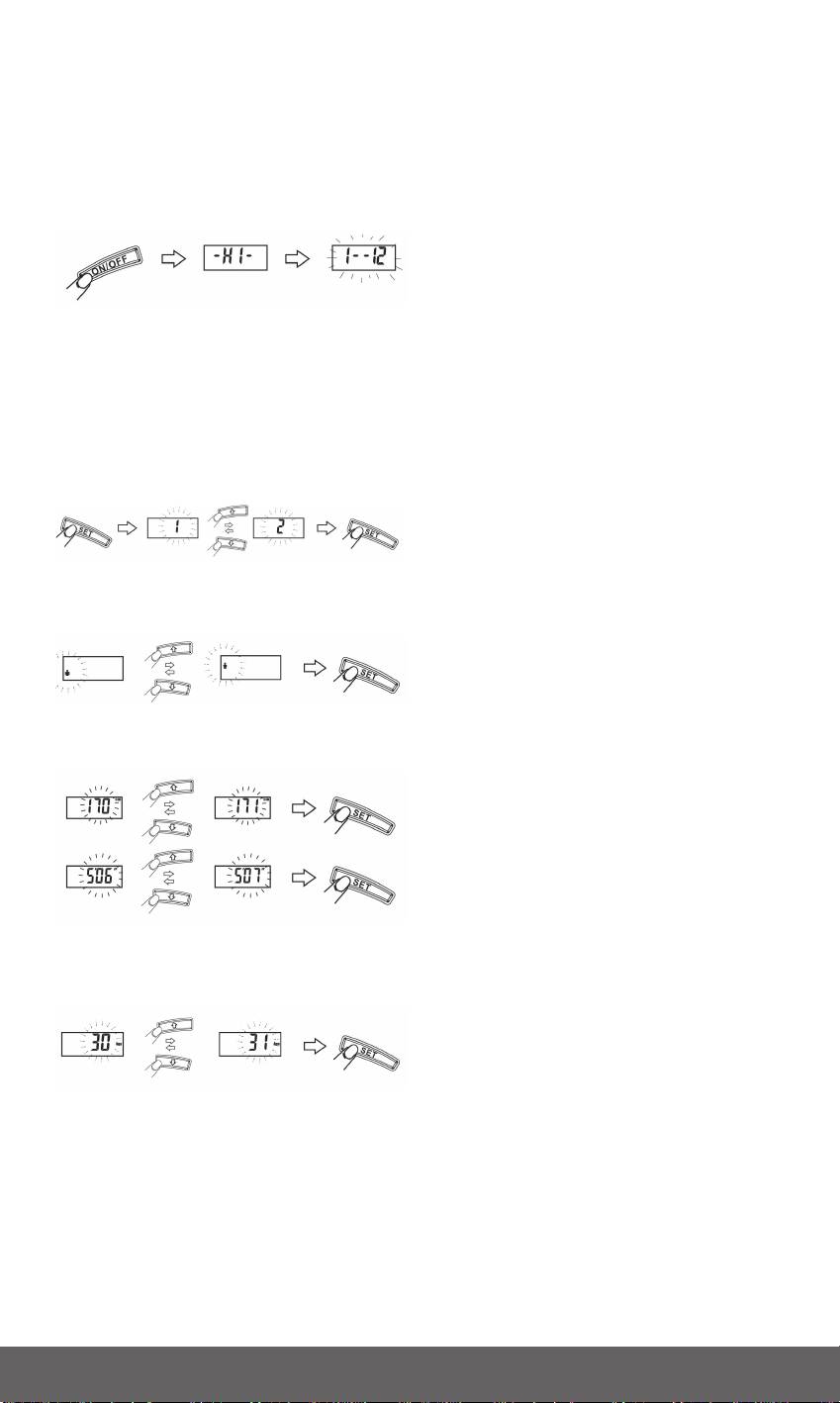
1. Press the on switch to switch on the
device ”-HI-” appears briefly on the
display followed by “1 - - 12”.
2. Press the “SET” key to enter
programming mode.
3. Press the arrow keys to select the input
unit mode (kg, cm / lbs, inch).
4. The ”1” start to flash on the display.
Select a memory slot with the arrow
keys and confirm your selection with the
SET key. All the previous settings will be
overwritten in the selected memory slot.
5. Two symbols (male/female) appear on
he display. Select your sex with the
arrow keys and press the SET key.
6. Enter your height in cm. By pressing the
arrow key again and press the SET key
to confirm.
7. The last value to be entered is your age.
Use the arrow key again to select age,
confirm by pressing the SET key.
8. ”1 - - 12” appears in the display and
shortly after ”0,0”. After a few seconds
the device switches automatically off.
When age is 12 or below 12 the scale is in
child mode.
13
