
Melissa 271-106: INTRODUCTION IMPORTANT SAFETY MEASURES OVERVIEW OF FUNCTIONS USE: CLEANING THE GUARANTEE DOES NOT APPLY IMPORTER
INTRODUCTION IMPORTANT SAFETY MEASURES OVERVIEW OF FUNCTIONS USE: CLEANING THE GUARANTEE DOES NOT APPLY IMPORTER: Melissa 271-106
Table of contents
- INTRODUCTION IMPORTANT SAFETY MEASURES OVERVIEW OF FUNCTIONS USE: CLEANING THE GUARANTEE DOES NOT APPLY IMPORTER
INTRODUCTION
To get the best out of your fan, please read these instructions
carefully before using it for the first time.
We also recommend that you keep the instructions for future
reference, so that you can remind yourself of the functions of the
fan.
IMPORTANT SAFETY MEASURES
•
Please ensure that the voltage of the fan corresponds to the
mains voltage.
•
Use the fan only for the purpose(s) defined in the user guide.
•
Never insert your fingers, pencils or other objects through the
cage during operation.
•
Switch the fan off before moving or cleaning it.
•
The fan should be set up on a stable and level surface to
avoid it being knocked over.
•
Do not expose the fan to excessive heat or humidity, as this
can cause damage to the electrical components.
•
Do not immerse in any form of liquid.
•
It is not advisable to expose people, in particular babies and
the elderly, to a continuous stream of cold air.
•
The fan should be kept out of the reach of children.
•
Ensure that the cable does not get caught beneath the device,
in drawers, behind shelves etc.
•
Do not run the cable under carpets, rugs, etc.
•
Ensure the cable is kept away from busy areas to avoid
anyone tripping over it.
•
Do not use if the device or cable becomes damaged. Take it
to a specialist for repair.
•
For indoor use only.
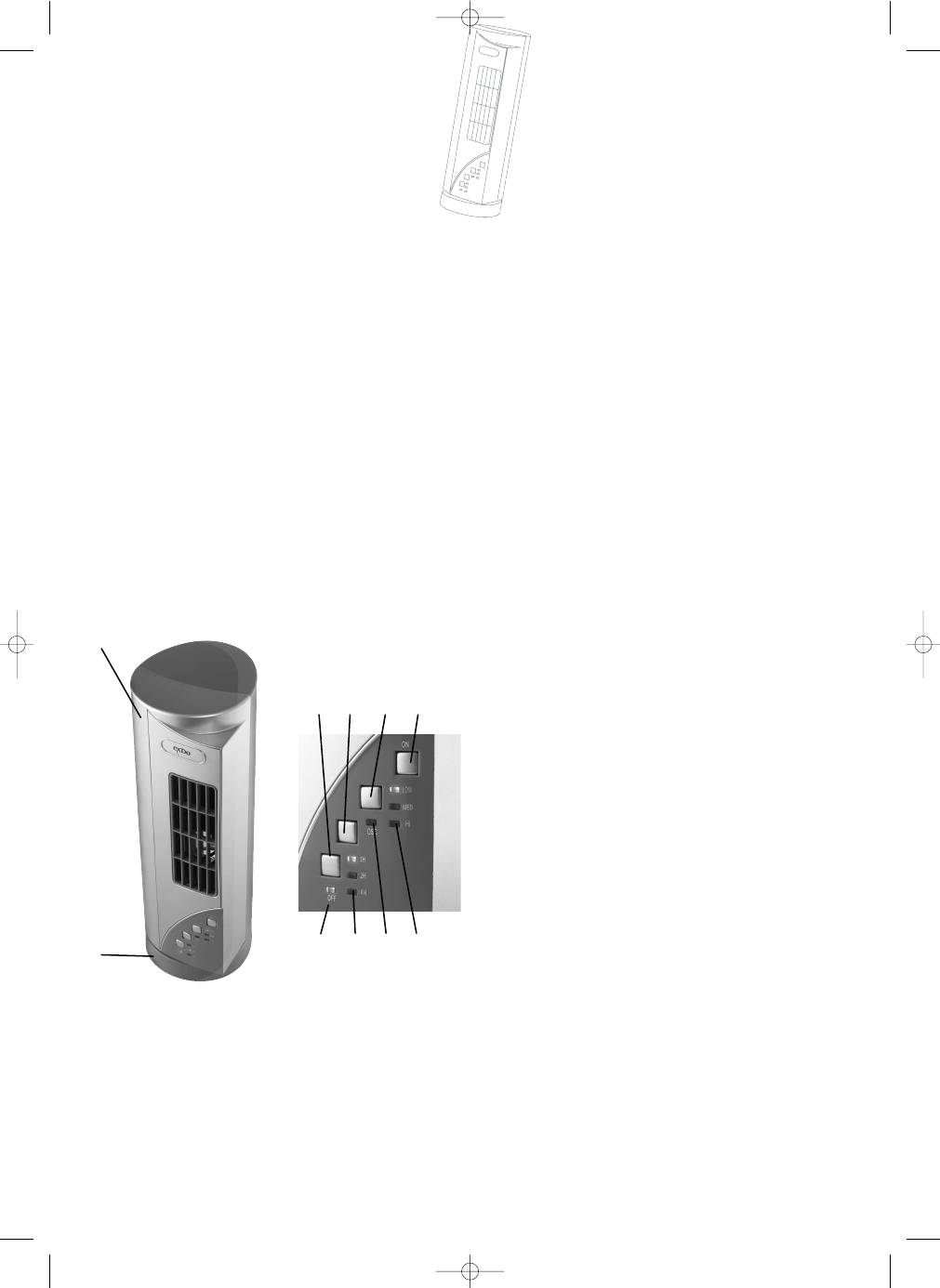
OVERVIEW OF FUNCTIONS
1. Upper
section
2. Base
3. Speed
button
4. Speed
indicator
5. Off
button
6. Oscillation
button
7. Oscillation
indicator
8. Timer
button
9. Timer
indicator
10. Stand-by light
USE:
WARNING:
In order to reduce the risk of fire or electric shock, never use the
appliance together with an electronic timer.
As long as the device is connected to the power supply, the stand-
by light will remain on.
Speed:
Use the speed button to select speed.
The fan can be switched off again by pressing the off button.
Pressing the speed button repeatedly will alternate between the 3
speed options.
The speed indicators will show which speed has been selected
(“LOW”, “MED” or “HI”).
Timer:
To use the timer function, first switch on the fan by selecting a
speed.
You can then press the timer button to choose whether the fan is
to switch off automatically after 1, 2 or 4 hours.
The timer indicators will show which timer setting has been
selected (“1H” = 1 hour, “2H” = 2 hours or “4H” = 4 hours).
Oscillation:
Press the oscillation button to start and stop the fan moving from
side to side.
The oscillation indicator comes on when oscillation has been
selected.
CLEANING
•
Always switch the fan off and unplug it before cleaning.
•
Clean the plastic parts using a damp cloth and a mild
detergent, and ensure that all detergent residue is removed.
•
Never use abrasive cleaning agents or solvents.
•
Do not immerse in any form of liquid.
THE GUARANTEE DOES NOT APPLY
•
If the instructions given above are not observed.
•
If the appliance has been mishandled, subjected to rough
treatment, or has suffered any other form of damage.
•
For faults that may have arisen as a result of faults in your
electricity supply.
•
If the appliance has been subject to unauthorised repairs.
Due to the constant development of our products in terms of
function and design, we reserve the right to make changes to the
product without prior warning.
IMPORTER
Adexi Group
We cannot be held responsible for any printing errors.
6
UK
1.
7.
5.
8.
6.
10.
9.
3.
2.
4.
IM 04/01/05 12:08 Side 6
