
Acer H6520BD: Getting Started
Getting Started: Acer H6520BD
8
Getting Started
English
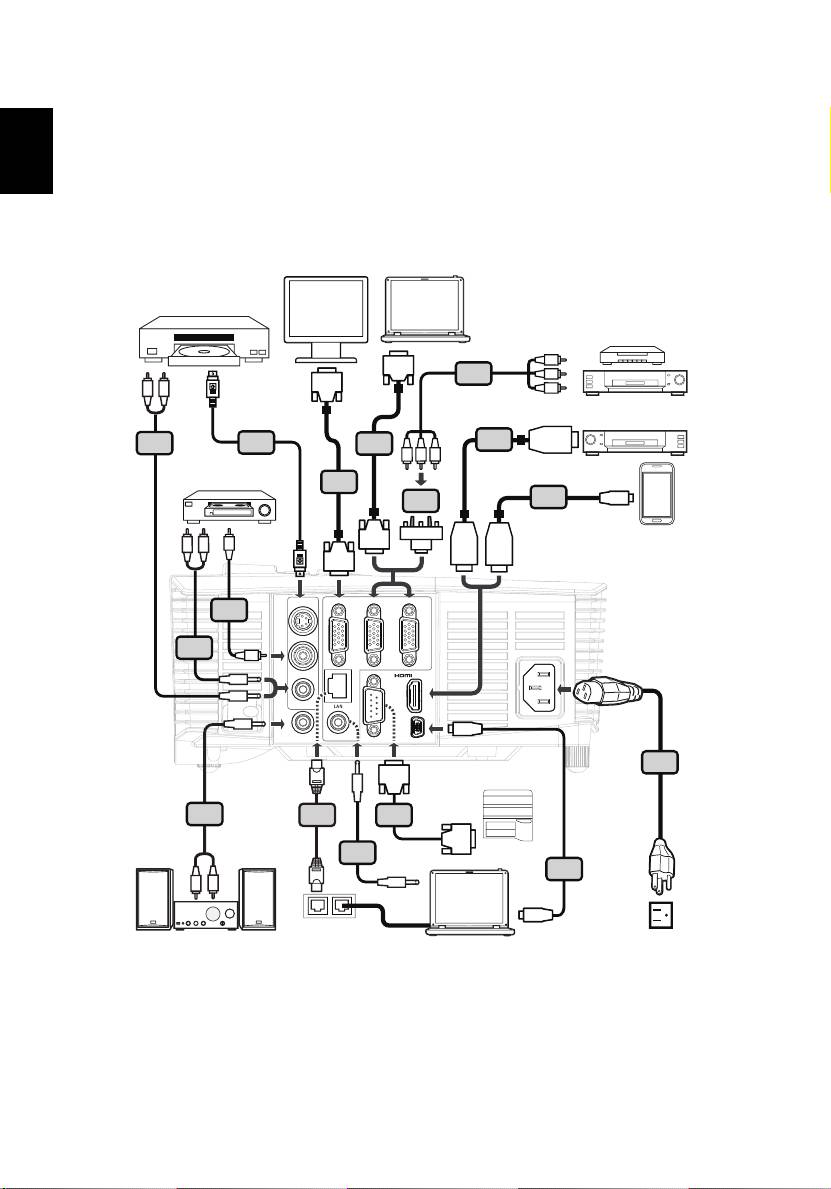
Connecting the Projector
<Type 1>
S-Video output
DVD player,
Set-top Box,
HDTV receiever
D-Sub
5
D-Sub
W
R
RBG
DVD player
HDMI
8
6
2
11
RBG
Video output
2
MHL
4
12
USB
HDTV adapter
D-Sub
W
R
Y
HDMI
HDMI
D-Sub
VGA OUT
VGA IN 2
VGA IN 1
7
S-VIDEO
8
Y
VIDEO
/ MHL
AUDIO IN
USB
AUDIO OUT
AUDIO IN
RS232
USB CTRL
RS232
1
8
13
9
RS232
3
RS232
10
R
W
USB
Internet
9
English
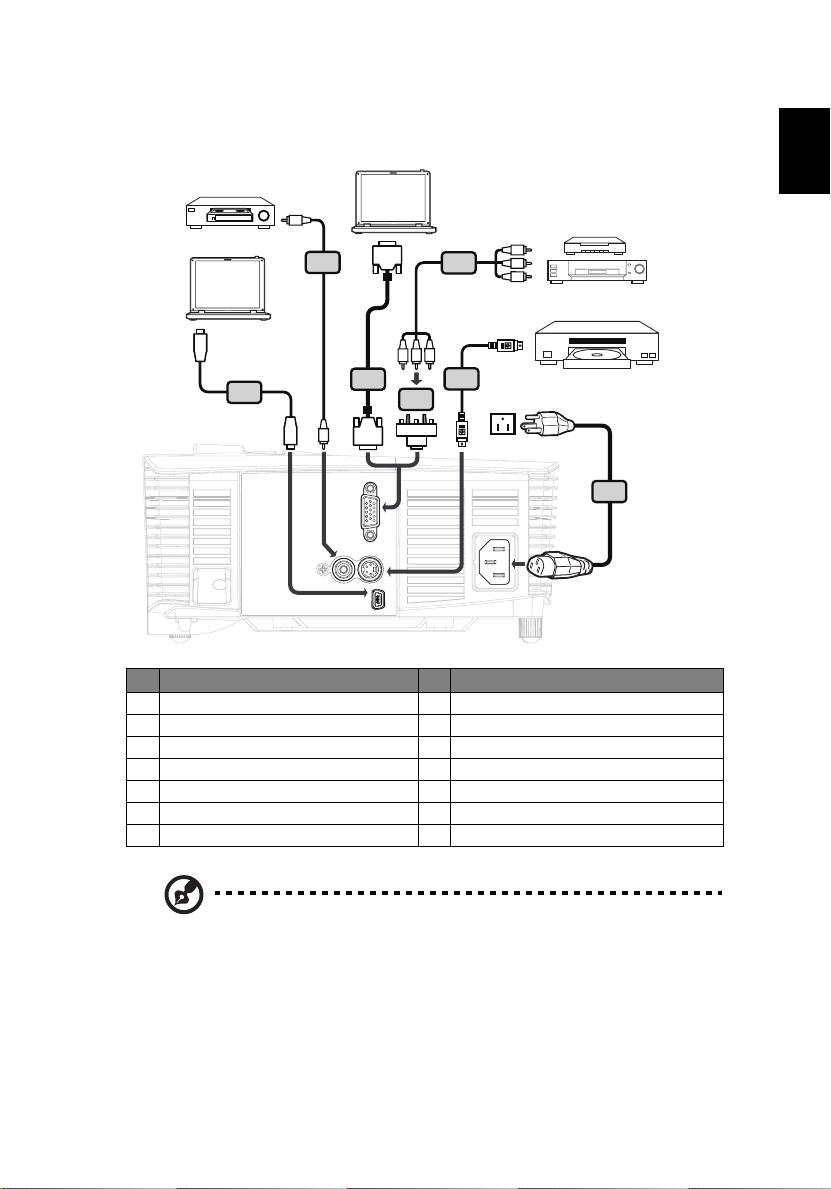
<Type 2>
Video output
DVD player,
Set-top Box,
Y
HDTV receiever
D-Sub
7
5
RBG
S-Video output
USB
RBG
2
6
10
4
Y
HDTV adapter
D-Sub
USB
1
VGA IN
VIDEO
S-VIDEO
USB CTRL
# Description # Description
1 Power cord 8 Audio cable jack/RCA
2 VGA cable 9 RS232 cable
3 Audio cable jack/jack 10 USB cable
4 VGA to component/HDTV adapter 11 HDMI cable
5 3 RCA component cable 12 MHL cable (MicroUSB to HDMI)
6 S-Video cable 13 RJ45 cable
7 Composite video cable
Note: To ensure the projector works well with your computer,
please make sure the timing of the display mode is compatible
with the projector.
Note: Functions vary depending on model definition.
Note: USB cable needs powered extender if the length is over 5 m.
Note: VGA OUT loops through for VGA IN 2 only.
Note: Some smartphones require a converter (supplied by
smartphone maker) to enable the MHL function.
10
Turning the Projector On/Off
English
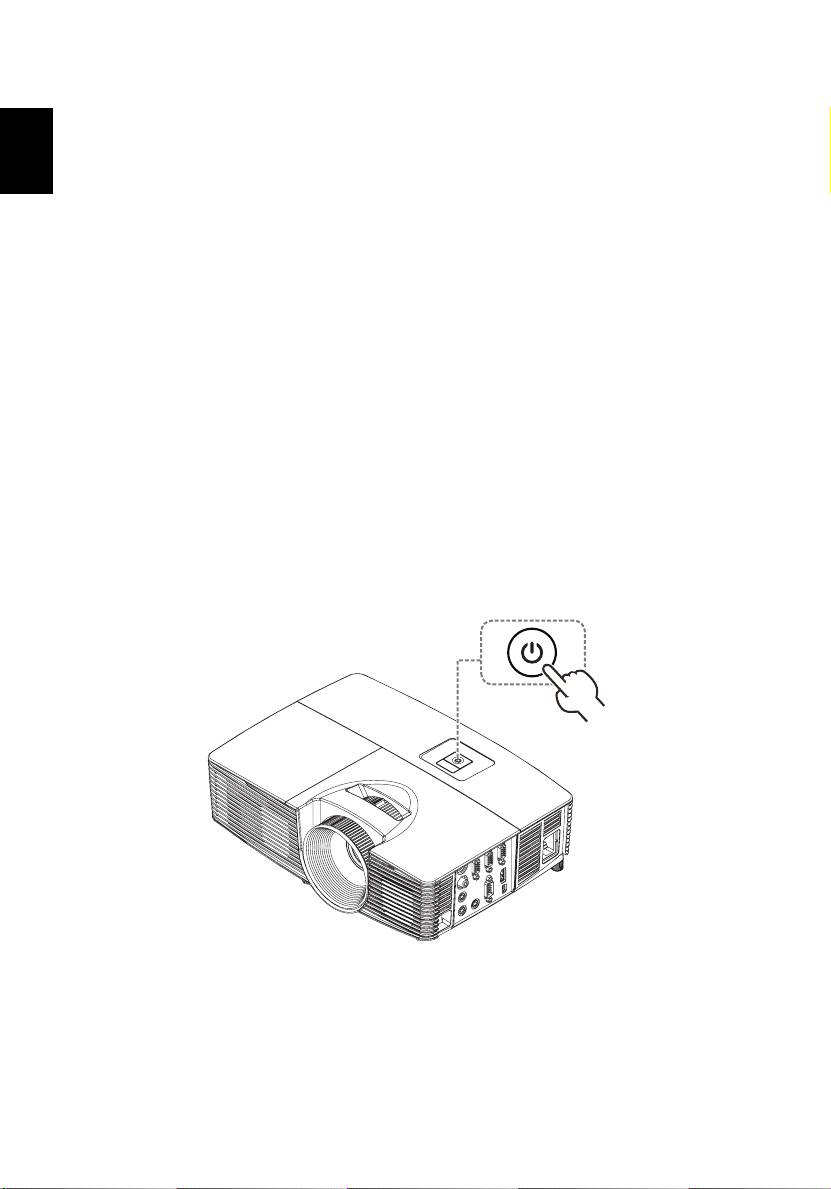
Turning on the Projector
1 Ensure that the power cord and signal cable are securely connected. The
Power indicator LED will flash red.
2 Turn on the projector by pressing "Power" button on the control panel or
remote control, and the Power indicator LED will turn blue.
3 Turn on your source (computer, notebook, video player ,etc.). The
projector will detect your source automatically.
• If the screen displays "Lock" and "Source" icons, it means the
projector is locked onto a specific source type and there is no such
type of input signal detected.
• If the screen displays "No Signal", please make sure the signal cables
are securely connected.
• If you connect to multiple sources at the same time, use the "Source"
button on the remote control or direct source key on the remote
control to switch between inputs.
Power button
11
English
Turning the projector off
1 To turn the projector off, press and hold the power button. This message
appears: "Please press the power button again to complete the shutdown
process." Press the power button again.
2 The LED power indicator will turn RED and blink rapidly after the projector
is turned off, and the fan(s) will continue to operate for about 2 minutes to
ensure that the system cools properly. (only supported under "Instant
Resume" mode)
3 As long as the power cord remains plugged in, you can press the power
button to turn the projector immediately back on anytime during the 2-
minute shutdown process. (only supported under "Instant Resume" mode)
4 Once the system has finished cooling, the LED power indicator will stop
blinking and turn solid red to indicate standby mode.
5 It is now safe to unplug the power cord.
Warning indicators:
• "Projector Overheated. Lamp will automatically turn off soon."
This onscreen message indicates that the projector has overheated.
The lamp with automatically turn off, the projector will automatically
shut down, and the LED temp indicator will turn solid red. Contact
your local dealer or service center.
• "Fan failed. Lamp will automatically turn off soon."
This onscreen message indicates that the fan has failed. The lamp will
automatically turn off, the projector will automatically shut down,
and the LED temp indicator will blink. Contact your local dealer or
service center.
Note: Whenever the projector automatically shuts down and the
LED lamp indicator turns solid red, contact your local reseller or
service center.
Note: Functions vary depending on model definition.
12
Adjusting the Projected Image
English
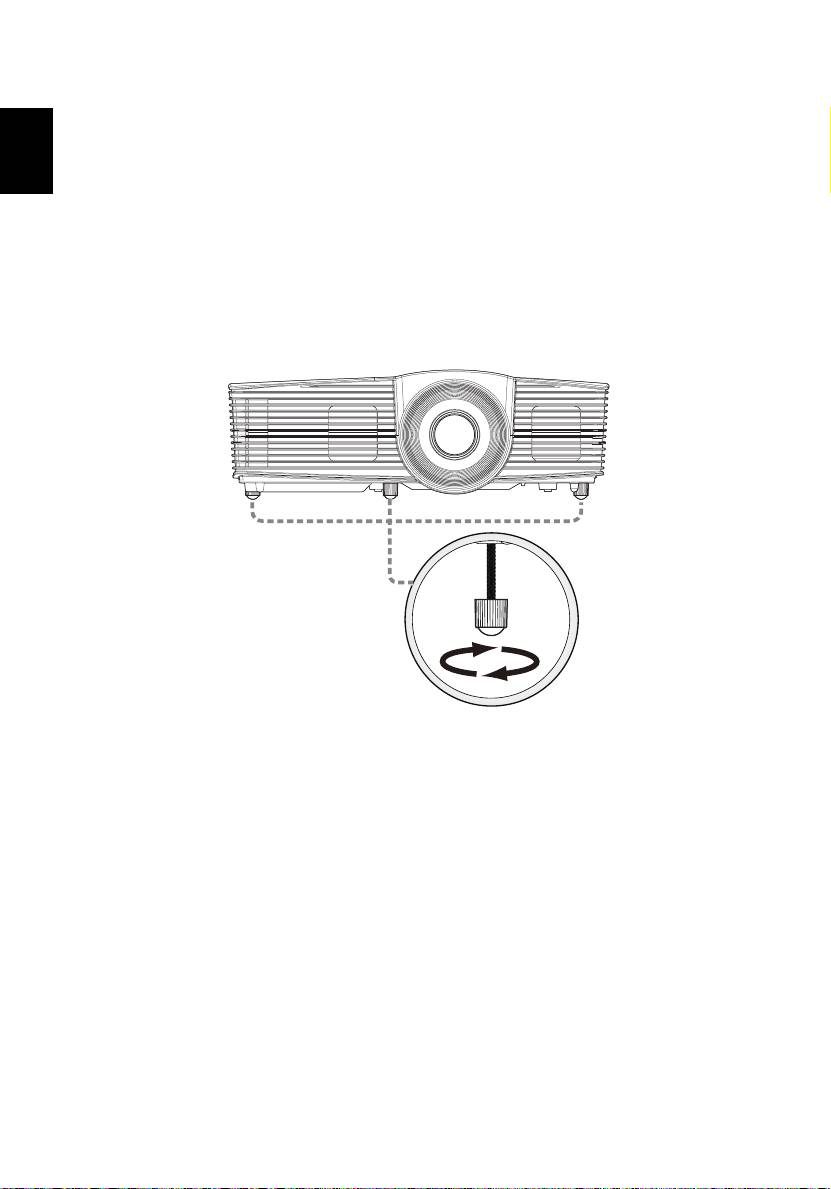
Adjusting the Height of Projected Image
The projector is equipped with elevator feet for adjusting the height of image.
To raise/lower the image:
Use Tilt adjusting wheel to fine-tune the display angle.
Tilt adjusting wheel
13
English
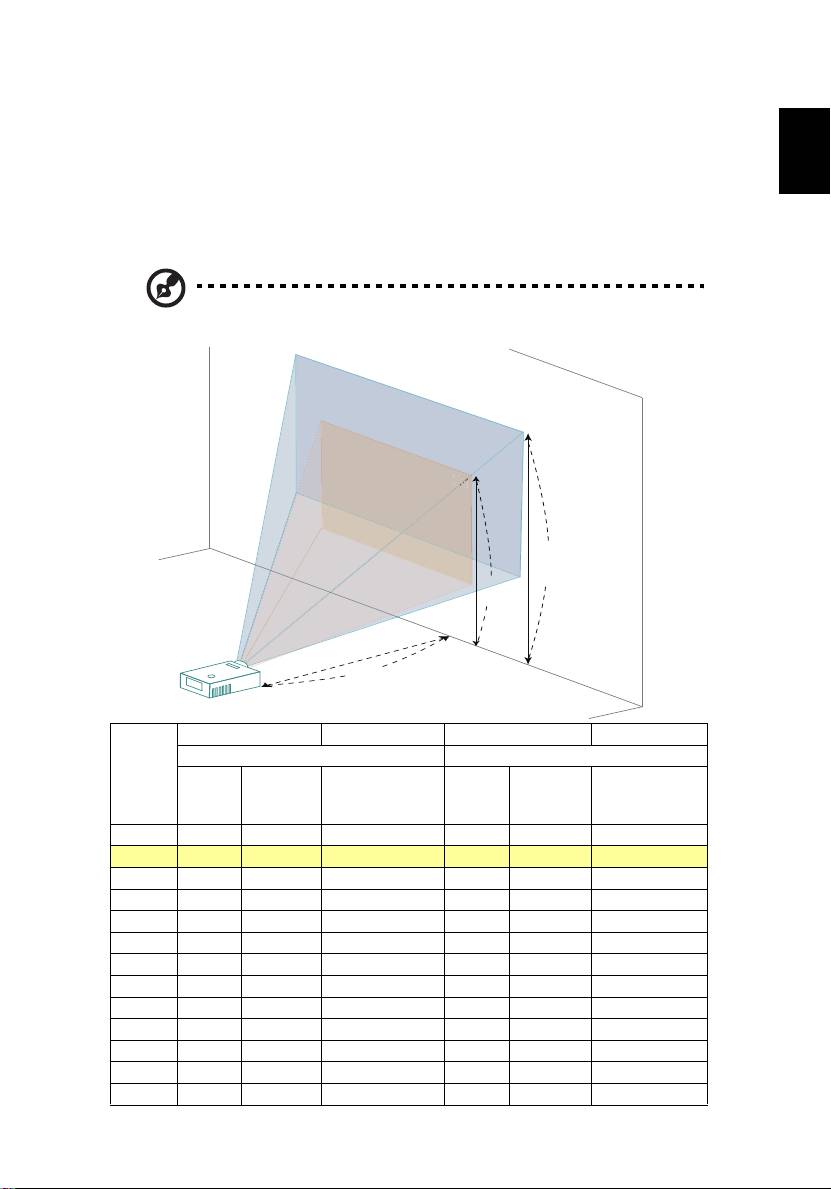
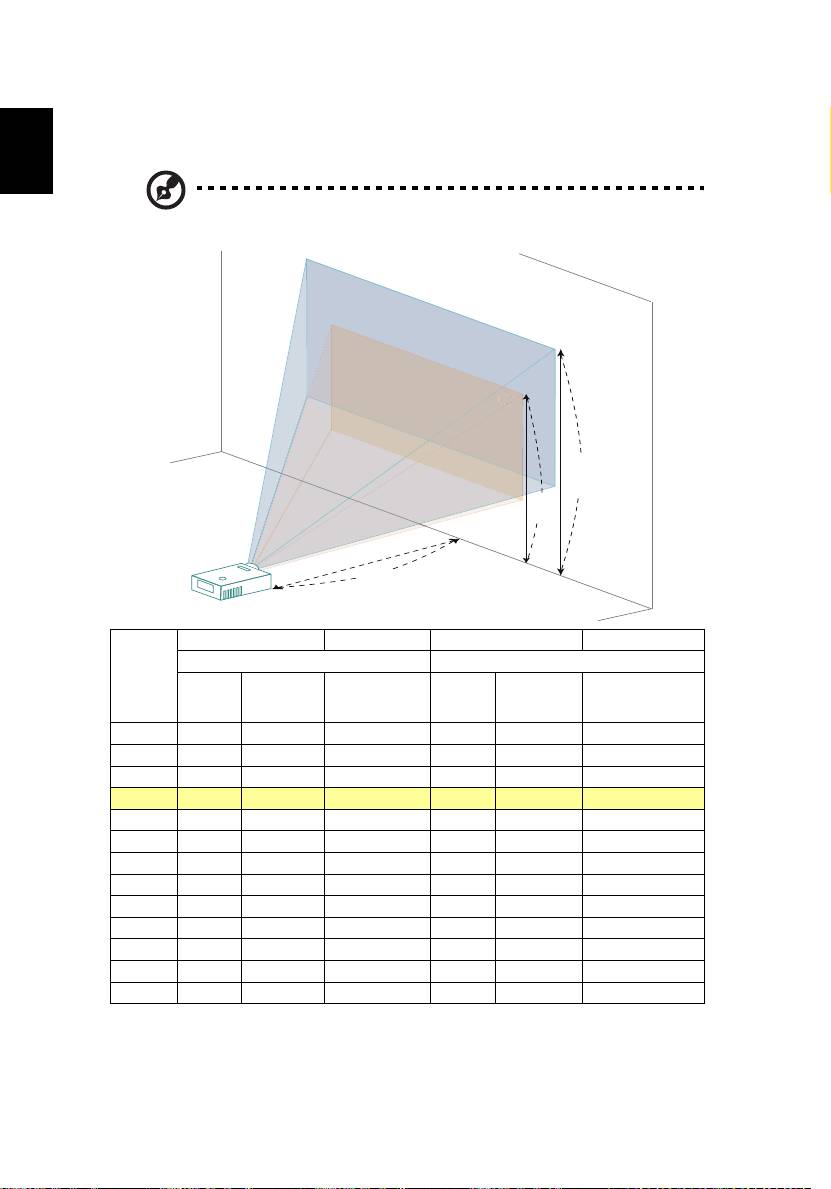
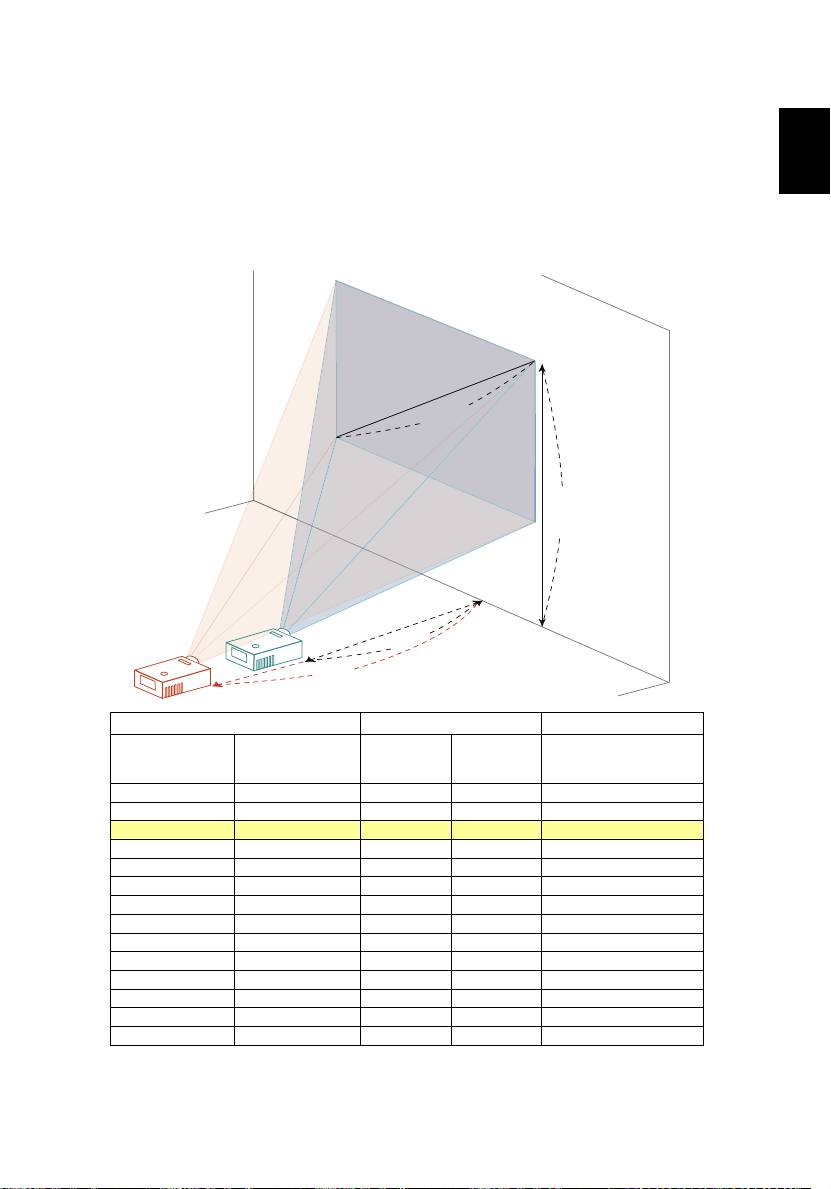
How to optimize image size and distance
Consult the table below to find the optimal image sizes achievable when the
projector is positioned at a desired distance from the screen.
• SVGA/XGA series
If the projector is 2.0 m from the screen, good image quality is possible for
image sizes between 46" and 50".
Note: Remind as below figure, the space of 88 cm height is
required when located at 2.0 m distance.
50"
46"
Screen size
Top
Screen size
Top
Desired
(Min zoom) (Max zoom)
Distance
(m)
Diagonal
From base to top
Diagonal
From base to top
W (cm) x H
W (cm) x H
<A>
(inch)
of image (cm)
(inch)
of image (cm)
(cm)
(cm)
<B>
<C>
<B>
<C>
1 23 47 x 35 40 25 51 x 38 44
2 46 93 x 70 80 50 103 x 77 88
2.5 57 116 x 87 100 63 128 x 96 111
3 69 140 x 105 120 76 154 x 115 133
3.5 80 163 x 122 140 88 179 x 135 155
4 92 186 x 140 160 101 205 x 154 177
4.5 103 209 x 157 181 114 231 x 173 199
5 114 233 x 174 201 126 256 x 192 221
6 137 279 x 209 241 151 308 x 231 265
7 160 326 x 244 281 177 359 x 269 310
8 183 372 x 279 321 202 410 x 308 354
9 206 419 x 314 361 227 462 x 346 398
10 229 465 x 349 401 252 513 x 385 442
Zoom Ratio: 1.1x
6"
6"
46"
46"
6
6"
M
a
x
s
c
r
e
e
n
s
i
z
e
M
i
n
s
c
r
e
e
n
s
B
i
z
e
Height: 88 cm
from base to
top of image
Height:
80 cm
C
A
2.0 m
Desired Distance
14
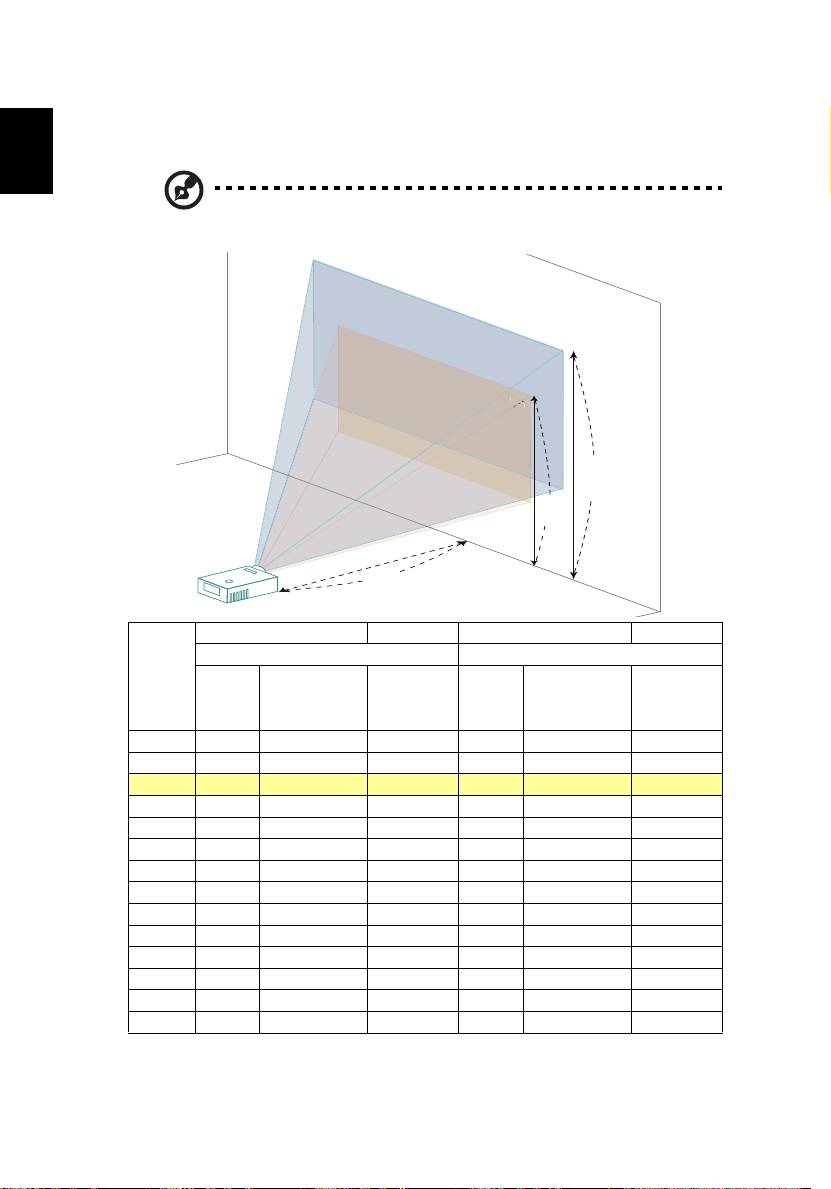
• WXGA series
If the projector is 2.0 m from the screen, good image quality is possible for
image sizes between 55" and 60".
English
Note: Remind as below figure, the space of 91 cm height is
required when located at 2.0 m distance.
60"
55"
Screen size Top Screen size Top
Desired
(Min zoom) (Max zoom)
Distance
From base
From base to
(m)
Diagonal
Diagonal
to top of
top of image
<A>
(inch)
W (cm) x H (cm)
(inch)
W (cm) x H (cm)
image (cm)
(cm)
<B>
<B>
<C>
<C>
1 27 59 x 37 41 30 65 x 40 45
1.5 41 88 x 55 62 45 97 x 60 68
2 55 118 x 74 83 60 129 x 81 91
2.5 68 147 x 92 103 75 161 x 101 113
3 82 176 x 110 124 90 194 x 121 136
3.5 96 206 x 129 145 105 226 x 141 159
4 109 235 x 147 165 120 258 x 161 181
4.5 123 265 x 165 186 135 290 x 181 204
5 137 294 x 184 207 150 323 x 202 227
6 164 353 x 221 248 180 387 x 242 272
7 191 412 x 257 289 210 452 x 282 317
8 218 471 x 294 331 240 516 x 323 363
9 246 529 x 331 372 270 581 x 363 408
10 273 588 x 368 413 300 645 x 403 453
Zoom Ratio: 1.1x
55"
55"
M
a
x
s
c
r
e
e
n
s
i
z
e
M
i
n
s
c
r
e
e
n
s
B
i
z
e
Height: 91 cm
from base to
Height:
top of image
83 cm
C
A
2.0 m
Desired Distance
15
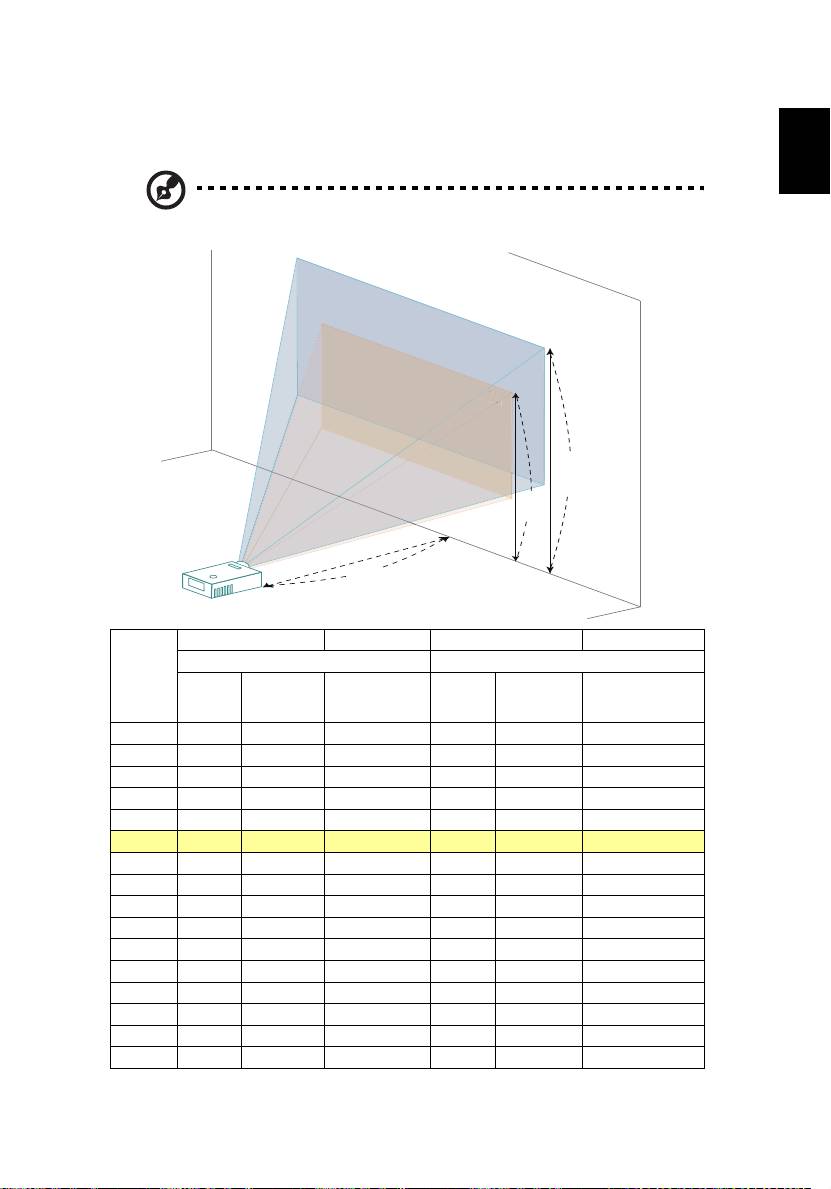
• 720p series
English
If the projector is 3 m from the screen, good image quality is possible for image
sizes between 80" and 87".
Note: Remind as below figure, the space of 130 cm height is
required when located at 3 m distance.
87"
80"
Screen size
Top
Screen size
Top
Desired
(Min zoom) (Max zoom)
Distance
(m)
Diagonal
From base to
Diagonal
From base to top
W (cm) x
W (cm) x
<A>
(inch)
top of image
(inch)
of image (cm)
H (cm)
H (cm)
<B>
(cm) <C>
<B>
<C>
0.9 24 53 x 30 36 26 58 x 33 39
1 27 59 x 33 39 29 65 x 36 43
1.5 40 88 x 50 59 44 97 x 54 65
2 53 118 x 66 79 58 129 x 73 87
2.5 66 147 x 83 99 73 161 x 91 108
3 80 176 x 99 118 87 194 x 109 130
3.5 93 206 x 116 138 102 226 x 127 152
4 106 235 x 132 158 117 258 x 145 173
4.5 120 265 x 149 178 131 290 x 163 195
5 133 294 x 165 197 146 323 x 181 216
6 159 353 x 199 237 175 387 x 218 260
7 186 412 x 232 276 204 452 x 254 303
9 239 529 x 298 355 262 581 x 327 390
10 266 588 x 331 395 291 645 x 363 433
10.5 279 618 x 347 414 306 677 x 381 455
11.8 314 694 x 390 466 34 761 x 428 511
Zoom Ratio: 1.1x
80"
0
M
a
x
s
c
r
e
e
n
s
i
z
e
M
i
n
s
c
r
e
e
n
s
i
z
e
B
Height: 130 cm
from base to
top of image
Height:
118 cm
C
A
3 m
Desired Distance
16
• 1080p series
If the projector is 3 m from the screen, good image quality is possible for image
sizes between 74" and 90".
English
Note: Remind as below figure, the space of 130 cm height is
required when located at 3 m distance.
90"
74"
Screen size
Top
Screen size
Top
Desired
(Min zoom) (Max zoom)
Distance
(m)
Diagonal
From base to
Diagonal
From base to top
W (cm) x
W (cm) x
<A>
(inch)
top of image
(inch)
of image (cm)
H (cm)
H (cm)
<B>
(cm) <C>
<B>
<C>
1.5 37 82 x 46 53 45 99 x 56 65
2 49 109 x 61 71 60 132 x 75 86
2.5 62 137 x 77 89 75 166 x 93 108
3 74 164 x 92 107 90 199 x 112 130
3.5 86 191 x 108 125 105 232 x 130 151
4 99 219 x 123 143 120 265 x 149 173
4.5 111 246 x 138 160 135 298 x 168 194
5 123 273 x 154 178 150 331 x 186 216
6 148 328 x 184 214 179 397 x 224 259
7 173 383 x 215 250 209 464 x 261 302
8 197 437 x 246 285 239 530 x 298 346
9 222 492 x 277 321 269 596 x 335 389
10 247 546 x 307 357 299 662 x 373 432
Zoom Ratio: 1.2x
74"
4
M
a
x
s
c
r
e
e
n
s
i
z
e
M
i
n
s
c
r
e
e
n
s
i
z
B
e
Height: 130 cm
from base to
top of image
Height:
107 cm
C
A
3 m
Desired Distance
17
English
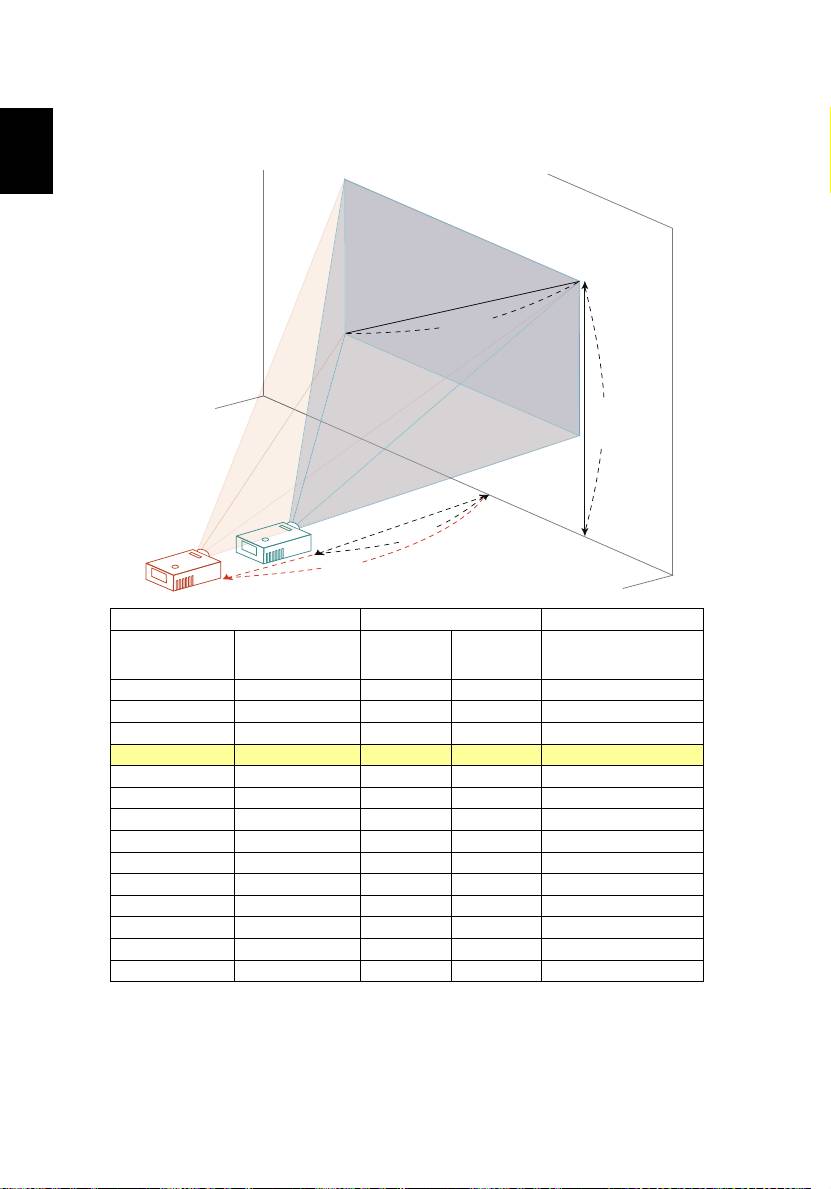
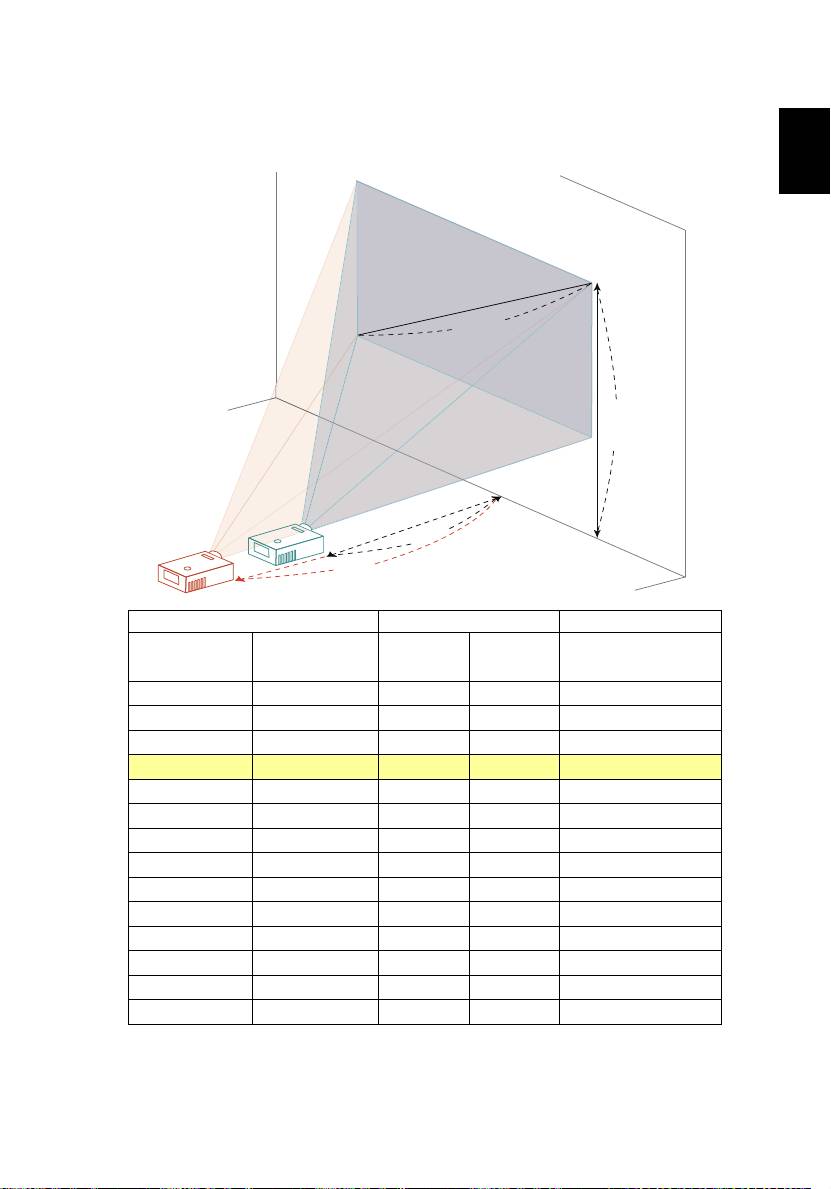
How to get a preferred image size by adjusting
distance and zoom
The table below shows how to achieve a desired image size by adjusting either
the position or the zoom ring.
• SVGA/XGA series
To obtain an image size of 50" set the projector at a distance 2.0 m and 2.2 m
from the screen.
A
50"
Desired
image size
D
Height: 88 cm
from base to top
of image
2.0 m
B
2.2 m
Desired Distance
C
Desired Image Size Distance (m) Top (cm)
From base to top of
Diagonal (inch)
Max zoom
Min zoom
W (cm) x H (cm)
image
<A>
<B>
<C>
<D>
30 61 x 46 1.2 1.3 53
40 81 x 61 1.6 1.7 70
50 102 x 76 2.0 2.2 88
60 122 x 91 2.4 2.6 105
70 142 x 107 2.8 3.1 123
80 163 x 122 3.2 3.5 140
90 183 x 137 3.6 3.9 158
100 203 x 152 4.0 4.4 175
120 244 x 183 4.8 5.2 210
150 305 x 229 5.9 6.6 263
180 366 x 274 7.1 7.9 315
200 406 x 305 7.9 8.7 351
250 508 x 381 9.9 10.9 438
300 610 x 457 11.9 526
Zoom Ratio: 1.1x
18
• WXGA series
To obtain an image size of 60" set the projector at a distance 2.0 m and 2.2 m
from the screen.
English
A
60"
Desired
image size
D
Height: 91 cm
from base to top
of image
2.0 m
B
2.2 m
Desired Distance
C
Desired Image Size Distance (m) Top (cm)
From base to top of
Diagonal (inch)
Max zoom
Min zoom
W (cm) x H (cm)
image
<A>
<B>
<C>
<D>
30 65 x 40 1.0 1.1 45
40 86 x 54 1.3 1.5 61
50 108 x 67 1.7 1.8 76
60 129 x 81 2.0 2.2 91
70 151 x 94 2.3 2.6 106
80 172 x 108 2.7 2.9 121
90 194 x 121 3.0 3.3 136
100 215 x 135 3.3 3.7 151
120 258 x 162 4.0 4.4 182
150 323 x 202 5.0 5.5 227
180 388 x 242 6.0 6.6 272
200 431 x 269 6.7 7.3 303
250 538 x 337 8.3 9.2 378
300 646 x 404 10.0 11.0 454
Zoom Ratio: 1.1x
19
• 720p series
English
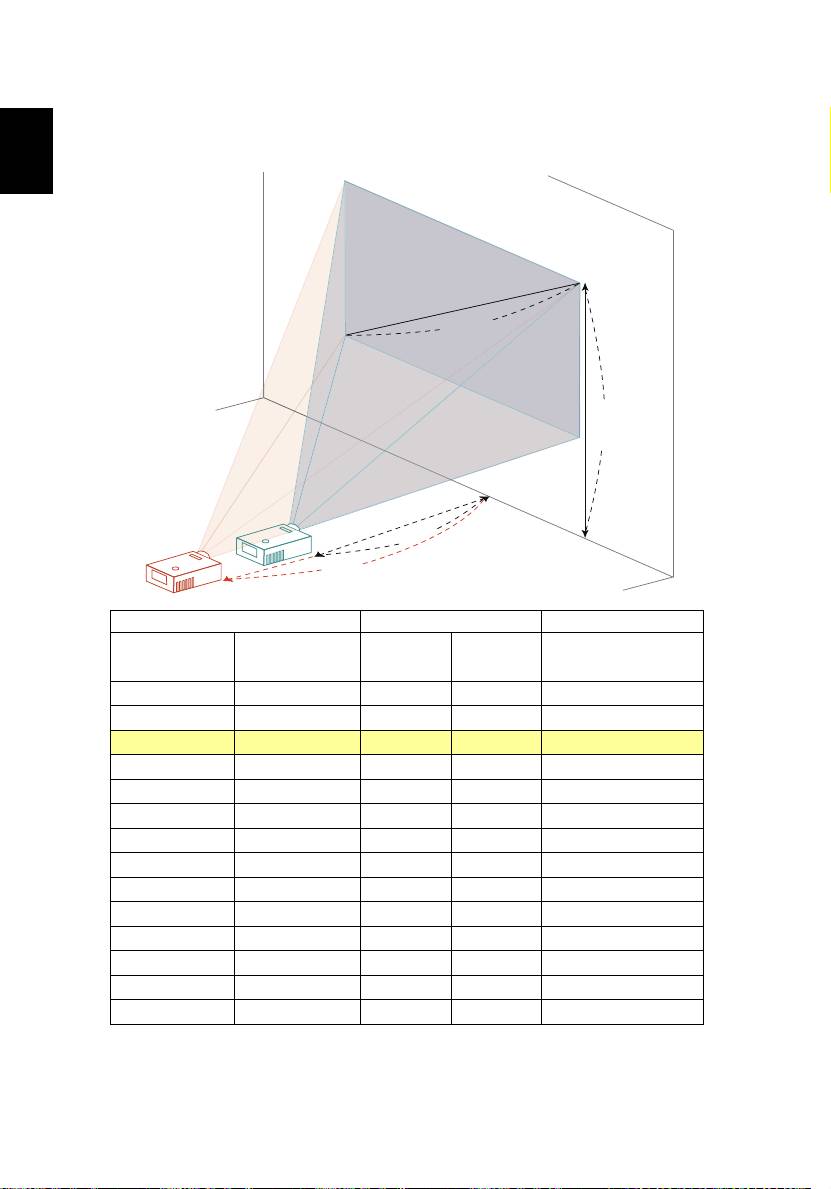
To obtain an image size of 60" set the projector at a distance 2.06 m and 2.26 m
from the screen.
A
60"
Desired
image size
D
Height: 89 cm
from base to top
of image
2.06 m
B
2.26 m
Desired Distance
C
Desired Image Size Distance (m) Top (cm)
From base to top of
Diagonal (inch)
Max zoom
Min zoom
W (cm) x H (cm)
image
<A>
<B>
<C>
<D>
26.57 59 x 33 0.91 1.00 39
30 66 x 37 1.03 1.13 45
40 89 x 50 1.37 1.51 59
60 133 x 75 2.06 2.26 89
70 155 x 87 2.40 2.63 104
80 177 x 100 2.75 3.01 119
90 199 x 112 3.09 3.39 134
100 221 x 125 3.43 3.76 149
120 266 x 149 4.12 4.52 178
150 332 x 187 5.15 5.65 223
180 398 x 224 6.18 6.77 267
250 553 x 311 8.58 9.41 371
300 664 x 374 10.29 11.29 446
306 677 x 381 10.50 11.52 455
Zoom Ratio: 1.1x
20
• 1080p series
To obtain an image size of 50" set the projector at a distance 1.7 m and 2.0 m
from the screen.
English
A
50"
Desired
image size
D
Height: 72 cm
from base to top
of image
1.7 m
B
2.0 m
Desired Distance
C
Desired Image Size Distance (m) Top (cm)
From base to top of
Diagonal (inch)
Max zoom
Min zoom
W (cm) x H (cm)
image
<A>
<B>
<C>
<D>
30 66 x 37 1.0 1.2 43
40 89 x 50 1.3 1.6 58
50 111 x 62 1.7 2.0 72
60 133 x 75 2.0 2.4 87
70 155 x 87 2.3 2.8 101
80 177 x 100 2.7 3.2 116
90 199 x 112 3.0 3.6 130
100 221 x 125 3.3 4.1 144
120 266 x 149 4.0 4.9 173
150 332 x 187 5.0 6.1 217
180 398 x 224 6.0 7.3 260
200 443 x 249 6.7 8.1 289
250 553 x 311 8.4 10.1 361
300 664 x 374 10.0 *** 433
Zoom Ratio: 1.2x
