
Olympus Stylus Verve: What can this camera do?
What can this camera do?: Olympus Stylus Verve
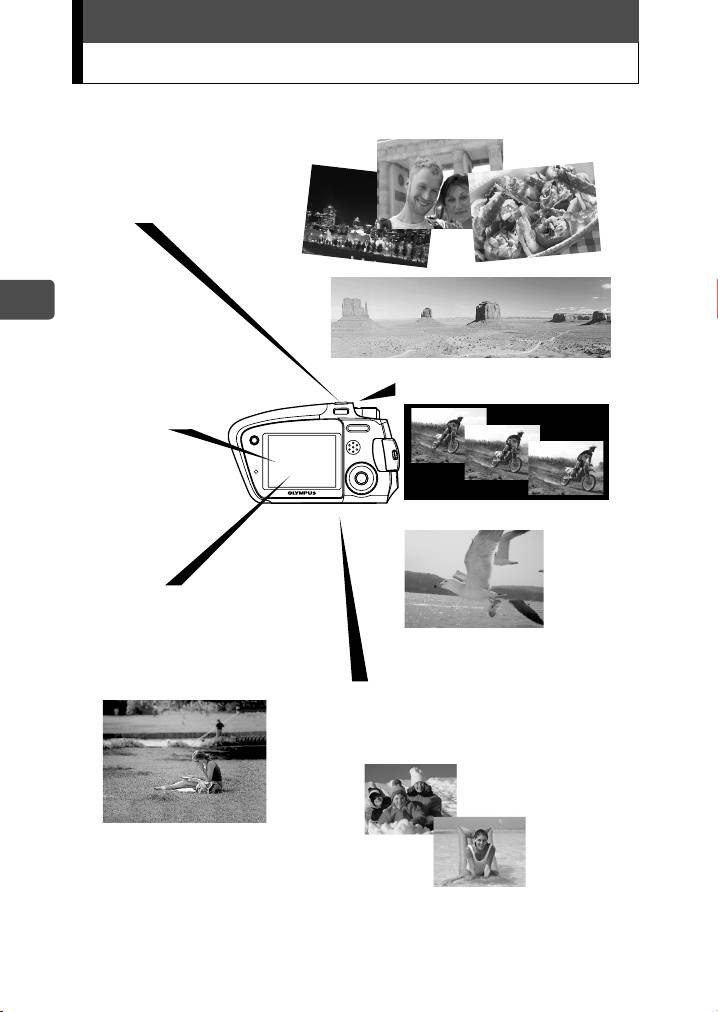
What can this camera do?
En
4
Th
e camera
h
as
14
s
h
oo
ti
000e_kisohen.book Page 4 Friday, July 30, 2004 7:06 PM
ng
modes.
Just choose a desired
shooting mode and press the
shutter button to take
pictures. The camera does all
the rest.
You can frame, take,
You can take successive
and view your shots
pictures
all on the very clear
1.8" monitor.
You can also record movies
The camera automatically
focuses on the subject even
if it is off-center and not
within the AF Target Mark on
the monitor.
([iESP] is set in [AF MODE].)
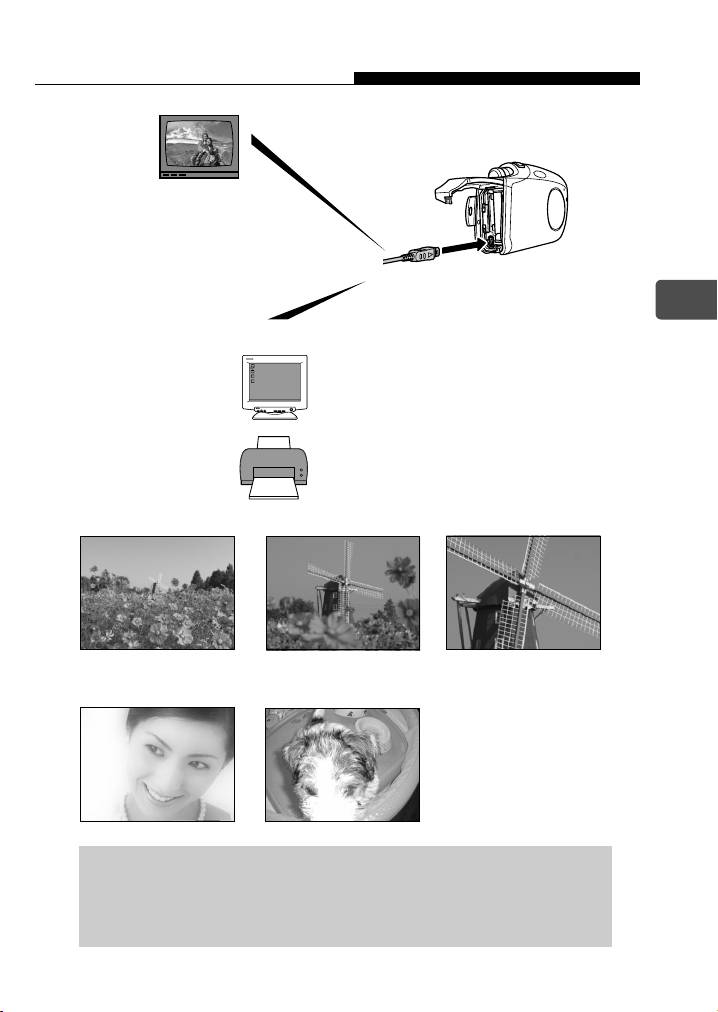
Since this camera is weatherproof,
it can be used at the pool side, ski
slopes, or other situations with no
worries about being splashed.
000e_kisohen.book Page 5 Friday, July 30, 2004 7:06 PM
What can this camera do?
The camera can play
back the pictures using
a TV.
En
When the camera is connected to a computer or printer...
Image data stored on the card can be
transmitted or played back by installing
supplied CD-ROM.
Connect the camera to a PictBridge
compatible printer, and you can print your
pictures without the use of a computer.
Use the 2x optical zoom and digital zoom (total 8x seamless zoom) to get
up close to the subject.
1x Optical 2x Optical 8x (Total Seamless Zoom)
Experiment with fun effects (Soft Focus and Fish-Eye examples below) without
losing your original images because they are automatically saved as new files.
Soft Focus Fish-Eye
For the details of the operation and advanced use of the camera,
see the separate Advanced manual (PDF on included CD-ROM)
which also describes about the installation of the software
provided, error messages and troubleshooting.
5
000e_kisohen.book Page 6 Friday, July 30, 2004 7:06 PM
For customers in North and South America
For customers in USA
Declaration of Conformity
Model Number : Stylus Verve, µ-mini DIGITAL
Trade Name : OLYMPUS
Responsible Party :
Address : Two Corporate Center Drive, PO Box 9058,
Melville, NY 11747-9058 U.S.A.
Telephone Number : 1-631-844-5000
Tested To Comply With FCC Standards
En
FOR HOME OR OFFICE USE
This device complies with Part 15 of the FCC rules. Operation is
subject to the following two conditions:
(1) This device may not cause harmful interference.
(2) This device must accept any interference received, including
interference that may cause undesired operation.
For customers in Canada
This Class B digital apparatus meets all requirements of the
Canadian Interference-Causing Equipment Regulations.
For customers in Europe
“CE” mark indicates that this product complies with the European
requirements for safety, health, environment and customer protection.
“CE” mark cameras are intended for sales in Europe.
Trademarks
• IBM is a registered trademark of International Business Machines Corporation.
• Microsoft and Windows are registered trademarks of Microsoft Corporation.
• Macintosh is a trademark of Apple Computer Inc.
• All other company and product names are registered trademarks and/or trademarks of
their respective owners.
• The standards for camera file systems referred to in this manual are the “Design Rule for
Camera File System/DCF” standards stipulated by the Japan Electronics and Information
Technology Industries Association (JEITA).
This manual describes about the basic operations of taking pictures and playing back
the pictures taken. For detailed functions and operations, please read the Advanced
manual (CD-ROM).
Please thoroughly read the manuals before using the camera. When you plan to take
important pictures while travelling abroad for instance, make sure if the camera
functions properly by taking a few trial pictures.
The monitor screen shots and the camera illustrations used in the manuals may differ
from the actual ones.
6
Table of contents
- Contents
- Unpacking the box contents
- What can this camera do?
- Safety precautions
- Weatherproof feature
- Attaching the strap
- Charging the battery
- Loading and removing the battery
- Inserting and removing the picture card
- Power on/off
- Holding the camera correctly
- Taking still pictures
- Playing back still pictures
- Information on OLYMPUS Master
- Table des matières
- Déballage du contenu du carton
- Quelles sont les possibilités de cet appareil photo ?
- Consignes de sécurité
- Imperméabilité
- Fixation de la courroie
- Recharge de la batterie
- Mise en place et retrait de la batterie
- Insertion et retrait de la carte
- Mise en marche/arrêt
- La prise en main de l’appareil
- Prise de vues fixes
- Lecture d’images fixes
- Informations sur OLYMPUS Master
- Contenidos
- Desembalaje del contenido de la caja
- ¿Qué puede hacer esta cámara?
- Precauciones de seguridad
- Resistencia al agua
- Fijación de la correa
- Carga de la batería
- Cómo instalar y retirar la batería
- Cómo insertar y extraer la tarjeta fotográfica
- Encendido/apagado de la cámara
- Sujeción correcta de la cámara
- Toma de fotografías
- Reproducción de fotografías
- Información sobre OLYMPUS Master
- Inhalt
- Inhalt der Verpackung
- Funktionen der Kamera
- Vorsichtsmaßnahmen
- Spritzwasserbeständigkeit
- Anbringen des Trageriemens
- Aufladen des Akkus
- Einlegen und Herausnehmen des Akkus
- Einlegen und Herausnehmen der Karte
- Ein- und Ausschalten der Kamera
- Richtige Kamerahaltung
- Einzelbildaufnahme
- Wiedergabe von Einzelbildern
- Installieren der OLYMPUS Master-Software
- Indice
- Verifica del contenuto della confezione
- Funzionalità della fotocamera
- Precauzioni di sicurezza
- Progettata per qualsiasi condizione atmosferica
- Attacco della tracolla
- Caricamento della batteria
- Caricamento e rimozione della batteria
- Inserimento e rimozione della scheda di memoria
- Accensione/spegnimento
- Impugnatura corretta della fotocamera
- Scatto di fotografie
- Riproduzione di fotografie
- Informazioni su OLYMPUS Master
- Содержание
- Содержимое комплекта
- Возможности данной камеры.
- Меры безопасности
- Защищенный корпус
- Прикрепление ремешка
- Зарядка аккумулятора
- Установка и извлечение аккумулятора
- Установка и извлечение карты памяти
- Включение/выключение камеры
- Правильное положение камеры
- Фотосъемка
- Просмотр фотографий
- Информация по программному обеспечению OLYMPUS Master


