
Olympus Stylus Verve: Lecture d’images fixes
Lecture d’images fixes: Olympus Stylus Verve
000e_kisohen.book Page 52 Friday, July 30, 2004 7:06 PM
Lecture d’images fixes
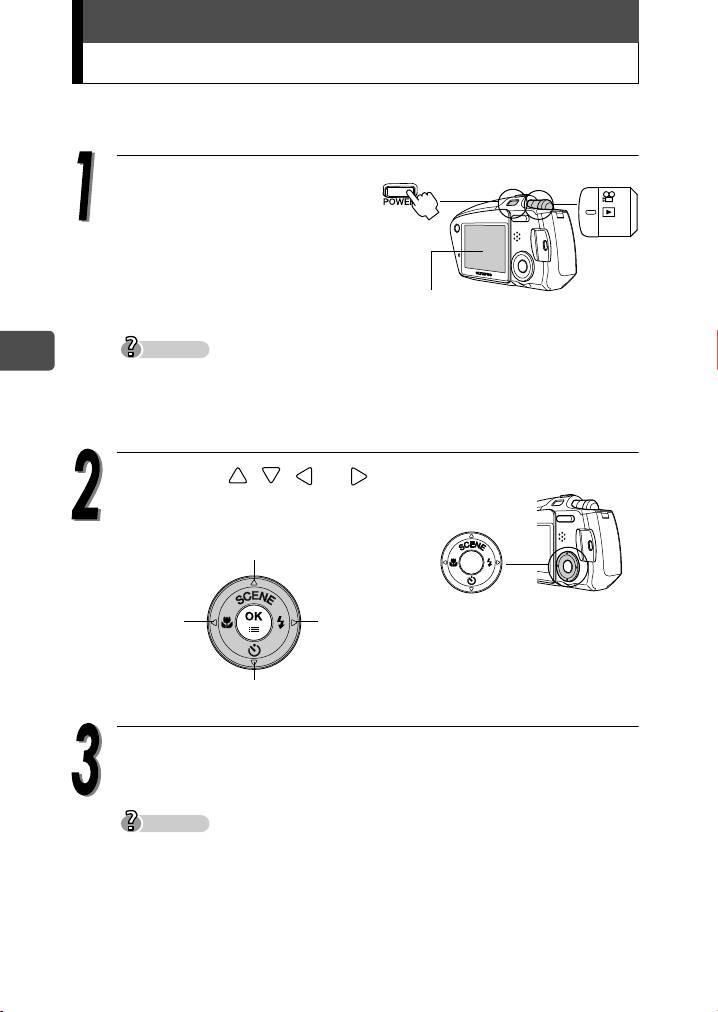
Lorsque le mode affichage est activé, la dernière photo prise apparaît
sur l’écran ACL.
Réglez la molette de
sélection du mode sur q,
puis appuyez sur
l’interrupteur POWER.
Le mode affichage est
sélectionné et la dernière photo
Écran ACL
prise apparaît sur l’écran ACL.
Conseils
Fr
Lorsque vous allumez l’appareil photo en mode de prise de vue, appuyez
sur la touche QUICK VIEW affiche les images. (QUICK VIEW)
Les informations de prise de vue affichées sur l’écran ACL disparaissent
après 3 secondes.
Appuyez sur , , ou sur la
molette de défilement pour faire
défiler les images.
Affiche la 10e photo en arrière
Affiche la photo
Affiche la
précédente
photo
suivante
Affiche la 10e photo en avant
Appuyez sur l’interrupteur POWER pour éteindre l’appareil
photo.
Conseils
Si l’image est affichée à l’aide de la touche QUICK VIEW pendant la prise de
vue, le mode de prise de vue peut être rétabli en procédant de la manière
suivante.
Appuyez sur la touche QUICK VIEW ou appuyez sur le déclencheur à mi-
course.
52
Table of contents
- Contents
- Unpacking the box contents
- What can this camera do?
- Safety precautions
- Weatherproof feature
- Attaching the strap
- Charging the battery
- Loading and removing the battery
- Inserting and removing the picture card
- Power on/off
- Holding the camera correctly
- Taking still pictures
- Playing back still pictures
- Information on OLYMPUS Master
- Table des matières
- Déballage du contenu du carton
- Quelles sont les possibilités de cet appareil photo ?
- Consignes de sécurité
- Imperméabilité
- Fixation de la courroie
- Recharge de la batterie
- Mise en place et retrait de la batterie
- Insertion et retrait de la carte
- Mise en marche/arrêt
- La prise en main de l’appareil
- Prise de vues fixes
- Lecture d’images fixes
- Informations sur OLYMPUS Master
- Contenidos
- Desembalaje del contenido de la caja
- ¿Qué puede hacer esta cámara?
- Precauciones de seguridad
- Resistencia al agua
- Fijación de la correa
- Carga de la batería
- Cómo instalar y retirar la batería
- Cómo insertar y extraer la tarjeta fotográfica
- Encendido/apagado de la cámara
- Sujeción correcta de la cámara
- Toma de fotografías
- Reproducción de fotografías
- Información sobre OLYMPUS Master
- Inhalt
- Inhalt der Verpackung
- Funktionen der Kamera
- Vorsichtsmaßnahmen
- Spritzwasserbeständigkeit
- Anbringen des Trageriemens
- Aufladen des Akkus
- Einlegen und Herausnehmen des Akkus
- Einlegen und Herausnehmen der Karte
- Ein- und Ausschalten der Kamera
- Richtige Kamerahaltung
- Einzelbildaufnahme
- Wiedergabe von Einzelbildern
- Installieren der OLYMPUS Master-Software
- Indice
- Verifica del contenuto della confezione
- Funzionalità della fotocamera
- Precauzioni di sicurezza
- Progettata per qualsiasi condizione atmosferica
- Attacco della tracolla
- Caricamento della batteria
- Caricamento e rimozione della batteria
- Inserimento e rimozione della scheda di memoria
- Accensione/spegnimento
- Impugnatura corretta della fotocamera
- Scatto di fotografie
- Riproduzione di fotografie
- Informazioni su OLYMPUS Master
- Содержание
- Содержимое комплекта
- Возможности данной камеры.
- Меры безопасности
- Защищенный корпус
- Прикрепление ремешка
- Зарядка аккумулятора
- Установка и извлечение аккумулятора
- Установка и извлечение карты памяти
- Включение/выключение камеры
- Правильное положение камеры
- Фотосъемка
- Просмотр фотографий
- Информация по программному обеспечению OLYMPUS Master


