
Olympus Stylus Verve: Safety precautions
Safety precautions: Olympus Stylus Verve
000e_kisohen.book Page 7 Friday, July 30, 2004 7:06 PM
Safety precautions
Before using this camera, please thoroughly read the precautions
hereinunder as well as “Precautions” for use shown in the Advanced
manual.
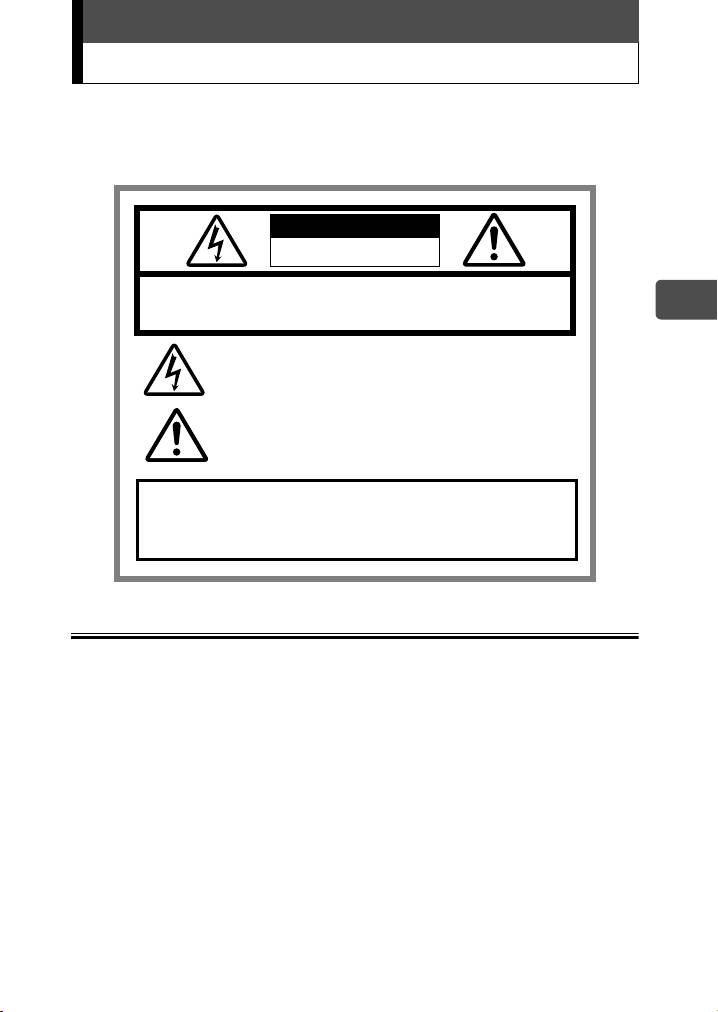
CAUTION
RISK OF ELECTRIC SHOCK
DO NOT OPEN
CAUTION:
TO REDUCE THE RISK OF ELECTRICAL SHOCK, DO NOT
REMOVE COVER (OR BACK). NO USER-SERVICEABLE PARTS INSIDE.
En
REFER SERVICING TO QUALIFIED OLYMPUS SERVICE PERSONNEL.
Lightning flash with an arrowhead, enclosed in a triangle, alerts
you to the presence of uninsulated voltage points
inside the product which could cause a serious electrical shock.
An exclamation mark enclosed in a triangle alerts you to important
operating and maintenance instructions in the
documentation provided with the product.
WARNING!
TO AVOID THE RISK OF FIRE OR ELECTRICAL SHOCK, NEVER EXPOSE
THIS PRODUCT TO WATER OR OPERATE IN A HIGH HUMIDITY
ENVIRONMENT.
General precautions
Read All Instructions — Before you use the product, read all operating instructions.
Save These Instructions — Save all safety and operating instructions for future
reference.
Heed Warnings — Read carefully and follow all warning labels on the product and those
described in the instructions.
Follow Instructions — Follow all instructions provided with this product.
Cleaning — Always unplug this product from the wall outlet before cleaning. Use only a
damp cloth for cleaning. Never use any type of liquid or aerosol cleaner, or any type of
organic solvent to clean this product.
Attachments — For your safety, and to avoid damaging the product, use only
accessories recommended by Olympus.
Water and Moisture — Never use this product around water (near a bathtub, kitchen
sink, laundry tub, wet basement, swimming pool or in the rain).
Location — To avoid damage to the product and prevent personal injury, never place
this product on an unstable stand, tripod, bracket, table or cart. Mount only on a stable
tripod, stand, or bracket. Follow the instructions that describe how to safely mount the
product, and use only the mounting devices recommended by the manufacturer.
Power Sources — Connect this product only to the power source described on the
product label. If you are not sure about the type of power supply in your home, consult
your local power company.
Refer to your operating instructions for information on using the product with a battery.
7
000e_kisohen.book Page 8 Friday, July 30, 2004 7:06 PM
Safety precautions
Grounding, Polarization — If this product can be used with a specified AC adapter, the
adapter may be equipped with a polarized alternating current line plug (a plug with one
blade wider than the other). This safety feature allows the plug to fit into the power outlet
only one way. If you cannot insert the plug into the wall outlet, pull it out, reverse it, and
then reinsert it. If the plug still fails to fit, contact an electricalian and have the receptacle
replaced.
Protecting the Power Cord — The power supply cord should be placed so it will not be
walked on. Never put a heavy object on the power cord or wrap it around the leg of a
table or chair. Keep the area around the power cord connection points, at the power
outlet, and at the product connection, free of all AC adapter or accessory power cords.
Lightning — If a lightning storm occurs while using a specified AC adapter, remove it
from the wall outlet immediately. To avoid damage from unexpected power surges,
always unplug the AC adapter from the power outlet and disconnect it from the camera
when the camera is not in use.
En
Overloading — Never overload wall outlets, extension cords, power strips, or other
power connection points with too many plugs.
Foreign Objects, Liquid Spillage — To avoid personal injury caused by fire or electrical
shock from contact with internal high voltage points, never insert a metal object into the
product.
Avoid using the product where there is a danger of spillage.
Heat — Never use or store this product near any heat source such as a radiator, heat
register, stove, or any type of equipment or appliance that generates heat, including
stereo amplifiers.
Servicing — Refer all servicing to qualified personnel. Attempting to remove the covers
or disassemble the product, could expose you to dangerous high voltage points.
Damage Requiring Service — If you notice any of the conditions described below while
using a specified AC adapter, unplug it from the wall outlet and refer servicing to qualified
service personnel:
a) Liquid has been spilled onto the product or some other object has fallen into the
product.
b) The product has been exposed to water.
c) The product does not operate normally despite following operating instructions.
Adjust only the controls described in the operating instructions as improper
adjustment of other controls could damage the product and require extensive repair
work by a qualified technician.
d) The product has been dropped or damaged in any way.
e) The product exhibits a distinct change in performance.
Replacement Parts — When replacement parts are required, make sure that the service
center uses only parts with the same characteristics as the originals, as recommended by
the manufacturer. Unauthorized substitution of parts could result in fire, electrical shock,
or create other hazards.
Safety Check — Upon completion of servicing or repairs, ask the service technician to
perform safety checks to determine that the product is in good working order.
FCC Notice
Radio and Television Interference
Change or modifications not expressly approved by the manufacturer may void the user’s
authority to operate this equipment. This equipment has been tested and found to comply
with the limits for a Class B digital device, pursuant to Part 15 of the FCC Rules. These limits
are designed to provide reasonable protection against harmful interference in a residential
installation.
This equipment generates, uses, and can radiate radio frequency energy and, if not installed
and used in accordance with the instructions, may cause harmful interference to radio
communications.
However, there is no guarantee that interference will not occur in a particular installation. If
this equipment does cause harmful interference to radio or television reception, which can
be determined by turning the equipment off and on, the user is encouraged to try to correct
the interference by one or more of the following measures:
8
000e_kisohen.book Page 9 Friday, July 30, 2004 7:06 PM
Safety precautions
• Adjust or relocate the receiving antenna.
• Increase the distance between the camera and receiver.
• Connect the equipment to an outlet on a circuit different from that to which the
receiver is connected.
• Consult your dealer or an experienced radio/TV technician for help.
Only the OLYMPUS-supplied USB cable should be used to connect the camera to
USB-enabled personal computers (PC).
Any unauthorized changes or modifications to this equipment would void the user's authority
to operate.
Legal and other notices
Olympus makes no representations or warranties regarding any damages, or benefit
En
expected by using this unit lawfully, or any request from a third person, which are caused
by the inappropriate use of this product.
Olympus makes no representations or warranties regarding any damages or any benefit
expected by using this unit lawfully which are caused by erasing picture data.
Disclaimer of Warranty
Olympus makes no representations or warranties, either expressed or implied, by or
concerning any content of these written materials or software, and in no event shall be
liable for any implied warranty of merchantability or fitness for any particular purpose or
for any consequential, incidental or indirect damages (including but not limited to
damages for loss of business profits, business interruption and loss of business
information) arising from the use or inability to use these written materials or software or
equipment. Some countries do not allow the exclusion or limitation of liability for
consequential or incidental damages, so the above limitations may not apply to you.
Olympus reserves all rights to this manual.
WARNING
Unauthorized photographing or use of copyrighted material may violate applicable
copyright laws. Olympus assumes no responsibility for unauthorized photographing, use
or other acts that infringe upon the rights of copyright owners.
Copyright Notice
All rights reserved. No part of these written materials or this software may be reproduced
or used in any form or by any means, electronic or mechanical, including photocopying
and recording or the use of any type of information storage and retrieval system, without
the prior written permission of Olympus. No liability is assumed with respect to the use of
the information contained in these written materials or software, or for damages resulting
from the use of the information contained therein. Olympus reserves the right to alter the
features and contents of this publication or software without obligation or advance notice.
9
Table of contents
- Contents
- Unpacking the box contents
- What can this camera do?
- Safety precautions
- Weatherproof feature
- Attaching the strap
- Charging the battery
- Loading and removing the battery
- Inserting and removing the picture card
- Power on/off
- Holding the camera correctly
- Taking still pictures
- Playing back still pictures
- Information on OLYMPUS Master
- Table des matières
- Déballage du contenu du carton
- Quelles sont les possibilités de cet appareil photo ?
- Consignes de sécurité
- Imperméabilité
- Fixation de la courroie
- Recharge de la batterie
- Mise en place et retrait de la batterie
- Insertion et retrait de la carte
- Mise en marche/arrêt
- La prise en main de l’appareil
- Prise de vues fixes
- Lecture d’images fixes
- Informations sur OLYMPUS Master
- Contenidos
- Desembalaje del contenido de la caja
- ¿Qué puede hacer esta cámara?
- Precauciones de seguridad
- Resistencia al agua
- Fijación de la correa
- Carga de la batería
- Cómo instalar y retirar la batería
- Cómo insertar y extraer la tarjeta fotográfica
- Encendido/apagado de la cámara
- Sujeción correcta de la cámara
- Toma de fotografías
- Reproducción de fotografías
- Información sobre OLYMPUS Master
- Inhalt
- Inhalt der Verpackung
- Funktionen der Kamera
- Vorsichtsmaßnahmen
- Spritzwasserbeständigkeit
- Anbringen des Trageriemens
- Aufladen des Akkus
- Einlegen und Herausnehmen des Akkus
- Einlegen und Herausnehmen der Karte
- Ein- und Ausschalten der Kamera
- Richtige Kamerahaltung
- Einzelbildaufnahme
- Wiedergabe von Einzelbildern
- Installieren der OLYMPUS Master-Software
- Indice
- Verifica del contenuto della confezione
- Funzionalità della fotocamera
- Precauzioni di sicurezza
- Progettata per qualsiasi condizione atmosferica
- Attacco della tracolla
- Caricamento della batteria
- Caricamento e rimozione della batteria
- Inserimento e rimozione della scheda di memoria
- Accensione/spegnimento
- Impugnatura corretta della fotocamera
- Scatto di fotografie
- Riproduzione di fotografie
- Informazioni su OLYMPUS Master
- Содержание
- Содержимое комплекта
- Возможности данной камеры.
- Меры безопасности
- Защищенный корпус
- Прикрепление ремешка
- Зарядка аккумулятора
- Установка и извлечение аккумулятора
- Установка и извлечение карты памяти
- Включение/выключение камеры
- Правильное положение камеры
- Фотосъемка
- Просмотр фотографий
- Информация по программному обеспечению OLYMPUS Master


