
Olympus Stylus Verve: Inserting and removing the picture card
Inserting and removing the picture card: Olympus Stylus Verve
000e_kisohen.book Page 16 Friday, July 30, 2004 7:06 PM
Inserting and removing the picture card
xD-Picture Card
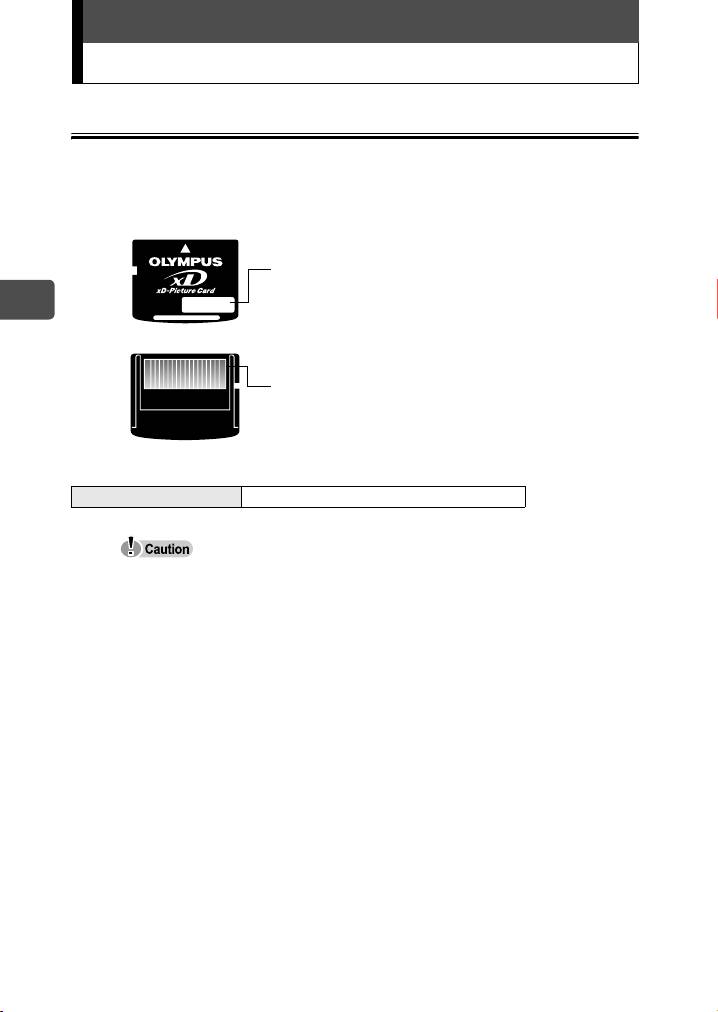
This camera uses an xD-Picture Card to record pictures. “Card” in this
manual refers to the xD-Picture Card. Pictures recorded and stored on
the card can be erased or transferred and edited on a computer.
You can use this space to briefly describe the
contents of the card.
En
These are the contacts for reading the
camera signals. Do not touch the gold area.
Compatible cards xD-Picture Card (16MB to 512MB)
This camera may not recognize a non-Olympus card or a card that was
formatted on another device (such as a computer). Before use, be sure to
format the card on this camera. For details, see the Advanced manual
(CD-ROM) supplied separately.
16
000e_kisohen.book Page 17 Friday, July 30, 2004 7:06 PM
Inserting and removing the picture card
Inserting the card
This camera stores image data on an xD-Picture Card. No pictures can
be stored unless a card has been inserted in the camera.
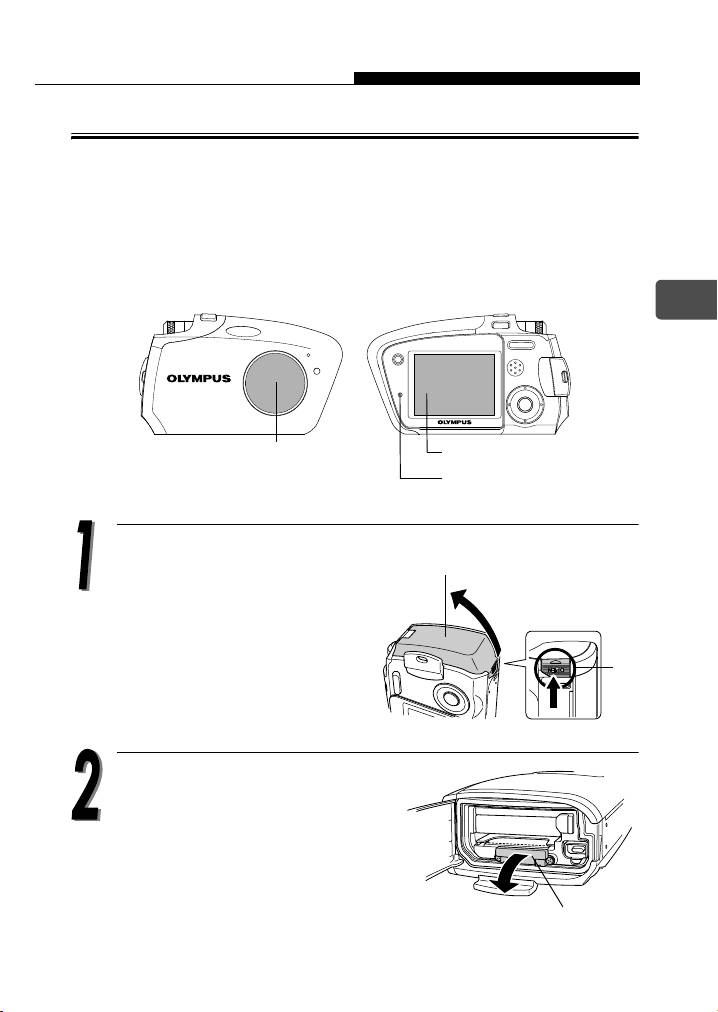
Check the following items before inserting or removing the card:
cThe lens barrier is closed.
dThe monitor is off.
eThe lamp is off.
En
cLens barrier
dMonitor
eLamp
Press and hold the button A.
Battery compartment/
connector cover
While pressing, push the
battery compartment/
connector cover in the
direction of the arrow.
A
Open the card cover. Use your
fingertips to pull the card cover
towards you.
Card cover
17
000e_kisohen.book Page 18 Friday, July 30, 2004 7:06 PM
Inserting and removing the picture card
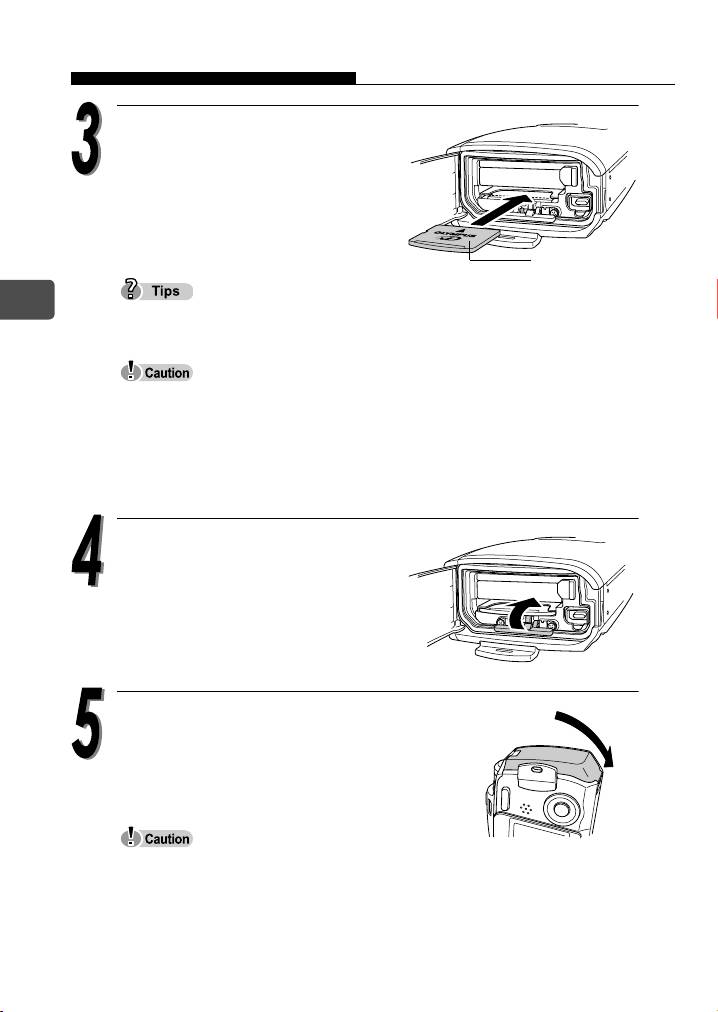
Orient the card and insert it into
the spring-loaded card slot as
shown.
The card will lock into place when
fully inserted.
Card
En
Push the card in as far as it will go.
The card can only be inserted one way; inserting it with incorrect
orientation or obliquely may cause damage to the connectors and the
card may get stuck in the camera.
If the card is not fully inserted in place, the pictures may not be stored
on the card.
Close the card cover.
Close the battery compartment/
connector cover as indicated by the
arrow.
If the card cover is open, the battery compartment/connector cover cannot
be closed.
18
000e_kisohen.book Page 19 Friday, July 30, 2004 7:06 PM
Inserting and removing the picture card
Removing the card
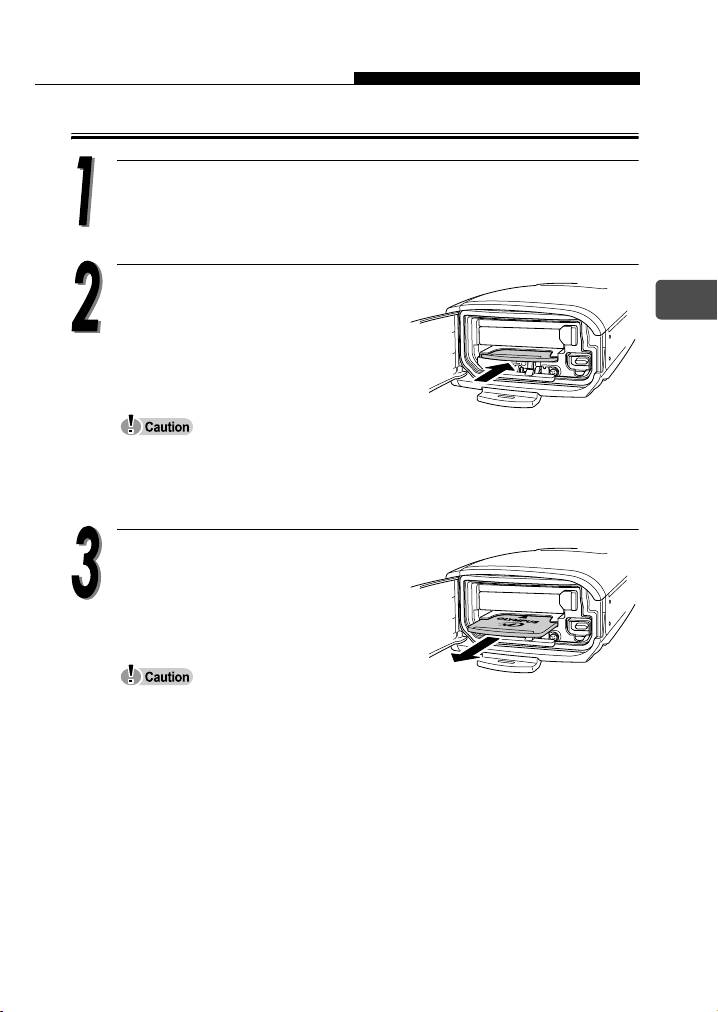
Open the battery compartment/connector cover and then open
the card cover.
Push the card all the way into
En
unlock it, then release your finger
slowly to let the card eject slowly.
The card will be partially ejected.
Do not push the card in with a hard or pointed item such as a ballpoint pen.
Releasing your finger quickly after pushing the card in may cause it to shoot
out of the slot.
Remove the card.
Never open the card cover while the camera is turned on. Such action could
destroy all the data on the card. Once destroyed, data cannot be restored.
Do not place any sticker on the cards. Doing so may cause the card get
stuck in the camera and will not eject.
19
Table of contents
- Contents
- Unpacking the box contents
- What can this camera do?
- Safety precautions
- Weatherproof feature
- Attaching the strap
- Charging the battery
- Loading and removing the battery
- Inserting and removing the picture card
- Power on/off
- Holding the camera correctly
- Taking still pictures
- Playing back still pictures
- Information on OLYMPUS Master
- Table des matières
- Déballage du contenu du carton
- Quelles sont les possibilités de cet appareil photo ?
- Consignes de sécurité
- Imperméabilité
- Fixation de la courroie
- Recharge de la batterie
- Mise en place et retrait de la batterie
- Insertion et retrait de la carte
- Mise en marche/arrêt
- La prise en main de l’appareil
- Prise de vues fixes
- Lecture d’images fixes
- Informations sur OLYMPUS Master
- Contenidos
- Desembalaje del contenido de la caja
- ¿Qué puede hacer esta cámara?
- Precauciones de seguridad
- Resistencia al agua
- Fijación de la correa
- Carga de la batería
- Cómo instalar y retirar la batería
- Cómo insertar y extraer la tarjeta fotográfica
- Encendido/apagado de la cámara
- Sujeción correcta de la cámara
- Toma de fotografías
- Reproducción de fotografías
- Información sobre OLYMPUS Master
- Inhalt
- Inhalt der Verpackung
- Funktionen der Kamera
- Vorsichtsmaßnahmen
- Spritzwasserbeständigkeit
- Anbringen des Trageriemens
- Aufladen des Akkus
- Einlegen und Herausnehmen des Akkus
- Einlegen und Herausnehmen der Karte
- Ein- und Ausschalten der Kamera
- Richtige Kamerahaltung
- Einzelbildaufnahme
- Wiedergabe von Einzelbildern
- Installieren der OLYMPUS Master-Software
- Indice
- Verifica del contenuto della confezione
- Funzionalità della fotocamera
- Precauzioni di sicurezza
- Progettata per qualsiasi condizione atmosferica
- Attacco della tracolla
- Caricamento della batteria
- Caricamento e rimozione della batteria
- Inserimento e rimozione della scheda di memoria
- Accensione/spegnimento
- Impugnatura corretta della fotocamera
- Scatto di fotografie
- Riproduzione di fotografie
- Informazioni su OLYMPUS Master
- Содержание
- Содержимое комплекта
- Возможности данной камеры.
- Меры безопасности
- Защищенный корпус
- Прикрепление ремешка
- Зарядка аккумулятора
- Установка и извлечение аккумулятора
- Установка и извлечение карты памяти
- Включение/выключение камеры
- Правильное положение камеры
- Фотосъемка
- Просмотр фотографий
- Информация по программному обеспечению OLYMPUS Master


