
Olympus Stylus Verve: Loading and removing the battery
Loading and removing the battery: Olympus Stylus Verve
000e_kisohen.book Page 13 Friday, July 30, 2004 7:06 PM
Loading and removing the battery
This camera uses an Olympus lithium ion battery (LI-30B).
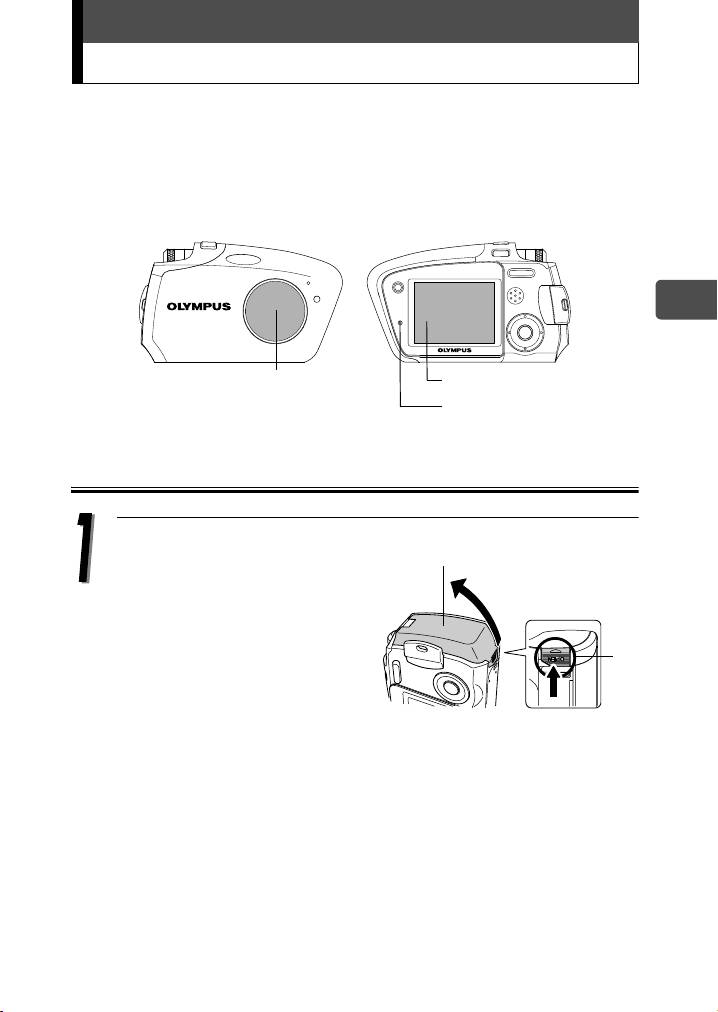
Check the following items before loading or removing the battery:
cThe lens barrier is closed.
dThe monitor is off.
eThe lamp is off.
En
cLens barrier
dMonitor
eLamp
Loading the battery
Press and hold the button A.
Battery compartment/
connector cover
While pressing, push the
battery compartment/
connector cover in the
direction of the arrow, to open
the cover.
A
13
000e_kisohen.book Page 14 Friday, July 30, 2004 7:06 PM
Loading and removing the battery
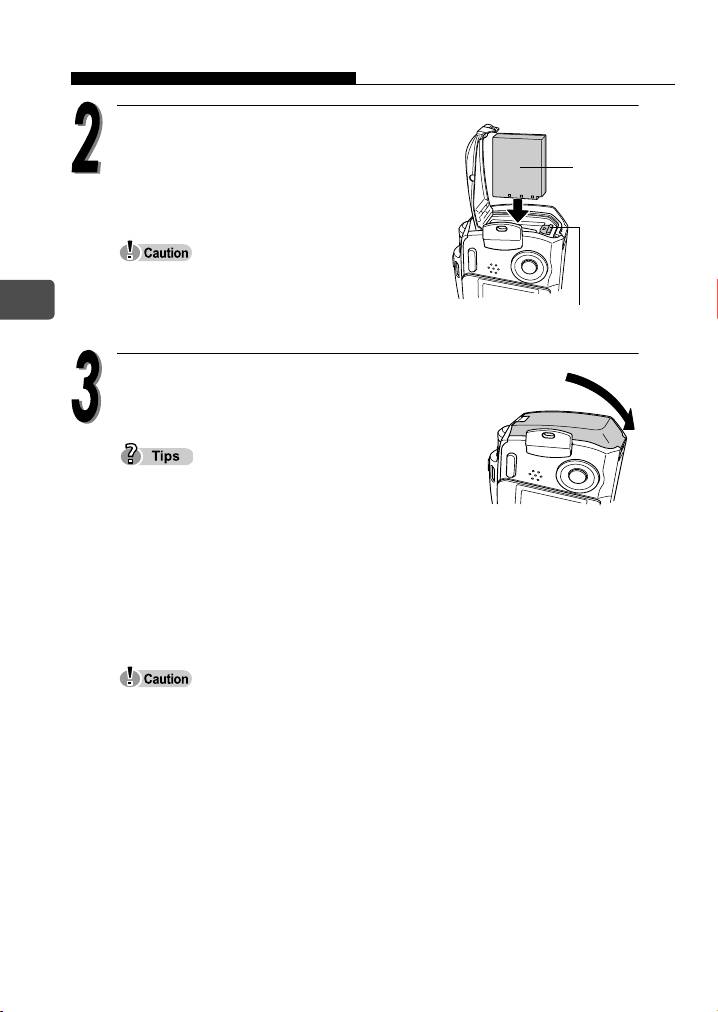
Orient the battery as shown. Insert the
battery into the slot until the battery is
Battery
locked in position with the battery lock
knob.
If the battery is not correctly oriented and
En
inserted, the battery compartment/connector
Battery lock knob
cover will not close.
Close the battery compartment/connector
cover as indicated by the arrow.
Do not try to forcibly close the battery
compartment/connector cover. The cover closes
easily when the battery is properly oriented and
inserted. If the cover does not close easily, check the orientation of the
battery.
For the number of storable pictures when a fully charged new battery is
used, see the “6. Appendix, Camera specifications” of the separate Advanced
manual (CD-ROM).
Power is consumed continuously during the conditions described below.
This may drain the battery power more quickly.
• Repeated zoom adjustments.
• Repeated auto-focus by depressing the shutter button half-way.
• The camera is connected to a computer or printer.
14
000e_kisohen.book Page 15 Friday, July 30, 2004 7:06 PM
Loading and removing the battery
Removing the battery
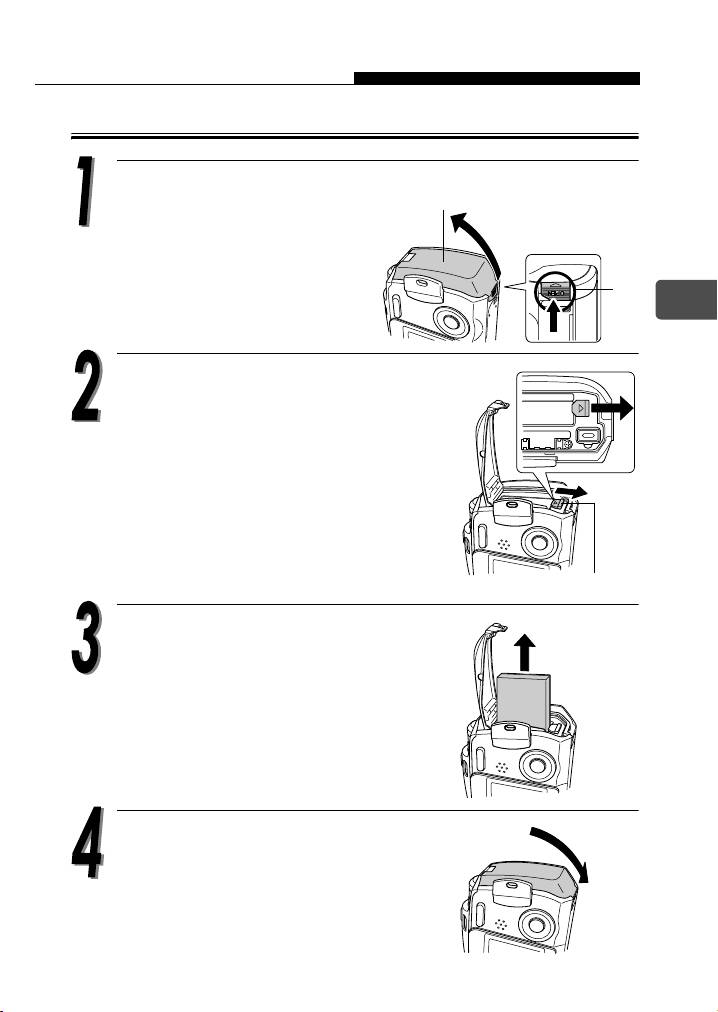
Press and hold the button A.
Battery compartment/
connector cover
While pressing, push the
battery compartment/
connector cover in the
direction of the arrow to open
A
the cover.
En
Slide the battery lock knob in the
direction of the arrow.
The battery ejects partially.
Battery lock knob
Pull the battery out.
Close the battery compartment/
connector cover as indicated by the
arrow.
15
Table of contents
- Contents
- Unpacking the box contents
- What can this camera do?
- Safety precautions
- Weatherproof feature
- Attaching the strap
- Charging the battery
- Loading and removing the battery
- Inserting and removing the picture card
- Power on/off
- Holding the camera correctly
- Taking still pictures
- Playing back still pictures
- Information on OLYMPUS Master
- Table des matières
- Déballage du contenu du carton
- Quelles sont les possibilités de cet appareil photo ?
- Consignes de sécurité
- Imperméabilité
- Fixation de la courroie
- Recharge de la batterie
- Mise en place et retrait de la batterie
- Insertion et retrait de la carte
- Mise en marche/arrêt
- La prise en main de l’appareil
- Prise de vues fixes
- Lecture d’images fixes
- Informations sur OLYMPUS Master
- Contenidos
- Desembalaje del contenido de la caja
- ¿Qué puede hacer esta cámara?
- Precauciones de seguridad
- Resistencia al agua
- Fijación de la correa
- Carga de la batería
- Cómo instalar y retirar la batería
- Cómo insertar y extraer la tarjeta fotográfica
- Encendido/apagado de la cámara
- Sujeción correcta de la cámara
- Toma de fotografías
- Reproducción de fotografías
- Información sobre OLYMPUS Master
- Inhalt
- Inhalt der Verpackung
- Funktionen der Kamera
- Vorsichtsmaßnahmen
- Spritzwasserbeständigkeit
- Anbringen des Trageriemens
- Aufladen des Akkus
- Einlegen und Herausnehmen des Akkus
- Einlegen und Herausnehmen der Karte
- Ein- und Ausschalten der Kamera
- Richtige Kamerahaltung
- Einzelbildaufnahme
- Wiedergabe von Einzelbildern
- Installieren der OLYMPUS Master-Software
- Indice
- Verifica del contenuto della confezione
- Funzionalità della fotocamera
- Precauzioni di sicurezza
- Progettata per qualsiasi condizione atmosferica
- Attacco della tracolla
- Caricamento della batteria
- Caricamento e rimozione della batteria
- Inserimento e rimozione della scheda di memoria
- Accensione/spegnimento
- Impugnatura corretta della fotocamera
- Scatto di fotografie
- Riproduzione di fotografie
- Informazioni su OLYMPUS Master
- Содержание
- Содержимое комплекта
- Возможности данной камеры.
- Меры безопасности
- Защищенный корпус
- Прикрепление ремешка
- Зарядка аккумулятора
- Установка и извлечение аккумулятора
- Установка и извлечение карты памяти
- Включение/выключение камеры
- Правильное положение камеры
- Фотосъемка
- Просмотр фотографий
- Информация по программному обеспечению OLYMPUS Master


