
Siemens TE502206RW: Display messages Before using for the rst time
Display messages Before using for the rst time: Siemens TE502206RW
Table of contents
- Safety instructions
- Table of Contents Included in delivery
- Overview Controls
- Display messages Before using for the rst time
- Switching off the appliance
- Water lter
- Menu settings
- Adjusting the Preparation using grinding unit coffee beans
- Preparation using Preparing milk froth ground coffee Dispensing hot water
- Maintenance and daily cleaning
- Cleaning the milk system
- Cleaning the brewing unit
- Tips on energy saving Service Programmes
- Descaling
- Cleaning Calc‘n‘Clean
- Frost protection
- Accessories Disposal Guarantee Technical data
- Simple troubleshooting Problem Cause Solution
- Problem Cause Solution
deen
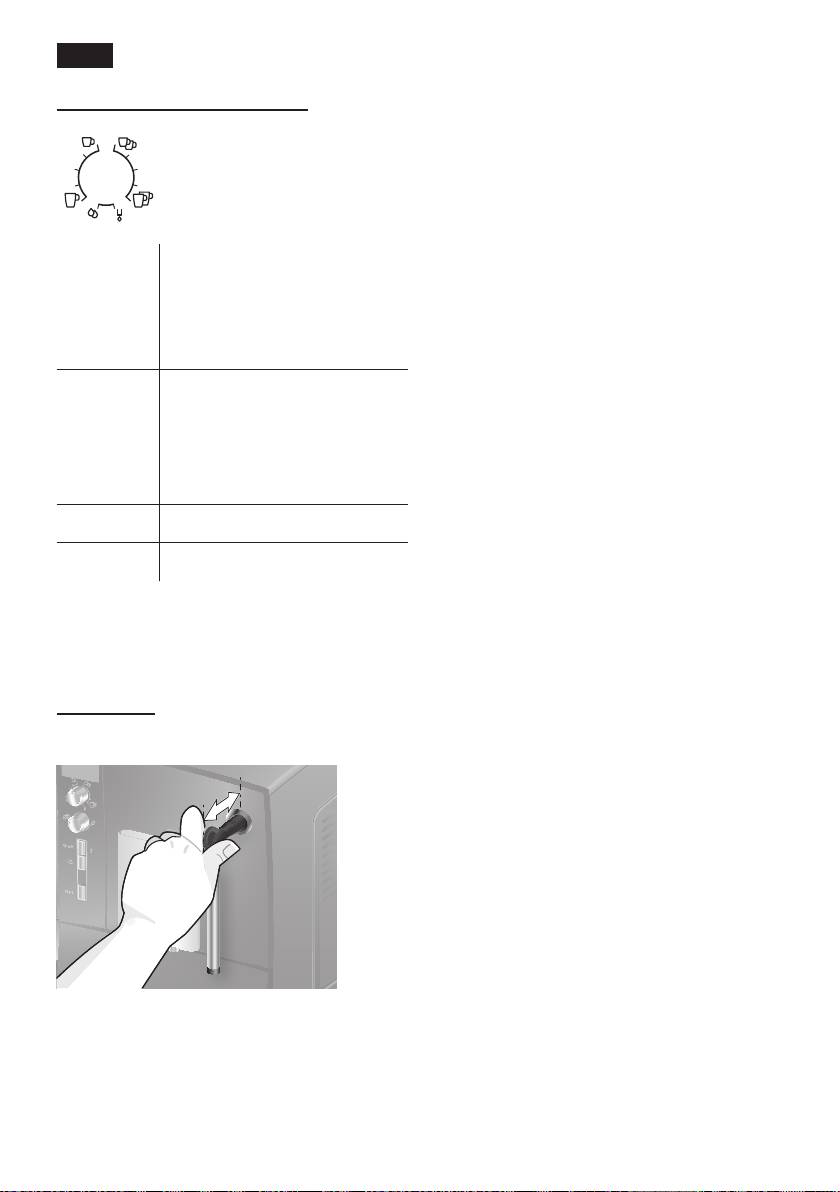
“Drink selection” rotary knob
Display messages
This rotary knob (14) is used
The display (15) shows not only the current
to select the required drink
operating status, but also various mes-
and the per-cup quantity. It
sages that give you status information or
is also used to change user
let you know when you need to take action.
settings�
As soon as you have taken the necessary
action, the message disappears and the
Small Espresso
a
menu for drink selection is displayed again.
Espresso
to
Small Café Crème
Café Crème
c
Large Café Crème
Before using for the
rst time
2 small Espresso
b
2 Espresso
General
to
2 small Café Crème
Fill the water tank with fresh, cold, uncar-
2Café Crème
bonated water only, and preferably use
d
2 large Café Crème
only beans for fully automatic coffee and
espresso machines. Do not use coffee
e
Rinse machine
beans that have been glazed, caramelised
or treated with other additives containing
f
Rinse milk system
sugar, since they will block the brewing unit.
N.B.: If a drink is selected that cannot be
The water hardness setting can be adjusted
prepared,
Invalid combination appears in
on this appliance. The factory default setting
the display� Change the coffee strength or
for the water hardness is 4� Check the
the selected drink�
water hardness with the enclosed test strip�
If the check reveals a value other than 4,
Milk frother
change the setting on the appliance accord-
Pull the milk frother (6) out to open it and
ingly after switching on (see “Menu settings”
push it back in to close it.
Water hardness on page 9)�
Switching on the appliance
1� Remove the protective lm.
2� Place the fully automatic espresso
machine on a at, water-resistant
surface that can take its weight. Make
sure that the machine’s ventilation slots
remain unobstructured.
Important: Only use the appliance in
frost-free rooms� If the appliance has been
transported or stored at temperatures below
0 °C, wait at least 3 hours before operation.
6
