
Yamaha RX-497: instruction
Class: Household, kitchen appliances, electronics and equipment
Type:
Manual for Yamaha RX-497
Table of contents
- CAUTION: READ THIS BEFORE OPERATING YOUR UNIT.
- CONTENTS
- FEATURES SUPPLIED ACCESSORIES
- CONTROLS AND FUNCTIONS
- CONTROLS AND FUNCTIONS
- Front panel display
- Rear panel
- Remote control
- CONTROLS AND FUNCTIONS
- Installing batteries in the remote control Using the remote control
- CONNECTIONS
- Connecting speakers
- Connecting the AM and FM antennas
- Connecting the AM loop antenna
- Connecting the power supply cord Turning on and off this unit
- PLAYING AND RECORDING Playing a source
- Adjusting the tonal quality
- Recording a source
- Using the sleep timer
- Muting the sound output
- FM/AM TUNING Automatic tuning
- Manual tuning
- Automatic preset tuning
- Customized automatic preset tuning
- Manual preset tuning
- Selecting preset stations Exchanging preset stations
- RADIO DATA SYSTEM (EUROPE MODEL ONLY) Receiving Radio Data System stations Changing the Radio Data System mode
- PTY SEEK function
- EON function
- ADVANCED SETUP Changing the ADVANCED SETUP menu parameters
- Switching the remote control ID
- ZONE 2 Connecting the Zone 2 components
- Controlling Zone 2
- REMOTE CONTROL FEATURES Control area
- Controlling other components
- Setting remote control codes
- General TROUBLESHOOTING
- Tuner
- Remote control
- SPECIFICATIONS
YAMAHA ELECTRONICS CORPORATION, USA
6660 ORANGETHORPE AVE., BUENA PARK, CALIF. 90620, U.S.A.
YAMAHA CANADA MUSIC LTD.
135 MILNER AVE., SCARBOROUGH, ONTARIO M1S 3R1, CANADA
YAMAHA ELECTRONIK EUROPA G.m.b.H.
SIEMENSSTR. 22-34, 25462 RELLINGEN BEI HAMBURG, GERMANY
YAMAHA ELECTRONIQUE FRANCE S.A.
RUE AMBROISE CROIZAT BP70 CROISSY-BEAUBOURG 77312 MARNE-LA-VALLEE CEDEX02, FRANCE
YAMAHA ELECTRONICS (UK) LTD.
YAMAHA HOUSE, 200 RICKMANSWORTH ROAD WATFORD, HERTS WD18 7GQ, ENGLAND
YAMAHA SCANDINAVIA A.B.
J A WETTERGRENS GATA 1, BOX 30053, 400 43 VÄSTRA FRÖLUNDA, SWEDEN
YAMAHA MUSIC AUSTRALIA PTY, LTD.
17-33 MARKET ST., SOUTH MELBOURNE, 3205 VIC., AUSTRALIA
© 2005 All rights reserved.
RX-497
Printed in Malaysia
WG05050
RX-497
Stereo Receiver
Récepteur stéréo
OWNER’S MANUAL
MODE D’EMPLOI
BEDIENUNGSANLEITUNG
BRUKSANVISNING
GEBRUIKSAANWIJZING
ИНСТРУКЦИЯ ПО ЭКСПЛУАТАЦИИ
G
01EN_RX-497_G-cv.fm Page 1 Thursday, September 1, 2005 11:20 AM
CAUTION: READ THIS BEFORE OPERATING YOUR UNIT.
1
To assure the finest performance, please read this manual
carefully. Keep it in a safe place for future reference.
2
Install this sound system in a well ventilated, cool, dry, clean
place – away from direct sunlight, heat sources, vibration,
dust, moisture, and/or cold. Allow ventilation space of at least
30 cm on the top, 20 cm on the left and right, and 20 cm on
the back of this unit.
3
Locate this unit away from other electrical appliances, motors,
or transformers to avoid humming sounds.
4
Do not expose this unit to sudden temperature changes from
cold to hot, and do not locate this unit in an environment with
high humidity (i.e. a room with a humidifier) to prevent
condensation inside this unit, which may cause an electrical
shock, fire, damage to this unit, and/or personal injury.
5
Avoid installing this unit where foreign objects may fall onto
this unit and/or this unit may be exposed to liquid dripping or
splashing. On the top of this unit, do not place:
–
Other components, as they may cause damage and/or
discoloration on the surface of this unit.
–
Burning objects (i.e. candles), as they may cause fire,
damage to this unit, and/or personal injury.
–
Containers with liquid in them, as they may fall and liquid
may cause electrical shock to the user and/or damage to
this unit.
6
Do not cover this unit with a newspaper, tablecloth, curtain,
etc. in order not to obstruct heat radiation. If the temperature
inside this unit rises, it may cause fire, damage to this unit,
and/or personal injury.
7
Do not plug in this unit to a wall outlet until all connections
are complete.
8
Do not operate this unit upside-down. It may overheat,
possibly causing damage.
9
Do not use force on switches, knobs and/or cords.
10
When disconnecting the power cable from the wall outlet,
grasp the plug; do not pull the cable.
11
Do not clean this unit with chemical solvents; this might
damage the finish. Use a clean, dry cloth.
12
Only voltage specified on this unit must be used. Using this
unit with a higher voltage than specified is dangerous and may
cause fire, damage to this unit, and/or personal injury.
YAMAHA will not be held responsible for any damage
resulting from use of this unit with a voltage other than
specified.
13
To prevent damage by lightning, keep the power cord and
outdoor antennas disconnected from a wall outlet or the unit
during a lightning storm.
14
Do not attempt to modify or fix this unit. Contact qualified
YAMAHA service personnel when any service is needed. The
cabinet should never be opened for any reasons.
15
When not planning to use this unit for long periods of time
(i.e. vacation), disconnect the AC power plug from the wall
outlet.
16
Install this unit near the AC outlet and where the AC power
plug can be reached easily.
17
Be sure to read the “TROUBLESHOOTING” section on
common operating errors before concluding that this unit is
faulty.
18
Before moving this unit, press MASTER ON/OFF to release it
outward to the OFF position, and disconnect the AC power
plug from the wall outlet.
19
VOLTAGE SELECTOR (Asia and General models only)
The VOLTAGE SELECTOR on the rear panel of this unit
must be set for your local main voltage BEFORE plugging
into the AC main supply. Voltages are:
General model .............AC 110/120/220/230–240 V, 50/60 Hz
Asia model ................................ AC 220/230–240 V, 50/60 Hz
\
CAUTION: READ THIS BEFORE OPERATING YOUR UNIT.
WARNING
TO REDUCE THE RISK OF FIRE OR ELECTRIC
SHOCK, DO NOT EXPOSE THIS UNIT TO RAIN
OR MOISTURE.
As long as this unit is connected to the AC wall outlet,
it is not disconnected from the AC power source even
if you turn off this unit by MASTER ON/OFF, or
MAIN ZONE ON/OFF and ZONE 2 ON/OFF. In this
state, this unit is designed to consume a very small
quantity of power.
1
PREP
ARA
TION
INTR
ODUCTION
BA
S
IC
OPERA
T
ION
AD
V
ANC
ED
OPERA
T
ION
A
DDITIONAL
INF
O
R
M
A
T
IO
N
English
FEATURES............................................................. 2
SUPPLIED ACCESSORIES ................................. 2
CONTROLS AND FUNCTIONS ......................... 3
Front panel ................................................................. 3
Front panel display .................................................... 5
Rear panel .................................................................. 6
Remote control........................................................... 7
Installing batteries in the remote control ................... 9
Using the remote control ........................................... 9
CONNECTIONS .................................................. 10
Connecting speakers ................................................ 11
Connecting the AM and FM antennas ..................... 12
Connecting the power supply cord .......................... 14
Turning on and off this unit ..................................... 14
PLAYING AND RECORDING .......................... 15
Playing a source....................................................... 15
Adjusting the tonal quality....................................... 16
Recording a source .................................................. 17
Using the sleep timer ............................................... 18
Muting the sound output.......................................... 19
FM/AM TUNING ................................................. 20
Automatic tuning ..................................................... 20
Manual tuning.......................................................... 21
Automatic preset tuning........................................... 22
Manual preset tuning ............................................... 24
Selecting preset stations........................................... 25
Exchanging preset stations ...................................... 25
RADIO DATA SYSTEM
(EUROPE MODEL ONLY) ............................ 26
Receiving Radio Data System stations .................... 26
Changing the Radio Data System mode .................. 26
PTY SEEK function ................................................ 27
EON function........................................................... 28
ADVANCED SETUP ............................................29
Changing the ADVANCED SETUP menu
parameters ........................................................... 29
Switching the remote control ID ............................. 30
ZONE 2 ..................................................................31
Connecting the Zone 2 components ........................ 31
Controlling Zone 2................................................... 32
REMOTE CONTROL FEATURES ...................33
Control area ............................................................. 33
Controlling other components ................................. 34
Setting remote control codes ................................... 35
TROUBLESHOOTING .......................................36
SPECIFICATIONS...............................................39
CONTENTS
INTRODUCTION
PREPARATION
BASIC OPERATION
ADVANCED OPERATION
ADDITIONAL INFORMATION
FEATURES
2
\
Built-in 2-channel power amplifier
◆
Minimum RMS output power
75 W + 75 W (8
Ω
), 0.04% THD, 20 Hz to 20 kHz
◆
Highly dynamic power, low impedance drive
capability
Sophisticated AM/FM tuner
◆
40-station random access preset tuning
◆
Automatic preset tuning
◆
Preset station exchanging capability
◆
Radio Data System tuning capability
(Europe model only)
Other features
◆
PURE DIRECT button used to reproduce the purest
source sound
◆
Continuously variable loudness control
◆
Sleep timer
◆
Remote control capability
◆
Zone 2 remote control (sold separately) capability
◆
Zone 2 custom installation facility
•
y
indicates a tip for your operation.
• Some operations can be performed by using either the buttons on the front panel of this unit or those on the remote control. In case the
button names differ between this unit and the remote control, the names of the buttons on the remote control are given in parentheses.
• This manual is printed prior to production. Design and specifications are subject to change in part as a result of improvements, etc. In
case of differences between the manual and the product, the product has priority.
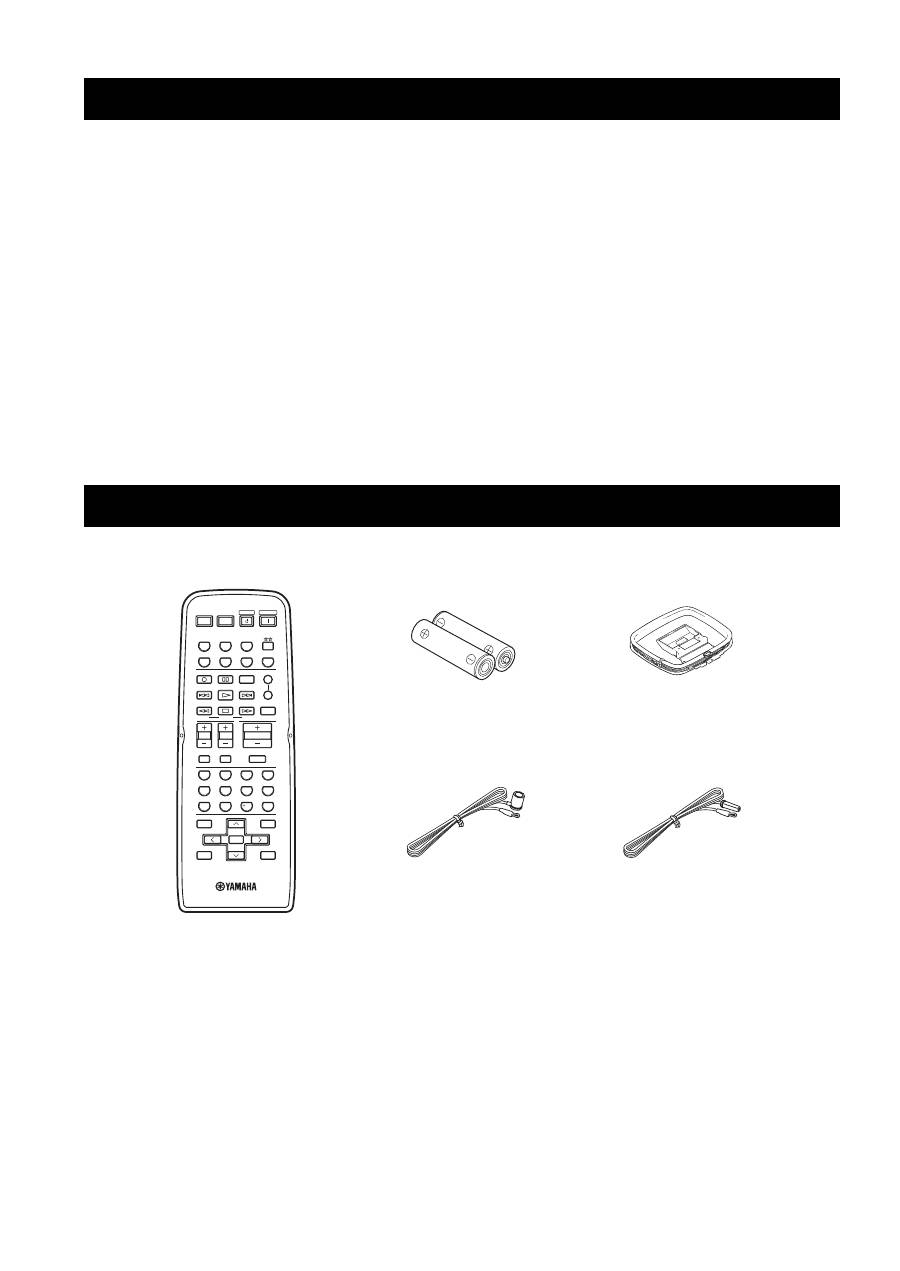
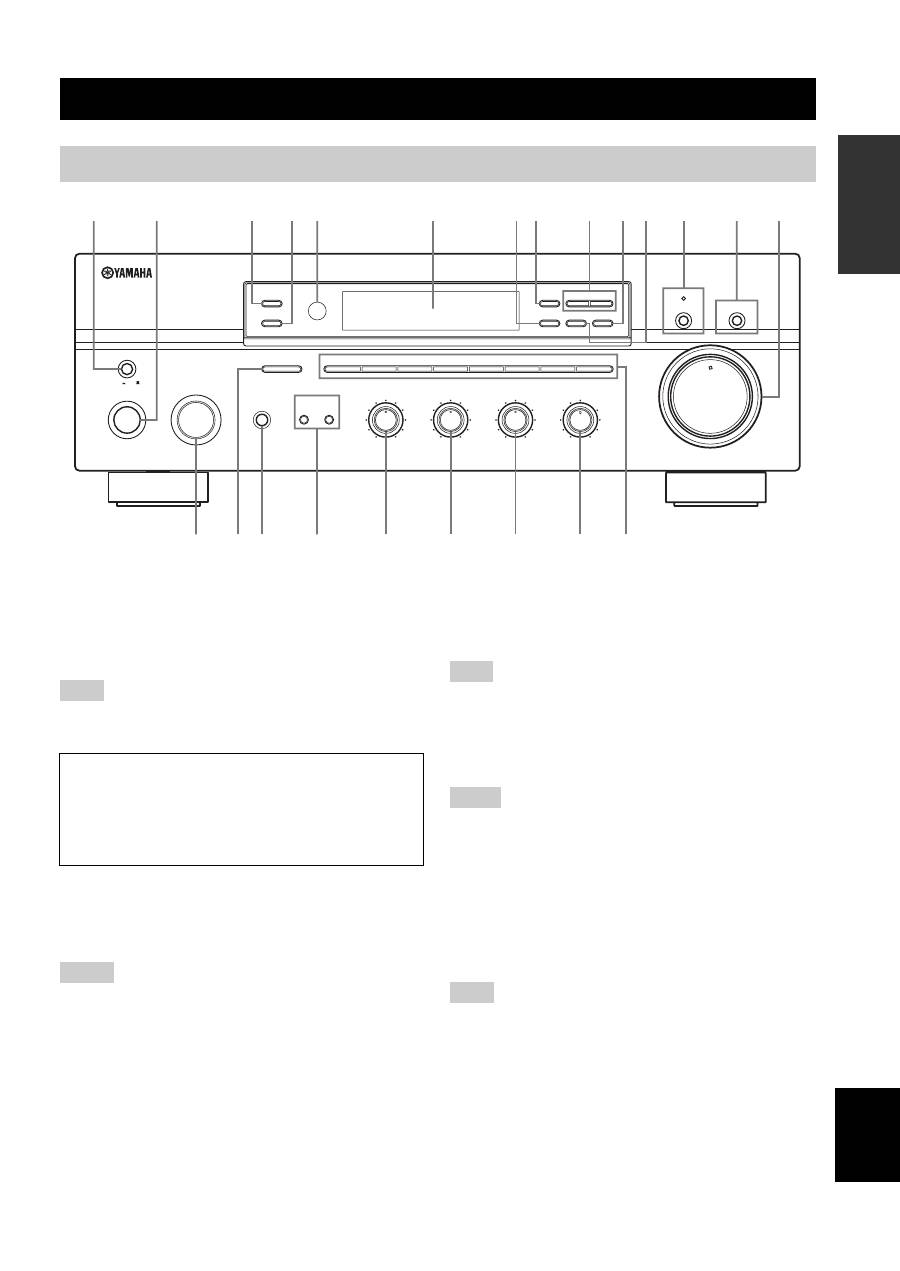
Please check that you received all of the following parts.
FEATURES SUPPLIED ACCESSORIES
STANDBY
POWER
CD
MD/TAPE
TUNER
PHONO
DVD
SLEEP
A
B
POWER
POWER
REC
CODE SET
MUTE
MENU
TITLE
VOLUME
DISC SKIP
EON
FREQ/TEXT
START
MODE
PTY SEEK
BAND
A/B/C/D/E
A/B/C/D/E
PRESET/CH
4
3
2
1
8
10
7
0
9
6
5
ENT.
DISPLAY
RETURN
TV MUTE
TV INPUT
AV
TV
ENTER
VCR
DTV/CBL
SPEAKERS
TV VOL
TV CH
Remote control
Batteries (x2)
(AA, R6, UM-3)
Indoor FM antenna
(U.S.A., Canada and
General models)
AM loop antenna
Indoor FM antenna
(Europe and Australia
models)
CONTROLS AND FUNCTIONS
3
INTR
ODUCTION
English
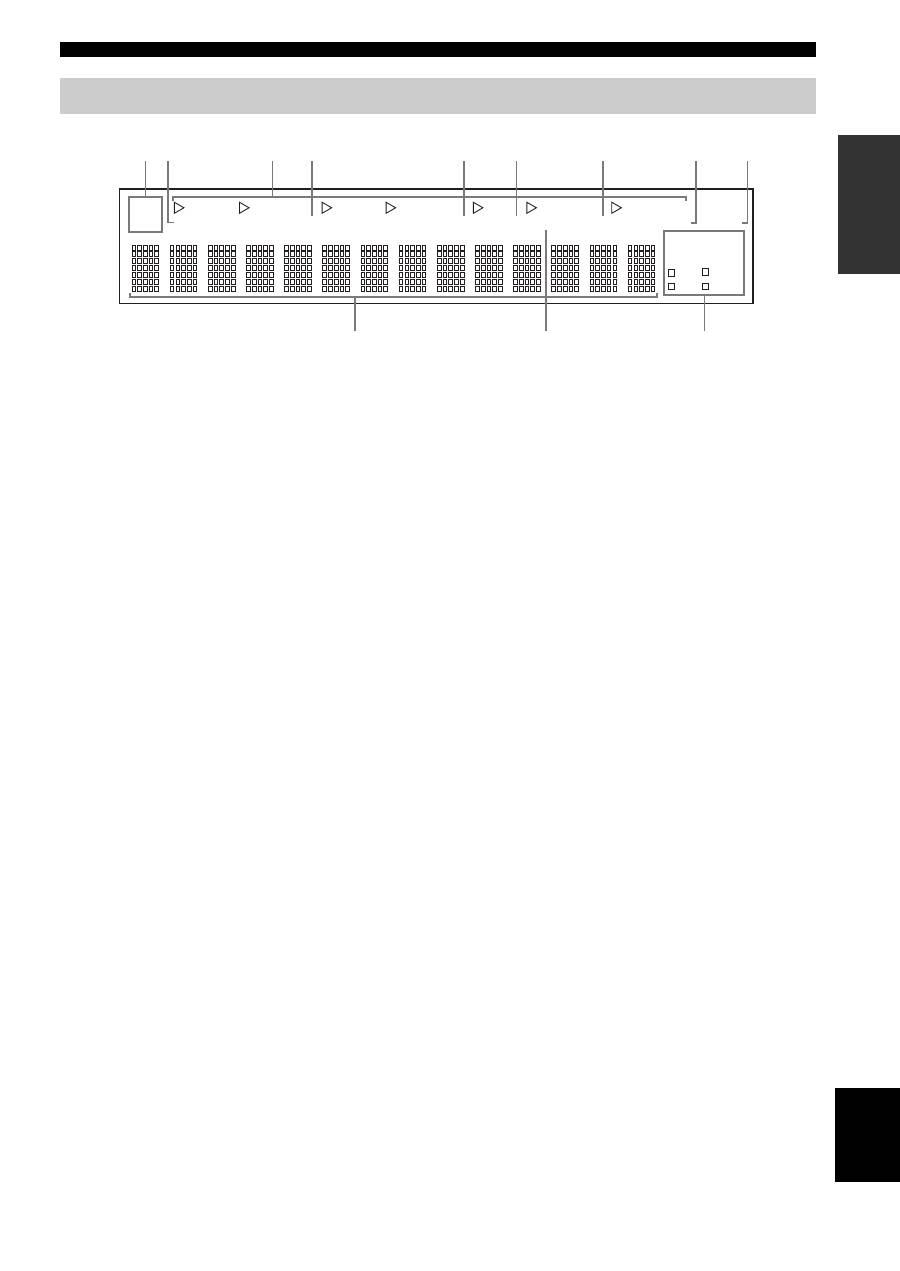
1
MASTER ON/OFF
Press inward to the ON position to turn on the power of
this unit. Press again to release it outward to the OFF
position to turn off this unit.
See page 14 for details.
Even when this unit is turned off, this unit consumes a small
amount of power to preserve the memory.
2
MAIN ZONE ON/OFF
Turns on Main Zone of this unit or sets it to the standby
mode.
See page 14 for details.
• This switch is operational only when MASTER ON/OFF is
pressed inward to the ON position.
• In the standby mode, this unit consumes a small amount of
power to receive infrared signals from the remote control.
3
ZONE 2 ON/OFF
Turns on Zone 2 or set it to the standby mode. When Zone
2 is turned on, signals are output at the ZONE 2 OUT
jacks.
This switch is operational only when MASTER ON/OFF is
pressed inward to the ON position.
4
ZONE CONTROL
Press to control the input source of Zone 2.
• This button is operational only when Zone 2 is turned on.
• When you press this button, the ZONE 2 indicator flashes in the
front panel display for approximately 5 seconds. Select the
input source of Zone 2 while the indicator is flashing.
• You can select the preset station when TUNER is selected as the
input source of Zone 2.
5
Remote control sensor
Receives infrared signals from the remote control.
Switch the remote control ID between ID1 and ID2 when using
multiple YAMAHA receivers or amplifiers (see pages 29, 30).
6
Front panel display
Shows information about the operational status of this
unit.
CONTROLS AND FUNCTIONS
Front panel
ON/OFF
INPUT
MAIN ZONE
PHONES
BASS
MASTER
SPEAKERS
ON
OFF
MD/TAPE MONITOR
PURE DIRECT
5
5
1
0
1
4
4
2
2
3
3
+
–
VOLUME
l
TUNING
h
ZONE 2 ON/OFF
ZONE CONTROL
FM/AM
EDIT
A/B/C/D/E
1
2
3
4
5
6
7
8
MEMORY
MAN'L/AUTO FM
TUNING MODE
AUTO/MAN'L
B
A
TREBLE
5
5
1
0
1
4
4
2
2
3
3
+
–
BALANCE
5
5
1
0
1
4
4
2
2
3
3
R
L
LOUDNESS
5
7
1
FLAT
6
4
8
2
10
–30dB
3
9
0
12
12
2
8
4
∞
20
20
60
60
26
26
40
40
16
16
-dB
-dB
DISPLAY
5
1
2
4
3
8
7
0 A
6
C
B
9
G
F
E
H
I
J
K
L
M
D
(Europe model)
Note
Memory back-up
The memory back-up circuit prevents the stored data
from being lost. However, the stored data will be lost if
the power cord is disconnected from the AC wall outlet
for more than one week.
Notes
Note
Notes
Note

CONTROLS AND FUNCTIONS
4
7
EDIT
Exchanges the assignment of two preset stations with each
other when TUNER is selected as the input source (see
page 25).
8
FM/AM
Switches the reception band between AM and FM when
TUNER is selected as the input source (see page 20).
9
TUNING
l
/
h
Selects the tuning frequency when TUNER is selected as
the input source (see page 20).
0
TUNING MODE
Switches the tuning mode between automatic (the AUTO
indicator turns on as a result) and manual (the AUTO
indicator turns off as a result) when TUNER is selected as
the input source.
A
MEMORY
Stores a station in the system memory (see page 24).
Sets this unit to the automatic preset tuning mode (see
page 22).
B
PURE DIRECT and indicator
Allows you to listen to a source in the purest possible
sound. The indicator above it lights up when this function
is turned on (see page 16).
C
MD/TAPE MONITOR
Allows you to listen to the sound played back on the
component connected to the MD/TAPE jacks on the rear
panel of this unit.
When the tape deck is used for recording, you can also
monitor the sound being recorded.
The MD/TAPE MON indicator in the front panel display
lights up when this function is turned on.
• When this function is on (the indicator lights up), MD/TAPE
cannot be selected with the INPUT selector.
• To listen to the source selected with the INPUT selector, press
again to turn off the function (the indicator turns off as a result).
• When MD/TAPE is selected with the INPUT selector, this
function will not turn on even if MD/TAPE MONITOR is
pressed.
D
VOLUME
Increases or decreases the sound output level.
This does not affect the OUT (REC) level.
E
INPUT selector
Selects the input source you want to listen to or watch.
F
A/B/C/D/E
Selects the preset station group (A to E) when TUNER is
selected as the input source (see page 23).
G
PHONES jack
Outputs audio for private listening with your headphones.
Press SPEAKERS A/B so that the SP A/B indicators turn
off before you connect your headphones to the PHONES
jack.
H
SPEAKERS A/B
Turns on or off the speaker set connected to the
SPEAKERS A and/or SPEAKERS B terminals on the rear
panel each time the corresponding button is pressed (see
page 15).
I
BASS
Increases or decreases the low frequency response. The 0
position produces a flat response (see page 16).
J
TREBLE
Increases or decreases the high frequency response. The 0
position produces a flat response (see page 16).
K
BALANCE
Adjusts the sound output balance of the left and right
speakers to compensate for sound imbalances caused by
speaker locations or listening room conditions (see page
16).
L
LOUDNESS
Retains a full tonal range at any volume level to
compensate for the human ears’ loss of sensitivity to high
and low-frequency ranges at a low volume level (see page
16).
M
Preset station number buttons
(1 to 8)
Selects the preset station number (1 to 8) directly when
TUNER is selected as the input source (see page 25).
Notes
Note
Note
CONTROLS AND FUNCTIONS
5
INTR
ODUCTION
English
1
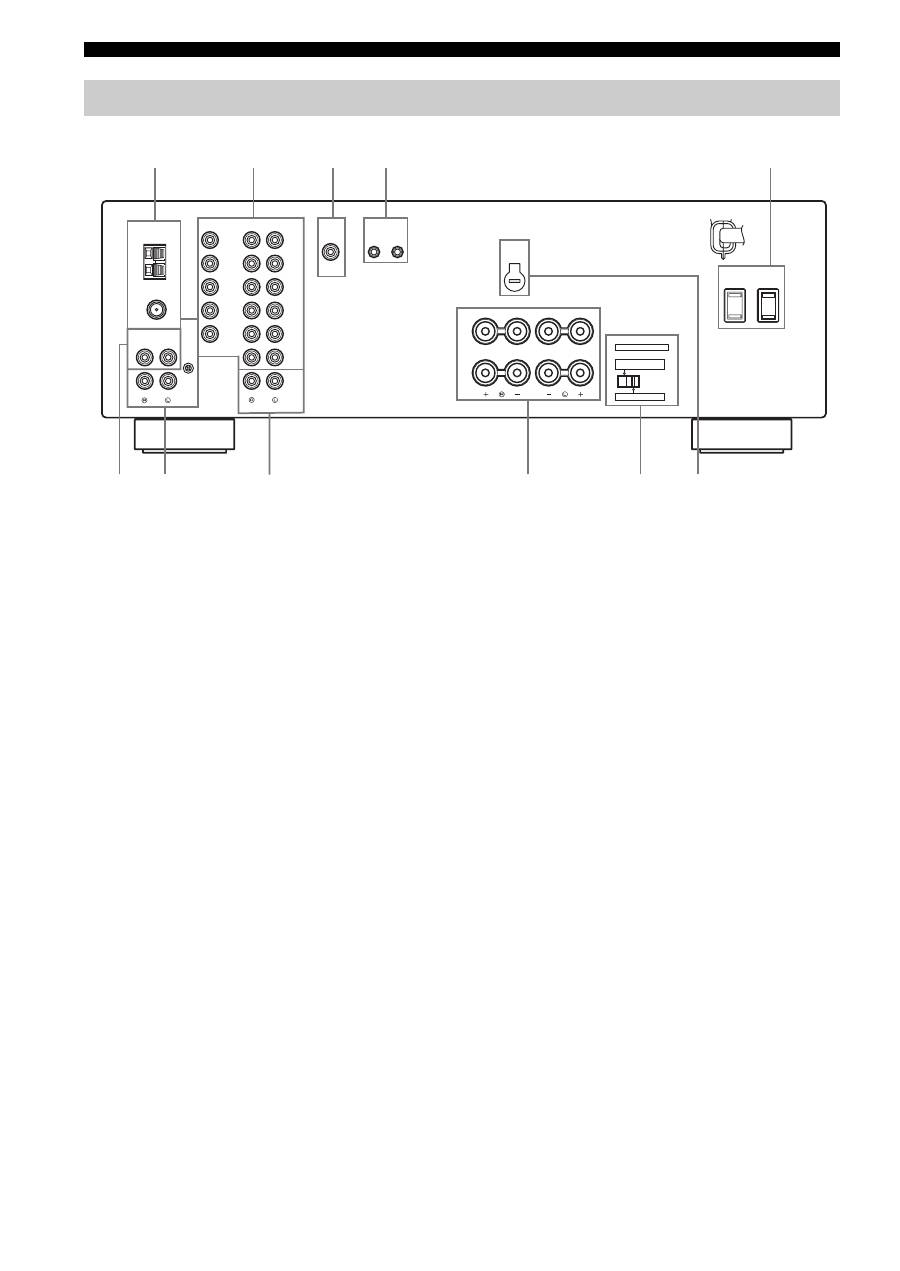
SP (SPEAKERS) A/B indicators
Light up according to the set of speakers selected.
Both indicators light up when both sets of speakers are
selected.
2
ZONE 2 indicator
Lights up when Zone 2 is turned on.
3
Input source indicators
Light up when this unit is in the corresponding mode.
4
MD/TAPE MON (MONITOR) indicator
Lights up while the MD/TAPE monitor function is turned
on.
5
MEMORY indicator
Flashes for approximately 5 seconds after MEMORY on
the front panel is pressed. While the MEMORY indicator
is flashing, store the displayed station in the system
memory by using A/B/C/D/E and one of the preset station
number buttons on the front panel.
6
AUTO indicator
Lights up when this unit is in the automatic tuning mode.
7
STEREO indicator
Lights up when this unit is receiving a strong signal for an
FM stereo broadcast while the AUTO indicator is lit.
8
SLEEP indicator
Lights up when the sleep timer is turned on.
9
MUTE indicator
Flashes while the MUTE function is turned on.
0
Multi-information display
Shows information when adjusting or changing settings.
A
TUNED indicator
Lights up when this unit is tuned into a station.
■
Europe model only
B
Radio Data System indicators
The box-shaped indicator beside the name of each Radio
Data System mode lights up when the corresponding
Radio Data System mode is selected.
PTY HOLD indicator
Lights up while searching for stations in the PTY
SEEK mode.
EON indicator
Lights up when the Radio Data System station that
offers the EON data service is being received.
Front panel display
SP
DVD
VCR
CD
TUNER
PHONO
HOLD
PTY
DTV/CBL
MD/TAPE
A B
ZONE2
ZONE3
MD/TAPE MON MEMORY AUTO TUNED STEREO SLEEP
EON
PS
RT
PTY
CT
MUTE
A
B
0
1 2
5
6
7
8
3
9
4
CONTROLS AND FUNCTIONS
6
1
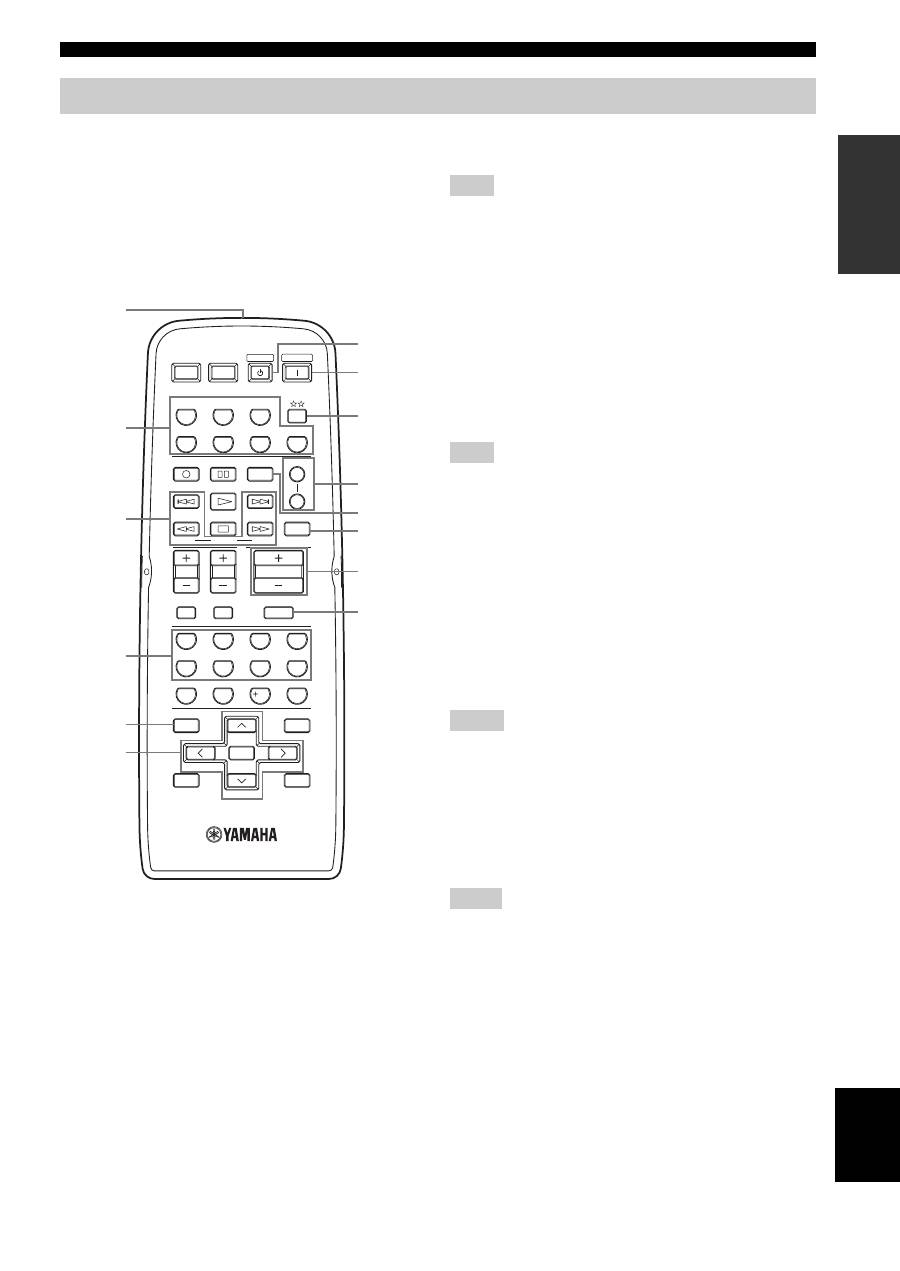
Antenna terminals
Connect FM and AM antennas.
See page 12 for connections information.
2
AUDIO/VIDEO jacks
Connect audio and video components.
See page 10 for connection information.
3
SUB WOOFER OUTPUT jack
Connect a subwoofer with built-in amplifier.
4
REMOTE jacks
These jacks are used to input/output remote control
signals.
See page 31 for connection information.
5
AC OUTLET(S) (SWITCHED)
Use to supply power to your other audio and video
components.
See page 14 for details.
6
CD jacks
Connect a CD player.
See page 10 for connection information.
7
PHONO jacks and GND terminal
Connect a turntable.
See page 10 for connection information.
8
ZONE 2 jacks
Connect a Zone 2 component.
See page 31 for connection information.
9
SPEAKERS terminals
Connect speakers.
See page 11 for connection information.
0
IMPEDANCE SELECTOR switch
Switches the impedance setting.
See page 11 for details.
■
Asia and General models only
A
VOLTAGE SELECTOR
VOLTAGE SELECTOR on the rear panel of this unit must
be set for your local main voltage BEFORE plugging the
power supply cord into the AC wall outlet.
Voltages are as follows:
Asia model ......................... AC 220/230–240 V, 50/60 Hz
General model...... AC 110/120/220/230–240 V, 50/60 Hz
Rear panel
GND
AM
ANT
FM
ANT
75
Ω
UNBAL.
DVD
DTV/
CBL
IN
(PLAY)
IN
(PLAY)
OUT
(REC)
OUT
(REC)
MD/TAPE
ZONE 2
MONITOR
OUT
VCR
DVD
DTV/
CBL
IN
OUT
VCR
AUDIO
VIDEO
TUNER
AUDIO
GND
OUTPUT
REMOTE
CD
PHONO
OUTPUT
IN
OUT
SUB
WOOFER
A OR B: 4
Ω
MIN. /SPEAKER
A + B: 8
Ω
MIN. /SPEAKER
A OR B: 8
Ω
MIN. /SPEAKER
IMPEDANCE SELECTOR
SET BEFORE POWER ON
SELECTEUR D'IMPEDANCE
SPEAKERS
A
B
AC OUTLETS
SWITCHED
VOLTAGE
SELECTOR
6
0
A
7
9
1
2
3
4
5
8
(General model)
CONTROLS AND FUNCTIONS
7
INTR
ODUCTION
English
This section describes the function of each button on the
remote control used to control this unit or other
components made by YAMAHA or other manufacturers.
The functions of the buttons used to control your other
audio and video components are the same as those of the
corresponding buttons on those components. Refer to
those components’ instruction manuals for details. To
operate other components using this remote control, see
“REMOTE CONTROL FEATURES” on page 33.
1
Infrared signal transmitter
Sends infrared signals.
2
Input selector buttons
Select the desired input source and change the control area
(see page 33).
3
Radio Data System control buttons
Controls the Radio Data System features.
The Radio Data System features (FREQ/TEXT, EON, PTY
SEEK MODE and PTY SEEK START) are only applicable to the
Europe model and are operational only when TUNER is selected
as the input source. For details, see “Receiving Radio Data
System stations” on page 26.
4
Numeric buttons (1 to 8)
Select the preset station number (1 to 8) when TUNER is
selected as the input source.
5
BAND
Switches to the previously used reception band (FM or
AM) when TUNER is selected as the input source.
The frequency of the previously received station is automatically
recalled.
6
A/B/C/D/E
j
/
i
Selects the preset station group (A to E) when TUNER
is selected as the input source (see page 25).
PRESET/CH
u
/
d
Selects the preset station number (1 to 8) when
TUNER is selected as the input source (see page 25).
7
STANDBY
Sets this unit to the standby mode.
• This button is operational only when MASTER ON/OFF on the
front panel is pressed inward to the ON position.
• In the standby mode, this unit consumes a small amount of
power to receive infrared signals from the remote control.
• This button does not set Zone 2 to the standby mode.
8
POWER
Turns on this unit.
• This button is operational only when MASTER ON/OFF on the
front panel is pressed inward to the ON position.
• This button does not turn on Zone 2.
Remote control
STANDBY
POWER
CD
MD/TAPE
TUNER
PHONO
DVD
SLEEP
A
B
POWER
POWER
REC
CODE SET
MUTE
MENU
TITLE
VOLUME
DISC SKIP
EON
FREQ/TEXT
START
MODE
PTY SEEK
BAND
A/B/C/D/E
A/B/C/D/E
PRESET/CH
4
3
2
1
8
10
7
0
9
6
5
ENT.
DISPLAY
RETURN
TV MUTE
TV INPUT
AV
TV
ENTER
VCR
DTV/CBL
SPEAKERS
TV VOL
TV CH
7
8
9
0
A
B
C
D
1
2
3
4
6
5
(Europe model)
Note
Note
Notes
Notes

CONTROLS AND FUNCTIONS
8
9
Changes the control area (see page 33).
0
SPEAKERS A/B
Turns on or off the set of speakers connected to the
SPEAKERS A and/or SPEAKERS B terminals on the rear
panel of this unit when the corresponding button is
pressed each time.
A
CODE SET
Use to set up remote control codes (see page 35).
B
SLEEP
Sets the sleep timer.
C
VOLUME +/–
Increases or decreases the sound output level.
• This does not affect the OUT (REC) level.
• When you press VOLUME +/– to control the sound output
level of this unit, VOLUME on the front panel rotates.
D
MUTE
Mutes the sound output. Press again to restore the sound
output to the previous volume level (see page 19).
The sound output to Zone 2 is not muted.
Notes
Note
CONTROLS AND FUNCTIONS
9
INTR
ODUCTION
English
■
Notes on batteries
• Change all of the batteries if the operation range of the remote control decreases.
• Use AA, R6, UM-3 batteries for the remote control.
• Make sure that the polarities are correct. See the illustration inside the battery compartment of each remote control.
• Remove the batteries if the remote control is not used for an extended period of time.
• Do not use old batteries together with new ones.
• Do not use different types of batteries (such as alkaline and manganese batteries) together. Read the packaging carefully as these
different types of batteries may have the same shape and color.
• We strongly recommend using alkaline batteries.
• If the batteries have leaked, dispose of them immediately. Avoid touching the leaked material or letting it come into contact with
clothing, etc. Clean the battery compartment thoroughly before installing new batteries.
• Do not throw away batteries with general house waste; dispose of them correctly in accordance with your local regulations.
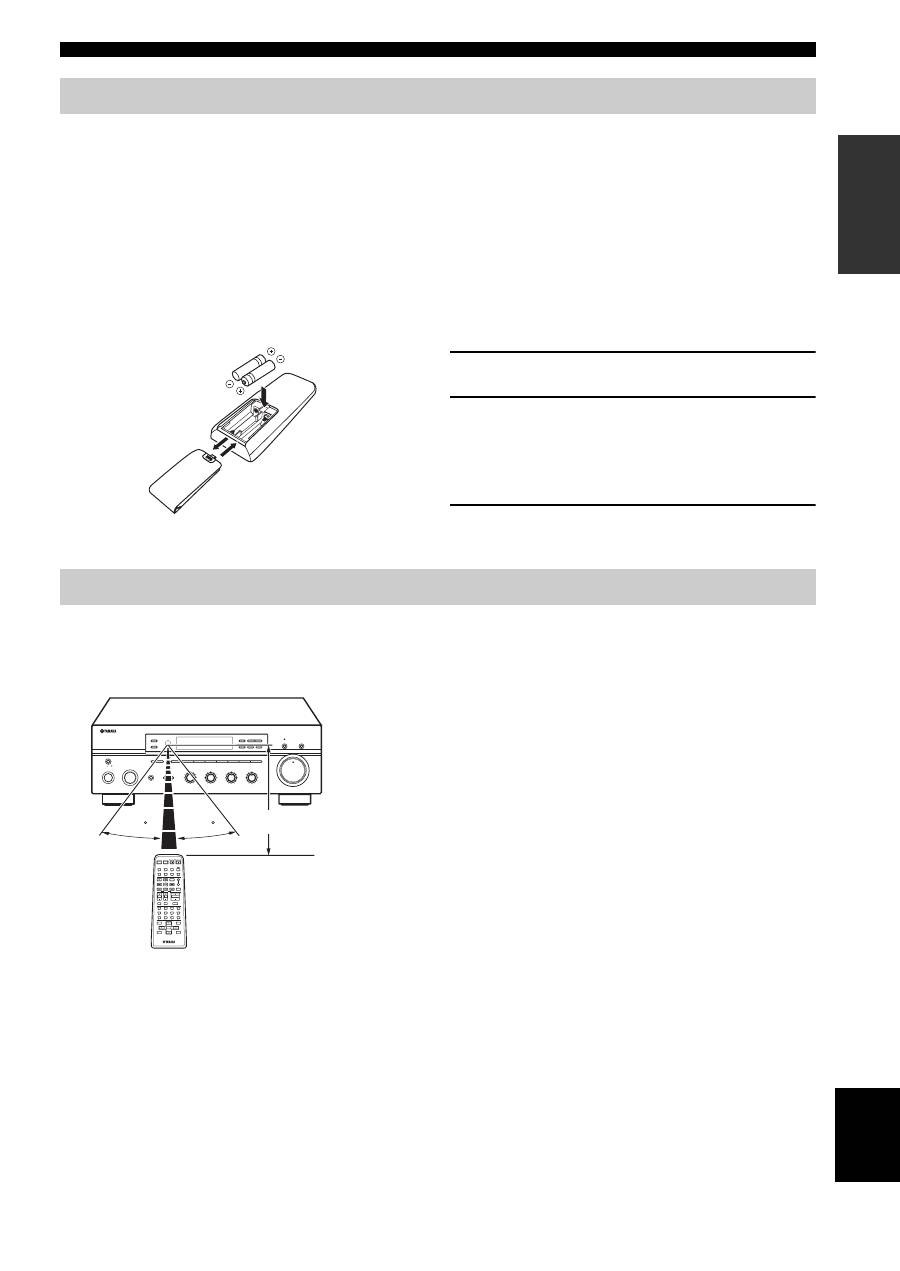
1
Open the battery compartment cover.
2
Insert the supplied batteries in each remote
control according to the polarity markings (+
and –) on the inside of the battery
compartment.
3
Close the cover back.
The remote control transmit a directional infrared beam.
Be sure to aim the remote control directly at the remote control sensor on the front panel of this unit or on the infrared
signal receiver in Zone 2 during operation.
■
Handling the remote control
• The area between the remote control and this unit (or the
infrared signal receiver in Zone 2) must be clear of large
obstacles.
• Do not spill water or other liquids on the remote control.
• Do not drop the remote control.
• Do not leave or store the remote control in the following types
of conditions:
– places of high humidity, such as near a bath
– places of high temperature, such as near a heater or a stove
– places of extremely low temperatures
– dusty places
• Do not expose the remote control sensor to strong lighting, in
particular, an inverter type fluorescent lamp; otherwise, the
remote control may not work properly. If necessary, position
this unit away from direct lighting.
Installing batteries in the remote control
1
3
2
Using the remote control
VOLUME
ON/OFF
INPUT
MAIN ZONE
PHONES
BASS
MASTER
SPEAKERS
ON
OFF
MD/TAPE MONITOR
PURE DIRECT
5
5
1
0
1
4
4
2
2
3
3
+
–
l
TUNING
h
ZONE 2 ON/OFF
ZONE CONTROL
FM/AM
EDIT
A/B/C/D/E
1
2
3
4
5
6
7
8
MEMORY
MAN'L/AUTO FM
TUNING MODE
AUTO/MAN'L
B
A
TREBLE
5
5
1
0
1
4
4
2
2
3
3
+
–
BALANCE
5
5
1
0
1
4
4
2
2
3
3
R
L
LOUDNESS
5
7
1
FLAT
6
4
8
2
10
–30dB
3
9
30
30
STANDBY
POWER
CD
MD/TAPE
TUNER
PHONO
DVD
SLEEP
A
B
POWER
POWER
REC
CODE SET
MUTE
MENU
TITLE
VOLUME
DISC SKIP
EON
FREQ/TEXT
START
MODE
PTY SEEK
BAND
A/B/C/D/E
A/B/C/D/E
PRESET/CH
4
3
2
1
8
10
7
0
9
6
5
ENT.
DISPLAY
RETURN
TV MUTE
TV INPUT
AV
TV
ENTER
VCR
DTV/CBL
SPEAKERS
TV VOL
TV CH
Approximately 6 m (19.7 ft)
CONNECTIONS
10
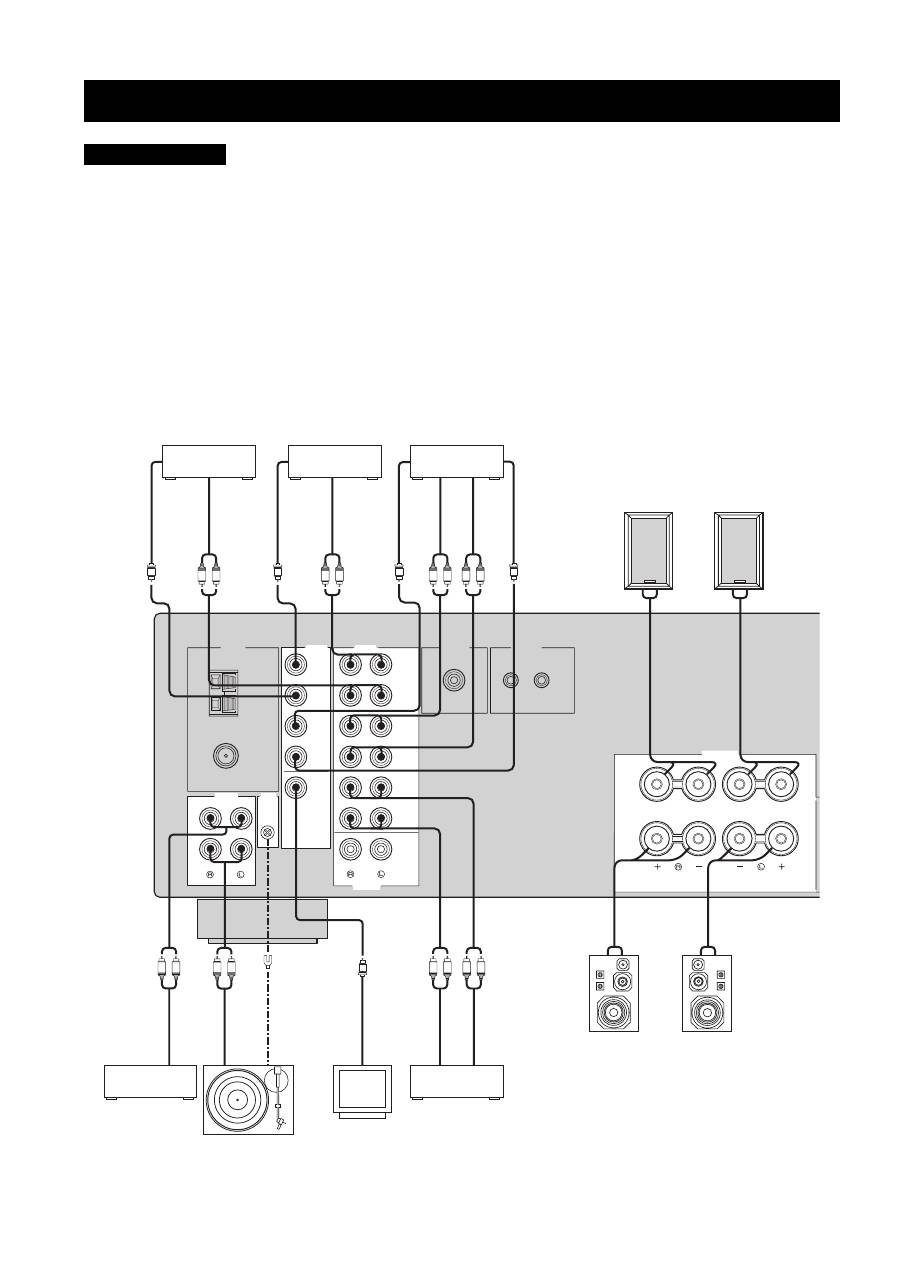
• Do not connect this unit or other components to the main power until all connections between components are complete.
• Do not let the bare speaker wires touch each other or do not let them touch any metal part of this unit. This could damage this unit and/
or the speakers.
• All connections must be correct: L (left) to L, R (right) to R, “+” to “+” and “–” to “–”. If the connections are faulty, no sound will be
heard from the speakers, and if the polarity of the speaker connections is incorrect, the sound will be unnatural and lack bass. Also,
refer to the owner’s manual for each of your components.
• Use the RCA type pin plug cables for audio and video components except speakers.
y
• The PHONO jacks are designed to connect a turntable with an MM or high-output MC cartridge. If you have a turntable with a low-
output MC cartridge, use an in-line boosting transformer or an MC-head amplifier when connecting your turntable to the PHONO
jacks.
• Connect your turntable to the GND terminal to reduce noise in the signal. However, you may hear less noise without the connection to
the GND terminal for some record players.
CONNECTIONS
CAUTION
GND
AM
ANT
FM
ANT
75
Ω
UNBAL.
DVD
DTV/
CBL
IN
(PLAY)
IN
(PLAY)
OUT
(REC)
OUT
(REC)
MD/TAPE
ZONE 2
MONITOR
OUT
VCR
DVD
DTV/
CBL
IN
OUT
VCR
AUDIO
VIDEO
TUNER
AUDIO
GND
GND
OUTPUT
REMOTE
CD
PHONO
OUTPUT
IN
OUT
SUB
WOOFER
SPEAKERS
A
B
R
L
L
R
L
R
R
L
L
R
L
R
L
R
L
R
V
V
V
V
V
+
–
–
+
+
–
–
+
Turntable
DVD player
VCR, etc.
CD player
MD recorder,
Tape deck, etc.
GND
Au
di
o ou
t
Digital TV,
Cable TV
V
ide
o o
ut
V
ide
o o
ut
Au
di
o ou
t
V
ide
o o
ut
Video
monitor
V
ide
o in
V
ide
o in
A
udi
o o
ut
Au
di
o i
n
Au
di
o o
ut
Au
di
o i
n
Au
di
o o
ut
Au
di
o o
ut
Speakers A
Speakers B
11
CONNECTIONS
PREP
ARA
TION
English
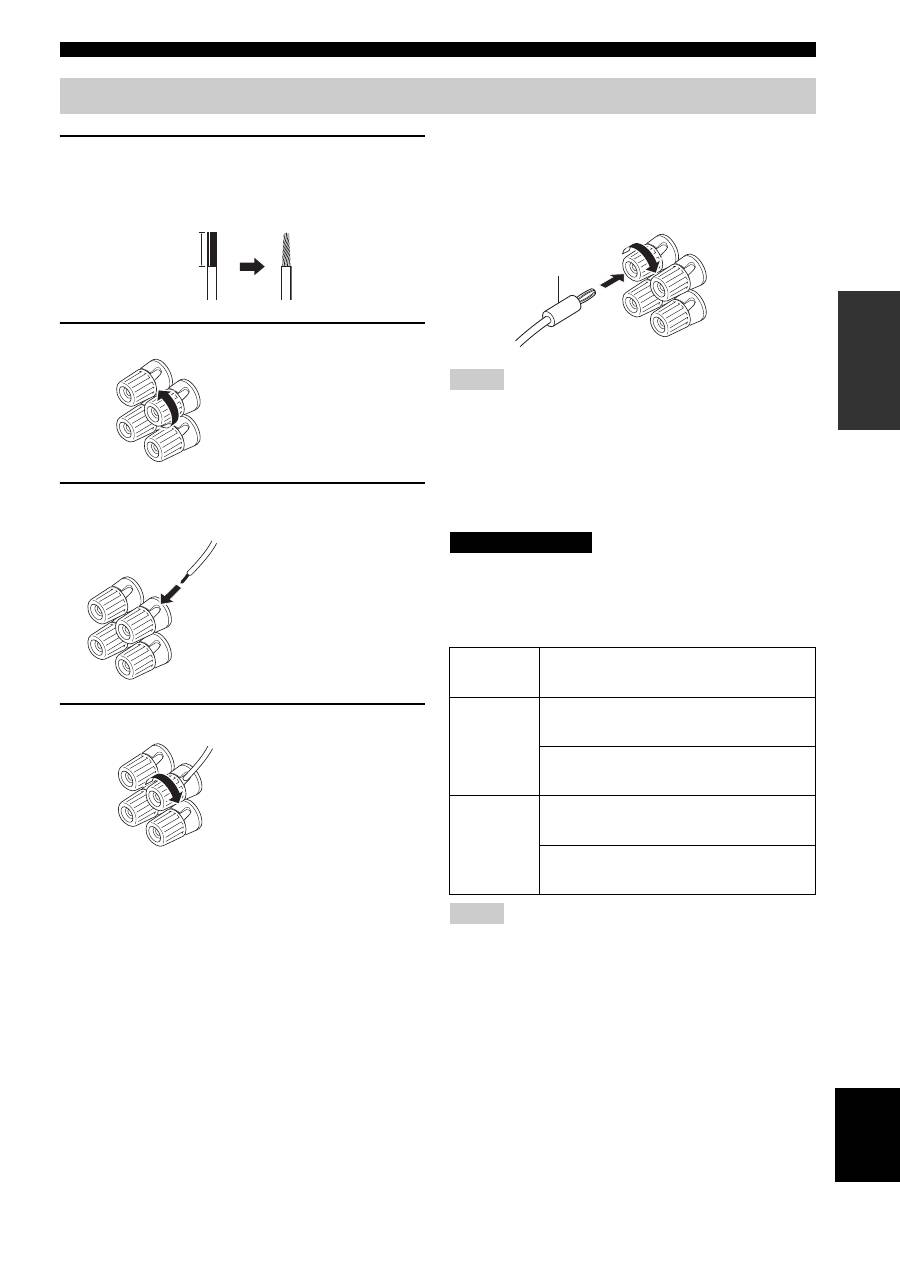
1
Remove approximately 10 mm (3/8 in) of
insulation from the end of each speaker
cable and twist the exposed wires of the
cable together to prevent short circuits.
2
Unscrew the knob.
3
Insert one bare wire into the hole in the side
of each terminal.
4
Tighten the knob to secure the wire.
■
Connecting the banana plug
(U.S.A., Canada, Australia and General
models only)
First, tighten the knob and then insert the banana plug into
the end of the corresponding terminal.
• One or two speaker sets can be connected to this unit. If you use
only one speaker set, connect it to either the SPEAKERS A or B
terminals.
• Use speakers with the specified impedance shown on the rear
panel of this unit.
■
IMPEDANCE SELECTOR
Do not slide the IMPEDANCE SELECTOR switch while the
power of this unit is turned on, as doing so may damage the unit.
Select the switch position (left or right) according to the
impedance of the speakers in your system.
• The Canada model cannot use two speaker sets (A and B)
simultaneously when the IMPEDANCE SELECTOR switch is
slid to the right position.
• If this unit fails to turn on, the IMPEDANCE SELECTOR
switch may not be fully slid to either position. If this is the case,
slide the switch all the way to either position when the power
supply to this unit is completely cut off.
Connecting speakers
10 mm (3/8 in)
Red: positive (+)
Black: negative (–)
Red: positive (+)
Black: negative (–)
Red: positive (+)
Black: negative (–)
Notes
Switch
position
Impedance level
Right
If you use one set (A or B), the impedance of
each speaker must be 8
Ω
or higher.
If you use two sets (A and B), the impedance
of each speaker must be 16
Ω
or higher.
Left
If you use one set (A or B), the impedance of
each speaker must be 4
Ω
or higher.
If you use two sets (A and B), the impedance
of each speaker must be 8
Ω
or higher.
Notes
Banana plug
CAUTION
12
CONNECTIONS
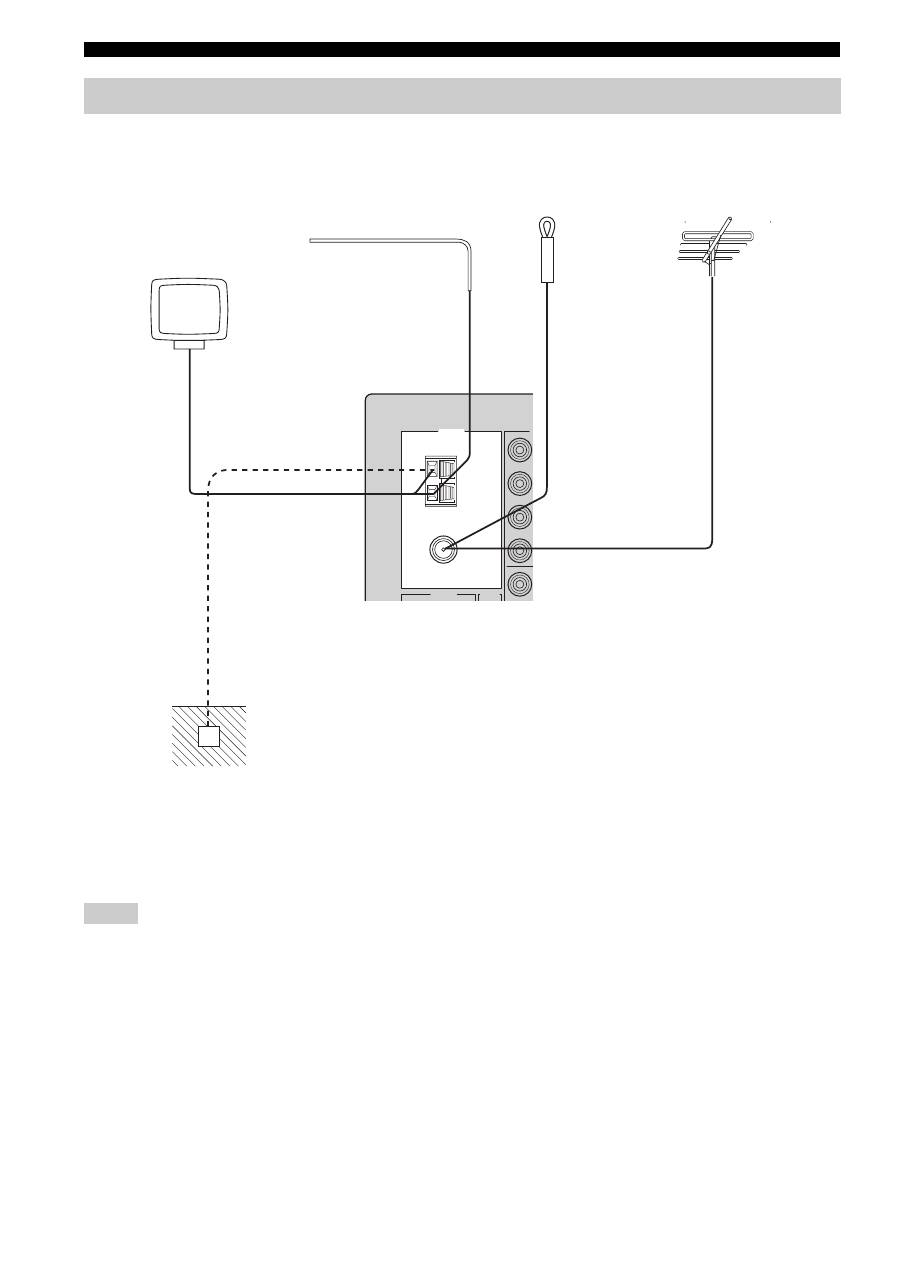
Both AM and FM indoor antennas are included with this unit. In general, these antennas should provide sufficient signal
strength. Connect each antenna correctly to the designated terminals.
• A properly installed outdoor antenna provides clearer reception than an indoor one. If you experience poor reception quality, an
outdoor antenna may improve the quality. Consult your nearest authorized YAMAHA dealer or service center about outdoor antennas.
• If you connect an outdoor FM antenna to this unit, do not connect the indoor FM antenna to this unit.
• To minimize interference from automobile ignition, locate the antenna as far from heavy traffic as possible.
• Keep the feeder cable or coaxial cable as short as possible. Do not bundle or roll up excess cable.
• The antenna should be placed at least 2 meters from reinforced concrete walls or metal structures.
Connecting the AM and FM antennas
Notes
GND
AM
ANT
FM
ANT
75
Ω
UNBAL.
MO
V
AUDIO
GND
CD
TUNER
AM loop antenna
(included)
Indoor FM
antenna
(included)
Outdoor AM antenna
Use a 5 to 10 m of vinyl-
covered wire extended
outdoors from a window.
Outdoor FM
antenna
Ground (GND terminal)
For maximum safety and
minimum interference, connect
the antenna GND terminal to a
good earth ground. A good earth
ground is a metal stake driven into
moist earth.
or
13
CONNECTIONS
PREP
ARA
TION
English
■
Connecting the AM loop antenna
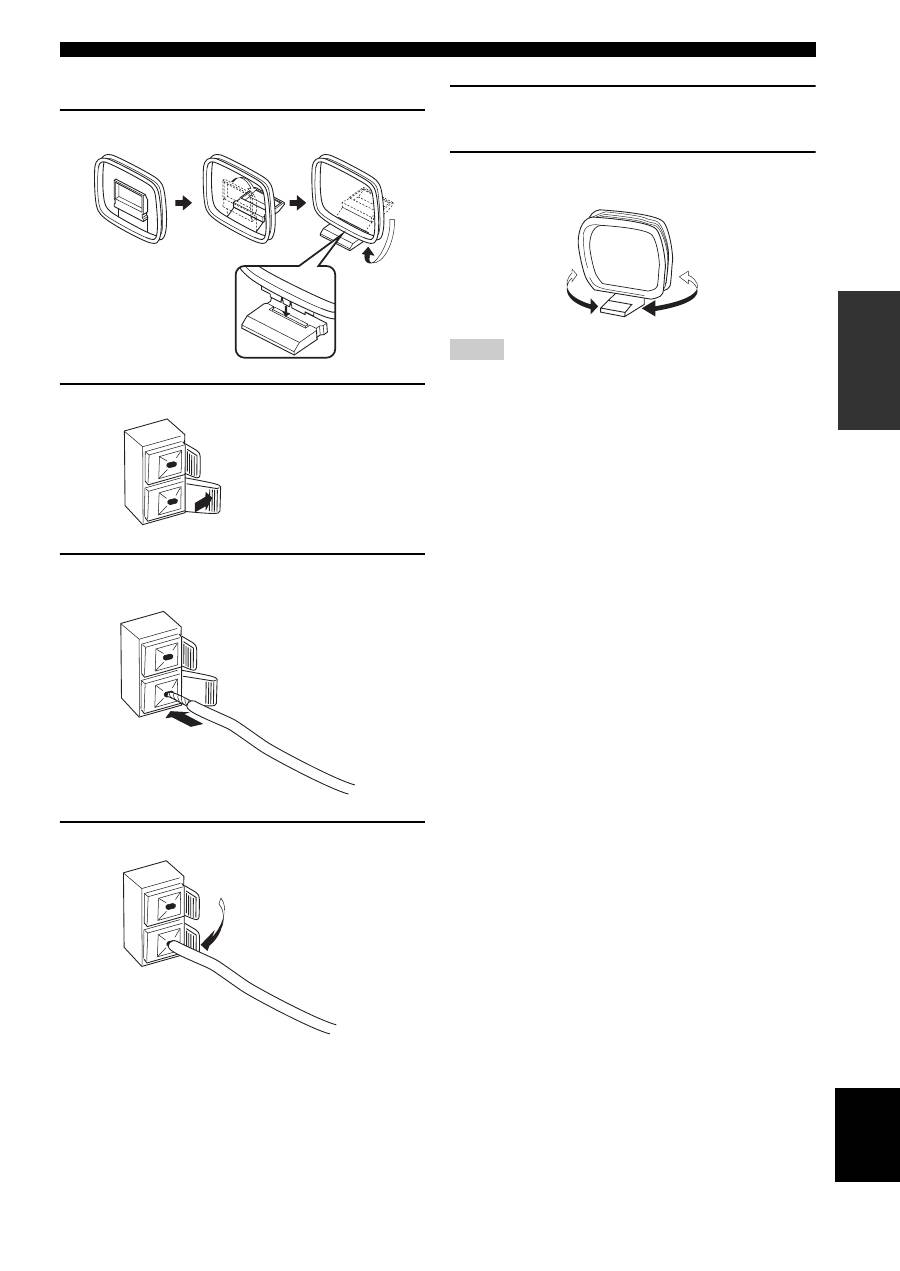
1
Set up the AM loop antenna.
2
Press and hold the tab.
3
Insert the AM loop antenna lead wires into
the AM ANT terminal.
4
Release the tab.
5
Repeat steps 2 to 4 to insert the AM loop
antenna lead wires into the GND terminal.
6
Orient the AM loop antenna for the best
reception.
• The AM loop antenna should be placed away from this unit.
• A properly installed outdoor antenna provides clearer reception
than an indoor one. If you experience poor reception quality, an
outdoor antenna may improve the quality. It is recommended
that you should connect a 5 to 10 m of vinyl-covered wire to the
AM ANT terminal and extend it outdoors from a window.
Consult your nearest authorized YAMAHA dealer or service
center about outdoor antennas.
• The AM loop antenna should always be connected, even if an
outdoor AM antenna is connected to this unit.
Notes
14
CONNECTIONS
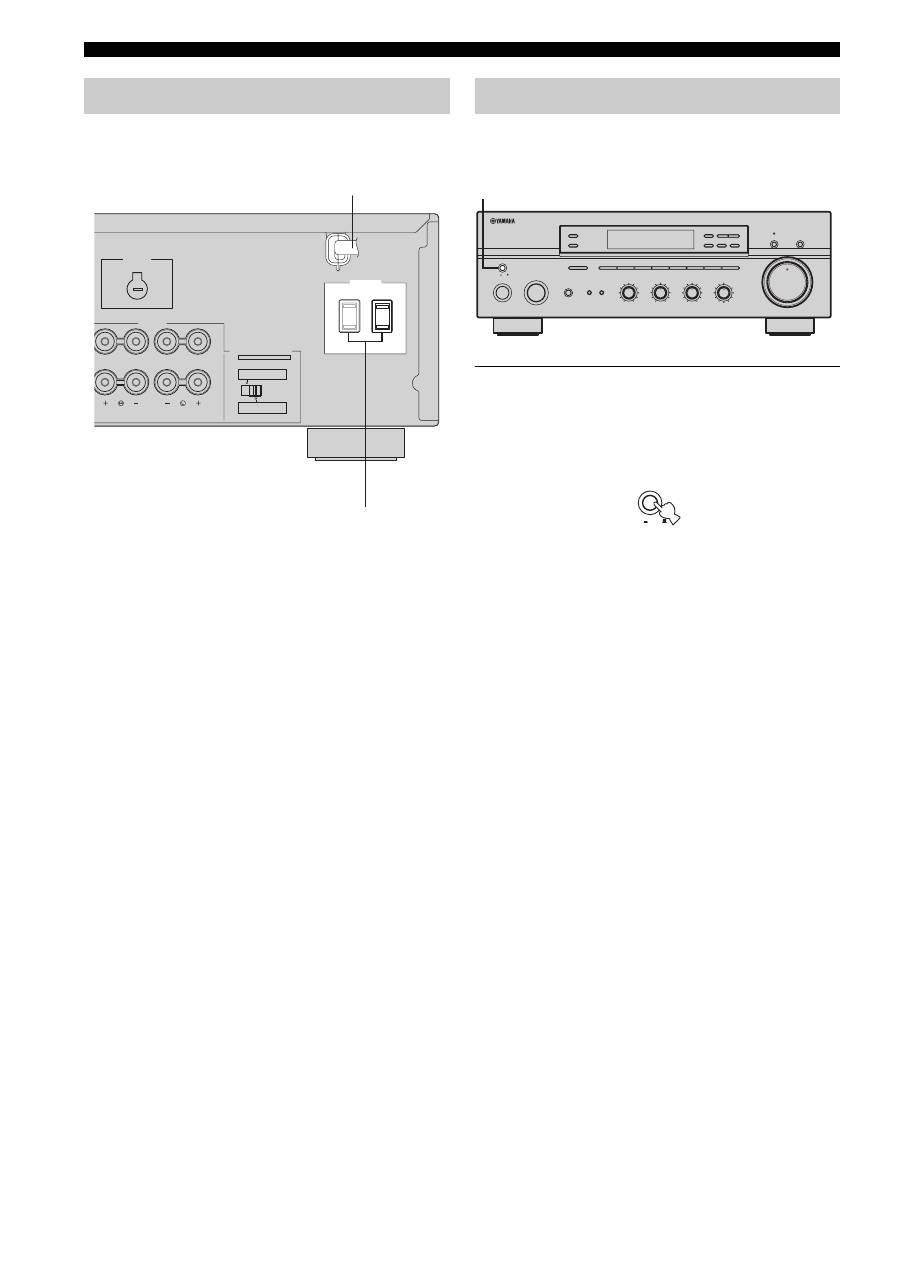
Plug the power supply cord into the AC wall outlet after
all other connections are complete.
■
AC OUTLET(S) (SWITCHED)
Australia model ..................................................... 1 outlet
Other models ....................................................... 2 outlets
Use these outlets to connect the power supply cords from
your other components to this unit. The outlets supply
power to any connected components whenever the power
of this unit is turned on. For information on the maximum
power (total power consumption of components), see
“SPECIFICATIONS” on page 39.
When all connections are complete, turn on the power of
this unit.
1
Press MASTER ON/OFF on the front panel
inward to the ON position to turn on the
power of this unit.
Main Zone of this unit turns on.
• You can set Main Zone of this unit to the standby mode
by pressing MAIN ZONE ON/OFF on the front panel
or STANDBY on the remote control.
Press MAIN ZONE ON/OFF on the front panel or
POWER on the remote control to turn Main Zone on
again.
• Press MASTER ON/OFF on the front panel again to
release it outward to the OFF position to turn off this
unit.
y
While MASTER ON/OFF on the front panel is pressed inward to
the ON position, you can turn on Zone 2 or set it to the standby
mode independently (see page 32).
Connecting the power supply cord
A OR B: 4
Ω
MIN. /SPEAKER
A + B: 8
Ω
MIN. /SPEAKER
A OR B: 8
Ω
MIN. /SPEAKER
A + B:16
Ω
MIN. /SPEAKER
IMPEDANCE SELECTOR
SET BEFORE POWER ON
SPEAKERS
VOLTAGE
SELECTOR
AC OUTLETS
SWITCHED
(General model)
AC power supply cord
AC OUTLET(S)
Turning on and off this unit
ON/OFF
INPUT
MAIN ZONE
PHONES
BASS
MASTER
ON
OFF
MD/TAPE MONITOR
PURE DIRECT
5
5
1
0
1
4
4
2
2
3
3
+
–
VOLUME
l
TUNING
h
ZONE 2 ON/OFF
ZONE CONTROL
FM/AM
EDIT
A/B/C/D/E
1
2
3
4
5
6
7
8
MEMORY
MAN'L/AUTO FM
TUNING MODE
AUTO/MAN'L
TREBLE
5
5
1
0
1
4
4
2
2
3
3
+
–
BALANCE
5
5
1
0
1
4
4
2
2
3
3
R
L
LOUDNESS
5
7
1
FLAT
6
4
8
2
10
–30dB
3
9
SPEAKERS
B
A
1
0
12
12
2
8
4
∞
20
20
60
60
26
26
40
40
16
16
-dB
-dB
MASTER
ON
OFF
PLAYING AND RECORDING
15
BA
S
IC
OPE
R
A
T
IO
N
English
l
Extreme caution should be exercised when you play back CDs encoded in DTS.
If you play back a CD encoded in DTS on a DTS-incompatible CD player, you will only hear some unwanted noise that may damage
your speakers. Check whether your CD player supports CDs encoded in DTS. Also, check the sound output level of your CD player
before you play back a CD encoded in DTS.
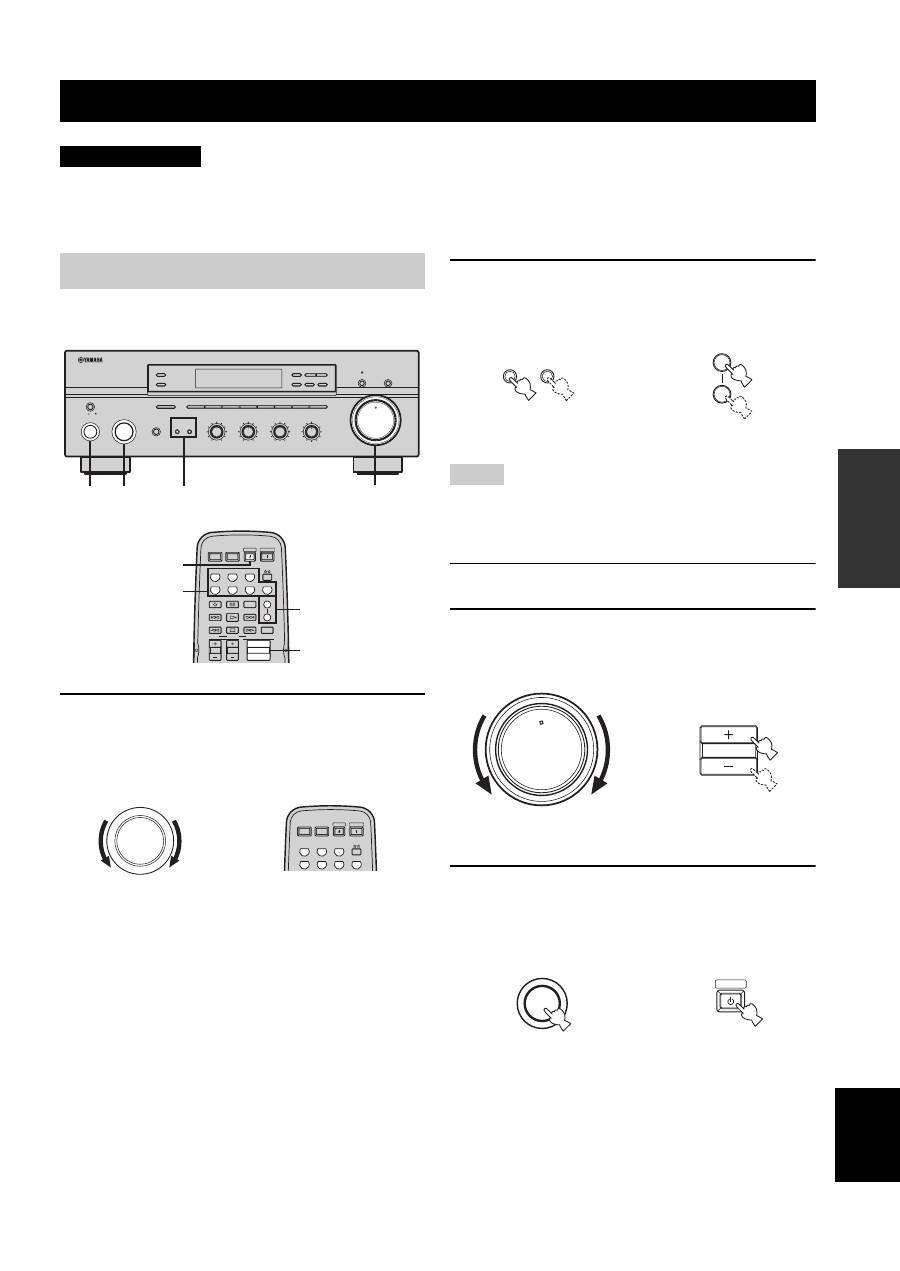
1
Rotate the INPUT selector on the front panel
(or press one of the input selector buttons on
the remote control) to select the desired
input source.
2
Press SPEAKERS A and/or SPEAKERS B on
the front panel or on the remote control to
select speakers A and/or speakers B.
• Both SPEAKERS A and B can be selected.
• Make sure that the IMPEDANCE SELECTOR switch is
correctly set (see page 11).
3
Play the source.
4
Rotate VOLUME on the front panel (or press
VOLUME +/– on the remote control) to adjust
the sound output level.
5
Press MAIN ZONE ON/OFF on the front panel
again (or press STANDBY on the remote
control) to finish using this unit and set it to
the standby mode.
PLAYING AND RECORDING
CAUTION
Playing a source
ON/OFF
INPUT
MAIN ZONE
PHONES
BASS
MASTER
SPEAKERS
ON
OFF
MD/TAPE MONITOR
PURE DIRECT
5
5
1
0
1
4
4
2
2
3
3
+
–
VOLUME
l
TUNING
h
ZONE 2 ON/OFF
ZONE CONTROL
FM/AM
EDIT
A/B/C/D/E
1
2
3
4
5
6
7
8
MEMORY
MAN'L/AUTO FM
TUNING MODE
AUTO/MAN'L
B
A
TREBLE
5
5
1
0
1
4
4
2
2
3
3
+
–
BALANCE
5
5
1
0
1
4
4
2
2
3
3
R
L
LOUDNESS
5
7
1
FLAT
6
4
8
2
10
–30dB
3
9
1
2
5
4
0
12
12
2
8
4
∞
20
20
60
60
26
26
40
40
16
16
-dB
-dB
STANDBY
POWER
CD
MD/TAPE
TUNER
PHONO
DVD
SLEEP
A
B
POWER
POWER
REC
CODE SET
VOLUME
DISC SKIP
EON
FREQ/TEXT
START
MODE
PTY SEEK
AV
TV
VCR
DTV/CBL
SPEAKERS
TV VOL
TV CH
2
4
1
5
INPUT
STANDBY
POWER
CD
MD/TAPE
TUNER
PHONO
DVD
POWER
POWER
AV
TV
VCR
DTV/CBL
Front panel
Remote control
or
Notes
SPEAKERS
B
A
A
B
SPEAKERS
or
Front panel
Remote control
0
12
12
2
8
4
∞
20
20
60
60
26
26
40
40
16
16
-dB
-dB
VOLUME
VOLUME
Remote control
Front panel
or
ON/OFF
MAIN ZONE
STANDBY
Remote control
Front panel
or
16
PLAYING AND RECORDING
■
Adjusting the BALANCE control
Adjusts the sound output balance of the left and right
speakers to compensate for sound imbalance caused by
speaker locations or listening room conditions.
■
Using the PURE DIRECT button
Routes input signals from your audio sources so that the
input signals bypass the BASS, TREBLE, BALANCE and
LOUDNESS controls, thus eliminating any alterations to
the audio signals and creating the purest possible sound.
■
Adjusting the BASS and TREBLE
controls
Adjust the high and low frequency response.
BASS
Increases or decreases the low frequency response.
TREBLE
Increases or decreases the high frequency response.
■
Adjusting the LOUDNESS control
Retains a full tonal range at any volume level, thus
compensating for the human ears’ loss of sensitivity to
high and low-frequency ranges at a low volume level.
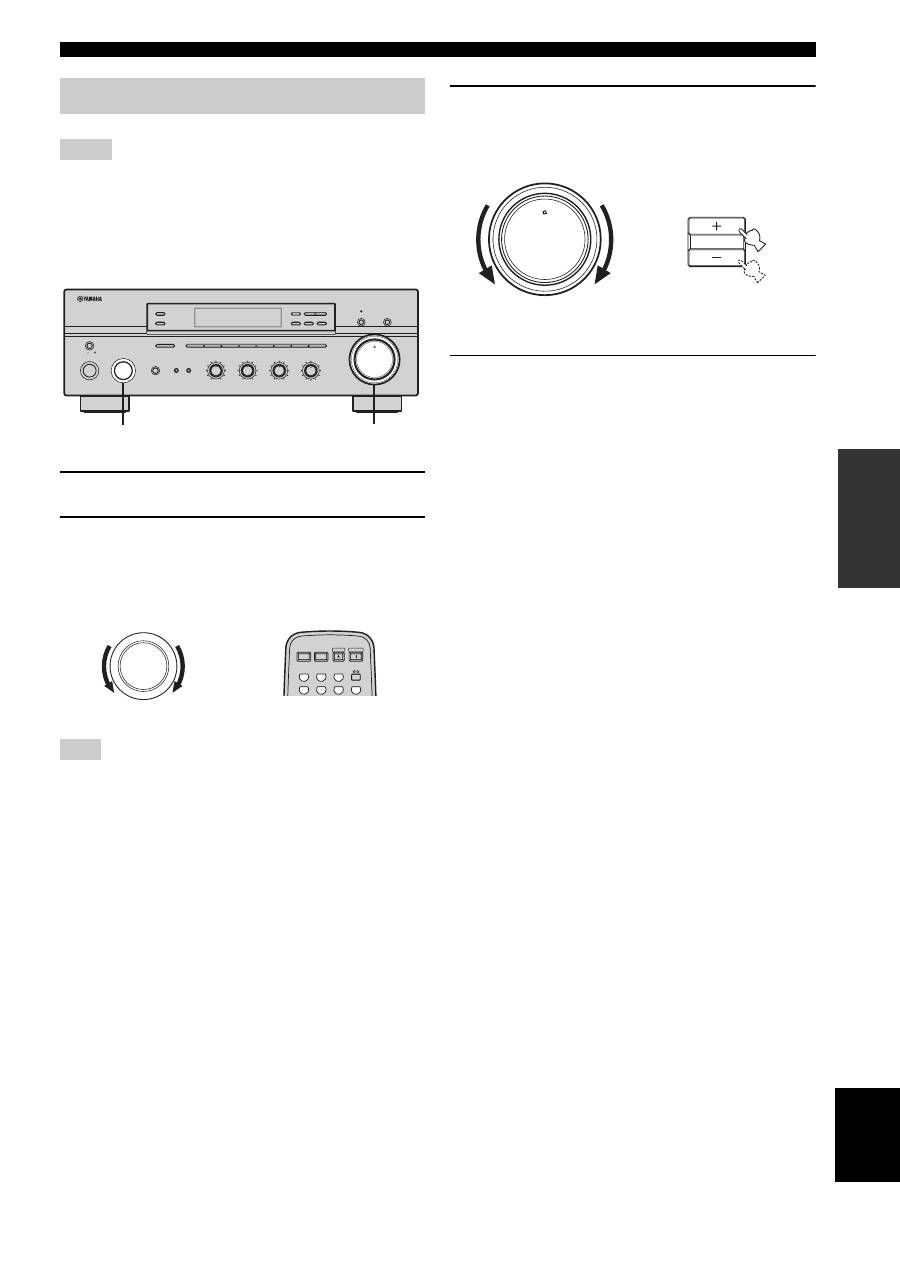
If the PURE DIRECT button is turned on with the LOUDNESS
control set at a certain level, the input signals bypass the
LOUDNESS control, resulting in a sudden increase in the sound
output level. To prevent your ears or the speakers from being
undesirably damaged, be sure to press the PURE DIRECT button
after lowering the sound output level or after checking that the
LOUDNESS control is properly set.
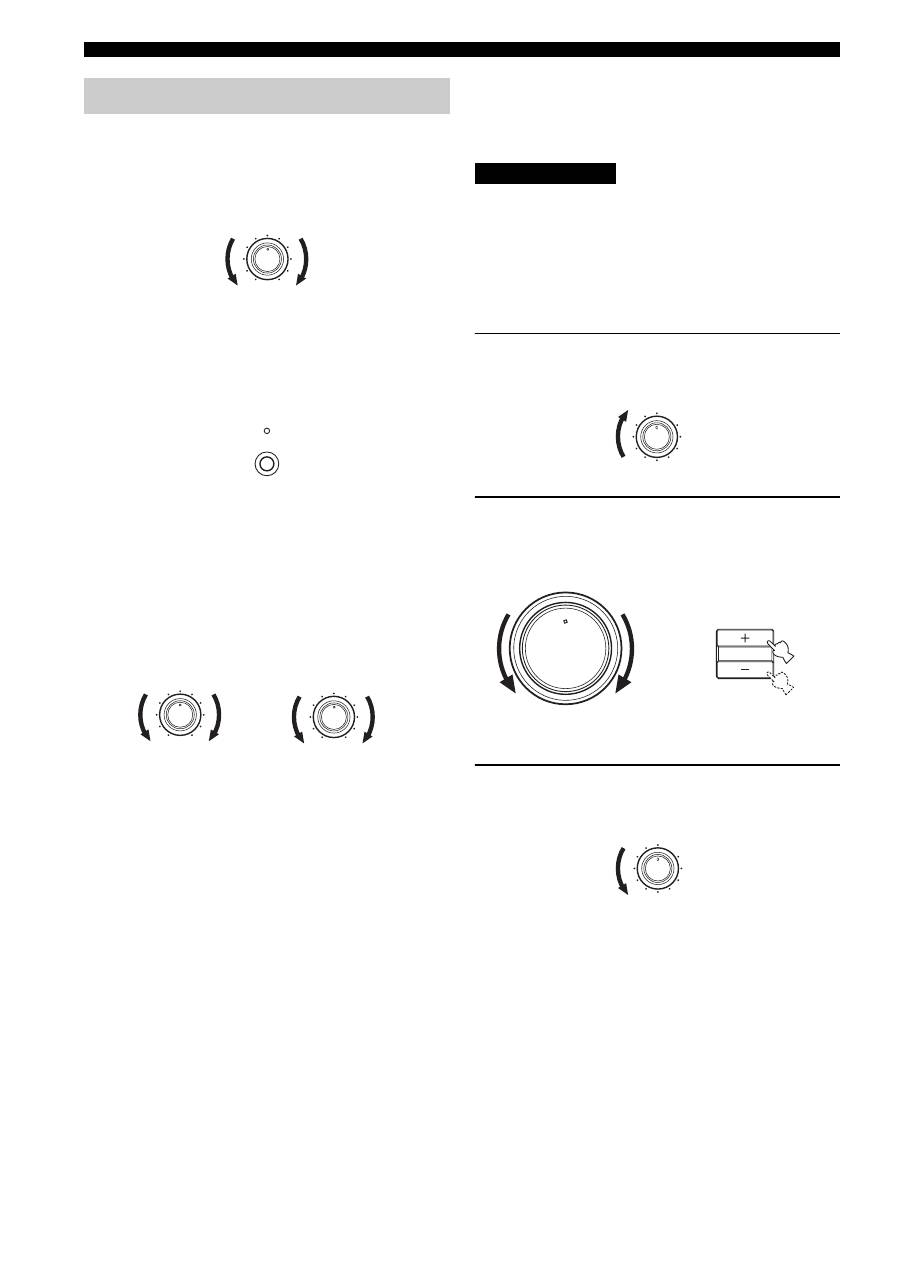
1
Rotate the LOUDNESS control on the front
panel to the FLAT position.
2
Rotate VOLUME on the front panel (or press
VOLUME +/– on the remote control) to set the
sound output level to the loudest listening
level that you would listen to.
3
Rotate the LOUDNESS control until the
desired volume is obtained.
Adjusting the tonal quality
BALANCE
5
5
1
0
1
4
4
2
2
3
3
R
L
PURE DIRECT
BASS
5
5
1
0
1
4
4
2
2
3
3
+
–
TREBLE
5
5
1
0
1
4
4
2
2
3
3
+
–
CAUTION
LOUDNESS
5
7
1
FLAT
6
4
8
2
10
–30dB
3
9
0
12
12
2
8
4
∞
20
20
60
60
26
26
40
40
16
16
-dB
-dB
VOLUME
VOLUME
Remote control
Front panel
or
LOUDNESS
5
7
1
FLAT
6
4
8
2
10
–30dB
3
9
17
PLAYING AND RECORDING
BA
S
IC
OPE
R
A
T
IO
N
English
• The VOLUME, BASS, TREBLE, BALANCE and
LOUDNESS controls and the PURE DIRECT buttons have no
effect on the source being recorded.
• Check the copyright laws in your country to record from
records, CDs, radio, etc. Recording copyright-protected
material may infringe on copyright laws.
1
Play the selected source to record from.
2
Rotate the INPUT selector on the front panel
(or press one of the input selector buttons on
the remote control) to select the source you
want to record from.
You cannot select any input source while the
MD/TAPE MON
indicator in the front panel display lights on.
3
Rotate VOLUME on the front panel (or press
VOLUME +/– on the remote control) to adjust
the sound output level of the selected source
to record from.
4
Begin recording on the MD recorder, the tape
deck or the VCR connected to this unit.
y
If the 3-head tape deck is used for recording, you can monitor the
sound of recording by pressing MD/TAPE MONITOR on the
front panel.
Recording a source
Notes
Note
ON/OFF
INPUT
MAIN ZONE
PHONES
BASS
MASTER
ON
OFF
MD/TAPE MON
PURE DIRECT
5
5
1
0
1
4
4
2
2
3
3
+
–
VOLUME
l
TUNING
h
ZONE 2 ON/OFF
ZONE CONTROL
FM/AM
EDIT
A/B/C/D/E
1
2
3
4
5
6
7
8
MEMORY
MAN'L/AUTO FM
TUNING MODE
AUTO/MAN'L
TREBLE
5
5
1
0
1
4
4
2
2
3
3
+
–
BALANCE
5
5
1
0
1
4
4
2
2
3
3
R
L
LOUDNESS
5
7
1
FLAT
6
4
8
2
10
–30dB
3
9
SPEAKERS
B
A
2
3
0
12
12
2
8
4
∞
20
20
60
60
26
26
40
40
16
16
-dB
-dB
INPUT
STANDBY
POWER
CD
MD/TAPE
TUNER
PHONO
DVD
POWER
POWER
AV
TV
VCR
DTV/CBL
Front panel
Remote control
or
0
12
12
2
8
4
∞
20
20
60
60
26
26
40
40
16
16
-dB
-dB
VOLUME
VOLUME
Remote control
Front panel
or
18
PLAYING AND RECORDING
Use this feature to automatically set this unit to the
standby mode after a certain amount of time. The sleep
timer is useful when you are going to sleep while this unit
is playing or recording a source. The sleep timer also
automatically turns off any external components
connected to the AC OUTLET(S).
• The sleep timer can only be set with the remote control.
• The sleep timer automatically turns off Zone 2. However, the
power of Zone 2 components are not turned off.
1
Press one of the input selector buttons on
the remote control to select an input source.
2
Start playback on the selected input source.
3
Press SLEEP repeatedly to set the amount of
time before this unit is set to the standby
mode.
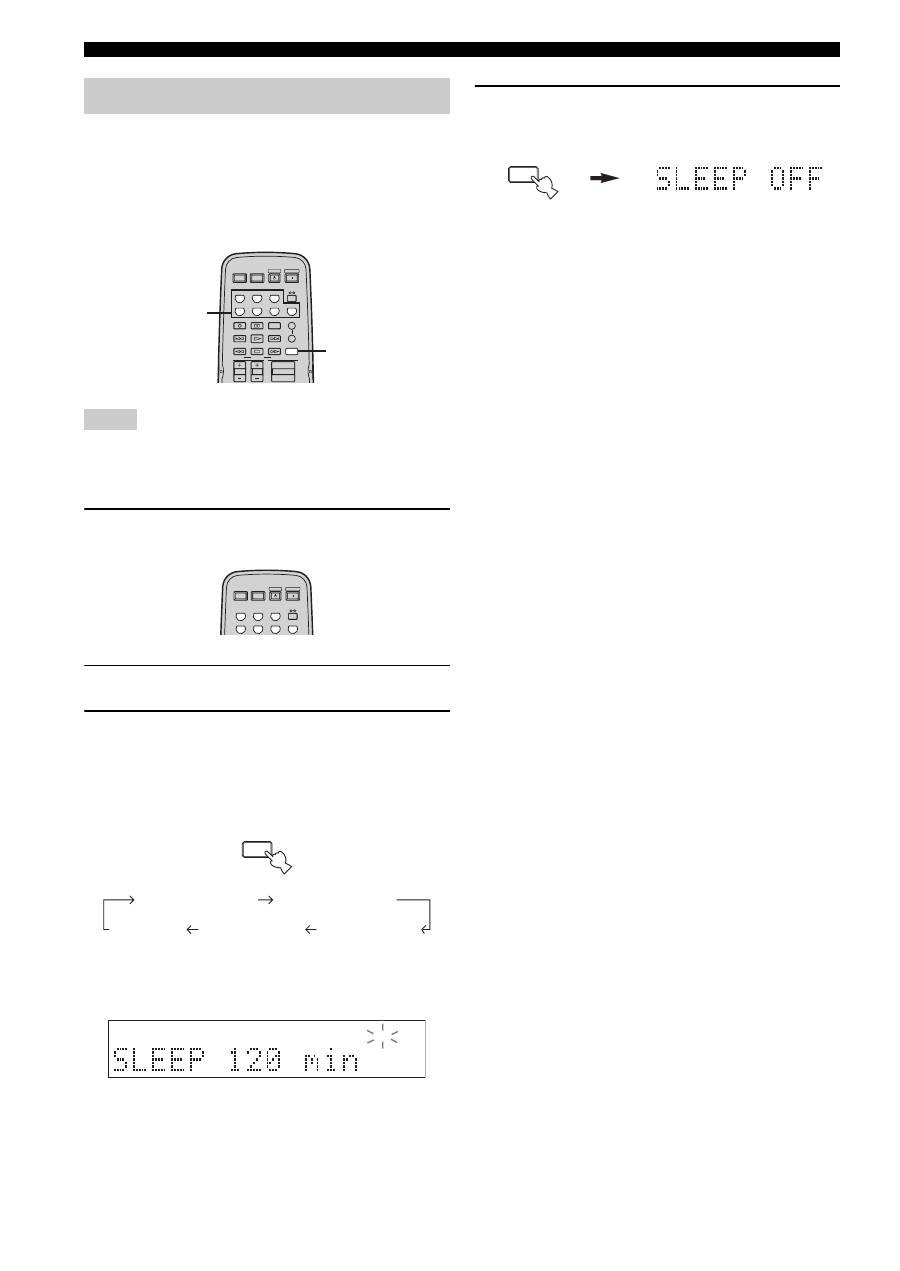
Each time you press SLEEP, the front panel display
changes as shown below.
The SLEEP indicator flashes while switching the
amount of time for the sleep timer.
4
Press SLEEP repeatedly so that SLEEP OFF
appears in the front panel display.
After a few seconds, SLEEP OFF disappears from the
front panel display, and the SLEEP indicator turns
off.
y
The sleep timer setting can also be canceled by pressing
STANDBY on the remote control (or MAIN ZONE ON/OFF or
MASTER ON/OFF on the front panel) to set this unit to the
standby mode.
Using the sleep timer
Notes
STANDBY
POWER
CD
MD/TAPE
TUNER
PHONO
DVD
SLEEP
A
B
POWER
POWER
REC
CODE SET
VOLUME
DISC SKIP
EON
FREQ/TEXT
START
MODE
PTY SEEK
AV
TV
VCR
DTV/CBL
SPEAKERS
TV VOL
TV CH
3
1
STANDBY
POWER
CD
MD/TAPE
TUNER
PHONO
DVD
POWER
POWER
AV
TV
VCR
DTV/CBL
SLEEP
SLEEP 120 min
SLEEP 90 min
SLEEP 60 min
SLEEP 30 min
SLEEP OFF
SLEEP
SLEEP
