
Yamaha KMA-500: instruction
Class: Household, kitchen appliances, electronics and equipment
Type:
Manual for Yamaha KMA-500
Table of contents
- IMPORTANT SAFETY INSTRUCTIONS
- FCC INFORMATION (for US customers)
- Caution: Read this before operating your unit
- CONTENTS
- HANDLING PRECAUTIONS BEFORE CONNECTING
- NAMES OF PARTS AND THEIR FUNCTIONS Front panel
- NAMES OF PARTS AND THEIR FUNCTIONS Rear panel
- NAMES OF PARTS AND THEIR FUNCTIONS
- SYSTEM CONNECTIONS
- CONNECTIONS
- CONNECTIONS
- CONNECTIONS
- CONFIGURATION DIAGRAM
- REMOTE CONTROL
- REMOTE CONTROL
- GENERAL OPERATION
- SETUP MODE ■ Menus in Setup mode
- ■ Setup mode table
- TROUBLESHOOTING Problems Possible causes Solutions MAINTENANCE
- AFTER-SALES SERVICING KARAOKE ETIQUETTE
- SPECIFICATIONS
L
KMA-700/KMA-500
Digital Karaoke Mixing Amplifier
OWNER’S MANUAL
MANUAL DE INSTRUCCIONES
ИНСТРУКЦИЯ ПО ЭКСПЛУАТАЦИИ
IMPORTANT SAFETY INSTRUCTIONS
1 Read these instructions.
2 Keep these instructions.
CAUTION
3 Heed all warnings.
RISK OF ELECTRIC SHOCK DO
4 Follow all instructions.
NOT OPEN
5 Do not use this apparatus near water.
6 Clean only with dry cloth.
CAUTION: TO REDUCE THE RISK OF
7 Do not block any ventilation openings. Install in accordance
ELECTRIC SHOCK, DO NOT REMOVE COVER
with the manufacturer’s instructions.
(OR BACK). NO USER-SERVICEABLE PARTS
8 Do not install near any heat sources such as radiators, heat
INSIDE. REFER SERVICING TO QUALIFIED
registers, stoves, or other apparatus (including amplifiers) that
SERVICE PERSONNEL.
produce heat.
9 Do not defeat the safety purpose of the polarized or
• Explanation of Graphical Symbols
grounding-type plug. A polarized plug has two blades with
one wider than the other. A grounding type plug has two
The lightning flash with arrowhead symbol, within an
blades and a third grounding prong. The wide blade or the
equilateral triangle, is intended to alert you to the
presence of uninsulated “dangerous voltage” within
third prong are provided for your safety. If the provided plug
the product’s enclosure that may be of sufficient
does not fit into your outlet, consult an electrician for
magnitude to constitute a risk of electric shock to
replacement of the obsolete outlet.
persons.
10 Protect the power cord from being walked on or pinched
The exclamation point within an equilateral triangle
particularly at plugs, convenience receptacles, and the point
is intended to alert you to the presence of important
where they exit from the apparatus.
operating and maintenance (servicing) instructions in
11 Only use attachments/accessories specified by the
the literature accompanying the appliance.
manufacturer.
12 Use only with the cart, stand, tripod, bracket,
or table specified by the manufacturer, or sold
IMPORTANT
with the apparatus. When a cart is used, use
Please record the serial number of this unit in the space
caution when moving the cart/apparatus
below.
combination to avoid injury from tip-over.
MODEL:
13 Unplug this apparatus during lightning storms or when unused
Serial No.:
for long periods of time.
The serial number is located on the rear of the unit.
14 Refer all servicing to qualified service personnel. Servicing is
Retain this Owner’s Manual in a safe place for future
required when the apparatus has been damaged in any way,
reference.
such as power cord or plug is damaged, liquid has been spilled
or objects have fallen into the apparatus, the apparatus has
been exposed to rain or moisture, does not operate normally,
or has been dropped.
i En
IMPORTANT SAFETY INSTRUCTIONS
FCC INFORMATION (for US customers)
1 IMPORTANT NOTICE: DO NOT MODIFY THIS
Compliance with FCC regulations does not guarantee that
UNIT!
interference will not occur in all installations. If this
This product, when installed as indicated in the
product is found to be the source of interference, which can
instructions contained in this manual, meets FCC
be determined by turning the unit “OFF” and “ON”, please
requirements. Modifications not expressly approved by
try to eliminate the problem by using one of the following
Yamaha may void your authority, granted by the FCC, to
measures:
use the product.
Relocate either this product or the device that is being
2IMPORTANT: When connecting this product to
affected by the interference.
accessories and/or another product use only high quality
Utilize power outlets that are on different branch (circuit
shielded cables. Cable/s supplied with this product MUST
breaker or fuse) circuits or install AC line filter/s.
be used. Follow all installation instructions. Failure to
In the case of radio or TV interference, relocate/reorient
follow instructions could void your FCC authorization to
the antenna. If the antenna lead-in is 300 ohm ribbon lead,
use this product in the USA.
change the lead-in to coaxial type cable.
3 NOTE: This product has been tested and found to comply
If these corrective measures do not produce satisfactory
with the requirements listed in FCC Regulations, Part 15
results, please contact the local retailer authorized to
for Class “B” digital devices. Compliance with these
distribute this type of product. If you can not locate the
requirements provides a reasonable level of assurance that
appropriate retailer, please contact Yamaha Electronics
your use of this product in a residential environment will
Corp., U.S.A. 6660 Orangethorpe Ave., Buena Park, CA
not result in harmful interference with other electronic
90620.
devices.
This equipment generates/uses radio frequencies and, if
The above statements apply ONLY to those products
not installed and used according to the instructions found
distributed by Yamaha Corporation of America or its
in the users manual, may cause interference harmful to the
subsidiaries.
operation of other electronic devices.
We Want You Listening For A Lifetime
Yamaha and the Electronic Industries Association’s Consumer Electronics Group want you to get the most out of your
equipment by playing it at a safe level. One that lets the sound come through loud and clear without annoying blaring or
distortion – and, most importantly, without affecting your sensitive hearing. Since hearing damage from loud sounds is
often undetectable until it is too late, Yamaha and the Electronic Industries Association’s Consumer Electronics Group
recommend you to avoid prolonged exposure from excessive volume levels.
ii En
Caution: Read this before operating your unit
1 To assure the finest performance, please read this manual
19 The batteries shall not be exposed to excessive heat such as
carefully. Keep it in a safe place for future reference.
sunshine, fire or like.
2 Install this sound system in a well ventilated, cool, dry, clean
20 Condensation will form when the surrounding temperature
place – away from direct sunlight, heat sources, vibration,
changes suddenly. Disconnect the power supply cable from
dust, moisture, and/or cold. Allow ventilation space of at least
the outlet, then leave the unit alone.
10 cm (3-15/16”) on the top, left and right of this unit, and
21 When using the unit for a long time, the unit may become
20 cm (7-7/8”) on the back.
warm. Turn the power off, then leave the unit alone for
3 Locate this unit away from other electrical appliances, motors,
cooling.
or transformers to avoid humming sounds.
22 VOLTAGE SELECTOR (Except U.S.A. model)
4 Do not expose this unit to sudden temperature changes from
The VOLTAGE SELECTOR on the rear panel of this unit
cold to hot, and do not locate this unit in an environment with
must be set for your local main voltage BEFORE plugging
high humidity (i.e. a room with a humidifier) to prevent
into the AC wall outlet.
condensation inside this unit, which may cause an electrical
shock, fire, damage to this unit, and/or personal injury.
5 Avoid installing this unit where foreign objects may fall onto
this unit and/or this unit may be exposed to liquid dripping or
splashing. On the top of this unit, do not place:
– Other components, as they may cause damage and/or
discoloration on the surface of this unit.
– Burning objects (i.e. candles), as they may cause fire,
damage to this unit, and/or personal injury.
– Containers with liquid in them, as they may fall and liquid
foot foot
may cause electrical shock to the user and/or damage to
rack
this unit.
6 Do not cover this unit with a newspaper, tablecloth, curtain,
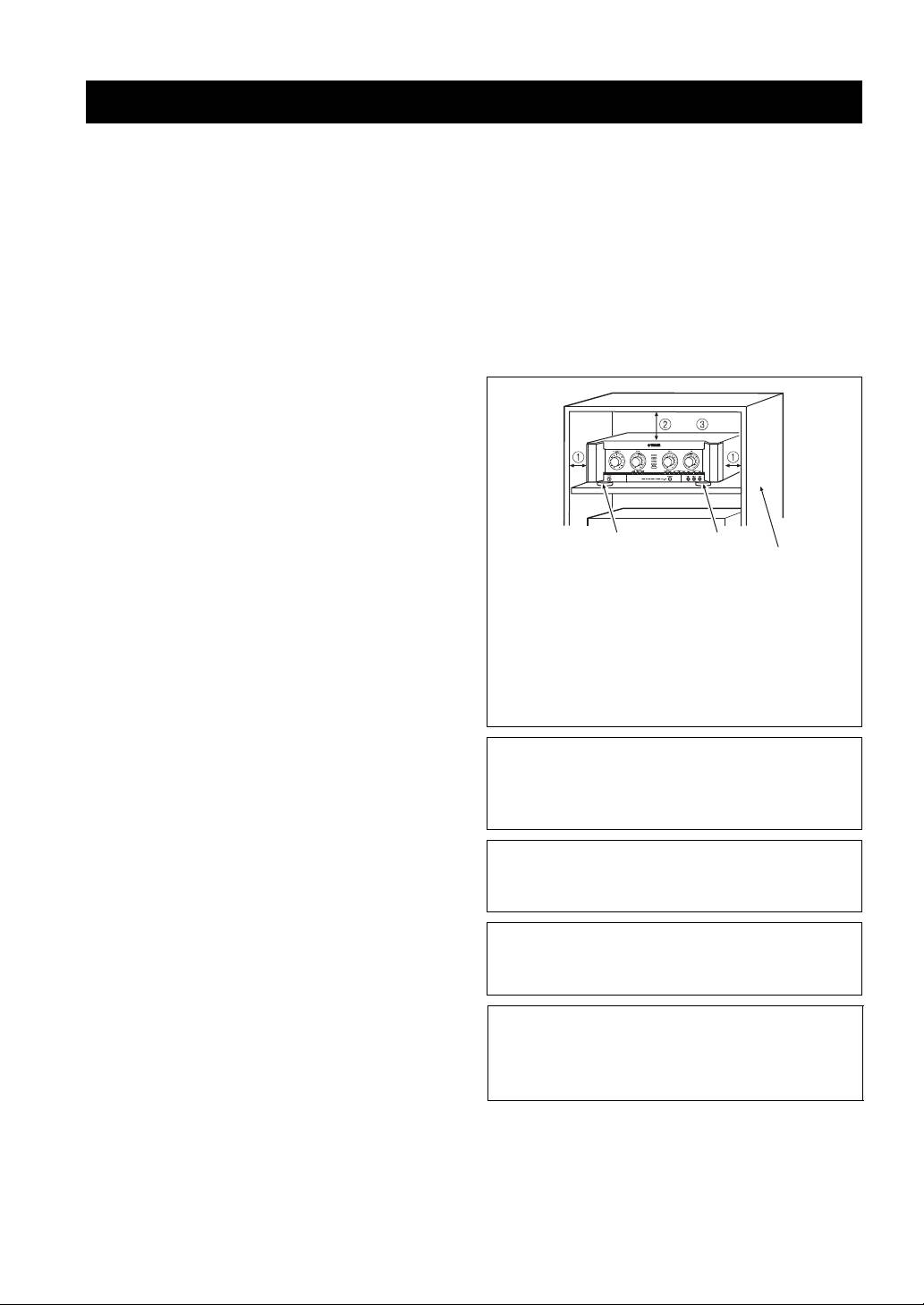
The following rack size measurements must be adhered to:
etc. in order not to obstruct heat radiation. If the temperature
inside this unit rises, it may cause fire, damage to this unit,
12 The ventilation space on the top, left and right of this
and/or personal injury.
unit; more than 10 cm (3-15/16”)
7 Do not plug in this unit to an AC wall outlet until all
3 The ventilation space on the back of this unit; more
connections are complete.
than 20 cm (7-7/8”)
8 Do not operate this unit upside-down. It may overheat,
4 Do not remove the feet.
possibly causing damage.
9 Do not use force on switches, knobs and/or cords.
10 When disconnecting the power cord from the AC wall outlet,
WARNING
grasp the plug; do not pull the cord.
TO REDUCE THE RISK OF FIRE OR ELECTRIC
11 Do not clean this unit with chemical solvents; this might
SHOCK, DO NOT EXPOSE THIS UNIT TO RAIN
damage the finish. Use a clean, dry cloth.
OR MOISTURE.
12 Only voltage specified on this unit must be used. Using this
unit with a higher voltage than specified is dangerous and may
As long as this unit is connected to the AC wall outlet,
cause fire, damage to this unit, and/or personal injury.
it is not disconnected from the AC power source even
Yamaha will not be held responsible for any damage resulting
if you turn off this unit by POWER switch.
from use of this unit with a voltage other than specified.
13 To prevent damage by lightning, keep the power cord
disconnected from an AC wall outlet or the unit during a
CAUTION
lightning storm.
Danger of explosion if battery is incorrectly replaced.
14 Do not attempt to modify or fix this unit. Contact qualified
Replace only with the same or equivalent type.
Yamaha service personnel when any service is needed. The
cabinet should never be opened for any reasons.
CAUTION
15 When not planning to use this unit for long periods of time
Use of controls or adjustments or performance of
(i.e. vacation), disconnect the AC power plug from the AC
procedures other than those specified herein may result
wall outlet.
in hazardous radiation exposure.
16 Install this unit near the wall outlet and where the AC power
plug can be reached easily.
17 Be sure to read the “Troubleshooting” section on common
operating errors before concluding that this unit is faulty.
18 Before moving this unit, press POWER switch to turn this
unit off, and disconnect the power cord from the AC wall
outlet.
iii En
CONTENTS
INTRODUCTION
HANDLING PRECAUTIONS .............................. 2
BEFORE CONNECTING ..................................... 2
PREPARATION
NAMES OF PARTS AND THEIR FUNCTIONS
.............................................................................. 3
PREPARATIONINTRODUCTION
OPERATION
SYSTEM CONNECTIONS................................... 6
CONNECTIONS .................................................... 7
CONFIGURATION DIAGRAM ........................ 10
REMOTE CONTROL ......................................... 11
GENERAL OPERATION ................................... 13
SETUP MODE...................................................... 14
OPERATION
ADDITIONAL INFORMATION
TROUBLESHOOTING....................................... 16
MAINTENANCE ................................................. 16
AFTER-SALES SERVICING............................. 17
KARAOKE ETIQUETTE ................................... 17
COPYRIGHT ....................................................... 17
INFORMATION
SPECIFICATIONS .............................................. 18
ADDITIONAL
English
1 En

INTRODUCTION
Thank you for your purchase of the Yamaha KMA-700/KMA-500 Digital Karaoke Mixing Amplifier.
This document is the owner’s manual for both KMA-700 and KMA-500. Model names are given where the details of
functions are unique to each model. Illustrations for KMA-700 are mainly used for explanations.
Before using this unit, be sure to read this manual so that you can take full advantage of the features of this unit.
After you finish reading, keep this manual in a safe place in case you need it in the future. The manual should be very
helpful in understanding the Digital Karaoke Mixing Amplifier and solving any difficulties that may arise during use.
HANDLING PRECAUTIONS
■ Do not install the unit in the following
• In places which may be exposed to rain, such as near a
locations:
window.
• In places exposed to direct sunlight or near heat
• In places which may be exposed to soot, vapor or heat,
sources, such as a radiator.
such as near cooking facilities.
• In places where heat cannot escape due to poor
ventilation, or are very humid or dusty.
• On a sloping surface or exposed to excessive vibration.
BEFORE CONNECTING
■ Connection precautions
■ Power consumption of AC OUTLETS
• Be sure to switch off the power of the relevant
(U.S.A. model only)
equipment before making any connection.
• Be careful that the total power consumption does not
• The white input/output jacks of the amplifier are
exceed the wattage marked on the rear panel. Do not
designed for the left channel, while the red input/output
connect appliances other than system components to
jacks are for the right channels. Be sure to connect the
the AC OUTLETS of this unit.
cords without making a mistake in the color codes for
• Do not connect a TV set to this unit; even if it indicates
the left and right channels.
a power consumption value below the permissible
• Insert the plugs of the connection cords securely into
value when the TV power is turned on.
the jacks. If the connection is incomplete, there may be
no sound produced or noise may be generated.
• When unplugging the power cable from the AC wall
outlet, be sure to hold the plastic molding of the plug
itself and pull.
• For KMA-700, set IMPEDANCE SELECTOR on the
rear panel before turning on the unit. Refer to
“IMPEDANCE SELECTOR” on page 7.
• Except in the case of the U.S.A. model, VOLTAGE
SELECTOR on the rear panel of this unit must be set
for your local main voltage BEFORE plugging the
power cable into the AC wall outlet. Refer to
“VOLTAGE SELECTOR” on page 9.
2 En
PREPARATION
NAMES OF PARTS AND THEIR FUNCTIONS
Front panel
PREPARATION
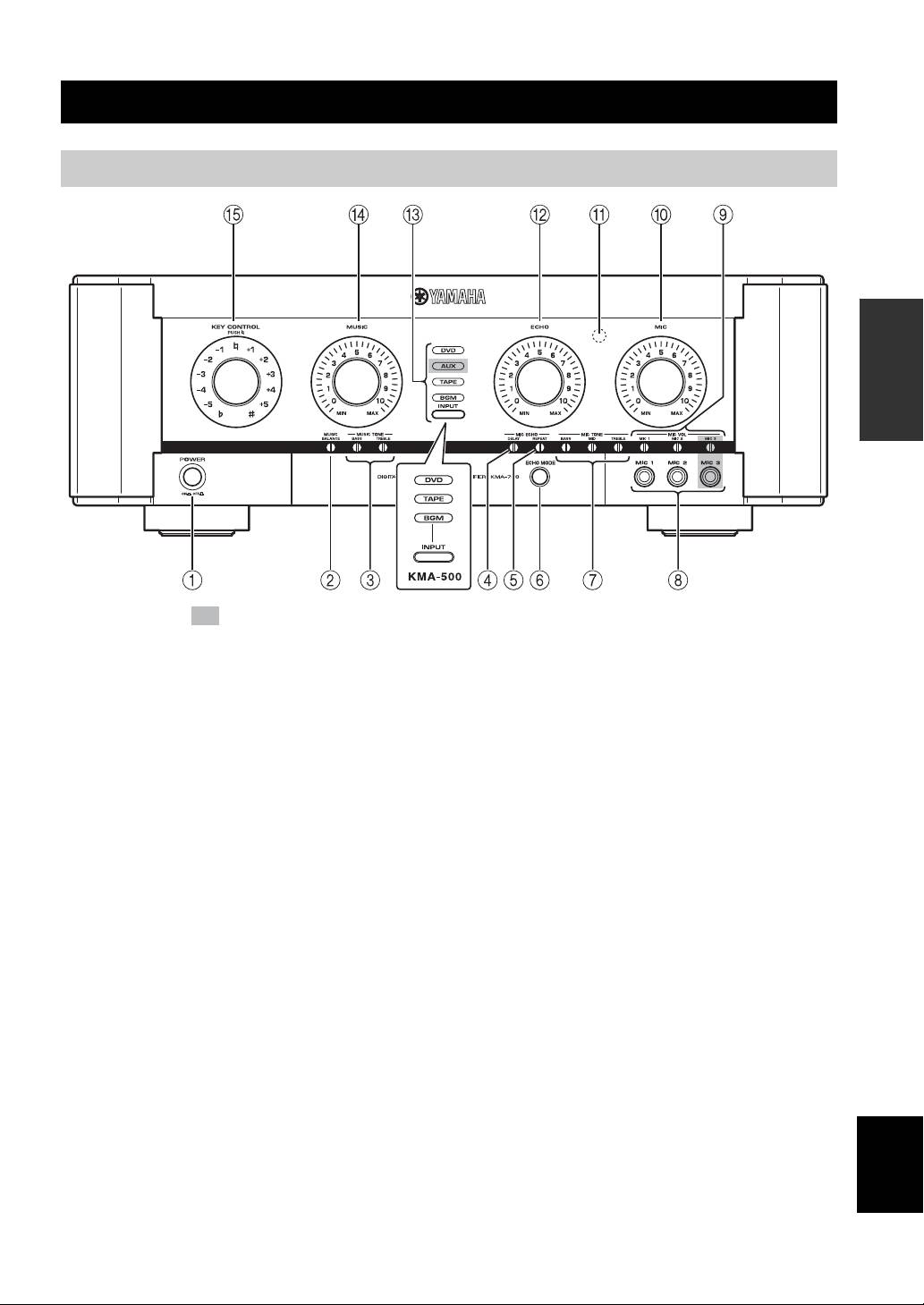
The shaded part ( ) is provided for KMA-700 only.
1 POWER (ON/OFF)
0 MIC
Turn the power ON/OFF.
Adjust the overall volume of all microphones.
2 MUSIC BALANCE
A Remote sensor
Adjust the volume balance.*
This sensor receives signals from the remote control.
3 MUSIC TONE (BASS/TREBLE)
B ECHO
Adjust the low/high frequency response.*
Adjust the amount of echo.
4 MIC ECHO DELAY
C INPUT/Input source indicators (DVD/AUX**/
Adjust the delay time between echoes.*
TAPE/BGM)
INPUT is not available in the default setting.
5 MIC ECHO REPEAT
To activate INPUT, refer to “Input mode” on page 14.
Adjust the amount of feedback.*
Input source indicators indicate the input source currently
6 ECHO MODE
active.
Select NORMAL, WIDE (stereo) or SPACIOUS** echo.
D MUSIC
SPACIOUS echo is an effect that produces both
Adjust the volume of the music source.
NORMAL and WIDE echo with a time lag. The LED
lights up in amber/green** when WIDE/SPACIOUS**
E KEY CONTROL
echo is selected.
To transpose the key of the played music, rotate this
control. The key can be changed in halftone steps in 5
7 MIC TONE (BASS/MID/TREBLE)
steps; either higher or lower. To reset the key to the
Adjust the low/middle/high frequency response of
natural key, press this control. If over 4 seconds of silence
microphones.*
occurs, the unit assumes the played song has finished and
English
8 MIC jacks (1/2/3**)
resets the key to natural.
Connect microphones to these jacks.
* Use a flathead screwdriver to adjust.
9 MIC VOL (1/2/3**)
** KMA-700 only
Adjust the microphone input level.*
3 En
NAMES OF PARTS AND THEIR FUNCTIONS
Rear panel
(Asia model)
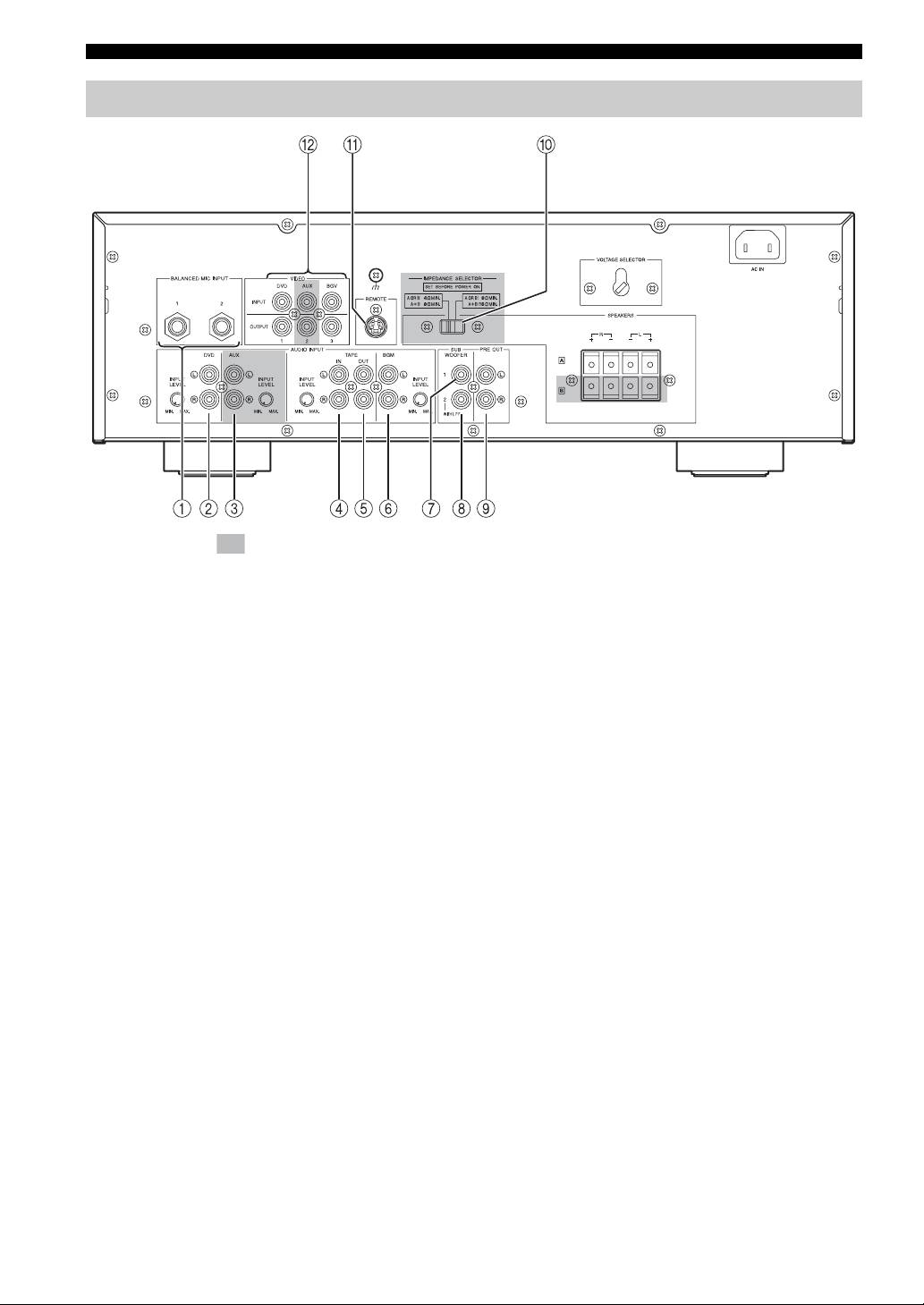
The shaded part ( ) is provided for KMA-700 only.
For details on component connection, refer to “SYSTEM
9 PRE OUT jacks
CONNECTIONS” on page 6.
Connect to the input jacks of the extension power
amplifier.
1 BALANCED MIC INPUT jacks (1/2)
Connect microphones to these jacks.
0 IMPEDANCE SELECTOR*
These are balanced inputs and each connects to the same
Refer to “IMPEDANCE SELECTOR” on page 7.
circuit MIC 1 and 2 on the front panel.
A REMOTE jack
2 DVD audio input jacks
Connect to an external remote control.
Connect to the output jacks of KARAOKE equipment or
Refer to “Connecting an external remote control” on page
DVD player.
8.
3 AUX audio input jacks*
B VIDEO INPUT jacks
Connect to the output jacks of a TAPE player, VCR, etc.
Connect to the input jack of the video output of a DVD,
AUX*, or background video player or video camera, etc.
4 TAPE audio input jacks
Connect to the output jacks of a TAPE player, VCR, etc.
5 TAPE audio output jacks
Connect to the input jacks of a TAPE player, VCR, etc.
* KMA-700 only
6 BGM audio input jacks
Connect to the output jacks of the source component of
background music.
7 SUBWOOFER jack without low-pass filter
Connect to the input jack of the subwoofer with a low-
pass filter. This jack outputs the monaural signal directly.
8 SUBWOOFER jack with low-pass filter
Connect to the input jack of the subwoofer.
4 En
NAMES OF PARTS AND THEIR FUNCTIONS
(Asia model)
PREPARATION
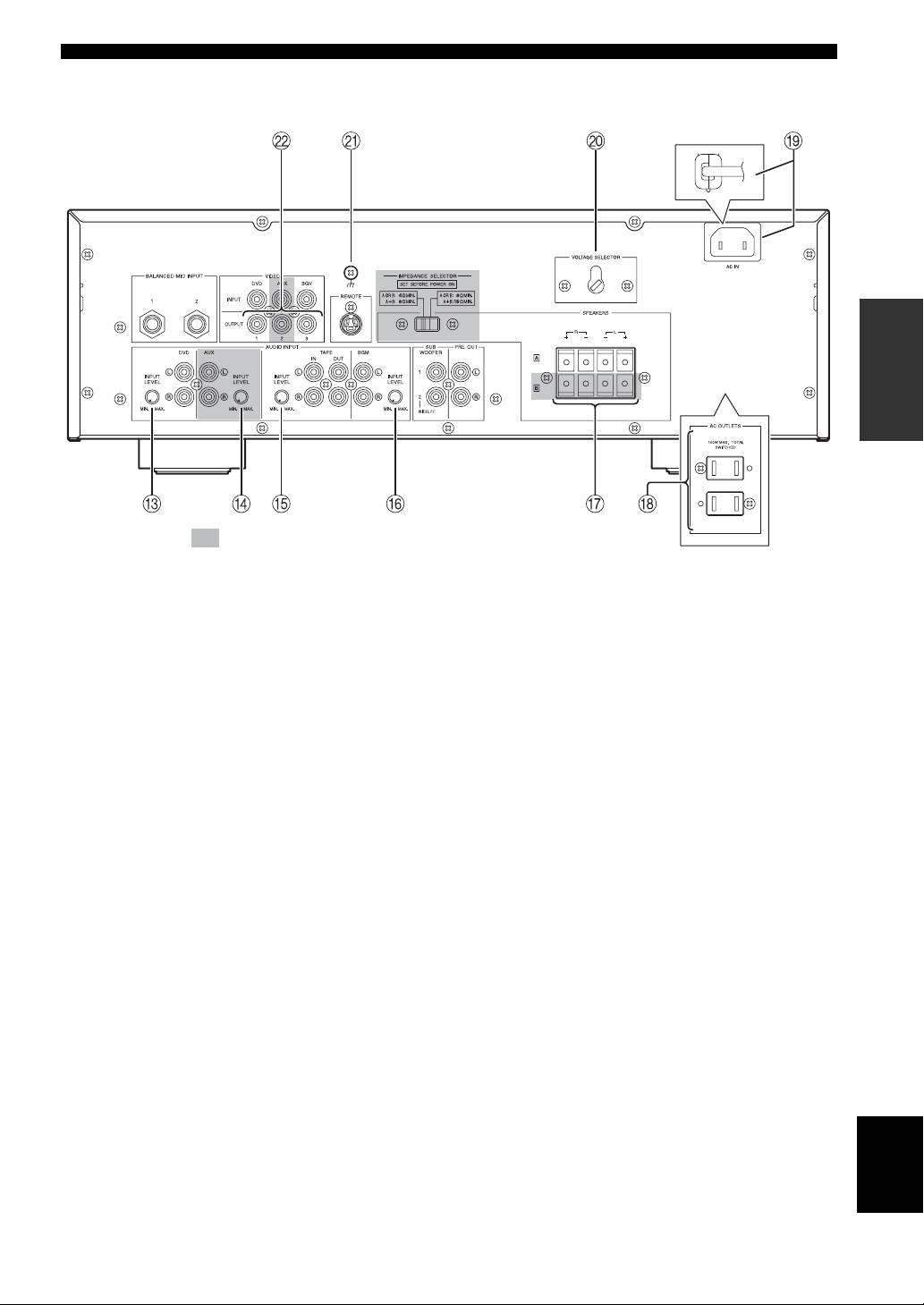
The shaded part ( ) is provided for KMA-700 only.
C DVD INPUT LEVEL
K Signal ground terminal
Adjust the balance of the DVD input level with respect to
Connect this terminal if a humming noise is emitted when
other inputs (AUX*, TAPE, BGM).
connecting this amplifier.
D AUX INPUT LEVEL*
L VIDEO OUTPUT jacks
Adjust the balance of the AUX input level with respect to
Connect to the video input of the monitor.
other inputs (DVD, TAPE, BGM).
E TAPE INPUT LEVEL
Adjust the balance of the TAPE input level with respect to
other inputs (DVD, AUX*, BGM).
* KMA-700 only
F BGM INPUT LEVEL
Adjust the balance of the BGM input level with respect to
other inputs (DVD, AUX*, TAPE).
G SPEAKERS (Speaker system terminal(s))
Connect to the speaker system(s).
For KMA-500, only one speaker system is available.
H AC OUTLETS (Max. total power consumption:
100 W. U.S.A. model only)
Refer to “AC OUTLETS” on page 9.
I AC IN (Except U.S.A. model)
Refer to “AC IN” on page 9.
Power cable (U.S.A. model only)
Plug this cable into an AC wall outlet.
English
J VOLTAGE SELECTOR (Except U.S.A. model)
Refer to “VOLTAGE SELECTOR” on page 9.
5 En
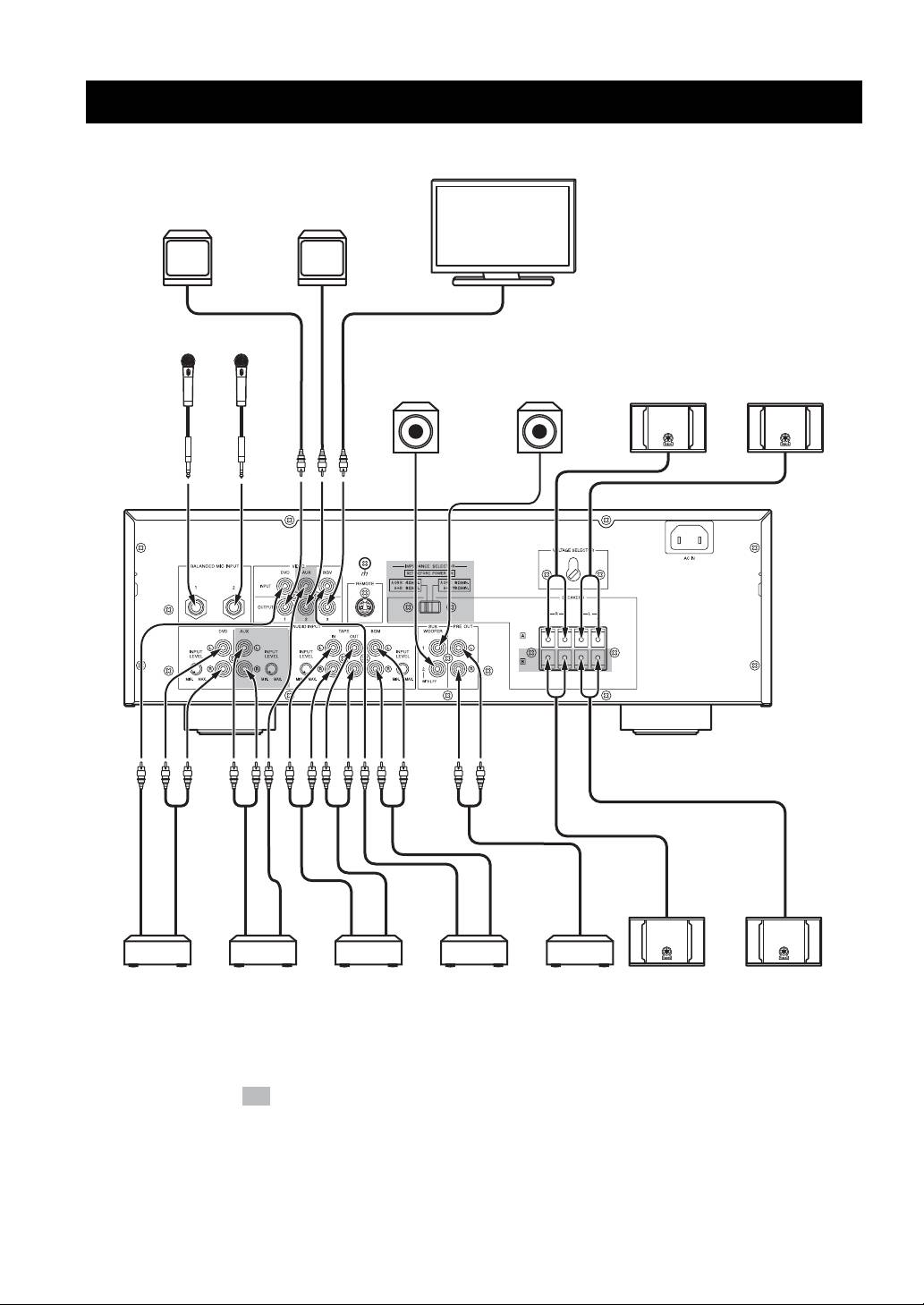
OPERATION
SYSTEM CONNECTIONS
Monitor TV
Monitor TV
Monitor TV
MIC
MIC
System 2
System 1
System A
Active subwoofer
Active subwoofer
(With lowpass filter)
Right Left
(Asia model)
KARAOKE/
VTR/LD
TAPE
Background
Power
Right Left
DVD player
player
recorder
music/video
amplifier
System B
(KMA-700
player
(KMA-700 only)
only)
The shaded part ( ) is provided for KMA-700 only.
6 En
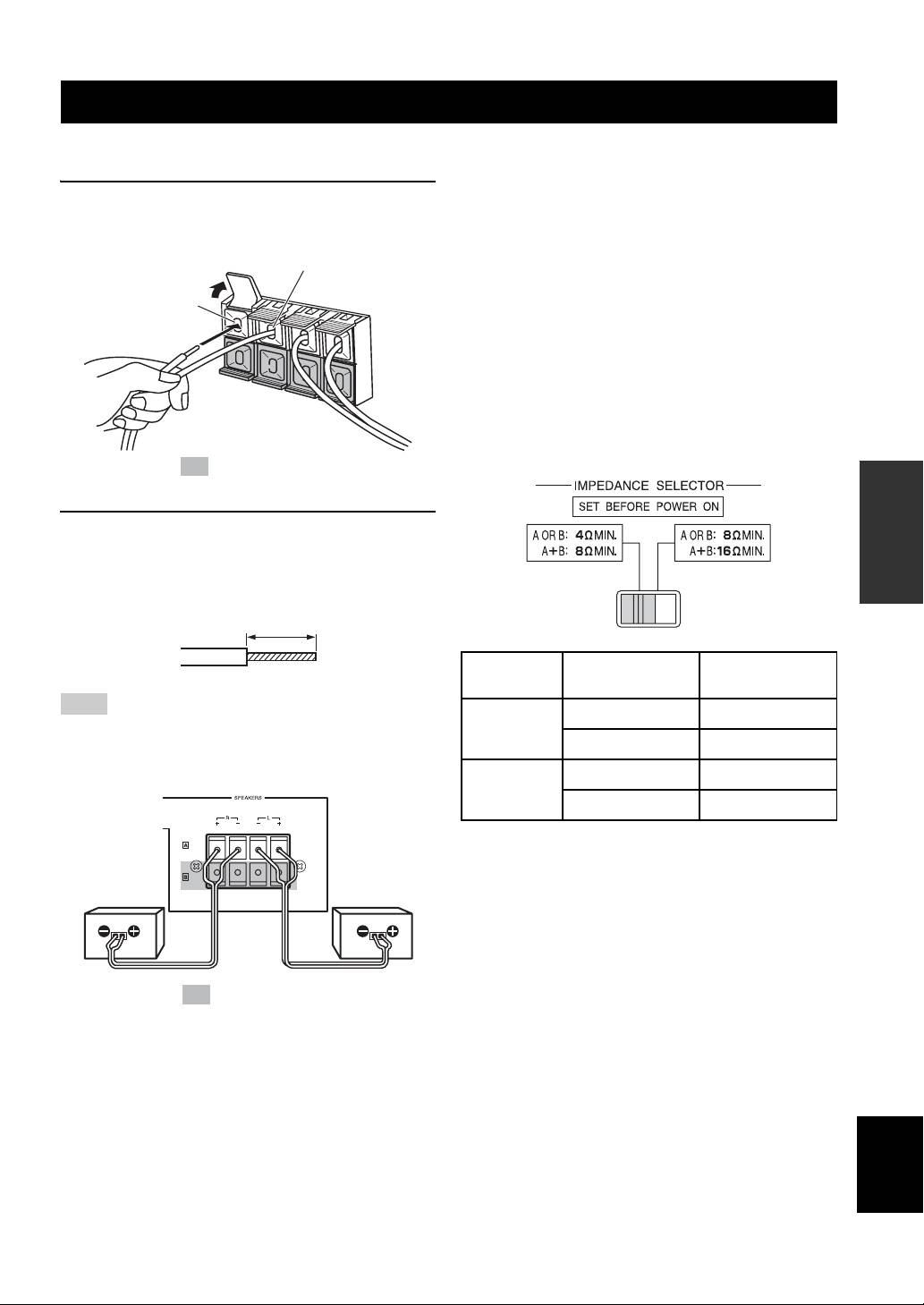
CONNECTIONS
■ Connecting speaker cords
■ Important precautions for speaker
connection
1 Pull the lever up to open, then insert the
• The maximum outputs of this unit are as follows:
KMA-700..................................................120 W + 120 W
conductor wire into the hole.
KMA-500..................................................100 W + 100 W
(–) cord to (–) terminal
Accordingly, the maximum input power of the speakers
used must exceed the above.
(+) cord to
• Use Yamaha speakers to prevent any trouble or
(+) terminal
damage caused by mismatching.
[For KMA-700]
IMPEDANCE SELECTOR
• Before turning on this unit, be sure to set
IMPEDANCE SELECTOR on the rear panel to the
position whose requirements your speaker system
meets.
The shaded part ( ) is provided for KMA-700 only.
OPERATION
2 Close the lever to secure the conductor wire.
Before connection, strip a section of coating 15 mm
(9/16”) in length from the end of each cord using a
tool such as pliers.
(Low) (High)
15 mm (9/16”)
Switch
If your system
Speaker
position
uses:
impedance level
Note
One speaker system
4
Ω or higher
Be careful that the cord conductors projected from a terminal do
Low
Two speaker systems
8
Ω or higher
not contact with another cord. Contact from the conductors of
different speaker cords may cause damage to the system.
One speaker system
8
Ω or higher
High
Two speaker systems
16
Ω or higher
• Do not change IMPEDANCE SELECTOR setting
while the power to this unit is on, otherwise this unit
Right
Left
may be damaged.
speaker
speaker
Connection examples
The minimum speaker impedance is 4 Ω. If two 6 Ω
speaker systems are connected in parallel, this will exceed
the design value and trigger a safety protector device.
When two speaker systems are used and the protector is
The shaded part ( ) is provided for KMA-700 only.
frequently activated, the speaker systems should be
connected serially instead.
English
7 En
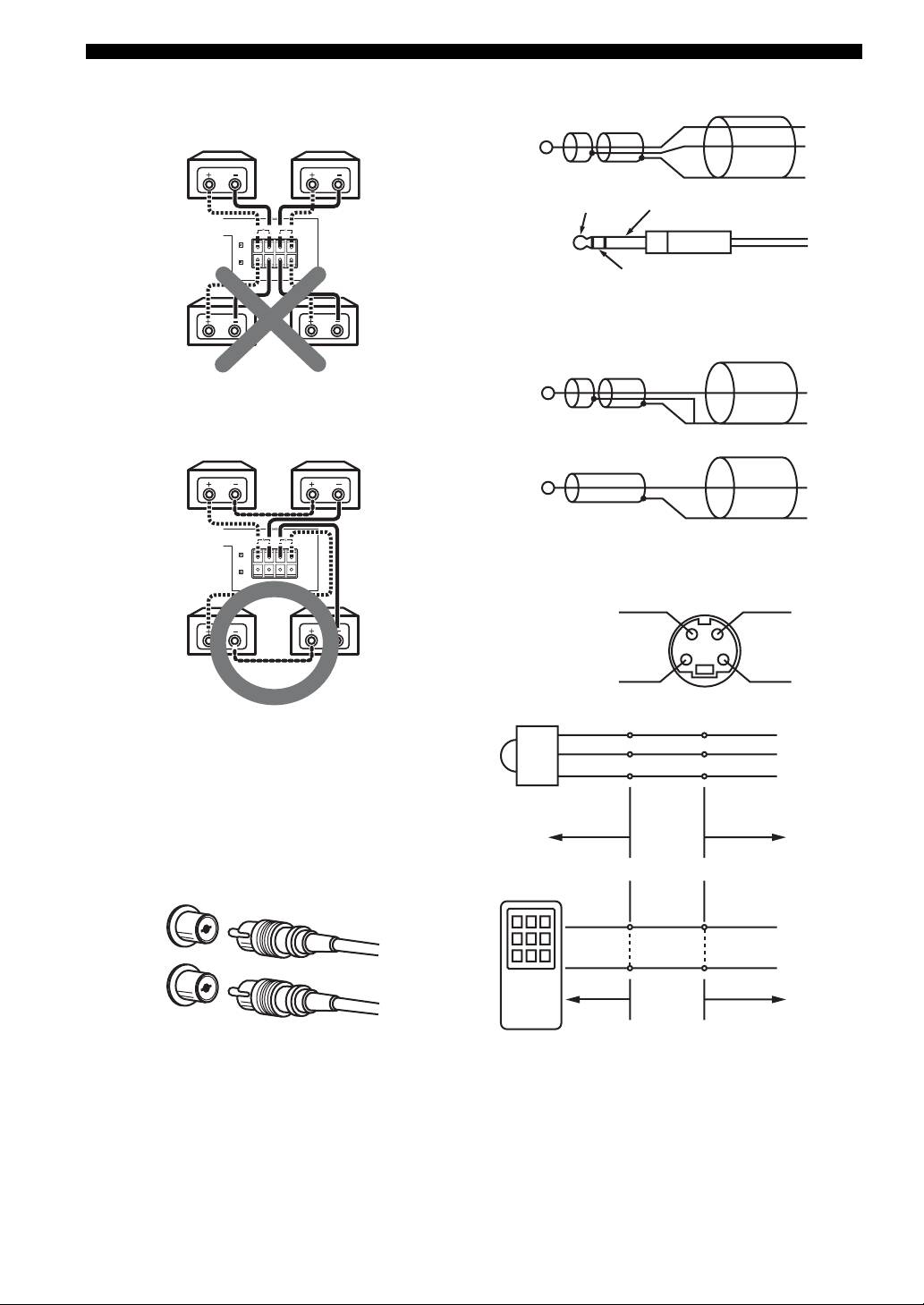
CONNECTIONS
1. Parallel connection
■ Connecting to the balanced input
(each speaker should be 8 Ω or more)
HOT
6 Ω 6 Ω
COLD
GND
HOT
GND
6 Ω + 6 Ω ➝ 3 Ω
(<4 Ω : NG)
COLD
■ Connecting to the unbalanced input
2. Series connection
HOT
(total: over 4 Ω is available)
GND
or
6 Ω 6 Ω
HOT
GND
6 Ω + 6 Ω = 12 Ω
(>4 Ω : OK)
■ Connecting an external remote control
REMOTE
GND
(Direct)
REMOTE
+5V_OUT
[For KMA-500]
+5V
+5V_OUT
The speaker impedance must be between 8 Ω to 16 Ω.
OUT
REMOTE
GND
GND
External remote control
■ Connecting the RCA pin plugs
satellite
When connecting RCA pin plugs, be sure to insert the red
plug into the red jack and the white plug into the white
RMC KMA-700/
jack.
KMA-500
White
REMOTE (Direct)
Left
White
GND
Right
Red
RMC KMA-700/
Red
KMA-500
8 En
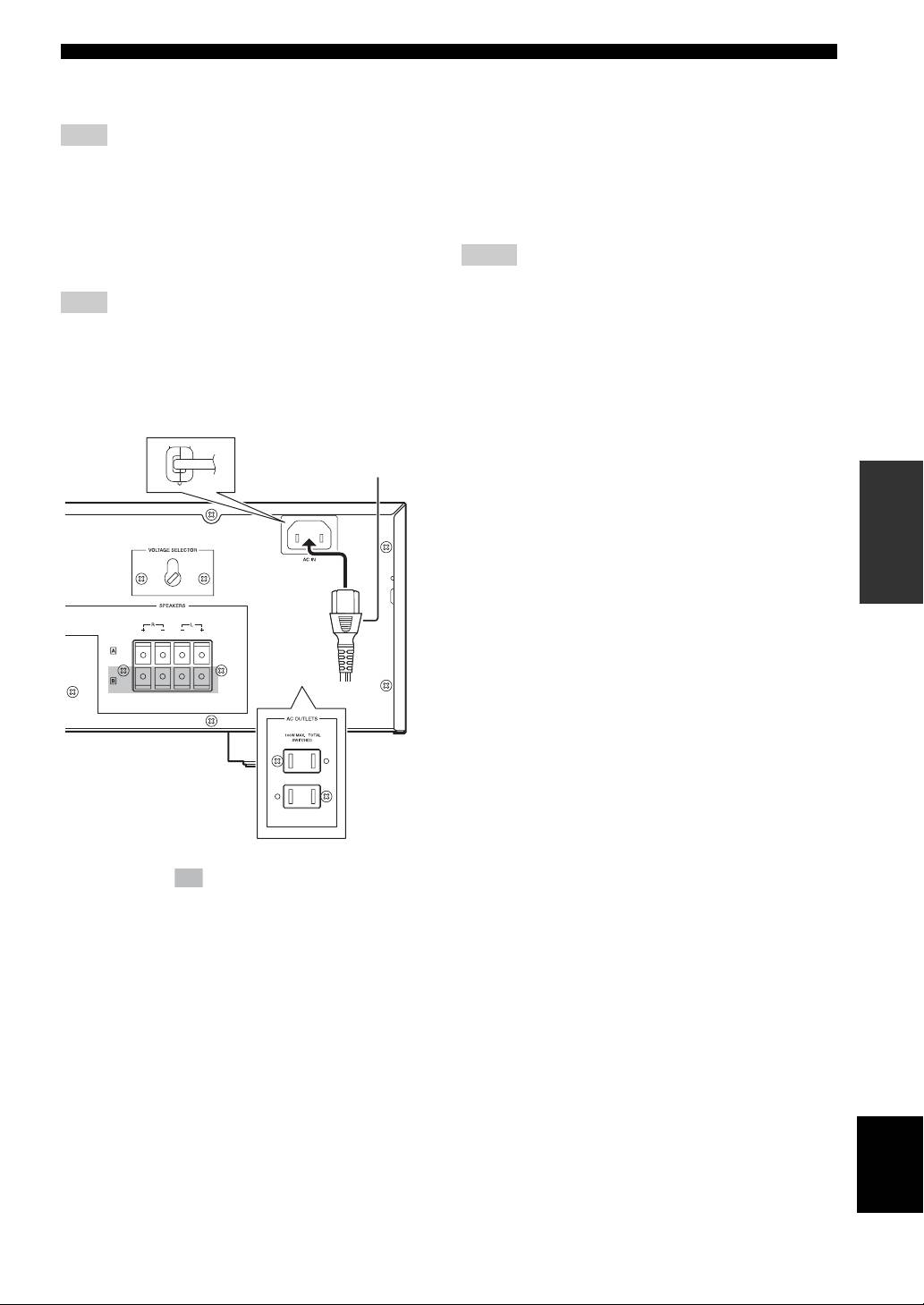
CONNECTIONS
1. External remote control satellite
AC OUTLETS
Connect to +5V_OUT, REMOTE and GND.
(SWITCHED. U.S.A. model only)
Use these outlets to connect the power cables from your
Note
other components to this unit. The power to AC
By connecting the remote control satellite to this input, this unit
OUTLETS is controlled by POWER on the front panel of
can receive the signal of the remote control.
this unit. The outlets supply power to any connected
component whenever the power of this unit is turned on.
2. REMOTE (Direct)
Total power consumption is 100 W.
Connect to REMOTE (Direct) and GND.
Connect to the infrared diode output (open collector) of
Notes
RMC.
• Be careful that the total power consumption does not exceed the
Note
wattage marked on the rear panel. Do not connect appliances
other than system components to the power outlets of this unit.
By connecting the REMOTE (Direct) to this input, this unit can
• Do not connect a TV set to this unit; even if it indicates a power
receive the signal of the REMOTE.
consumption value below the permissible value when the TV
power is turned on.
■ Power related switch and connections
on the rear panel
Supplied power cable
(Except U.S.A. model)
OPERATION
(Asia model)
The shaded part ( ) is provided for KMA-700 only.
The parts in the sub illustrations are provided for U.S.A.
model only.
AC IN
(Except U.S.A. model)
Connect the supplied power cable to AC IN.
Power cable
Plug the power cable into the AC wall outlet after all other
connections are complete.
VOLTAGE SELECTOR
(Except U.S.A. model)
English
VOLTAGE SELECTOR on the rear panel of this unit
must be set for your local main voltage BEFORE plugging
the power cable into the AC wall outlet.
9 En
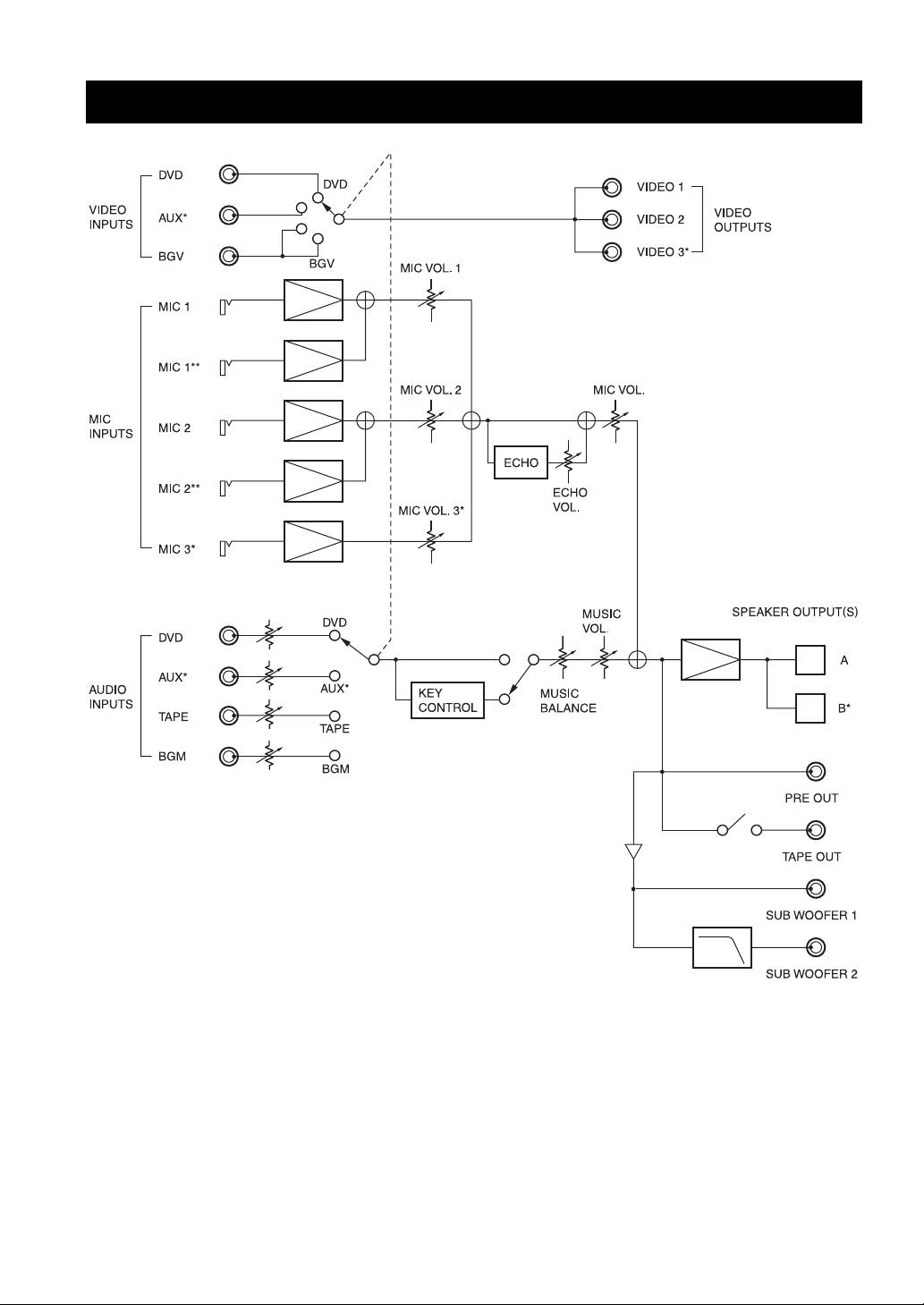
CONFIGURATION DIAGRAM
* KMA-700 only
** Balanced input, on the rear panel
10 En
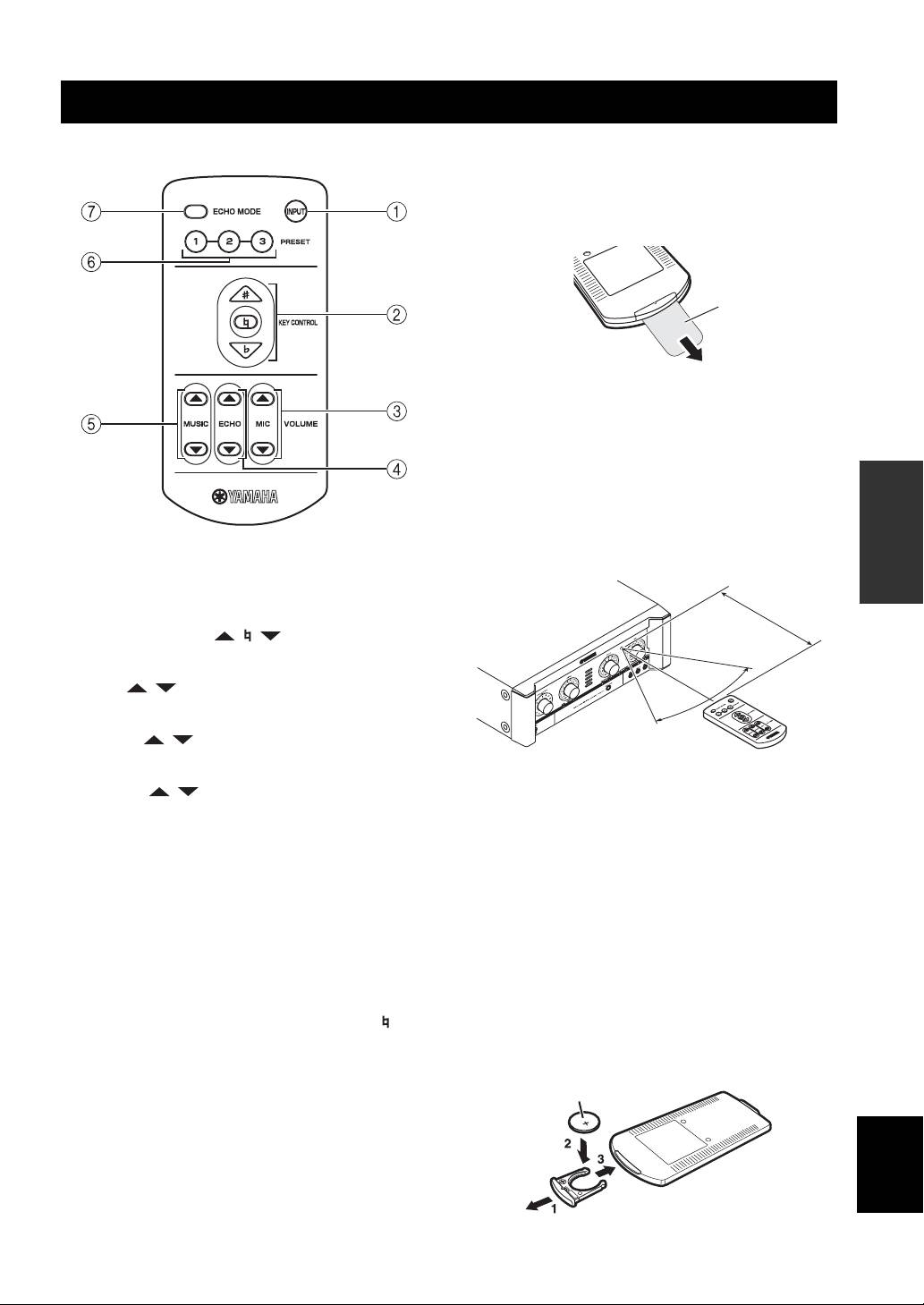
REMOTE CONTROL
■ Names of parts and their functions
■ Preparing the remote control
The remote control comes with the battery already
installed. Before using the remote control for the very first
time, pull out the plastic tab, as shown.
Plastic tab
For information on replacing the battery, refer to next
section.
■ Operation of remote control
1. Remote control
OPERATION
The distance between the remote control and the remote
sensor of this unit should be within 6 m (20’). Be sure to
aim the remote control directly at the remote sensor on the
front panel.
1 INPUT
INPUT is not available in default setting.
Within 6 m
(20’)
To activate INPUT, refer to “Input mode” on page 14.
2 KEY CONTROL ( / / )
Transpose the key of the played music.
30°
3 MIC ( / )*
30°
Adjust the overall volume of the microphones.
4 ECHO ( / )*
Adjust the amount of echo.
2. Loading a battery
5 MUSIC ( / )*
The life of the battery used in the remote control is about
Adjust the music volume.
half a year under normal use. Remove the battery if the
* The LED on the corresponding control on the front panel blinks
remote control is not used for an extended period. When
during adjustment.
the battery becomes weak, replace with a new CR2025
battery.
6 PRESET (1/2/3)
Recall saved preset settings for MIC volume/ECHO
To replace the battery:
amount/MUSIC volume/ECHO MODE.
1. Using a small screwdriver, carefully slide out the
battery holder.
To save current settings of the above, press the desired
2. Remove the expired battery, and place the new
button (PRESET 1, 2, 3 or KEY CONTROL on the front
CR2025 battery onto the battery holder with the + side
panel) for 3 seconds. Pressing KEY CONTROL saves
facing up.
settings to PRESET 1. When save is completed, “ ” on
3. Slide the battery holder into the remote control, and
the KEY CONTROL blinks once. You can save up to 3
push it so that it clicks shut.
presets (PRESET 1/2/3) on this unit. Refer to “Power ON
recall” on page 14.
+ side up
7 ECHO MODE
English
Select NORMAL, WIDE or SPACIOUS (KMA-700 only)
echo.
11 En
REMOTE CONTROL
Improper use of batteries may cause a risk of battery
Information for Users on Collection and
leakage and explosion.
Disposal of Old Equipment and Used
Adhere to the following guidelines:
• Do not attempt to recharge the old battery.
Batteries
• Insert a battery so that the positive (+) and negative (–)
These symbols on the products,
poles are positioned as shown.
packaging, and/or accompanying
• Even if the shapes are the same, the voltage of batteries
documents mean that used electrical and
may vary depending on the models. Be careful not to
electronic products and batteries should
use different model of battery.
not be mixed with general household
• Dispose of the old battery in accordance with local
waste.
regulations.
For proper treatment, recovery and
recycling of old products and used
batteries, please take them to applicable
collection points, in accordance with your
national legislation and the Directives
2002/96/EC and 2006/66/EC.
By disposing of these products and
batteries correctly, you will help to save
valuable resources and prevent any
potential negative effects on human
health and the environment which could
otherwise arise from inappropriate waste
handling.
For more information about collection
and recycling of old products and
batteries, please contact your local
municipality, your waste disposal service
or the point of sale where you purchased
the items.
[Information on Disposal in other
Countries outside the European
Union]
These symbols are only valid in the
European Union. If you wish to discard
these items, please contact your local
authorities or dealer and ask for the
correct method of disposal.
Note for the battery symbol
(bottom two symbol examples):
This symbol might be used in
combination with a chemical symbol. In
this case it complies with the requirement
set by the Directive for the chemical
involved.
12 En
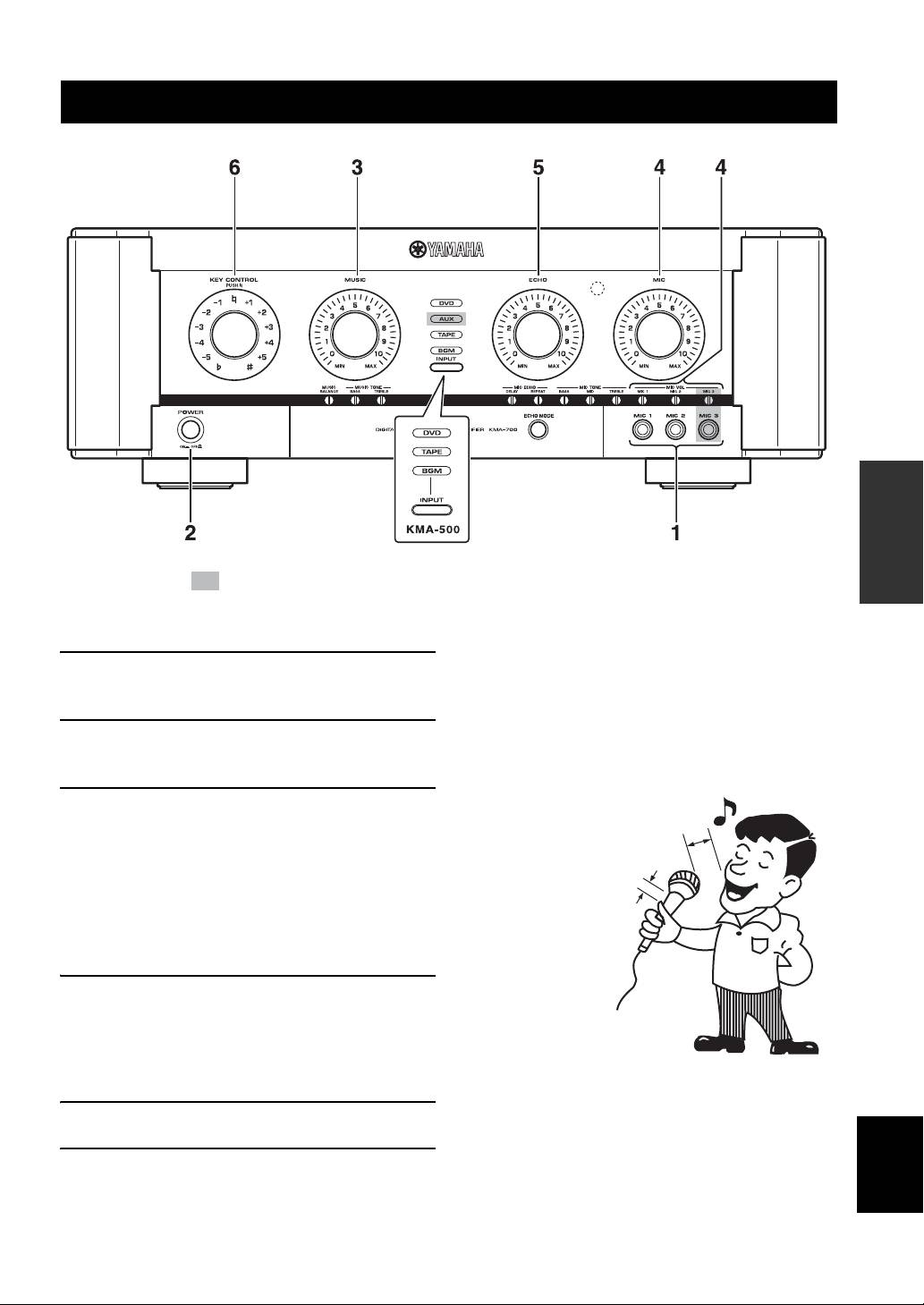
GENERAL OPERATION
OPERATION
The shaded part ( ) is provided for KMA-700 only.
■ Notes for the proper use of microphones
1 Connect the required number of
• Sing into the microphone by holding it at a distance of 5 to
10 cm (2 to 3-15/16”) from your mouth.
microphones.
• To ensure clear sound, grasp the microphone below the mic
head.
2 Set the POWER switches of this unit and
• Do not block the lower part of the windscreen. This will disturb
other required components to ON.
proper voice reproduction with unclear bass. Howling also
tends to occur in such cases.
3 Play the KARAOKE music source
5 to 10 cm (2 to 3-15/16”)
component, and adjust the volume by
away from your mouth.
rotating MUSIC.
The music source is selected automatically in default
Grasp the microphone below
the head.
setting. To set the conditions for selection, refer to
“Auto input condition” on page 14. To select the
music source manually, refer to “Input mode” on
page 14.
4 Adjust the microphone volume by rotating
MIC.
When different microphone volumes are not
balanced, adjust MIC VOL using a flathead
screwdriver.
5 Adjust the ECHO amount by rotating ECHO.
English
6 Adjust the key by rotating KEY CONTROL.
13 En
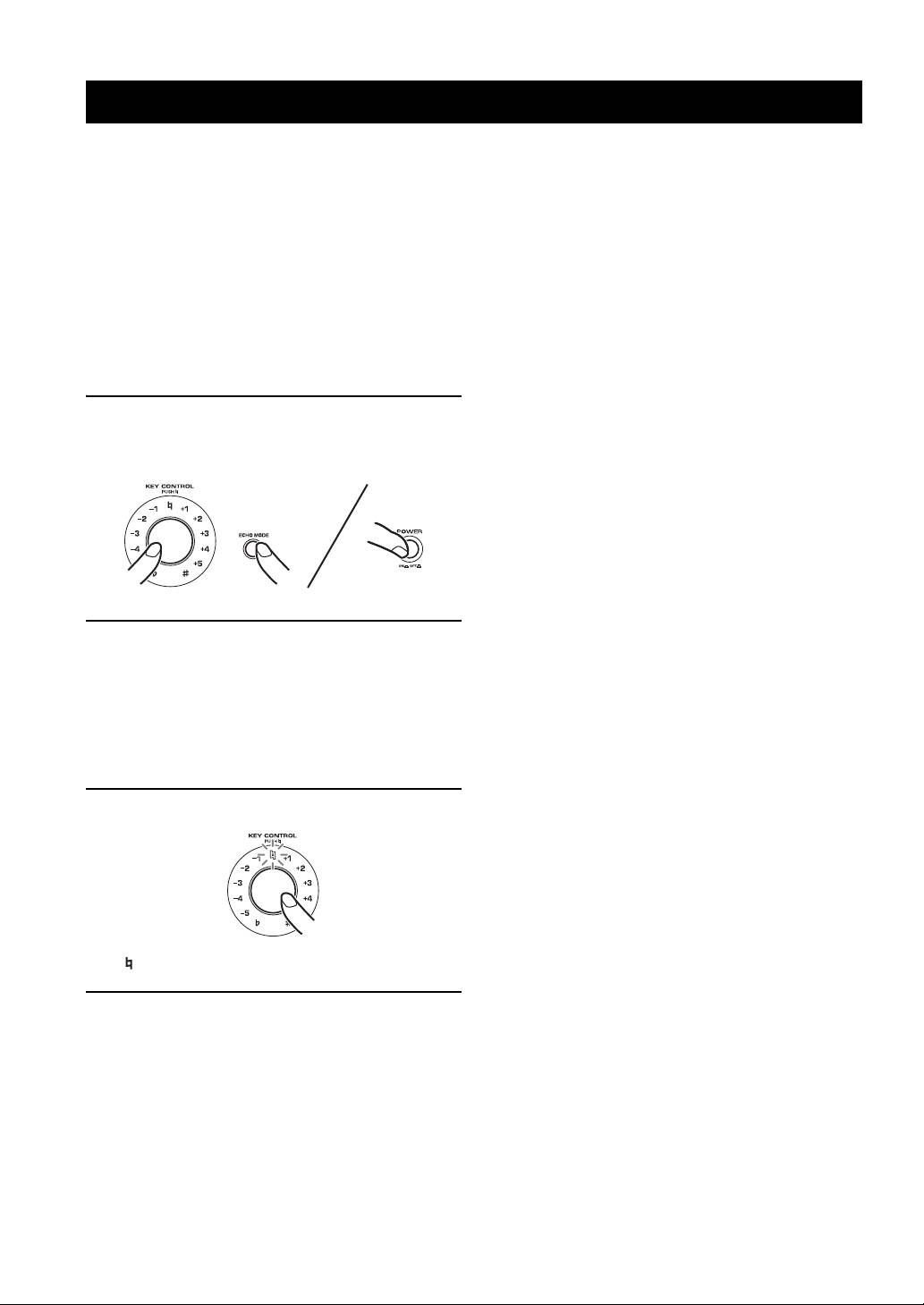
SETUP MODE
You can set the following menu in Setup mode:
2. Input mode
• Power ON recall
Set Input mode to Auto or Manual.
• Input mode
Auto*: The input source is set automatically.
• Auto input condition
Manual: The input source is selected by INPUT.
•Enable remote
Source is selected in order of DVD, AUX**, TAPE,
• Remote mode
BGM.
• MIC/MUSIC max level
3. Auto input condition
• MIC/MUSIC volume select
Set the conditions for each source (DVD, AUX** and
• Initializing
TAPE) for Auto Input mode described in 2.
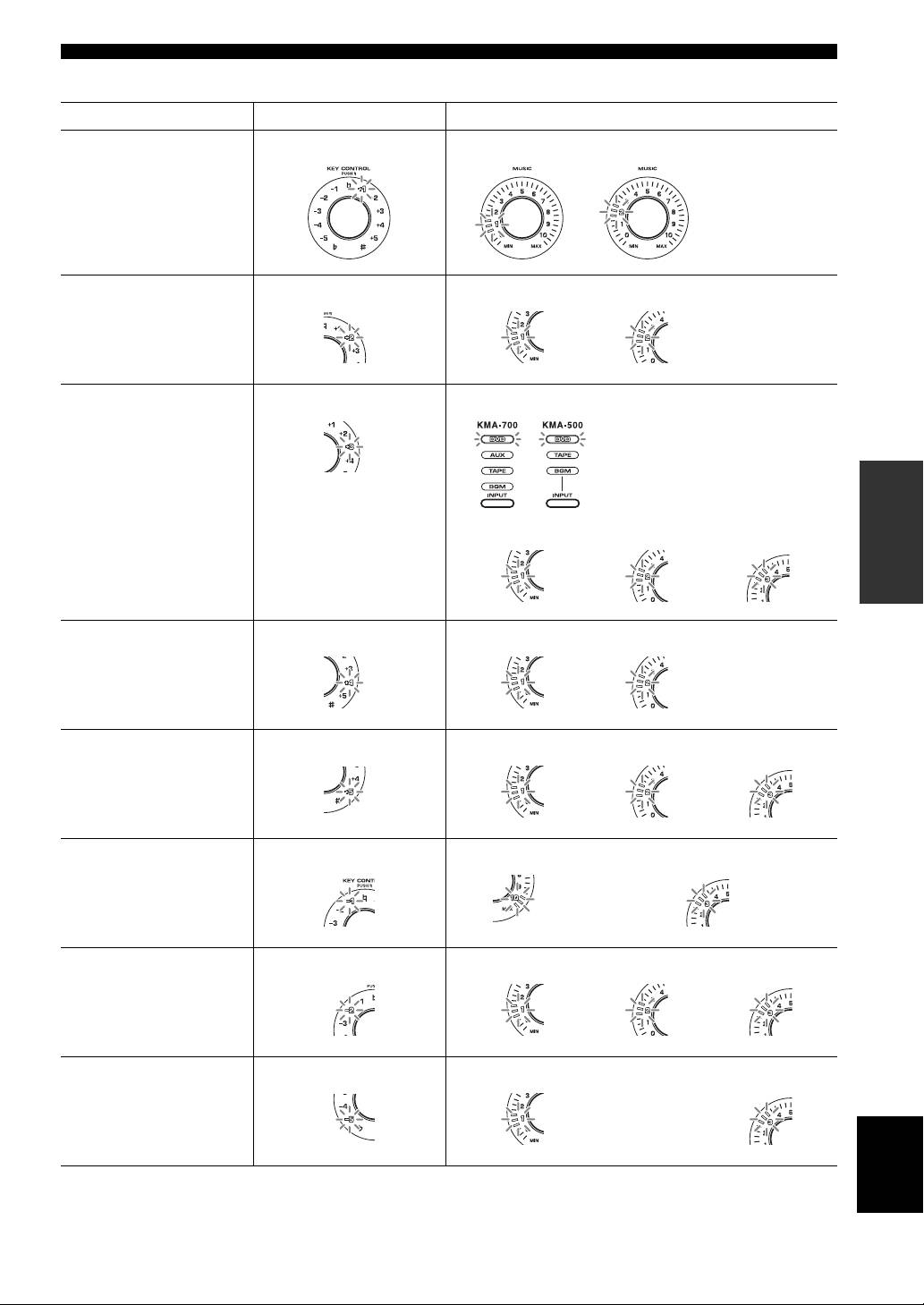
To set each menu above, set the corresponding controls as
Audio*: The source is switched based on audio signal.
shown in the “Setup mode table” on page 15 according to
Video: The source is switched based on video signal.
the following procedure.
Audio/Video: The source is switched based on audio or
video signal.
1 To enter Setup mode, turn off the main unit
For only this menu, select desired source by INPUT
and press POWER while pressing KEY
before selecting the desired item.
CONTROL and ECHO MODE.
4. Enable remote
Enable or disable remote control.
Enable*: The remote control is enabled.
Disable: The remote control is disabled.
5. Remote mode
Set the light receiving device.
Front&Ext.*: Both the front panel and external remote
control satellite receive the signal from the remote control.
2 Set KEY CONTROL and MUSIC according to
Front: Only the front panel receives the signal.
the “Setup mode table” on page 15 to set
Ext.: Only the external remote control satellite receives
desired menus and items.
the signal.
For Auto input condition, select the desired source
6. MIC/MUSIC max level
before selecting the item.
Set the maximum volume of MIC and MUSIC.
Set all settings you want to change before moving to
10*: No setting.
step 3.
9 to 3: The maximum volume is set to the level indicated
(2 to 0 cannot be set).
3 Press KEY CONTROL to enter the settings.
7. MIC/MUSIC volume select
Select how MIC and MUSIC volumes increase/decrease
(i.e., the volume curve) when the controls are turned.
Pattern 1*: Steep curve
Pattern 2: Less steep curve
Pattern 3: Least steep curve, and is most suitable for fine
adjustment.
“ ” blinks once when the settings are entered.
8. Initializing
Reset all the settings set in Setup mode to the defaults.
4 To terminate Setup mode, turn off the main
Cancel: Initializing is not executed.
unit.
Initialize: Initializing is executed.
When pressing KEY CONTROL with MUSIC set to 3,
■ Menus in Setup mode
Initializing is executed.
1. Power ON recall
Select Last memory or Preset, to recall the settings of MIC
volume/ECHO amount/MUSIC volume/ECHO MODE
when the unit is turned on.
* Default setting
Last memory*: The settings when the unit was turned off
** KMA-700 only
last are recalled.
Preset: The settings saved to PRESET 1 are recalled.
14 En
SETUP MODE
■ Setup mode table
Menu KEY CONTROL Items/MUSIC
1. Power ON recall
+1 Last memory: 1 Preset: 2
2. Input mode
+2 Auto: 1 Manual: 2
3. Auto input condition
+3
Select desired source
by INPUT.
Example: DVD
OPERATION
Audio: 1 Video: 2 Audio/Video: 3
4. Enable remote
+4 Enable: 1 Disable: 2
5. Remote mode
+5 Front&Ext.: 1 Front: 2 Ext.: 3
6. MIC/MUSIC max
–1
No setting: 10 Set to the indicated level: 9 to 3
level
Example: 3
7. MIC/MUSIC volume
–2
Pattern 1: 1 Pattern 2: 2 Pattern 3: 3
select
8. Initializing
–5
Cancel: 1 Initialize: 3
English
15 En
ADDITIONAL INFORMATION
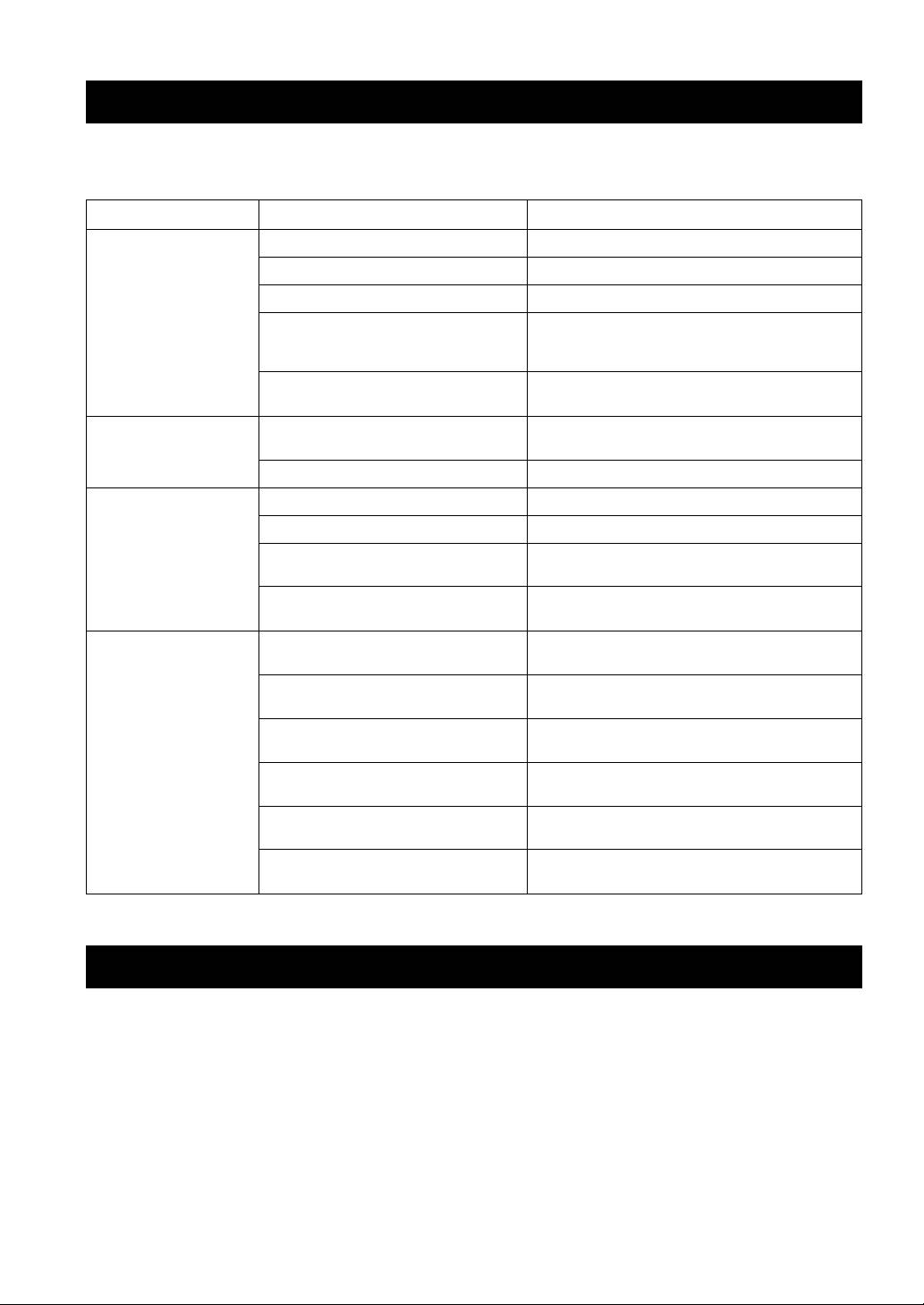
TROUBLESHOOTING
If problems should occur, check the following table for simple remedies.
If the problem still cannot be solved, please consult your dealer.
Problems Possible causes Solutions
No speaker sound is
POWER is set to OFF. Set POWER to ON.
output at all.
The power cable is unplugged. Plug the power cable securely into the AC wall outlet.
MUSIC is in the lowest position. Adjust MUSIC.
The wrong music source is selected when
Select the correct music source with INPUT or set Input
Input mode is set to Manual in Setup mode.
mode to Auto in Setup mode. Refer to “Input mode” on
page 14.
The sound is cut off due to a temperature rise
Turn the power off, then leave the unit alone for cooling.
in the unit.
No sound is output from
MUSIC BALANCE is turned fully to one
Set the control to the center position.
one of the speakers.
speaker.
One of the speaker cords is disconnected. Insert the cord securely into the terminals.
No microphone sound is
The microphone plug is not fully inserted. Insert the plug securely into the jack.
output.
The switch on the microphone is set to OFF. Set the switch on the microphone to ON.
The corresponding MIC VOL or MIC controls
Adjust the control.
are in the minimum position.
The microphone is too far from your mouth, or
Refer to the user’s manual supplied with your microphone.
the microphone handling is incorrect.
The remote control does
The remote control is too far away or tilted too
The remote control will function within 6 m (20’) and no
not work, or does not
much.
more than 30 degrees off-center from the front panel.
function properly.
Direct sunlight or lighting is striking the
Reposition this unit.
remote control sensor of this unit.
Enable remote is set to Disable in Setup mode. Set Enable remote to Enable in Setup mode. Refer to
“Enable remote” on page 14.
The wrong Remote mode is set in Setup mode. Set the correct Remote mode in Setup mode. Refer to
“Remote mode” on page 14.
The battery is weak. Replace with a new CR2025 battery. Refer to “Loading a
battery” on page 11.
When INPUT does not work, Input mode is set
Set Input mode to Manual in Setup mode. Refer to “Input
to Auto.
mode” on page 14.
MAINTENANCE
When the set gets dirty, wipe it with a soft, dry cloth.
Never use alcohol, thinner, benzene, insecticide or other volatile agents, for they may damage the surface paint or gloss
of the set.
Also do not wipe the set with a chemical cloth or leave it on the set for a long period, for the surface finish may
deteriorate or the paint may be stripped off.
16 En
