
Yamaha KMA-500: TROUBLESHOOTING Problems Possible causes Solutions MAINTENANCE
TROUBLESHOOTING Problems Possible causes Solutions MAINTENANCE: Yamaha KMA-500
Table of contents
- IMPORTANT SAFETY INSTRUCTIONS
- FCC INFORMATION (for US customers)
- Caution: Read this before operating your unit
- CONTENTS
- HANDLING PRECAUTIONS BEFORE CONNECTING
- NAMES OF PARTS AND THEIR FUNCTIONS Front panel
- NAMES OF PARTS AND THEIR FUNCTIONS Rear panel
- NAMES OF PARTS AND THEIR FUNCTIONS
- SYSTEM CONNECTIONS
- CONNECTIONS
- CONNECTIONS
- CONNECTIONS
- CONFIGURATION DIAGRAM
- REMOTE CONTROL
- REMOTE CONTROL
- GENERAL OPERATION
- SETUP MODE ■ Menus in Setup mode
- ■ Setup mode table
- TROUBLESHOOTING Problems Possible causes Solutions MAINTENANCE
- AFTER-SALES SERVICING KARAOKE ETIQUETTE
- SPECIFICATIONS
ADDITIONAL INFORMATION
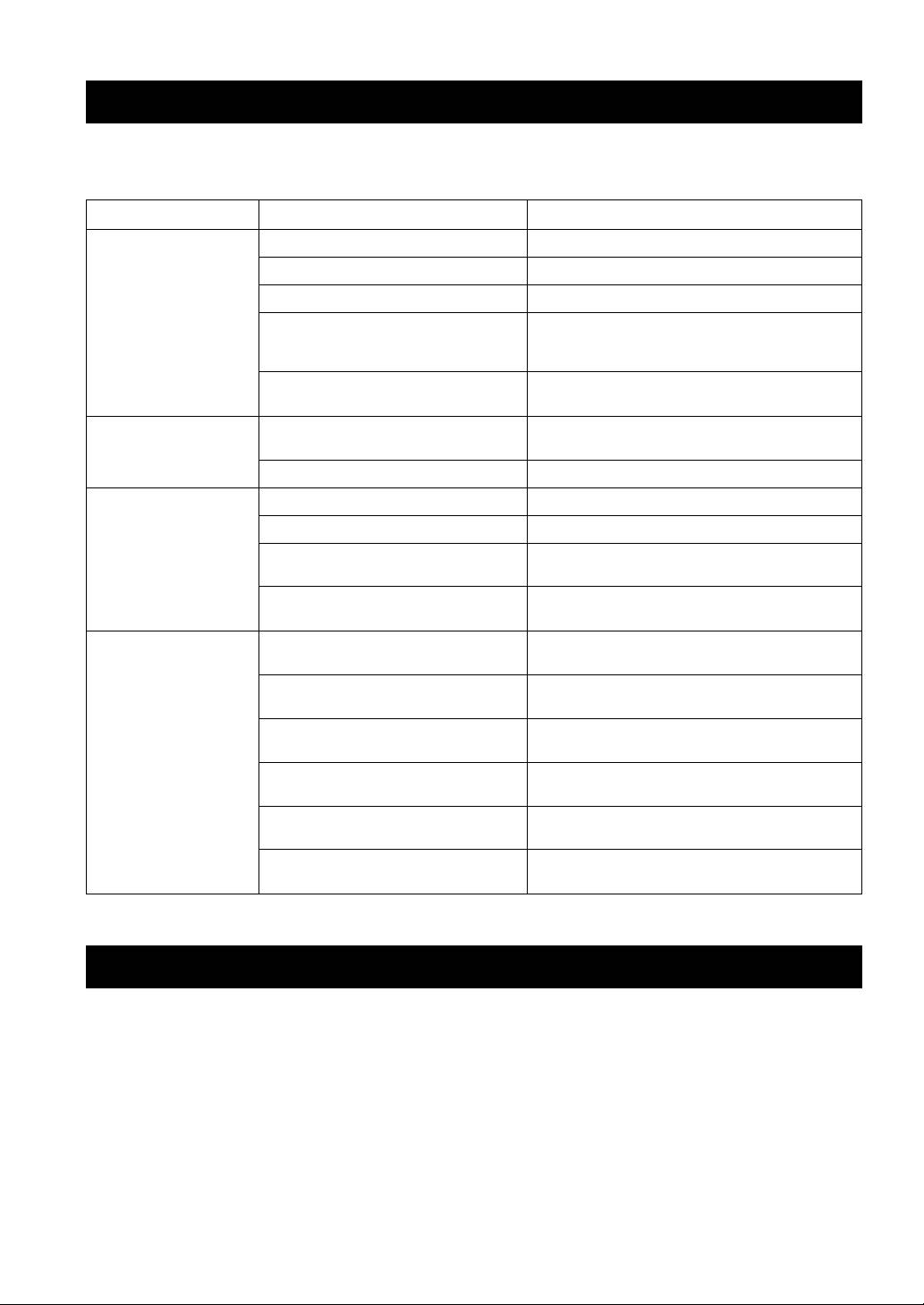
TROUBLESHOOTING
If problems should occur, check the following table for simple remedies.
If the problem still cannot be solved, please consult your dealer.
Problems Possible causes Solutions
No speaker sound is
POWER is set to OFF. Set POWER to ON.
output at all.
The power cable is unplugged. Plug the power cable securely into the AC wall outlet.
MUSIC is in the lowest position. Adjust MUSIC.
The wrong music source is selected when
Select the correct music source with INPUT or set Input
Input mode is set to Manual in Setup mode.
mode to Auto in Setup mode. Refer to “Input mode” on
page 14.
The sound is cut off due to a temperature rise
Turn the power off, then leave the unit alone for cooling.
in the unit.
No sound is output from
MUSIC BALANCE is turned fully to one
Set the control to the center position.
one of the speakers.
speaker.
One of the speaker cords is disconnected. Insert the cord securely into the terminals.
No microphone sound is
The microphone plug is not fully inserted. Insert the plug securely into the jack.
output.
The switch on the microphone is set to OFF. Set the switch on the microphone to ON.
The corresponding MIC VOL or MIC controls
Adjust the control.
are in the minimum position.
The microphone is too far from your mouth, or
Refer to the user’s manual supplied with your microphone.
the microphone handling is incorrect.
The remote control does
The remote control is too far away or tilted too
The remote control will function within 6 m (20’) and no
not work, or does not
much.
more than 30 degrees off-center from the front panel.
function properly.
Direct sunlight or lighting is striking the
Reposition this unit.
remote control sensor of this unit.
Enable remote is set to Disable in Setup mode. Set Enable remote to Enable in Setup mode. Refer to
“Enable remote” on page 14.
The wrong Remote mode is set in Setup mode. Set the correct Remote mode in Setup mode. Refer to
“Remote mode” on page 14.
The battery is weak. Replace with a new CR2025 battery. Refer to “Loading a
battery” on page 11.
When INPUT does not work, Input mode is set
Set Input mode to Manual in Setup mode. Refer to “Input
to Auto.
mode” on page 14.
MAINTENANCE
When the set gets dirty, wipe it with a soft, dry cloth.
Never use alcohol, thinner, benzene, insecticide or other volatile agents, for they may damage the surface paint or gloss
of the set.
Also do not wipe the set with a chemical cloth or leave it on the set for a long period, for the surface finish may
deteriorate or the paint may be stripped off.
16 En
