
Yamaha KMA-500: GENERAL OPERATION
GENERAL OPERATION: Yamaha KMA-500
Table of contents
- IMPORTANT SAFETY INSTRUCTIONS
- FCC INFORMATION (for US customers)
- Caution: Read this before operating your unit
- CONTENTS
- HANDLING PRECAUTIONS BEFORE CONNECTING
- NAMES OF PARTS AND THEIR FUNCTIONS Front panel
- NAMES OF PARTS AND THEIR FUNCTIONS Rear panel
- NAMES OF PARTS AND THEIR FUNCTIONS
- SYSTEM CONNECTIONS
- CONNECTIONS
- CONNECTIONS
- CONNECTIONS
- CONFIGURATION DIAGRAM
- REMOTE CONTROL
- REMOTE CONTROL
- GENERAL OPERATION
- SETUP MODE ■ Menus in Setup mode
- ■ Setup mode table
- TROUBLESHOOTING Problems Possible causes Solutions MAINTENANCE
- AFTER-SALES SERVICING KARAOKE ETIQUETTE
- SPECIFICATIONS
GENERAL OPERATION
OPERATION
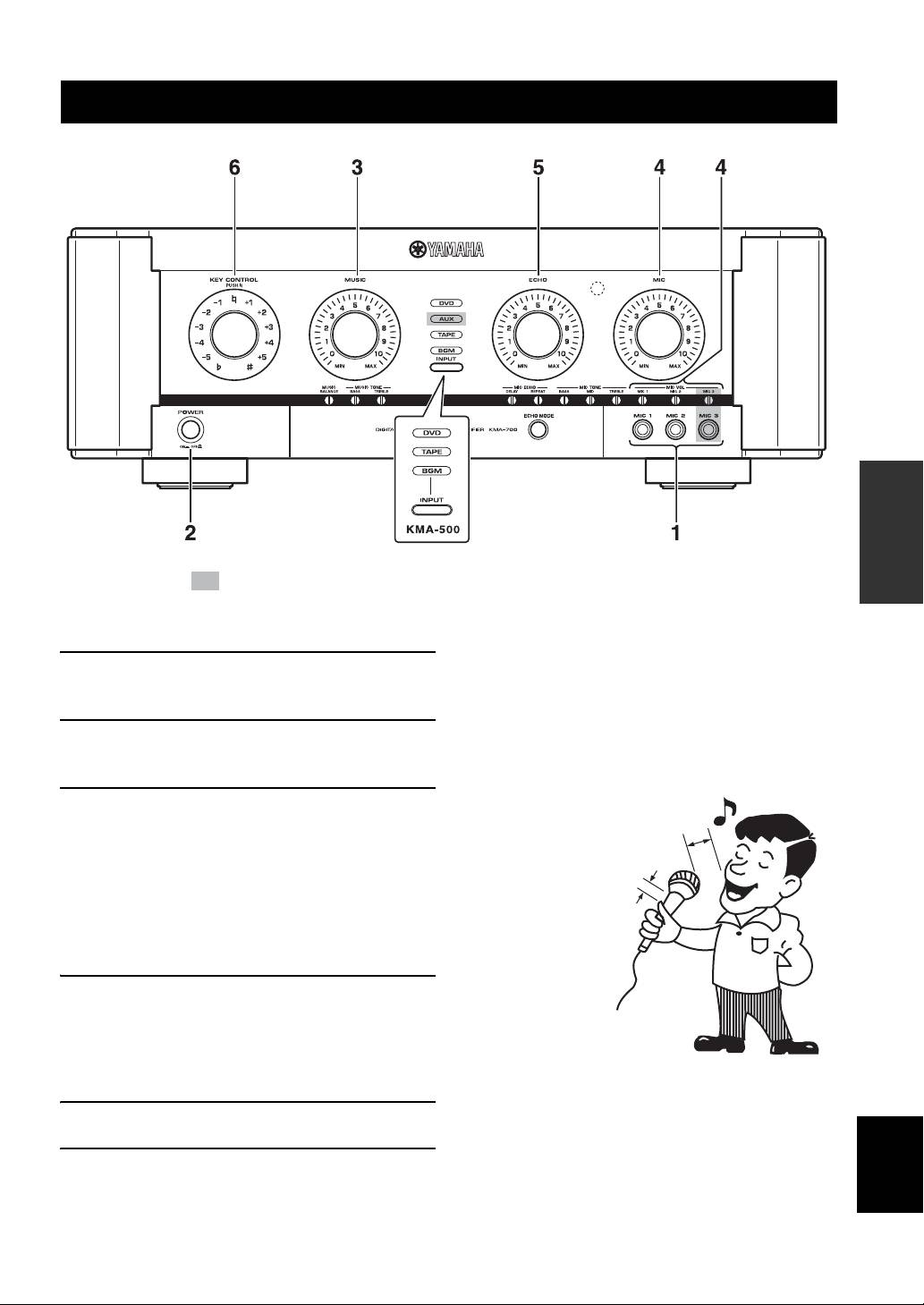
The shaded part ( ) is provided for KMA-700 only.
■ Notes for the proper use of microphones
1 Connect the required number of
• Sing into the microphone by holding it at a distance of 5 to
10 cm (2 to 3-15/16”) from your mouth.
microphones.
• To ensure clear sound, grasp the microphone below the mic
head.
2 Set the POWER switches of this unit and
• Do not block the lower part of the windscreen. This will disturb
other required components to ON.
proper voice reproduction with unclear bass. Howling also
tends to occur in such cases.
3 Play the KARAOKE music source
5 to 10 cm (2 to 3-15/16”)
component, and adjust the volume by
away from your mouth.
rotating MUSIC.
The music source is selected automatically in default
Grasp the microphone below
the head.
setting. To set the conditions for selection, refer to
“Auto input condition” on page 14. To select the
music source manually, refer to “Input mode” on
page 14.
4 Adjust the microphone volume by rotating
MIC.
When different microphone volumes are not
balanced, adjust MIC VOL using a flathead
screwdriver.
5 Adjust the ECHO amount by rotating ECHO.
English
6 Adjust the key by rotating KEY CONTROL.
13 En
