
Yamaha KMA-500: NAMES OF PARTS AND THEIR FUNCTIONS Front panel
NAMES OF PARTS AND THEIR FUNCTIONS Front panel: Yamaha KMA-500
Table of contents
- IMPORTANT SAFETY INSTRUCTIONS
- FCC INFORMATION (for US customers)
- Caution: Read this before operating your unit
- CONTENTS
- HANDLING PRECAUTIONS BEFORE CONNECTING
- NAMES OF PARTS AND THEIR FUNCTIONS Front panel
- NAMES OF PARTS AND THEIR FUNCTIONS Rear panel
- NAMES OF PARTS AND THEIR FUNCTIONS
- SYSTEM CONNECTIONS
- CONNECTIONS
- CONNECTIONS
- CONNECTIONS
- CONFIGURATION DIAGRAM
- REMOTE CONTROL
- REMOTE CONTROL
- GENERAL OPERATION
- SETUP MODE ■ Menus in Setup mode
- ■ Setup mode table
- TROUBLESHOOTING Problems Possible causes Solutions MAINTENANCE
- AFTER-SALES SERVICING KARAOKE ETIQUETTE
- SPECIFICATIONS
PREPARATION
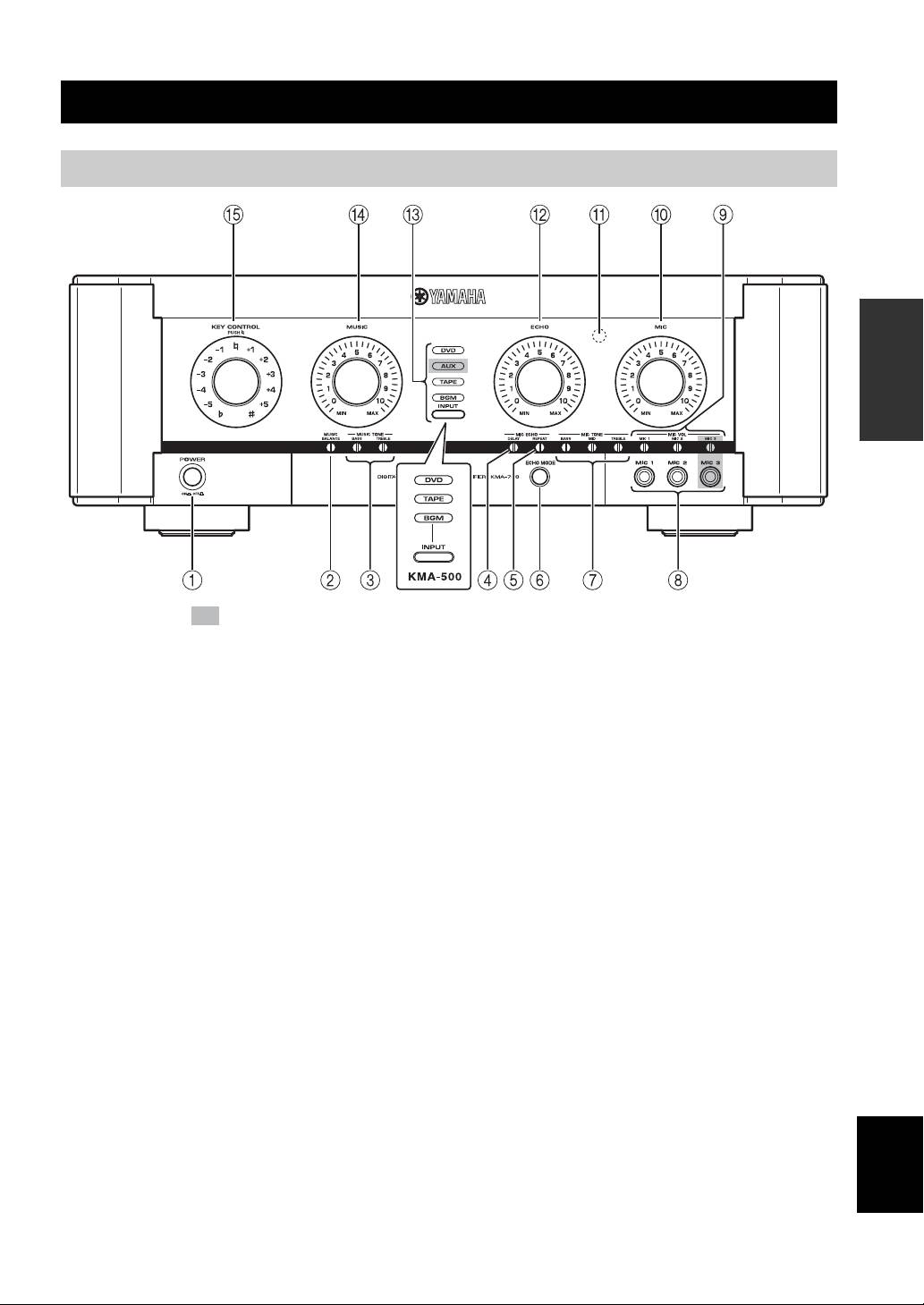
NAMES OF PARTS AND THEIR FUNCTIONS
Front panel
PREPARATION
The shaded part ( ) is provided for KMA-700 only.
1 POWER (ON/OFF)
0 MIC
Turn the power ON/OFF.
Adjust the overall volume of all microphones.
2 MUSIC BALANCE
A Remote sensor
Adjust the volume balance.*
This sensor receives signals from the remote control.
3 MUSIC TONE (BASS/TREBLE)
B ECHO
Adjust the low/high frequency response.*
Adjust the amount of echo.
4 MIC ECHO DELAY
C INPUT/Input source indicators (DVD/AUX**/
Adjust the delay time between echoes.*
TAPE/BGM)
INPUT is not available in the default setting.
5 MIC ECHO REPEAT
To activate INPUT, refer to “Input mode” on page 14.
Adjust the amount of feedback.*
Input source indicators indicate the input source currently
6 ECHO MODE
active.
Select NORMAL, WIDE (stereo) or SPACIOUS** echo.
D MUSIC
SPACIOUS echo is an effect that produces both
Adjust the volume of the music source.
NORMAL and WIDE echo with a time lag. The LED
lights up in amber/green** when WIDE/SPACIOUS**
E KEY CONTROL
echo is selected.
To transpose the key of the played music, rotate this
control. The key can be changed in halftone steps in 5
7 MIC TONE (BASS/MID/TREBLE)
steps; either higher or lower. To reset the key to the
Adjust the low/middle/high frequency response of
natural key, press this control. If over 4 seconds of silence
microphones.*
occurs, the unit assumes the played song has finished and
English
8 MIC jacks (1/2/3**)
resets the key to natural.
Connect microphones to these jacks.
* Use a flathead screwdriver to adjust.
9 MIC VOL (1/2/3**)
** KMA-700 only
Adjust the microphone input level.*
3 En
