
Yamaha KMA-500: SETUP MODE ■ Menus in Setup mode
SETUP MODE ■ Menus in Setup mode: Yamaha KMA-500
Table of contents
- IMPORTANT SAFETY INSTRUCTIONS
- FCC INFORMATION (for US customers)
- Caution: Read this before operating your unit
- CONTENTS
- HANDLING PRECAUTIONS BEFORE CONNECTING
- NAMES OF PARTS AND THEIR FUNCTIONS Front panel
- NAMES OF PARTS AND THEIR FUNCTIONS Rear panel
- NAMES OF PARTS AND THEIR FUNCTIONS
- SYSTEM CONNECTIONS
- CONNECTIONS
- CONNECTIONS
- CONNECTIONS
- CONFIGURATION DIAGRAM
- REMOTE CONTROL
- REMOTE CONTROL
- GENERAL OPERATION
- SETUP MODE ■ Menus in Setup mode
- ■ Setup mode table
- TROUBLESHOOTING Problems Possible causes Solutions MAINTENANCE
- AFTER-SALES SERVICING KARAOKE ETIQUETTE
- SPECIFICATIONS
SETUP MODE
You can set the following menu in Setup mode:
2. Input mode
• Power ON recall
Set Input mode to Auto or Manual.
• Input mode
Auto*: The input source is set automatically.
• Auto input condition
Manual: The input source is selected by INPUT.
•Enable remote
Source is selected in order of DVD, AUX**, TAPE,
• Remote mode
BGM.
• MIC/MUSIC max level
3. Auto input condition
• MIC/MUSIC volume select
Set the conditions for each source (DVD, AUX** and
• Initializing
TAPE) for Auto Input mode described in 2.
To set each menu above, set the corresponding controls as
Audio*: The source is switched based on audio signal.
shown in the “Setup mode table” on page 15 according to
Video: The source is switched based on video signal.
the following procedure.
Audio/Video: The source is switched based on audio or
video signal.
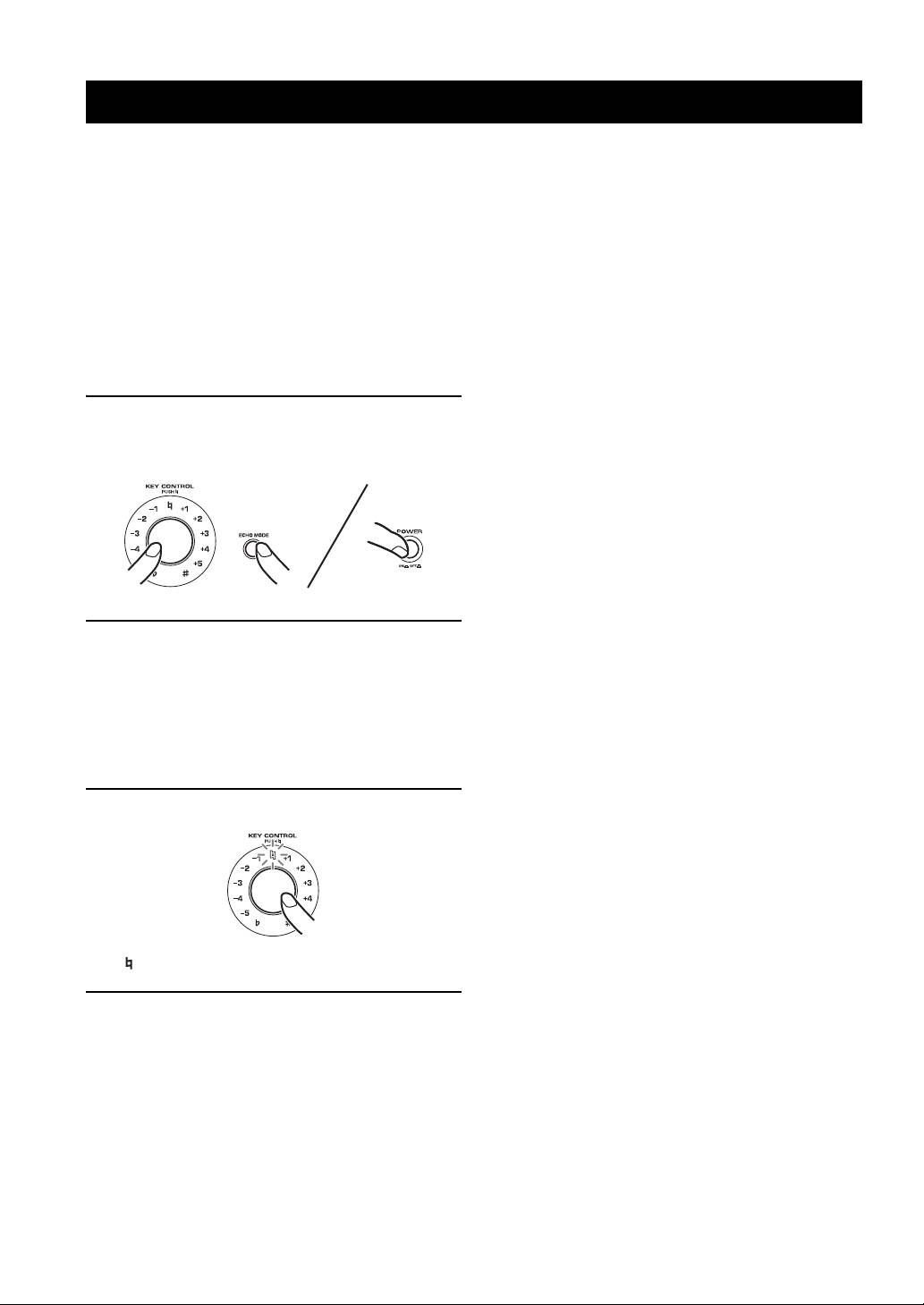
1 To enter Setup mode, turn off the main unit
For only this menu, select desired source by INPUT
and press POWER while pressing KEY
before selecting the desired item.
CONTROL and ECHO MODE.
4. Enable remote
Enable or disable remote control.
Enable*: The remote control is enabled.
Disable: The remote control is disabled.
5. Remote mode
Set the light receiving device.
Front&Ext.*: Both the front panel and external remote
control satellite receive the signal from the remote control.
2 Set KEY CONTROL and MUSIC according to
Front: Only the front panel receives the signal.
the “Setup mode table” on page 15 to set
Ext.: Only the external remote control satellite receives
desired menus and items.
the signal.
For Auto input condition, select the desired source
6. MIC/MUSIC max level
before selecting the item.
Set the maximum volume of MIC and MUSIC.
Set all settings you want to change before moving to
10*: No setting.
step 3.
9 to 3: The maximum volume is set to the level indicated
(2 to 0 cannot be set).
3 Press KEY CONTROL to enter the settings.
7. MIC/MUSIC volume select
Select how MIC and MUSIC volumes increase/decrease
(i.e., the volume curve) when the controls are turned.
Pattern 1*: Steep curve
Pattern 2: Less steep curve
Pattern 3: Least steep curve, and is most suitable for fine
adjustment.
“ ” blinks once when the settings are entered.
8. Initializing
Reset all the settings set in Setup mode to the defaults.
4 To terminate Setup mode, turn off the main
Cancel: Initializing is not executed.
unit.
Initialize: Initializing is executed.
When pressing KEY CONTROL with MUSIC set to 3,
■ Menus in Setup mode
Initializing is executed.
1. Power ON recall
Select Last memory or Preset, to recall the settings of MIC
volume/ECHO amount/MUSIC volume/ECHO MODE
when the unit is turned on.
* Default setting
Last memory*: The settings when the unit was turned off
** KMA-700 only
last are recalled.
Preset: The settings saved to PRESET 1 are recalled.
14 En
