
Nikon GP-1-DSLR: Mounting the GP-1 on the Camera Strap
Mounting the GP-1 on the Camera Strap: Nikon GP-1-DSLR
Table of contents
- For Your Safety
- Notices
- The GP-1 and Supplied Accessories
- Features of the GP-1
- Turning the GP-1 on and Off
- Cameras with Ten-pin Remote Terminals
- Cameras with Accessory Terminals
- Disconnecting the GP-1
- Mounting the GP-1 on the Camera Strap
- The GPS Signal
- Coordinated Universal Time (UTC)
- Auto Meter Off
- GPS data for D90 digital cameras
- Notes on the GP-1
- Precautions for Use
- Specifi cations
- Connecting the GP-1 to a Computer
En
10
Mounting the GP-1 on the Camera
Mounting the GP-1 on the Camera
Page 2 of 2
Page 2 of 2
Mounting the GP-1 on the Camera Strap
Mounting the GP-1 on the Camera Strap
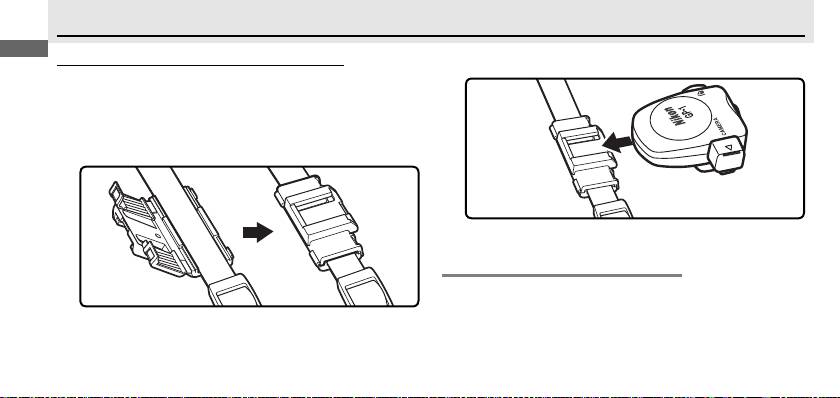
Mount the GP-1 on the camera strap as shown (햶).
2
The supplied strap adapter (햸) can be used to attach
the GP-1 to the camera strap.
Attach the strap adapter as shown.
Do not attach
1
the adapter where the strap is doubled.
D
D
Mounting the GP-1 on the Camera Strap
Mounting the GP-1 on the Camera Strap
Note that the built-in GPS antenna may sometimes not
be in the correct orientation when the GP-1 is mounted
on the camera strap, and that signal quality may drop as
a result.
Top 10 manuals
100.00
NZXT HALE90 1000W99.99
Samsung SM-R38099.97
AEG BSB 18C99.97
Dell 2700W99.97
Smeg KSEC70X99.96
Beurer HDE 4099.96
Pyramida KH 50 v.299.96
MSI CSM-H81M-P3299.96
AEG HR 562799.95
Melissa 640-048