
Indesit IWB 5105: Description of the washing machine and starting a wash cycle
Description of the washing machine and starting a wash cycle: Indesit IWB 5105
6
GB
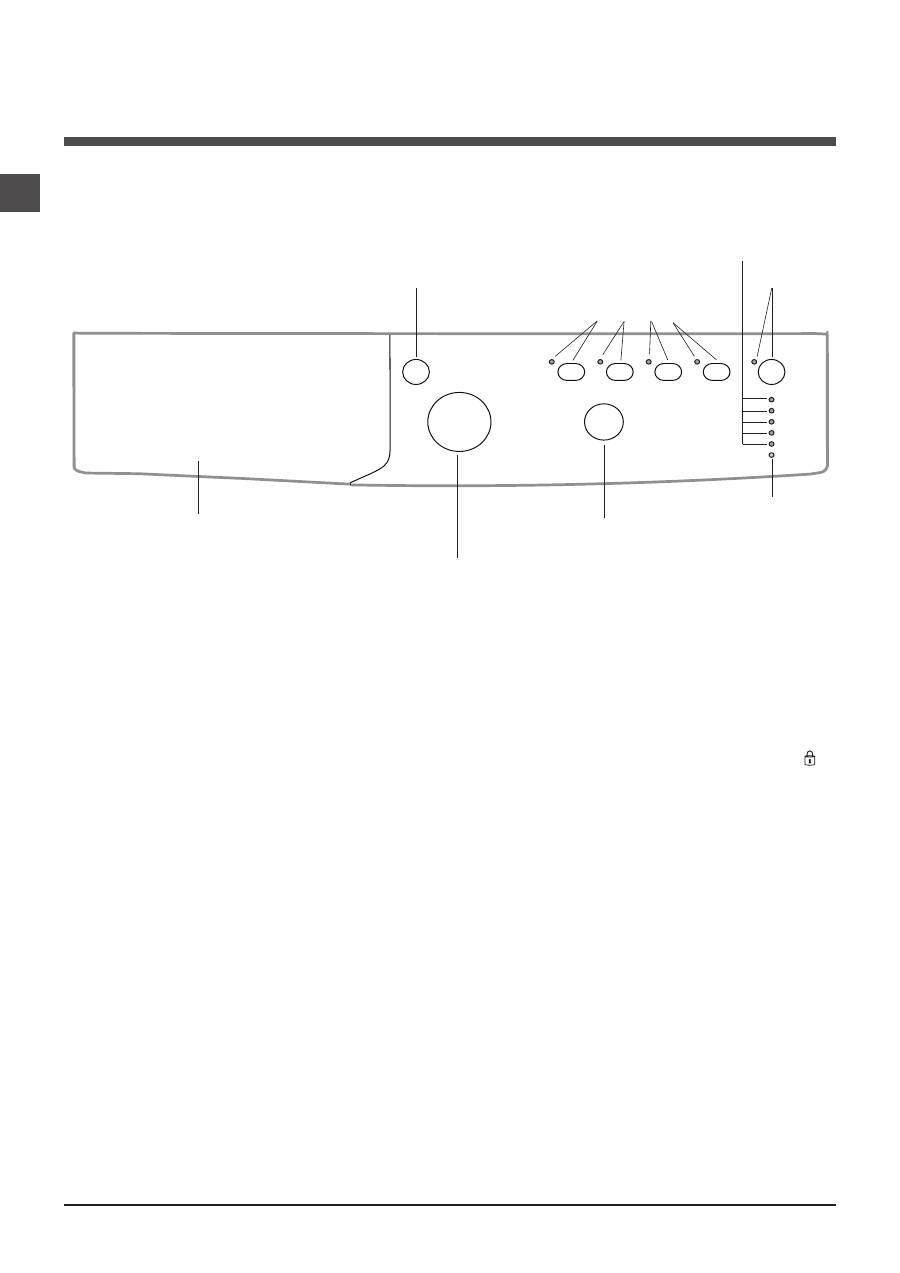
Detergent dispenser drawer:
used to dispense
detergents and washing additives (
see “Detergents and
laundry”
).
ON/OFF
button: switches the washing machine on and
off.
WASH CYCLE
knob: programmes the wash cycles. Du-
ring the wash cycle, the knob does not move.
FUNCTION
buttons with indicator light
:
used to select the
available functions. The indicator light corresponding to the
selected function will remain lit.
TEMPERATURE
knob: sets the temperature or the cold
wash cycle (
see “Personalisation”
).
WASH CYCLE PROGRESS/DELAY TIMER
indicator
lights:
used to monitor the progress of the wash cycle.
The illuminated indicator light shows which phase is in
progress.
If the Delay Timer function has been set, the time remai-
ning until the wash cycle starts will be indicated
(see next
page).
DOOR LOCKED
indicator light: indicates whether the
door may be opened or not
(see next page)
.
START/PAUSE
button with indicator light: starts or tem-
porarily interrupts the wash cycles.
N.B.
To pause the wash cycle in progress, press this
button; the corresponding indicator light will flash orange,
while the indicator light for the current wash cycle phase
will remain lit in a fixed manner. If the DOOR LOCKED
indicator light is switched off, the door may be opened.
To start the wash cycle from the point at which it was inter-
rupted, press this button again.
Standby mode
This washing machine, in compliance with new energy sa-
ving regulations, is fitted with an automatic standby system
which is enabled after about 30 minutes if no activity is
detected. Press the ON-OFF button briefly and wait for the
machine to start up again.
Consumption in off-mode: 0,5 W
Consumption in Left-on: 0,5 W
Description of the washing machine and starting a wash cycle
WASH CYCLE PROGRESS/
DELAY TIMER
indicator lights
DOOR LOCKED
indicator light
START/
PAUSE
button with
indicator light
Control panel
Detergent dispenser drawer
ON/OFF
button
WASH CYCLE
knob
TEMPERATURE
knob
FUNCTION
buttons with
indicator lights
GB
7
Indicator lights
The indicator lights provide important information.
This is what they can tell you:
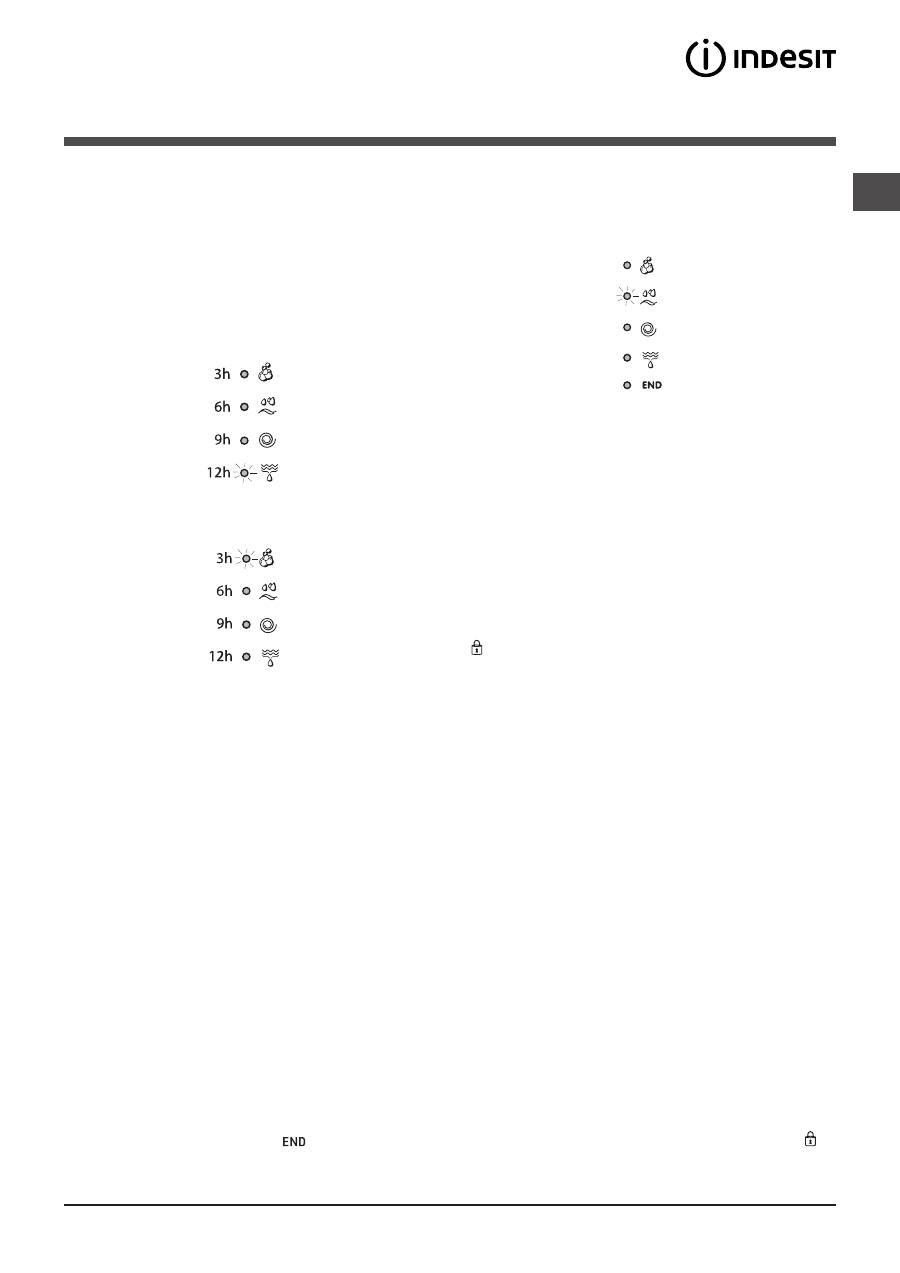
Delayed start
If the DELAY TIMER function has been activated (
see “Per-
sonalisation”
), after the wash cycle has been started the
indicator light corresponding to the selected delay period
will begin to flash:
As time passes, the remaining delay will be displayed and
the corresponding indicator light will flash:
The set programme will start once the selected time delay
has expired.
Wash cycle phase indicator lights
Once the desired wash cycle has been selected and has be-
gun, the indicator lights switch on one by one to indicate which
phase of the cycle is currently in progress.
Function buttons and corresponding indicator lights
When a function is selected, the corresponding indicator
light will illuminate.
If the selected function is not compatible with the program-
med wash cycle, the corresponding indicator light will flash
and the function will not be activated.
If the selected function is not compatible with another
function which has been selected previously, the indicator
light corresponding to the first function selected will
flash and only the second function will be activated; the
indicator light corresponding to the enabled option will
remain lit.
Door locked indicator light
When the indicator light is on, the porthole door is locked
to prevent it from being opened; make sure the indicator
light is off before opening the door (wait approximately 3
minutes). To open the door during a running wash cycle,
press the START/PAUSE button; the door may be opened
once the DOOR LOCKED indicator light turns off.
Starting a wash cycle
1.
Switch the washing machine on by pressing the ON/OFF button. All indicator lights will switch on for a few seconds, then
they will switch off and the START/PAUSE indicator light will pulse.
2.
Load the laundry and close the door.
3.
Set the WASH CYCLE knob to the desired programme.
4.
Set the washing temperature (
see “Personalisation”).
5.
Measure out the detergent and washing additives (
see “Detergents and laundry”).
6.
Select the desired functions.
7.
Start the wash cycle by pressing the START/PAUSE button and the corresponding indicator light will remain lit in a fixed
manner, in green.
To cancel the set wash cycle, pause the machine by pressing the START/PAUSE button and select a new cycle.
8.
At the end of the wash cycle the
indicator light will switch on. The door can be opened once the DOOR LOCKED
indicator light turns off. Take out your laundry and leave the appliance door ajar to make sure the drum dries completely.
Switch the washing machine off by pressing the ON/OFF button.
Wash
Rinse
Spin
Drain
End of wash cycle
Table of contents
- Installation
- Care and maintenance
- Precautions and tips
- Description of the washing machine and starting a wash cycle
- Wash cycles
- Personalisation
- Detergents and laundry
- Troubleshooting
- Service
- Bedienungsanleitungen
- Installation
- Reinigung und Pflege
- Vorsichtsmaßregeln und Hinweise
- Waschprogramme
- Personalisierungen
- Waschmittel und Wäsche
- Störungen und Abhilfe
- Kundendienst
- Navodila za uporabo
- Namestitev
- Vzdrževanje in čiščenje
- Opozorila in nasveti
- Opis pralnega stroja in zagon programa
- Programi
- Posebne nastavitve
- Pralna sredstva in perilo
- Motnje in njihovo odpravljanje
- Pomoč
- Upute za uporabu
- Postavljanje
- Opis perilice rublja i pokretanje programa
- Programi
- Osobni izbor
- Deterdžent i rublje
- Mjere predostrožnosti i savjeti
- Održavanje i očuvanje
- Nepravilnosti i rješenja
- Servisna služba
- Instrucţiuni de folosire
- Instalare
- Întreţinere şi curăţare
- Precauţii şi sfaturi
- Descrierea maşinii de spălat şi activarea unui program
- Programe
- Personalizare
- Detergenţi şi rufe albe
- Anomalii şi remedii
- Asistenţă
- Руководство по эксплуатации
- Установка
- Описание стиральной машины и порядка запуска программы
- Программы
- Персонализированные настройки
- Моющие средства и типы белья
- Предосторожности и рекомендации
- Техническое обслуживание и уход
- Поиск неисправностей и методы их устранения
- Сервисное обслуживание
- Istruzioni per l’uso
- Installazione
- Manutenzione e cura
- Precauzioni e consigli
- Descrizione della lavabiancheria e avviare un programma
- Programmi
- Personalizzazioni
- Detersivi e biancheria
- Anomalie e rimedi
- Assistenza


