
Yamaha BRX-610: SETUP MENU Menu/Submenu Item Function Page
SETUP MENU Menu/Submenu Item Function Page: Yamaha BRX-610
Table of contents
- CAUTION: READ THIS BEFORE OPERATING YOUR UNIT.
- WHAT YOU CAN DO WITH THIS UNIT SUPPLIED PARTS
- ABOUT DISCS AND FILES Types of discs/files that can be used with this unit
- Loading a disc Notice for watching 3D video images Disc precautions
- Front panel
- Remote control 4 PROGRAM : Sets the order of playback
- I ZOOM : Zooms in/out. The
- S TOP MENU : Displays the top menu screen
- Rear panel
- Installing the batteries in the remote control Using the remote control
- 5.1-channel speaker layout Connecting speakers
- Connecting the FM antenna Connecting iPod
- Connecting to a TV
- Connecting audio devices (such as a CD or MD player) Connecting a satellite/cable TV tuner Connecting a portable digital music player other than iPod
- NETWORK AND USB CONNECTION Connecting to the NETWORK terminal Connecting to the USB port
- OTHER CONNECTION Connecting the power cable
- INITIAL WIZARD/EASY SETUP Setting with the Initial Wizard/Easy Setup
- BASIC OPERATION
- BASIC OPERATION
- BASIC OPERATION Playing back photo/music/video
- BASIC OPERATION ■ Operations for viewing photos
- BASIC OPERATION Using network content Using network services
- Operation for iPod Operation for CDs
- ADVANCED PLAYBACK OPERATION On Screen menu
- Status menu
- Using Bookmark Using search Program play
- Enjoying BONUSVIEW™ and BD- Live™
- LISTENING TO FM RADIO STATIONS Tuning to radio stations Selecting preset radio stations Presetting radio stations
- Deleting preset stations Displaying Radio Data System information (Russia model only)
- USING USEFUL FUNCTIONS Setting the sleep timer Operating this unit by TV remote control (the HDMI control function)
- USING USEFUL FUNCTIONS ■ Registering HDMI components to TV ■ Changing the connection method and connected components
- SETUP MENU Menu/Submenu Item Function Page
- Menu/Submenu Item Function Page
- Operation for SETUP menu
- SETUP MENU General Setting
- SETUP MENU ■ Playback ■ Network ■ Security
- Display Setting ■ TV
- SETUP MENU ■ Video Process
- Audio Setting ■ Audio Output ■ Post Process ■ System Information ■ Speaker Setting
- About the video output formats When [TV System] is set to [PAL] When [TV System] is set to [Multi]
- SOFTWARE UPGRADE Upgrading the software
- TROUBLESHOOTING General Problem Cause Remedy Page
- Problem Cause Remedy Page
- Radio reception Problem Cause Remedy Page iPod Status message Cause Remedy Page Problem Cause Remedy Page
- Problem Cause Remedy Page USB Status message Cause Remedy Page Problem Cause Remedy Page
- Disc playback ■ General Problem Cause Remedy Page
- ■ Picture Problem Cause Remedy Page Remote control Problem Cause Remedy Page Network Problem Cause Remedy Page
- TROUBLESHOOTING Problem Cause Remedy Page
- Messages on the screen Error message Cause Remedy Page Others Problem Cause Remedy Page
- GLOSSARY
- SPECIFICATIONS
- SPECIFICATIONS
SETTINGS
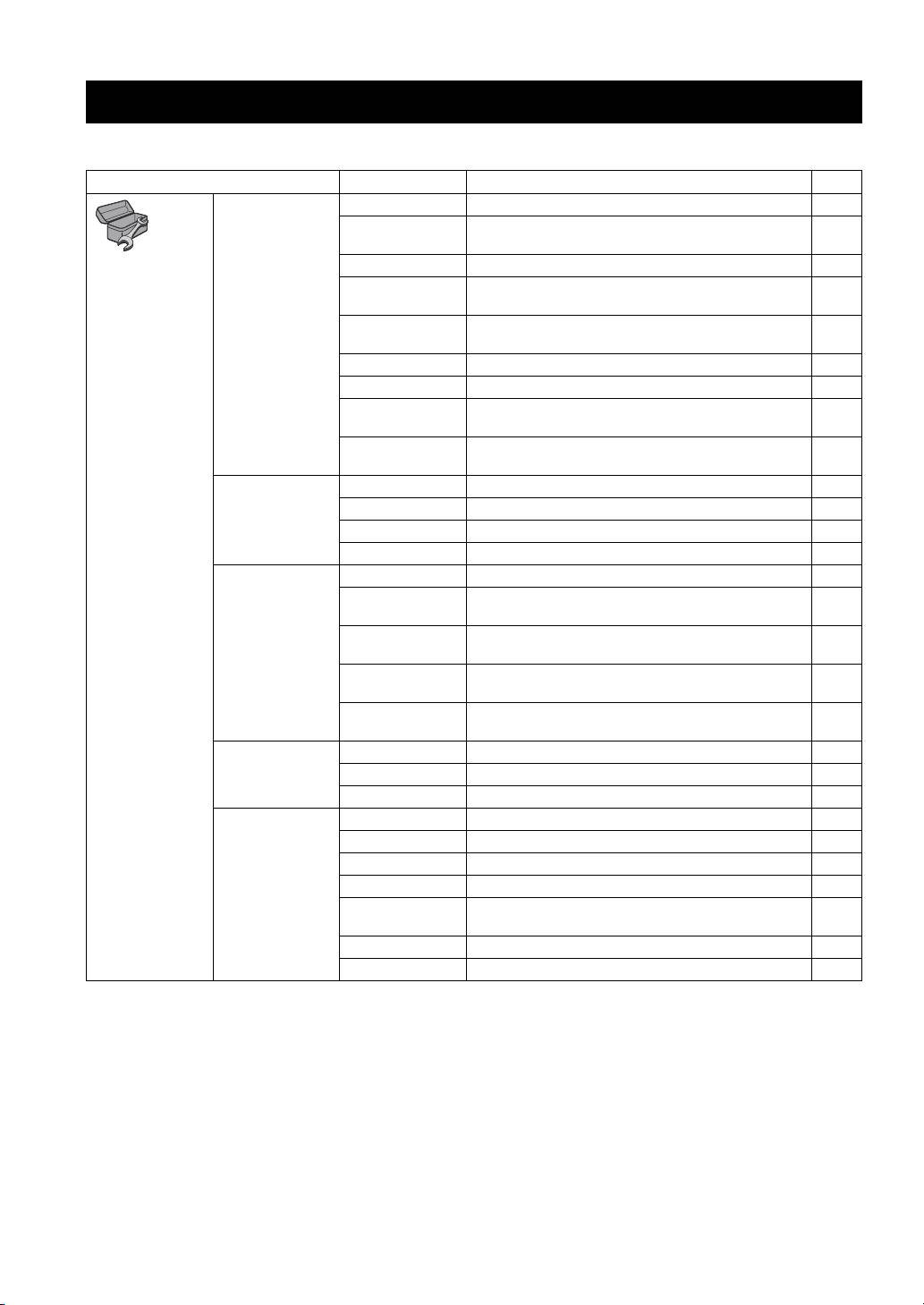
SETUP MENU
The SETUP menu enables various audio/visual settings and adjustments for functions using the remote control unit.
Menu/Submenu Item Function Page
System Screen Saver Sets screen saver to On/Off. 35
Auto Power Off Disc/USB/Net: Sets auto power off mode to On/Off.
35
Other Inputs: Sets auto power off mode to on by hours or Off.
General Setting
Disc Auto Playback Sets this unit to start disc playback automatically. 35
HDMI Control Sets this unit to receive control signal from the remote
35
control of your TV.
Load Default Resets all settings to the default setting except Security
35
setting.
Upgrade Performs upgrade of this unit. 35
Easy Setup Sets language, resolution, screen aspect ratio. 35
Local Storage Displays status of Local Storage, formats Local Storage and
35
selects the front/rear USB port for Local Storage.
3D Playback
Displays a warning message concerning 3D video playback
35
Message
when this unit is turned on.
Language OSD Selects the language for On Screen Display. 35
Menu Prioritizes the language for disc menu. 35
Audio Prioritizes the language for audio. 35
Subtitle Prioritizes the language for subtitle. 35
Playback Closed Caption Sets the closed caption to On/Off. 36
Angle Mark Sets to display the Angle Mark when a BD/DVD disc with
36
multiple angles is played back.
PIP Mark Sets to display the PIP Mark when a BD/DVD disc with
36
Picture in Picture is played back.
Secondary Audio
Sets to display the Secondary Audio Mark when a BD/DVD
36
Mark
disc with secondary audio is played back.
Last Memory Sets this unit to remember the last playback position of a disc
36
when it is set to standby mode or the disc tray is opened.
Security Change Password Changes password for Parental Control and Country Code. 36
Parental Control Sets the Parental Control depending on the disc content. 36
Country Code Sets your Country Code. 36
Network Internet Connection Sets the internet connection to Enable/Disable. 36
Information Displays network information screen. 36
Connection Test Performs the network connection test. 36
IP Setting Sets the IP setting to Auto/Manual. 36
BD-Live
Sets the BD-Live connection to Permitted/Partial Permitted/
36
Connection
Prohibited.
DLNA Sets the DLNA to Enable/Disable. 36
Proxy Setting Sets the proxy setting. 36
32 En
