
Yamaha BRX-610: Operation for iPod Operation for CDs
Operation for iPod Operation for CDs: Yamaha BRX-610
Table of contents
- CAUTION: READ THIS BEFORE OPERATING YOUR UNIT.
- WHAT YOU CAN DO WITH THIS UNIT SUPPLIED PARTS
- ABOUT DISCS AND FILES Types of discs/files that can be used with this unit
- Loading a disc Notice for watching 3D video images Disc precautions
- Front panel
- Remote control 4 PROGRAM : Sets the order of playback
- I ZOOM : Zooms in/out. The
- S TOP MENU : Displays the top menu screen
- Rear panel
- Installing the batteries in the remote control Using the remote control
- 5.1-channel speaker layout Connecting speakers
- Connecting the FM antenna Connecting iPod
- Connecting to a TV
- Connecting audio devices (such as a CD or MD player) Connecting a satellite/cable TV tuner Connecting a portable digital music player other than iPod
- NETWORK AND USB CONNECTION Connecting to the NETWORK terminal Connecting to the USB port
- OTHER CONNECTION Connecting the power cable
- INITIAL WIZARD/EASY SETUP Setting with the Initial Wizard/Easy Setup
- BASIC OPERATION
- BASIC OPERATION
- BASIC OPERATION Playing back photo/music/video
- BASIC OPERATION ■ Operations for viewing photos
- BASIC OPERATION Using network content Using network services
- Operation for iPod Operation for CDs
- ADVANCED PLAYBACK OPERATION On Screen menu
- Status menu
- Using Bookmark Using search Program play
- Enjoying BONUSVIEW™ and BD- Live™
- LISTENING TO FM RADIO STATIONS Tuning to radio stations Selecting preset radio stations Presetting radio stations
- Deleting preset stations Displaying Radio Data System information (Russia model only)
- USING USEFUL FUNCTIONS Setting the sleep timer Operating this unit by TV remote control (the HDMI control function)
- USING USEFUL FUNCTIONS ■ Registering HDMI components to TV ■ Changing the connection method and connected components
- SETUP MENU Menu/Submenu Item Function Page
- Menu/Submenu Item Function Page
- Operation for SETUP menu
- SETUP MENU General Setting
- SETUP MENU ■ Playback ■ Network ■ Security
- Display Setting ■ TV
- SETUP MENU ■ Video Process
- Audio Setting ■ Audio Output ■ Post Process ■ System Information ■ Speaker Setting
- About the video output formats When [TV System] is set to [PAL] When [TV System] is set to [Multi]
- SOFTWARE UPGRADE Upgrading the software
- TROUBLESHOOTING General Problem Cause Remedy Page
- Problem Cause Remedy Page
- Radio reception Problem Cause Remedy Page iPod Status message Cause Remedy Page Problem Cause Remedy Page
- Problem Cause Remedy Page USB Status message Cause Remedy Page Problem Cause Remedy Page
- Disc playback ■ General Problem Cause Remedy Page
- ■ Picture Problem Cause Remedy Page Remote control Problem Cause Remedy Page Network Problem Cause Remedy Page
- TROUBLESHOOTING Problem Cause Remedy Page
- Messages on the screen Error message Cause Remedy Page Others Problem Cause Remedy Page
- GLOSSARY
- SPECIFICATIONS
- SPECIFICATIONS
BASIC OPERATION
■ Repeat play
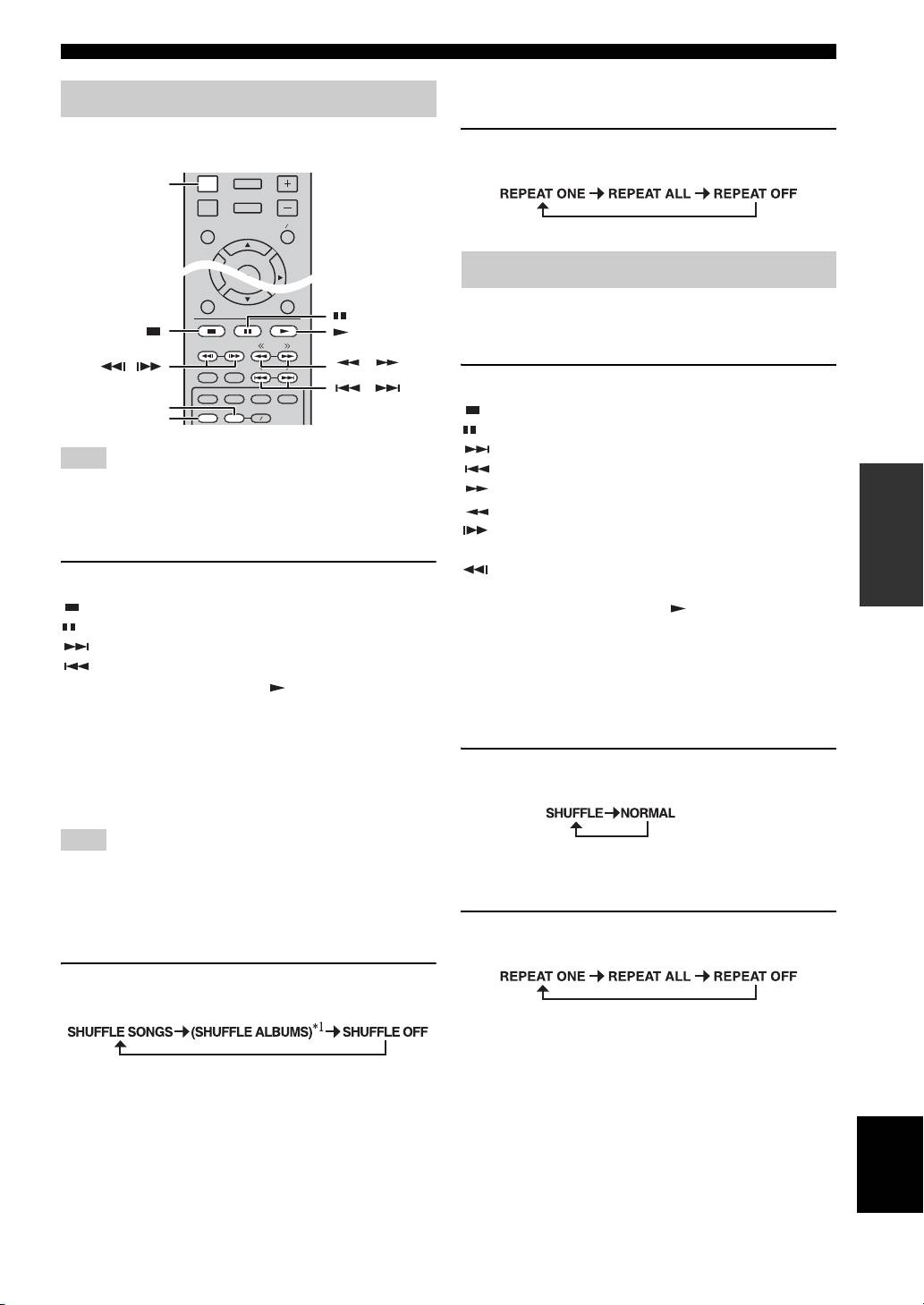
Operation for iPod
You can repeat playback as you want.
You can operate playback of your iPod by using the
1 Press REPEAT repeatedly for repeat play.
buttons on the remote control.
Each press cycles as follows:
You can also operate playback of music for CDs.
■ Playback controls
1 Press any buttons below during playback.
: Stops playback.
: Pauses playback.
: Skips forward.
Note
: Skips backward.
OPERATIONS
Some features may not be compatible depending on the model or
: Searches forward.
the software version of your iPod.
: Searches backward.
: Press for instant search. Instant search skips the
■ Playback controls
music 30 seconds.
: Press for instant replay. Instant replay replays the
1 Press any buttons below during playback.
music from 10 seconds before.
: Stops playback.
To start/resume playback, press .
: Pauses playback.
y
: Skips forward.
You can also use the Numeric buttons to enter the number of
: Skips backward.
the song directly. To clear the entry, press CLEAR.
To start/resume playback, press .
■ Shuffle play
y
You can play back in random sequence.
Press DISPLAY to display information below on the front panel
display during playback.
• Song name
1 Press SHUFFLE repeatedly for shuffle play.
• Artist name
Each press toggles as follows:
• Album name
Note
There are some characters that cannot be displayed on the front
■ Repeat play
panel display of this unit.
You can repeat playback as you want.
■ Shuffle play
1 Press REPEAT repeatedly for repeat play.
You can play back in random sequence.
Each press cycles as follows:
1 Press SHUFFLE repeatedly for shuffle play.
Each press cycles as follows:
*
1
You cannot set ALBUMS when you use an iPod touch and
iPhone.
English
23 En
RETURN ON SCREEN
TUNING
PRESET
DIMMER
STATUS
PIP
SUBTITLE
AUDIO
MEMORY
SHUFFLE
REPEAT
A B
DISPLAY
SETUP
VOLUME
OPTION
HOME
TOP MENU POP-UP MENU
ENTER
DISPLAY
Operation for CDs
,
,
,
REPEAT
SHUFFLE
