
Yamaha RX-797: Zone 2 remote control
Zone 2 remote control: Yamaha RX-797
Table of contents
- CAUTION: READ THIS BEFORE OPERATING YOUR UNIT.
- CONTENTS
- FEATURES SUPPLIED ACCESSORIES
- CONTROLS AND FUNCTIONS Front panel
- CONTROLS AND FUNCTIONS
- Front panel display
- CONTROLS AND FUNCTIONS Rear panel
- CONTROLS AND FUNCTIONS Remote control
- CONTROLS AND FUNCTIONS
- Zone 2 remote control
- Installing batteries in the remote controls Using the remote controls
- CONNECTIONS Connecting speakers
- Connecting audio and video components
- Connecting the AM and FM antennas
- ■ Connecting the AM loop antenna
- Connecting the power supply cord
- Turning on and off this unit
- PLAYING AND RECORDING Playing a source
- PLAYING AND RECORDING
- Adjusting the tonal quality
- Recording a source
- Using the sleep timer
- Muting the sound output
- FM/AM TUNING Automatic tuning
- Manual tuning
- Automatic preset tuning
- FM/AM TUNING
- FM/AM TUNING Manual preset tuning
- FM/AM TUNING Selecting preset stations Exchanging preset stations
- RADIO DATA SYSTEM (EUROPE MODEL ONLY) Receiving Radio Data System Changing the Radio Data System stations mode
- PTY SEEK function
- EON function
- ADVANCED SETUP Changing the ADVANCED SETUP menu parameters
- Switching the remote control ID
- ZONE 2 Connecting the Zone 2 components
- Controlling Zone 2
- REMOTE CONTROL FEATURES Control area
- Controlling other components
- Setting remote control codes
- TROUBLESHOOTING ■ General
- ■ Tuner
- ■ Remote control
- SPECIFICATIONS
- LIST OF REMOTE CONTROL CODES
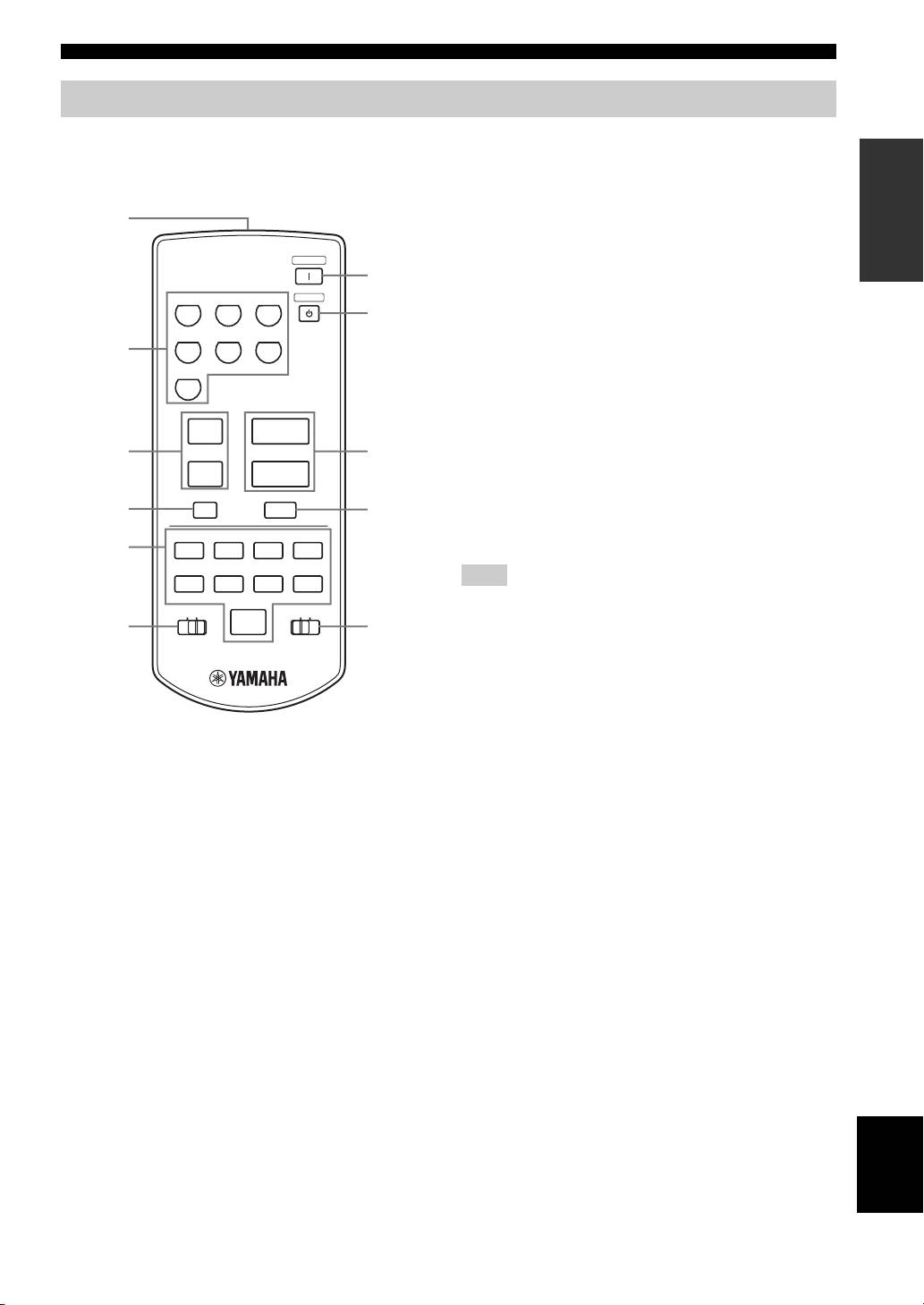
CONTROLS AND FUNCTIONS
Zone 2 remote control
This section describes the function of each button on the
3 PRESET u / d
INTRODUCTION
Zone 2 remote control used to control Zone 2. You can
Selects the preset station number (1 to 8) when TUNER is
also use the Zone 2 remote control to control YAMAHA
selected as the input source.
CD players and YAMAHA cassette tape deck.
4 A/B/C/D/E
1
Selects the preset station group (A to E) when TUNER is
selected as the input source.
POWER
ZONE 2
7
5 CD/TAPE control buttons
CD PHONO
TUNER
STANDBY
Controls YAMAHA CD players or YAMAHA cassette
8
tape deck.
MD/TAPE VCR DTV/CBL
2
6 ID1/ID2 switch
Switches the remote control ID between ID1 and ID2 (see
DVD
page 33).
7 POWER
u
+
Turns on Zone 2.
3
PRESET
VOLUME
9
8 STANDBY
d
–
Sets Zone 2 to the standby mode.
A/B/C/D/E
4
MUTE
0
9 VOLUME +/–
A/B
Increases or decreases the sound output level of Zone 2.
5
w
e
f
DISPLAY
DIR BDIR A
REC
Note
b
s
a
DISC
This does not affect the OUT (REC) level.
TAPECDID2ID1
p
6
A
0 MUTE
Mutes the sound output to Zone 2. Press again to restore
the sound output to the previous volume level.
A CD/TAPE switch
(Europe model)
Switches the function of the control buttons numbered 5
between controlling YAMAHA CD players and
1 Infrared signal transmitter
controlling YAMAHA cassette tape deck.
Sends infrared signals.
2 Input selector buttons
Select the desired input source of Zone 2.
English
9
