
Yamaha RX-797: CONTROLS AND FUNCTIONS Front panel
CONTROLS AND FUNCTIONS Front panel: Yamaha RX-797
Table of contents
- CAUTION: READ THIS BEFORE OPERATING YOUR UNIT.
- CONTENTS
- FEATURES SUPPLIED ACCESSORIES
- CONTROLS AND FUNCTIONS Front panel
- CONTROLS AND FUNCTIONS
- Front panel display
- CONTROLS AND FUNCTIONS Rear panel
- CONTROLS AND FUNCTIONS Remote control
- CONTROLS AND FUNCTIONS
- Zone 2 remote control
- Installing batteries in the remote controls Using the remote controls
- CONNECTIONS Connecting speakers
- Connecting audio and video components
- Connecting the AM and FM antennas
- ■ Connecting the AM loop antenna
- Connecting the power supply cord
- Turning on and off this unit
- PLAYING AND RECORDING Playing a source
- PLAYING AND RECORDING
- Adjusting the tonal quality
- Recording a source
- Using the sleep timer
- Muting the sound output
- FM/AM TUNING Automatic tuning
- Manual tuning
- Automatic preset tuning
- FM/AM TUNING
- FM/AM TUNING Manual preset tuning
- FM/AM TUNING Selecting preset stations Exchanging preset stations
- RADIO DATA SYSTEM (EUROPE MODEL ONLY) Receiving Radio Data System Changing the Radio Data System stations mode
- PTY SEEK function
- EON function
- ADVANCED SETUP Changing the ADVANCED SETUP menu parameters
- Switching the remote control ID
- ZONE 2 Connecting the Zone 2 components
- Controlling Zone 2
- REMOTE CONTROL FEATURES Control area
- Controlling other components
- Setting remote control codes
- TROUBLESHOOTING ■ General
- ■ Tuner
- ■ Remote control
- SPECIFICATIONS
- LIST OF REMOTE CONTROL CODES
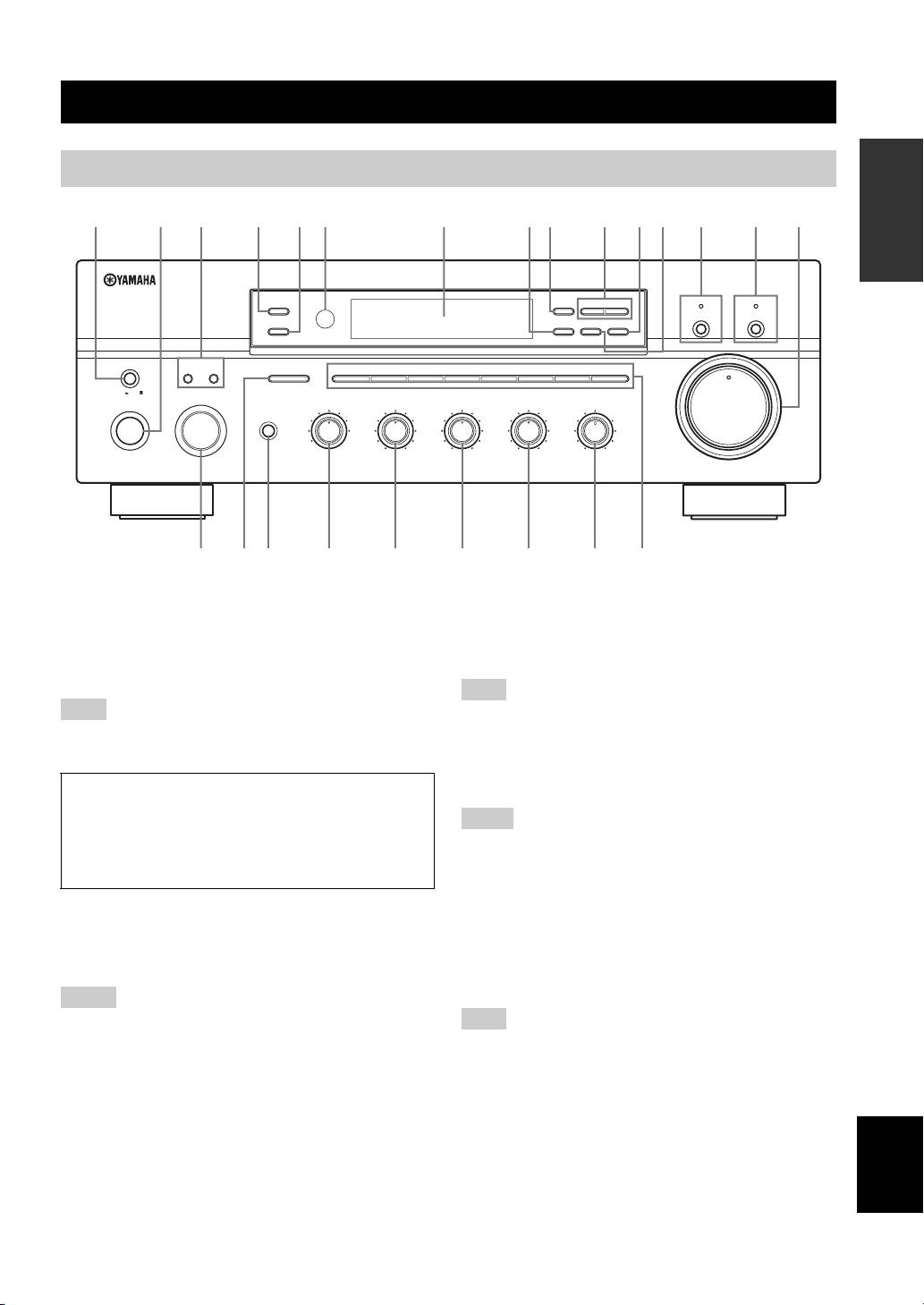
CONTROLS AND FUNCTIONS
CONTROLS AND FUNCTIONS
INTRODUCTION
Front panel
ZONE 2 ON/OFF
FM/AM
l
TUNING
h
CD DIRECT AMPPURE DIRECT
ZONE CONTROL
EDIT
MEMORY
TUNING MODE
MAN'L/AUTO FM
AUTO/MAN'L
MASTER SPEAKERS
BA
A/B/C/D/E
12345678
VOLUME
12
ON OFF
INPUT
REC OUT
BASS
TREBLE
BALANCE
LOUDNESS
MAIN ZONE
SOURCE
PHONES
MD/TAPE
CD
1
0
1
1
0
1
1
0
1
1
FLAT
VCR TUNER
22
22
22
210
–
30dB
ON/OFF
DTV/CBL
PHONO
3
3
3
3
3
3
3 9
DVD
44
44
44
48
–
55
+
–
55
+
L
55
R
57
0
6
1 MASTER ON/OFF
4 ZONE 2 ON/OFF
Press inward to the ON position to turn on the power of
Turns on Zone 2 or set it to the standby mode. When Zone
this unit. Press again to release it outward to the OFF
2 is turned on, signals are output at the ZONE 2 OUT
position to turn off this unit.
jacks.
See page 16 for details.
This switch is operational only when MASTER ON/OFF is
Even when this unit is turned off, this unit consumes a small
pressed inward to the ON position.
amount of power to preserve the memory.
5 ZONE CONTROL
Press to control the input source of Zone 2.
• This button is operational only when Zone 2 is turned on.
• When you press this button, the ZONE 2 indicator flashes in the
front panel display for approximately 5 seconds. Select the
input source of Zone 2 while the indicator is flashing.
2 MAIN ZONE ON/OFF
• You can select the preset station when TUNER is selected as the
Turns on Main Zone of this unit or sets it to the standby
input source of Zone 2.
mode.
See page
16
for details.
6 Remote control sensor
Receives infrared signals from the remote control.
• This switch is operational only when MASTER ON/OFF is
pressed inward to the ON position.
Switch the remote control ID between ID1 and ID2 when using
• In the standby mode, this unit consumes a small amount of
multiple YAMAHA receivers or amplifiers (see pages 9, 32 and
power to receive infrared signals from the remote control.
33).
3 SPEAKERS A/B
7 Front panel display
Turns on or off the speaker set connected to the
English
Shows information about the operational status of this
SPEAKERS A and/or SPEAKERS B terminals on the rear
unit.
panel each time the corresponding button is pressed (see
page 17).
3
12
20
8
4
2
∞
20
60
60
26
26
40
40
16
16
-dB
-dB
6312 5498AB7DC0
E
DISPLAY
(General model)
HGFIJKLMN
Note
Note
Memory back-up
The memory back-up circuit prevents the stored data
Notes
from being lost. However, the stored data will be lost if
the power cord is disconnected from the AC wall outlet
for more than one week.
Notes
Note
