
Yamaha RX-797: RADIO DATA SYSTEM (EUROPE MODEL ONLY) Receiving Radio Data System Changing the Radio Data System stations mode
RADIO DATA SYSTEM (EUROPE MODEL ONLY) Receiving Radio Data System Changing the Radio Data System stations mode: Yamaha RX-797
Table of contents
- CAUTION: READ THIS BEFORE OPERATING YOUR UNIT.
- CONTENTS
- FEATURES SUPPLIED ACCESSORIES
- CONTROLS AND FUNCTIONS Front panel
- CONTROLS AND FUNCTIONS
- Front panel display
- CONTROLS AND FUNCTIONS Rear panel
- CONTROLS AND FUNCTIONS Remote control
- CONTROLS AND FUNCTIONS
- Zone 2 remote control
- Installing batteries in the remote controls Using the remote controls
- CONNECTIONS Connecting speakers
- Connecting audio and video components
- Connecting the AM and FM antennas
- ■ Connecting the AM loop antenna
- Connecting the power supply cord
- Turning on and off this unit
- PLAYING AND RECORDING Playing a source
- PLAYING AND RECORDING
- Adjusting the tonal quality
- Recording a source
- Using the sleep timer
- Muting the sound output
- FM/AM TUNING Automatic tuning
- Manual tuning
- Automatic preset tuning
- FM/AM TUNING
- FM/AM TUNING Manual preset tuning
- FM/AM TUNING Selecting preset stations Exchanging preset stations
- RADIO DATA SYSTEM (EUROPE MODEL ONLY) Receiving Radio Data System Changing the Radio Data System stations mode
- PTY SEEK function
- EON function
- ADVANCED SETUP Changing the ADVANCED SETUP menu parameters
- Switching the remote control ID
- ZONE 2 Connecting the Zone 2 components
- Controlling Zone 2
- REMOTE CONTROL FEATURES Control area
- Controlling other components
- Setting remote control codes
- TROUBLESHOOTING ■ General
- ■ Tuner
- ■ Remote control
- SPECIFICATIONS
- LIST OF REMOTE CONTROL CODES
RADIO DATA SYSTEM (EUROPE MODEL ONLY)
RADIO DATA SYSTEM (EUROPE MODEL ONLY)
Receiving Radio Data System
Changing the Radio Data System
stations
mode
Radio Data System is a data transmission system used by FM
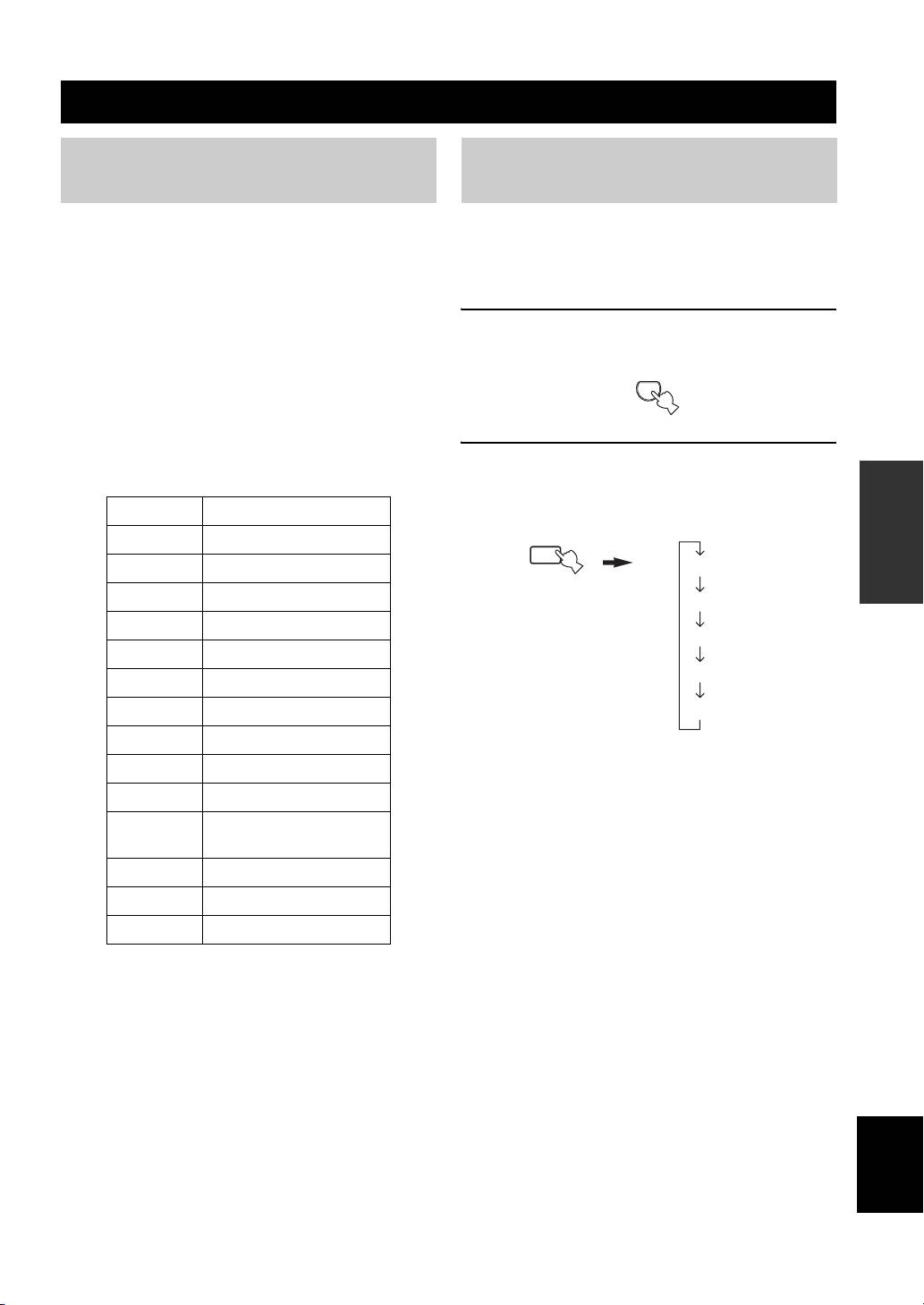
Four modes are available for displaying Radio Data
stations in many countries. The Radio Data System function is
System data. The PS, PTY, RT and/or CT indicators that
carried out among the network stations.
correspond to the Radio Data System data services offered
This unit can receive various Radio Data System data such as PS
by the station light up in the front panel display.
(Program Service name), PTY (Program Type), RT (Radio Text),
CT (Clock Time), EON (Enhanced Other Networks) when
1 Press TUNER on the remote control to set
receiving Radio Data System broadcasting stations.
this unit to tuner mode.
■ PS (Program Service name) mode
TUNER
The name of the Radio Data System station being received
is displayed.
■ PTY (Program Type) mode
There are 15 program types to classify Radio Data System
2 Press FREQ/TEXT repeatedly on the remote
stations.
control to display the various Radio Data
OPERATION
System data offered by the transmitting
BASIC
NEWS News
station.
AFFAIRS Current affairs
b
INFO General information
FREQ/TEXT
PS
Remote control
SPORT Sports
PTY
EDUCATE Education
RT
DRAMA Drama
CT
CULTURE Culture
SCIENCE Science
Frequency display
VARIED Light entertainment
POP M Pops
ROCK M Rock
M.O.R. M Middle-of-the-road music
(easy-listening)
LIGHT M Light classics
CLASSICS Serious classics
OTHER M Other music
■ RT (Radio Text) mode
Information about the program (such as the title of the
song or name of the singer) on the Radio Data System
station being received is displayed using a maximum of 64
alphanumeric characters, including the umlaut symbol. If
other characters are used for RT data, they are displayed
with an underbar (_).
■ CT (Clock Time) mode
The current time is displayed and updated every minute.
English
If the data are accidentally cut off, “CT WAIT” may appear.
■ EON (Enhanced Other Networks)
See “EON function” on page 31.
29
