
Yamaha RX-797: Installing batteries in the remote controls Using the remote controls
Installing batteries in the remote controls Using the remote controls: Yamaha RX-797
Table of contents
- CAUTION: READ THIS BEFORE OPERATING YOUR UNIT.
- CONTENTS
- FEATURES SUPPLIED ACCESSORIES
- CONTROLS AND FUNCTIONS Front panel
- CONTROLS AND FUNCTIONS
- Front panel display
- CONTROLS AND FUNCTIONS Rear panel
- CONTROLS AND FUNCTIONS Remote control
- CONTROLS AND FUNCTIONS
- Zone 2 remote control
- Installing batteries in the remote controls Using the remote controls
- CONNECTIONS Connecting speakers
- Connecting audio and video components
- Connecting the AM and FM antennas
- ■ Connecting the AM loop antenna
- Connecting the power supply cord
- Turning on and off this unit
- PLAYING AND RECORDING Playing a source
- PLAYING AND RECORDING
- Adjusting the tonal quality
- Recording a source
- Using the sleep timer
- Muting the sound output
- FM/AM TUNING Automatic tuning
- Manual tuning
- Automatic preset tuning
- FM/AM TUNING
- FM/AM TUNING Manual preset tuning
- FM/AM TUNING Selecting preset stations Exchanging preset stations
- RADIO DATA SYSTEM (EUROPE MODEL ONLY) Receiving Radio Data System Changing the Radio Data System stations mode
- PTY SEEK function
- EON function
- ADVANCED SETUP Changing the ADVANCED SETUP menu parameters
- Switching the remote control ID
- ZONE 2 Connecting the Zone 2 components
- Controlling Zone 2
- REMOTE CONTROL FEATURES Control area
- Controlling other components
- Setting remote control codes
- TROUBLESHOOTING ■ General
- ■ Tuner
- ■ Remote control
- SPECIFICATIONS
- LIST OF REMOTE CONTROL CODES
CONTROLS AND FUNCTIONS
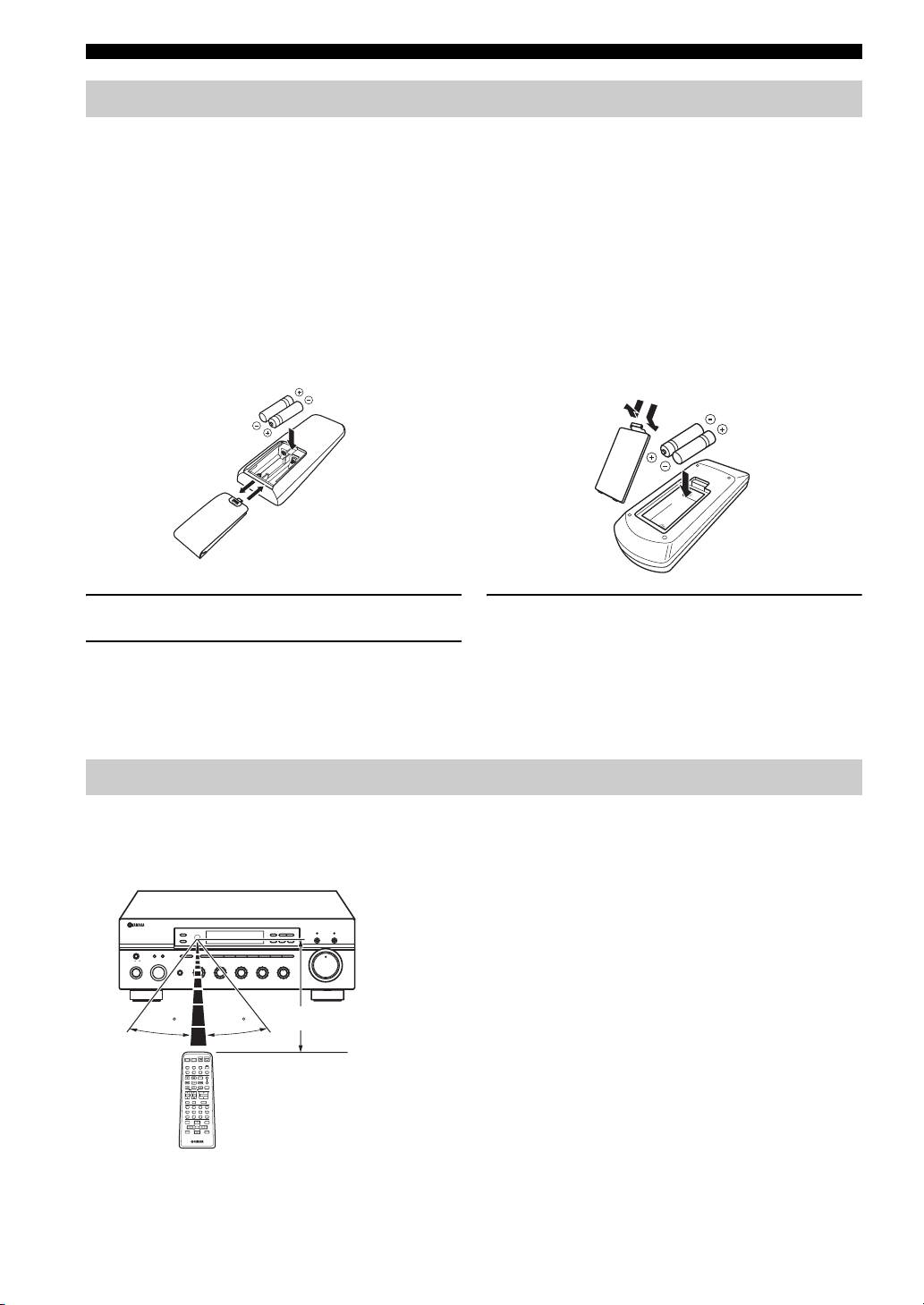
Installing batteries in the remote controls
■ Notes on batteries
• Change all of the batteries if the operation range of the remote controls decreases.
• Use AA, R6, UM-3 batteries for the remote control and AAA, R03, UM-4 batteries for the Zone 2 remote control.
• Make sure that the polarities are correct. See the illustration inside the battery compartment of each remote control.
• Remove the batteries if the remote controls are not used for an extended period of time.
• Do not use old batteries together with new ones.
• Do not use different types of batteries (such as alkaline and manganese batteries) together. Read the packaging carefully as these
different types of batteries may have the same shape and color.
• We strongly recommend using alkaline batteries.
• If the batteries have leaked, dispose of them immediately. Avoid touching the leaked material or letting it come into contact with
clothing, etc. Clean the battery compartment thoroughly before installing new batteries.
• Do not throw away batteries with general house waste; dispose of them correctly in accordance with your local regulations.
Remote control Zone 2 remote control
1
3
2
1
2
3
1 Open the battery compartment cover.
3 Close the cover back.
2 Insert the supplied batteries in each remote
control according to the polarity markings (+
and –) on the inside of the battery
compartment.
Using the remote controls
The remote controls transmit a directional infrared beam.
Be sure to aim the remote controls directly at the remote control sensor on the front panel of this unit or on the infrared
signal receiver in Zone 2 during operation.
■ Handling the remote controls
• The area between the remote controls and this unit (or the
infrared signal receiver in Zone 2) must be clear of large
ZONE 2 ON/OFF
FM/AM
l
TUNING
h
ZONE CONTROL
EDIT
MEMORY
TUNING MODE
CD DIRECT AMPPURE DIRECT
obstacles.
MAN'L/AUTO FM
AUTO/MAN'L
MASTER SPEAKERS
BA
A/B/C/D/E
12345678
VOLUME
ON OFF
• Do not spill water or other liquids on the remote controls.
MAIN ZONE
INPUT
PHONES
MD/TAPE
REC OUT
SOURCE
CD
1
BASS
0
1
TREBLE
BALANCE
VCR TUNER
22
22
1
0
1
22
1
0
1
LOUDNESS
1
FLAT
–
30dB
ON/OFF
DTV/CBL
DVD
PHONO
3
44
3
3
44
3
3
44
3
3
210
9
• Do not drop the remote controls.
–
55
+
–
55
+
L
55
R
48
57
6
• Do not leave or store the remote controls in the following types
of conditions:
Approximately 6 m (19.7 ft)
30 30
– places of high humidity, such as near a bath
– places of high temperature, such as near a heater or a stove
POWER POWER
AVTV
STANDBY
POWER
CD
MD/TAPE
TUNER
– places of extremely low temperatures
DTV/CBL
VCR
PHONODVD
REC
CODE SET
SPEAKERS
DISC SKIP
A
FREQ/TEXT
EON
SLEEP
B
– dusty places
MODE PTY SEEK
START
TV VOL
TV CH
VOLUME
TV MUTE TV INPUT
MUTE
• Do not expose the remote control sensor to strong lighting, in
4321
65
7
8
09
10
ENT.
particular, an inverter type fluorescent lamp; otherwise, the
BAND
MENUTITLE
A/B/C/D/E A/B/C/D/E
ENTER
PRESET/CH
DISPLAYRETURN
remote controls may not work properly. If necessary, position
this unit away from direct lighting.
10
